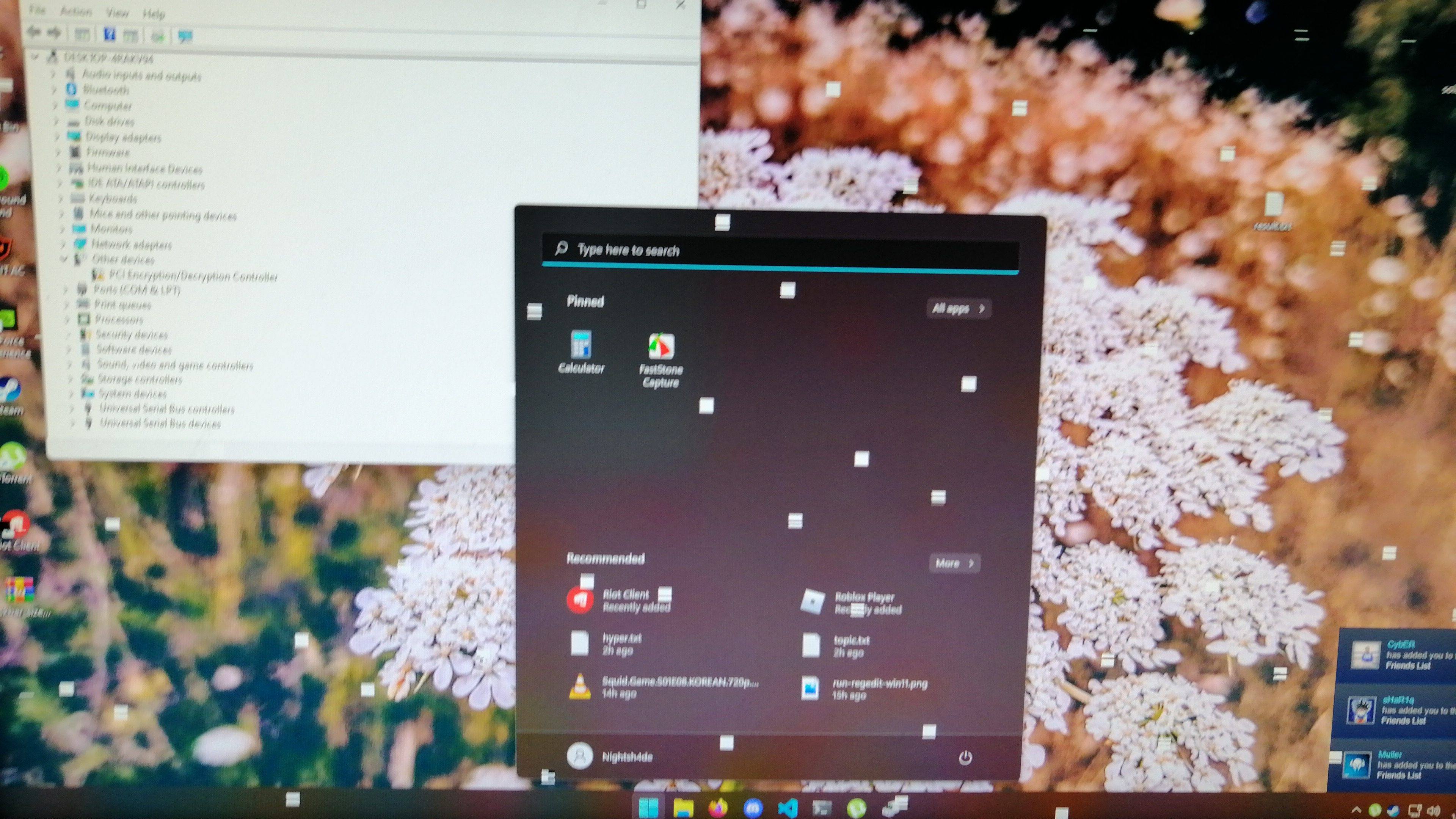
Windows has stopped this device because it has reported problems. (Code 43)


So if I choose the Nothing option on the Choose what to keep screen, it'll only format the system partition i.e. C:?


If you're gonna choose: Keep nothing, you might as well do a clean install.
Maybe you should post a screenshot, so we understand what you're talking about.


IF I understand what you're asking...

An In-Place upgrade doesn't affect other drives or partitions, like a clean install can.
Generally, when you do a clean install, you temporarily unhook all other drives, so the installer doesn't stick the recovery or EFI partitions on some other drive.

Here's a screen of my Disk Management. An In-Place upgrade only affects what's in the RED rectangle.
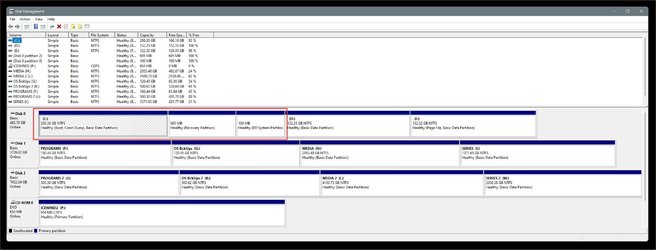

Image1.jpg


An In-Place upgrade is NOT a format... it's a repair. It compares what's in the ISO image with what's on your drive.
If it finds a mismatch, it replaces the item on your drive, with the item from the ISO image.


On a clean install the ISO image is bootable and is on a USB stick.
It erases (formats) then installs a complete fresh copy of Windows.

 
Last edited:

My Computers My Computers

  • At a glance

    Win 11 Home ♦♦♦26200.9278 ♦♦♦♦♦♦♦25H2AMD Ryzen 7 3700XG.Skill (F4-3200C14D-16GTZKW)EVGA RTX 2070 (08G-P4-2171-KR)
    OS
    Win 11 Home ♦♦♦26200.9278 ♦♦♦♦♦♦♦25H2
    Computer type
    PC/Desktop
    Manufacturer/Model
    Built by Ghot® [May 2020]
    CPU
    AMD Ryzen 7 3700X
    Motherboard
    Asus Pro WS X570-ACE (BIOS 5302)
    Memory
    G.Skill (F4-3200C14D-16GTZKW)
    Graphics Card(s)
    EVGA RTX 2070 (08G-P4-2171-KR)
    Sound Card
    Realtek ALC1220P / ALC S1220A
    Monitor(s) Displays
    Dell U3011 30"
    Screen Resolution
    2560 x 1600
    Hard Drives
    2x Samsung 860 EVO 500GB,
    WD 4TB Black FZBX - SATA III,
    WD 8TB Black FZBX - SATA III,
    DRW-24B1ST CD/DVD Burner
    PSU
    PC Power & Cooling 750W Quad EPS12V
    Case
    Cooler Master ATCS 840 Tower
    Cooling
    CM Hyper 212 EVO (push/pull)
    Keyboard
    Ducky DK9008 Shine II Blue LED
    Mouse
    Logitech Optical M-100
    Internet Speed
    300/300
    Browser
    Firefox (latest)
    Antivirus
    Bitdefender Total Security
    Other Info
    Speakers: Klipsch Pro Media 2.1
  • At a glance

    Windows XP Pro 32bit w/SP3AMD Athlon 64 X2 5000+ (OC'd @ 3.2Ghz)TWIN2X2048-6400C4DHX (2 x 1GB, DDR2 800)EVGA 256-P2-N758-TR GeForce 8600GT SSC
    Operating System
    Windows XP Pro 32bit w/SP3
    Computer type
    PC/Desktop
    Manufacturer/Model
    Built by Ghot® (not in use)
    CPU
    AMD Athlon 64 X2 5000+ (OC'd @ 3.2Ghz)
    Motherboard
    ASUS M2N32-SLI Deluxe Wireless Edition
    Memory
    TWIN2X2048-6400C4DHX (2 x 1GB, DDR2 800)
    Graphics card(s)
    EVGA 256-P2-N758-TR GeForce 8600GT SSC
    Sound Card
    Onboard
    Monitor(s) Displays
    ViewSonic G90FB Black 19" Professional (CRT)
    Screen Resolution
    up to 2048 x 1536
    Hard Drives
    WD 36GB 10,000rpm Raptor SATA
    Seagate 80GB 7200rpm SATA
    Lite-On LTR-52246S CD/RW
    Lite-On LH-18A1P CD/DVD Burner
    PSU
    PC Power & Cooling Silencer 750 Quad EPS12V
    Case
    Generic Beige case, 80mm fans
    Cooling
    ZALMAN 9500A 92mm CPU Cooler
    Keyboard
    Logitech Classic Keybooard 200
    Mouse
    Logitech Optical M-BT96a
    Internet Speed
    300/300
    Browser
    Firefox 3.x ??
    Antivirus
    Symantec (Norton)
    Other Info
    Still assembled, still runs. Haven't turned it on for 15 years?
Right, thank you for explaining the difference. I'm going to proceed with a clean install as I don't care much about the apps and I can easily reinstall them.

On a side note, I updated my BIOS and tried using DDU again but to no avail unfortunately.
 

My Computer My Computer

At a glance

Windows 11
OS
Windows 11
Right, thank you for explaining the difference. I'm going to proceed with a clean install as I don't care much about the apps and I can easily reinstall them.

On a side note, I updated my BIOS and tried using DDU again but to no avail unfortunately.


Yeah, a clean install is the better choice, except most folk want to keep their installed programs.
If you don't want to keep your programs, then definitely do a clean install.
THEN, if the problem still exists, you know it's a hardware problem.


Remember to unhook all the other drives in your comp, before you start with the clean install.
The only drive that should be "hooked up" is the one you're installing Windows on.
If you need it... on ASUS boards, you use the F8 key to get to the boot menu.


Here's the clean install assistant....

This cat cries.png
 
Last edited:

My Computers My Computers

  • At a glance

    Win 11 Home ♦♦♦26200.9278 ♦♦♦♦♦♦♦25H2AMD Ryzen 7 3700XG.Skill (F4-3200C14D-16GTZKW)EVGA RTX 2070 (08G-P4-2171-KR)
    OS
    Win 11 Home ♦♦♦26200.9278 ♦♦♦♦♦♦♦25H2
    Computer type
    PC/Desktop
    Manufacturer/Model
    Built by Ghot® [May 2020]
    CPU
    AMD Ryzen 7 3700X
    Motherboard
    Asus Pro WS X570-ACE (BIOS 5302)
    Memory
    G.Skill (F4-3200C14D-16GTZKW)
    Graphics Card(s)
    EVGA RTX 2070 (08G-P4-2171-KR)
    Sound Card
    Realtek ALC1220P / ALC S1220A
    Monitor(s) Displays
    Dell U3011 30"
    Screen Resolution
    2560 x 1600
    Hard Drives
    2x Samsung 860 EVO 500GB,
    WD 4TB Black FZBX - SATA III,
    WD 8TB Black FZBX - SATA III,
    DRW-24B1ST CD/DVD Burner
    PSU
    PC Power & Cooling 750W Quad EPS12V
    Case
    Cooler Master ATCS 840 Tower
    Cooling
    CM Hyper 212 EVO (push/pull)
    Keyboard
    Ducky DK9008 Shine II Blue LED
    Mouse
    Logitech Optical M-100
    Internet Speed
    300/300
    Browser
    Firefox (latest)
    Antivirus
    Bitdefender Total Security
    Other Info
    Speakers: Klipsch Pro Media 2.1
  • At a glance

    Windows XP Pro 32bit w/SP3AMD Athlon 64 X2 5000+ (OC'd @ 3.2Ghz)TWIN2X2048-6400C4DHX (2 x 1GB, DDR2 800)EVGA 256-P2-N758-TR GeForce 8600GT SSC
    Operating System
    Windows XP Pro 32bit w/SP3
    Computer type
    PC/Desktop
    Manufacturer/Model
    Built by Ghot® (not in use)
    CPU
    AMD Athlon 64 X2 5000+ (OC'd @ 3.2Ghz)
    Motherboard
    ASUS M2N32-SLI Deluxe Wireless Edition
    Memory
    TWIN2X2048-6400C4DHX (2 x 1GB, DDR2 800)
    Graphics card(s)
    EVGA 256-P2-N758-TR GeForce 8600GT SSC
    Sound Card
    Onboard
    Monitor(s) Displays
    ViewSonic G90FB Black 19" Professional (CRT)
    Screen Resolution
    up to 2048 x 1536
    Hard Drives
    WD 36GB 10,000rpm Raptor SATA
    Seagate 80GB 7200rpm SATA
    Lite-On LTR-52246S CD/RW
    Lite-On LH-18A1P CD/DVD Burner
    PSU
    PC Power & Cooling Silencer 750 Quad EPS12V
    Case
    Generic Beige case, 80mm fans
    Cooling
    ZALMAN 9500A 92mm CPU Cooler
    Keyboard
    Logitech Classic Keybooard 200
    Mouse
    Logitech Optical M-BT96a
    Internet Speed
    300/300
    Browser
    Firefox 3.x ??
    Antivirus
    Symantec (Norton)
    Other Info
    Still assembled, still runs. Haven't turned it on for 15 years?

I know when I replaced my GTX 1080 with the RTX 3080. I used DDU in safe mode. No internet to perform clean uninstall of the Nvidia drivers. And put in the 3080. And sis fresh install of drivers. I was getting BSOD. I did a install of Windows 10 and everything was fine. I would recommend doing a format and fresh install of Windows. Good luck.
 

My Computer My Computer

At a glance

Windows 11 ProRyzen 7 5700x3DCORSAIR Vengeance RGB Pro 32GB (4 x 8GB) DDR4...MSI Ventus 3x RTX 3080 OC
OS
Windows 11 Pro
Computer type
PC/Desktop
Manufacturer/Model
DIY
CPU
Ryzen 7 5700x3D
Motherboard
ASUS TUF GAMING X570-PLUS WiFi
Memory
CORSAIR Vengeance RGB Pro 32GB (4 x 8GB) DDR4-3600
Graphics Card(s)
MSI Ventus 3x RTX 3080 OC
Sound Card
Onboard DTS custom chipset
Monitor(s) Displays
Primary: Alienware AW3425DW, Secondary: MSI MAG27QRF-QD,
Screen Resolution
Main monitor: 3440x1440@240hz, 2nd 2560x1440@165hz
Hard Drives
ADATA XPG SX8200 1TB,. 2TB Samsung 970 Evo plus, 4TB WD Black.
PSU
Corsair RM750x
Case
Phanteks Enthroo Pro Tempered glass
Cooling
Corsair 212 Evo RGB Black air cooler
Keyboard
Steeleseries Apex 7 TKL
Mouse
Logitech 502 PROTEUS SPECTRUM
Internet Speed
1.5 gigabyte fiber
Browser
Chrome
Antivirus
Bitdefender
Yeah, a clean install is the better choice, except most folk want to keep their installed programs.
If you don't want to keep your programs, then definitely do a clean install.
THEN, if the problem still exists, you know it's a hardware problem.


Remember to unhook all the other drives in your comp, before you start with the clean install.
The only drive that should be "hooked up" is the one you're installing Windows on.
If you need it... on ASUS boards, you use the F8 key to get to the boot menu.


Here's the clean install assistant....

View attachment 11089
Hi,

I only have one drive with two partitions so no worries there. I'm about to start the clean install process. Hopefully, I come back bearing good news.

Cheers.
 

My Computer My Computer

At a glance

Windows 11
OS
Windows 11
Please report the problem via the Microsoft Feedback Hub:


Code:
Some applications on devices that have AMD Ryzen processors might drop performance
Status    Originating update    History
Resolved KB5006746    N/A

Resolved: 2021-10-21, 10:00 PT
Opened: 2021-10-20, 16:34 PT
Devices with AMD Ryzen processors might experience latency in the L3 cache after upgrading to Windows 11. Some applications sensitive to memory subsystems performance access time might be affected, including diagnostic and benchmarking applications and certain gaming applications.

Resolution: This issue has been resolved in KB5006746

Affected platforms:
Client: Windows 11, version 21H2
 

My Computer My Computer

At a glance

Windows 10Intel(R) Core(TM) i7-4800MQ CPU @ 2.70GHz16 GB Total: Manufacturer : Samsung MemoryTyp...NVIDIA Quadro K3100M; Intel(R) HD Graphics 4600
OS
Windows 10
Computer type
Laptop
Manufacturer/Model
HP
CPU
Intel(R) Core(TM) i7-4800MQ CPU @ 2.70GHz
Motherboard
Product : 190A Version : KBC Version 94.56
Memory
16 GB Total: Manufacturer : Samsung MemoryType : DDR3 FormFactor : SODIMM Capacity : 8GB Speed : 1600
Graphics Card(s)
NVIDIA Quadro K3100M; Intel(R) HD Graphics 4600
Sound Card
IDT High Definition Audio CODEC; PNP Device ID HDAUDIO\FUNC_01&VEN_111D&DEV_76E0
Hard Drives
Model Hitachi HTS727575A9E364
Antivirus
Microsoft Defender
Other Info
Mobile Workstation
Hey,

I formatted my system drive and installed Windows 11 again. What I forgot to mention earlier is that I see the red lines or dots, that I mentioned in the starting post, even when the system is booting up.

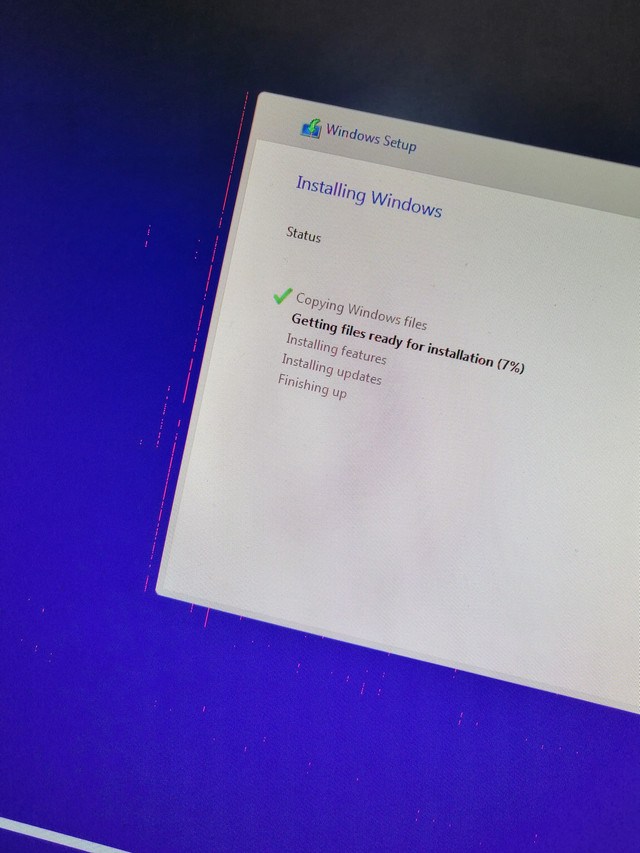
While I was installing Windows 11, I saw the same during the setup which made me suspicious of the clean install as I thought it wouldn't fix it if I'm seeing it here as well.

At this point, I have no possible clue of what could be causing the problem. What I know for sure is that it isn't the GPU because I ordered this one when I first started facing the issue and it still remains. I'm going to attach photos of how it looked on my previous GPU vs how it looks now on the new one.

Anyone who could possibly help with this? I'm out of ideas. It would be highly appreciated.

New GPU:
IMG-20211023-191917.jpg


Old GPU:
IMG-20211014-WA0012.jpg

IMG-20211014-WA0014.jpg
 

My Computer My Computer

At a glance

Windows 11
OS
Windows 11
Hi,

I only have one drive with two partitions so no worries there. I'm about to start the clean install process. Hopefully, I come back bearing good news.

Cheers.
I suggest backing up the partition with your data before doing anything.
Edit: I see I'm to late.
 

My Computers My Computers

  • At a glance

    Windows 11 Pro 25H2Intel Core i7-10700K16GB (8GB PC4-19200 DDR4 SDRAM x2)NVIDIA GeForce GTX 1050 TI
    OS
    Windows 11 Pro 25H2
    Computer type
    PC/Desktop
    Manufacturer/Model
    PowerSpec B746
    CPU
    Intel Core i7-10700K
    Motherboard
    ASRock Z490 Phantom Gaming 4/ax
    Memory
    16GB (8GB PC4-19200 DDR4 SDRAM x2)
    Graphics Card(s)
    NVIDIA GeForce GTX 1050 TI
    Sound Card
    Realtek Audio
    Monitor(s) Displays
    #1. LG ULTRAWIDE 34" #2. AOC Q32G2WG3 32"
    Screen Resolution
    #1. 3440 X 1440 #2. 1920 x 1080
    Hard Drives
    NVMe WDC WDS100T2B0C-00PXH0 1TB
    Samsung SSD 860 EVO 1TB
    PSU
    750 Watts (62.5A)
    Case
    PowerSpec/Lian Li ATX 205
    Keyboard
    Logitech K270
    Mouse
    Logitech M185
    Browser
    Microsoft Edge and Firefox
    Antivirus
    Webroot SecureAnywhere CE 26.1
  • At a glance

    Windows 11 Canary ChannelIntel Core i5-8400 CPU @ 2.80GHz16 MB DDR 4-2666
    Operating System
    Windows 11 Canary Channel
    Computer type
    PC/Desktop
    Manufacturer/Model
    PowerSpec G156
    CPU
    Intel Core i5-8400 CPU @ 2.80GHz
    Motherboard
    AsusTeK Prime B360M-A
    Memory
    16 MB DDR 4-2666
    Monitor(s) Displays
    23" Speptre HDMI 75Hz
    Screen Resolution
    1920x1080
    Hard Drives
    Samsung 970 EVO 500GB NVMe
    Keyboard
    Logitek K270
    Mouse
    Logitek M185
    Browser
    Firefox, Edge and Edge Canary
    Antivirus
    Windows Defender
I wonder if it could be a problem with the power supply. Do you have a local shop that could test it for you?
 

My Computers My Computers

  • At a glance

    Windows 11 Pro 25H2Intel Core i7-10700K16GB (8GB PC4-19200 DDR4 SDRAM x2)NVIDIA GeForce GTX 1050 TI
    OS
    Windows 11 Pro 25H2
    Computer type
    PC/Desktop
    Manufacturer/Model
    PowerSpec B746
    CPU
    Intel Core i7-10700K
    Motherboard
    ASRock Z490 Phantom Gaming 4/ax
    Memory
    16GB (8GB PC4-19200 DDR4 SDRAM x2)
    Graphics Card(s)
    NVIDIA GeForce GTX 1050 TI
    Sound Card
    Realtek Audio
    Monitor(s) Displays
    #1. LG ULTRAWIDE 34" #2. AOC Q32G2WG3 32"
    Screen Resolution
    #1. 3440 X 1440 #2. 1920 x 1080
    Hard Drives
    NVMe WDC WDS100T2B0C-00PXH0 1TB
    Samsung SSD 860 EVO 1TB
    PSU
    750 Watts (62.5A)
    Case
    PowerSpec/Lian Li ATX 205
    Keyboard
    Logitech K270
    Mouse
    Logitech M185
    Browser
    Microsoft Edge and Firefox
    Antivirus
    Webroot SecureAnywhere CE 26.1
  • At a glance

    Windows 11 Canary ChannelIntel Core i5-8400 CPU @ 2.80GHz16 MB DDR 4-2666
    Operating System
    Windows 11 Canary Channel
    Computer type
    PC/Desktop
    Manufacturer/Model
    PowerSpec G156
    CPU
    Intel Core i5-8400 CPU @ 2.80GHz
    Motherboard
    AsusTeK Prime B360M-A
    Memory
    16 MB DDR 4-2666
    Monitor(s) Displays
    23" Speptre HDMI 75Hz
    Screen Resolution
    1920x1080
    Hard Drives
    Samsung 970 EVO 500GB NVMe
    Keyboard
    Logitek K270
    Mouse
    Logitek M185
    Browser
    Firefox, Edge and Edge Canary
    Antivirus
    Windows Defender
Please make a backup image of the Windows 11 installation so that you can quickly restore it.

Then create a bootable Windows 10 iso Windows 1809 or 1903 and report the findings of the Windows images and status of the Nvidia GPU in device manager.
If available install GPU drivers from the motherboard website (not Nvidia website).


My Computer My Computer

At a glance

Windows 10Intel(R) Core(TM) i7-4800MQ CPU @ 2.70GHz16 GB Total: Manufacturer : Samsung MemoryTyp...NVIDIA Quadro K3100M; Intel(R) HD Graphics 4600
OS
Windows 10
Computer type
Laptop
Manufacturer/Model
HP
CPU
Intel(R) Core(TM) i7-4800MQ CPU @ 2.70GHz
Motherboard
Product : 190A Version : KBC Version 94.56
Memory
16 GB Total: Manufacturer : Samsung MemoryType : DDR3 FormFactor : SODIMM Capacity : 8GB Speed : 1600
Graphics Card(s)
NVIDIA Quadro K3100M; Intel(R) HD Graphics 4600
Sound Card
IDT High Definition Audio CODEC; PNP Device ID HDAUDIO\FUNC_01&VEN_111D&DEV_76E0
Hard Drives
Model Hitachi HTS727575A9E364
Antivirus
Microsoft Defender
Other Info
Mobile Workstation
I wonder if it could be a problem with the power supply. Do you have a local shop that could test it for you?
Hi, I do. I can check the power supply with them. However, anything other than that, I don't think the guy has enough knowledge to tell me what could be causing this.

Please make a backup image of the Windows 11 installation so that you can quickly restore it.

Then create a bootable Windows 10 iso Windows 1809 or 1903 and report the findings of the Windows images and status of the Nvidia GPU in device manager.
If available install GPU drivers from the motherboard website (not Nvidia website).

I shall try this now and report back once I have Windows 10 installed.
 

My Computer My Computer

At a glance

Windows 11
OS
Windows 11
If there are problems with an older version of Windows 10 then see if you can find another computer to swap test the GPU card.
 

My Computer My Computer

At a glance

Windows 10Intel(R) Core(TM) i7-4800MQ CPU @ 2.70GHz16 GB Total: Manufacturer : Samsung MemoryTyp...NVIDIA Quadro K3100M; Intel(R) HD Graphics 4600
OS
Windows 10
Computer type
Laptop
Manufacturer/Model
HP
CPU
Intel(R) Core(TM) i7-4800MQ CPU @ 2.70GHz
Motherboard
Product : 190A Version : KBC Version 94.56
Memory
16 GB Total: Manufacturer : Samsung MemoryType : DDR3 FormFactor : SODIMM Capacity : 8GB Speed : 1600
Graphics Card(s)
NVIDIA Quadro K3100M; Intel(R) HD Graphics 4600
Sound Card
IDT High Definition Audio CODEC; PNP Device ID HDAUDIO\FUNC_01&VEN_111D&DEV_76E0
Hard Drives
Model Hitachi HTS727575A9E364
Antivirus
Microsoft Defender
Other Info
Mobile Workstation
If there are problems with an older version of Windows 10 then see if you can find another computer to swap test the GPU card.
Would using Windows 10 v1909 be fine as well?
 

My Computer My Computer

At a glance

Windows 11
OS
Windows 11
yes
 

My Computer My Computer

At a glance

Windows 10Intel(R) Core(TM) i7-4800MQ CPU @ 2.70GHz16 GB Total: Manufacturer : Samsung MemoryTyp...NVIDIA Quadro K3100M; Intel(R) HD Graphics 4600
OS
Windows 10
Computer type
Laptop
Manufacturer/Model
HP
CPU
Intel(R) Core(TM) i7-4800MQ CPU @ 2.70GHz
Motherboard
Product : 190A Version : KBC Version 94.56
Memory
16 GB Total: Manufacturer : Samsung MemoryType : DDR3 FormFactor : SODIMM Capacity : 8GB Speed : 1600
Graphics Card(s)
NVIDIA Quadro K3100M; Intel(R) HD Graphics 4600
Sound Card
IDT High Definition Audio CODEC; PNP Device ID HDAUDIO\FUNC_01&VEN_111D&DEV_76E0
Hard Drives
Model Hitachi HTS727575A9E364
Antivirus
Microsoft Defender
Other Info
Mobile Workstation
Because you are having the same problem with the new video card I don't think that is your problem. I'm thinking that your power supply might have a bad filter and causing a static interference with the video card. Another possibility, Do you have any new electrical devices running near your computer?
 

My Computers My Computers

  • At a glance

    Windows 11 Pro 25H2Intel Core i7-10700K16GB (8GB PC4-19200 DDR4 SDRAM x2)NVIDIA GeForce GTX 1050 TI
    OS
    Windows 11 Pro 25H2
    Computer type
    PC/Desktop
    Manufacturer/Model
    PowerSpec B746
    CPU
    Intel Core i7-10700K
    Motherboard
    ASRock Z490 Phantom Gaming 4/ax
    Memory
    16GB (8GB PC4-19200 DDR4 SDRAM x2)
    Graphics Card(s)
    NVIDIA GeForce GTX 1050 TI
    Sound Card
    Realtek Audio
    Monitor(s) Displays
    #1. LG ULTRAWIDE 34" #2. AOC Q32G2WG3 32"
    Screen Resolution
    #1. 3440 X 1440 #2. 1920 x 1080
    Hard Drives
    NVMe WDC WDS100T2B0C-00PXH0 1TB
    Samsung SSD 860 EVO 1TB
    PSU
    750 Watts (62.5A)
    Case
    PowerSpec/Lian Li ATX 205
    Keyboard
    Logitech K270
    Mouse
    Logitech M185
    Browser
    Microsoft Edge and Firefox
    Antivirus
    Webroot SecureAnywhere CE 26.1
  • At a glance

    Windows 11 Canary ChannelIntel Core i5-8400 CPU @ 2.80GHz16 MB DDR 4-2666
    Operating System
    Windows 11 Canary Channel
    Computer type
    PC/Desktop
    Manufacturer/Model
    PowerSpec G156
    CPU
    Intel Core i5-8400 CPU @ 2.80GHz
    Motherboard
    AsusTeK Prime B360M-A
    Memory
    16 MB DDR 4-2666
    Monitor(s) Displays
    23" Speptre HDMI 75Hz
    Screen Resolution
    1920x1080
    Hard Drives
    Samsung 970 EVO 500GB NVMe
    Keyboard
    Logitek K270
    Mouse
    Logitek M185
    Browser
    Firefox, Edge and Edge Canary
    Antivirus
    Windows Defender
Have you tried a different display and or display cable? It could be the monitor or HDMI/ DP cable.
 

My Computer My Computer

At a glance

Windows 11 Pro 22H2, build: 22621.521Intel i7-12700K 3.6GHz Base (5.0GHz Turbo)64GB DDR 3600MhzAsus Tuff RTX 3080 10GB OC
OS
Windows 11 Pro 22H2, build: 22621.521
Computer type
PC/Desktop
Manufacturer/Model
Scan 3XS Custom 1700
CPU
Intel i7-12700K 3.6GHz Base (5.0GHz Turbo)
Motherboard
Asus ProArt Creator B660 D4
Memory
64GB DDR 3600Mhz
Graphics Card(s)
Asus Tuff RTX 3080 10GB OC
Sound Card
Onboard Realtek
Monitor(s) Displays
Gigabyte G32QC 32inch 16:9 curved @2560 x 1440p 165Hz Freesync Premium Pro/ Dell SE2422H 24inch 16:9 1920 x 1080p 75Hz Freesync
Screen Resolution
2560 x 1440p & 1920 x 1080p
Hard Drives
WD SN570 1TB NVME (Boot), Samsung 870QVO 1TB (SSD), SanDisk 3D Ultra 500Gb (SSD) x2, Seagate 3Tb Expansion Desk (Ext HDD), 2x Toshiba 1Tb P300 (Ext HDD)
PSU
Corsair RM1000X Modular
Case
Corsair 4000D Airflow Desktop
Cooling
Corsair Hydro H150i RGB Pro XT 360mm Liquid Cooler, 3 x 120mm fans, 1x Exhaust
Keyboard
Microsoft Ergonomic
Mouse
Logitech G402
Internet Speed
800Mbs
Browser
Edge Chromium
Antivirus
Defender, Malwarebytes
Because you are having the same problem with the new video card I don't think that is your problem. I'm thinking that your power supply might have a bad filter and causing a static interference with the video card. Another possibility, Do you have any new electrical devices running near your computer?
Exactly my thoughts. I'm leaning towards a hardware problem myself because if it was a software issue, it should have been fixed with the clean install. On top of that, if it was a software issue, I shouldn't see the red lines/dots while booting up.. I'm going to take the PC to a local store tomorrow and try a different PSU.

As for electronics, not really. I don't have any electronics that are being used in the room. Just a PC that lies in the corner, powered off for weeks.

Have you tried a different display and or display cable? It could be the monitor or HDMI/ DP cable.
I have two monitors, the red lines appear on both of them. Both of them can't be turned on at the same time now because Windows is stopping the drivers. I tried a different DP cable earlier while downloading something, same result, sadly.

At this point, I'm just dying to know what is causing the issue. I don't care if its faulty hardware, I can replace that. The question is what..
 

My Computer My Computer

At a glance

Windows 11
OS
Windows 11
Do you have another PCI-e slot on your MB to try the card in. It would rule out the slot.
 

My Computer My Computer

At a glance

Windows 11 ProRyzen 7 5700x3DCORSAIR Vengeance RGB Pro 32GB (4 x 8GB) DDR4...MSI Ventus 3x RTX 3080 OC
OS
Windows 11 Pro
Computer type
PC/Desktop
Manufacturer/Model
DIY
CPU
Ryzen 7 5700x3D
Motherboard
ASUS TUF GAMING X570-PLUS WiFi
Memory
CORSAIR Vengeance RGB Pro 32GB (4 x 8GB) DDR4-3600
Graphics Card(s)
MSI Ventus 3x RTX 3080 OC
Sound Card
Onboard DTS custom chipset
Monitor(s) Displays
Primary: Alienware AW3425DW, Secondary: MSI MAG27QRF-QD,
Screen Resolution
Main monitor: 3440x1440@240hz, 2nd 2560x1440@165hz
Hard Drives
ADATA XPG SX8200 1TB,. 2TB Samsung 970 Evo plus, 4TB WD Black.
PSU
Corsair RM750x
Case
Phanteks Enthroo Pro Tempered glass
Cooling
Corsair 212 Evo RGB Black air cooler
Keyboard
Steeleseries Apex 7 TKL
Mouse
Logitech 502 PROTEUS SPECTRUM
Internet Speed
1.5 gigabyte fiber
Browser
Chrome
Antivirus
Bitdefender
Do you have another PCI-e slot on your MB to try the card in. It would rule out the slot.
Yes, I have. I installed the new GPU in a different slot when I got it, still same thing..
 

My Computer My Computer

At a glance

Windows 11
OS
Windows 11
Please make a backup image of the Windows 11 installation so that you can quickly restore it.

Then create a bootable Windows 10 iso Windows 1809 or 1903 and report the findings of the Windows images and status of the Nvidia GPU in device manager.
If available install GPU drivers from the motherboard website (not Nvidia website).

Just did this, still the same thing, sadly.

Back to Windows 11 now.
 

My Computer My Computer

At a glance

Windows 11
OS
Windows 11
Back
Top Bottom