Windows installation and running installation on the same drive


vsub

Active member
Member
VIP
Local time
2:34 PM
Posts
207
OS
Windows 11
I was always wondering if something like this is possible since every tool that allows you create a bootable drive asks you to format the drive before you do

For example can I create two partitions on a flash drive,on one of the partitions will have windows installed and on other one the windows installation
Or on an internal ssd.create another partition and put the installation there

And btw does "Reset PC" without keeping any files different than clean windows installation
 

My Computer

System One

  • OS
    Windows 11
    Computer type
    Laptop
    Manufacturer/Model
    MSI Sword 17 HX
    CPU
    14700HX
    Memory
    64GB
    Graphics Card(s)
    RTX 4070
Or maybe,can i make a backup of my current windows installation and then run that backup on a VM
Then,try removing things from it one by one to figure out what is causing the problems I have on my main installation(rather than doing a full reinstall,I can try to find out what is causing the problems so I can fix it without causing any damage to the main os)
 

My Computer

System One

  • OS
    Windows 11
    Computer type
    Laptop
    Manufacturer/Model
    MSI Sword 17 HX
    CPU
    14700HX
    Memory
    64GB
    Graphics Card(s)
    RTX 4070
For example can I create two partitions on a flash drive,on one of the partitions will have windows installed and on other one the windows installation
Or on an internal ssd.create another partition and put the installation there
Windows Setup has no use for an extracted Windows folder, it can only use servicing packages found on the ISO.

The source packages contain important versioning details used in the install, it's not just a plain file copy. If you were to run DISM to repair a corrupted Windows from a local ISO source, it would also need to have the servicing packages.

And btw does "Reset PC" without keeping any files different than clean windows installation
Reset My PC assumes you haven't corrupted the WinSxS component folder, and uses it to recopy Windows files. The current Windows folder is renamed to Windows.old, and component folder files are relinked to the a new Windows folder. If you don't choose to keep your existing files and settings, Reset My PC will remove other folders and reset the registry.

The component store is what allows SFC or DISM /restorehealth to repair Windows. It's a backup copy of Windows files held for safekeeping.

When you use Reset My PC, no new files are installed or updated, it uses the existing files in the store. This presumes you haven't damaged or tampered with WinSxS. On a clean install, there is no previous copy of WinSxS to use so Setup has to extract it from install WIM/ESD, and then link files to the Windows folder.

Reset My PC is optimistic in that it believes everything works fine, but you wanted a fresh start.
 

My Computer

System One

  • OS
    Windows 7
I guess I have to do a clean install then
Windows works fine but I have some strange problems that don't make any sense,it could be some windows update,or some program installed or some drivers
 

My Computer

System One

  • OS
    Windows 11
    Computer type
    Laptop
    Manufacturer/Model
    MSI Sword 17 HX
    CPU
    14700HX
    Memory
    64GB
    Graphics Card(s)
    RTX 4070
First make a full backup, then try a repair install. If that doesn't work, then do a clean install.

A repair install will only fix a bad Windows. If you still have problems, it could be 3rd-party apps and other changes made to the system. Which only a clean install can fix; or at least until you re-introduce the bad changes into the system.
 

My Computer

System One

  • OS
    Windows 7
As a OEM computer has dedicated drivers, If you're going yo do a clean install (deleting all 4 partitions - EFI, MSR, C:, and Recovery) I strongly recommend you backup all your drivers.
 

My Computers

System One System Two

  • OS
    Windows 11 Pro - Windows 7 HP 64 - Lubuntu
    Computer type
    PC/Desktop
    Manufacturer/Model
    custom build
    CPU
    i5 6600K - 800MHz to 4400MHz
    Motherboard
    GA-Z170-HD3P
    Memory
    4+4G GSkill DDR4 3000
    Graphics Card(s)
    IG - Intel 530
    Monitor(s) Displays
    Samsung 226BW
    Screen Resolution
    1680x1050
    Hard Drives
    (1) -1 SM951 – 128GB M.2 AHCI PCIe SSD drive for Win 11
    (2) -1 WD SATA 3 - 1T for Data
    (3) -1 WD SATA 3 - 1T for backup
    (4) -1 BX500 SSD - 256G for Windows 7 and Lubuntu
    PSU
    Thermaltake 450W TR2 gold
    Keyboard
    Old and good Chicony mechanical keyboard
    Mouse
    Logitech mX performance - 9 buttons (had to disable some)
    Internet Speed
    500 Mb/s
    Browser
    Firefox 64
  • Operating System
    Windows 11 Pro
    Computer type
    Laptop
    Manufacturer/Model
    Asus Q550LF
    CPU
    i7-4500U 800- 3000MHz
    Motherboard
    Asus Q550LF
    Memory
    (4+4)G DDR3 1600
    Graphics card(s)
    IG intel 4400 + NVIDIA GeForce GT 745M
    Sound Card
    Realtek
    Monitor(s) Displays
    LG Display LP156WF4-SPH1
    Screen Resolution
    1920 x 1080
    Hard Drives
    BX500 120G SSD for Windows and programs
    & 1T HDD for data
    Internet Speed
    500 Mb/s
    Browser
    Firefox 64
Now that you mention it,do I have to manually delete all those partitions
When I run the setup I get error
Setup does not support configuration of or installation to disks connected through a USB or IEEE 1394 port

I have to install a VMD driver and then I am allowed to continue
This makes visible all of the partitions on the drive including those
Will just selecting the one that says Windows be enough I have to delete all
 

My Computer

System One

  • OS
    Windows 11
    Computer type
    Laptop
    Manufacturer/Model
    MSI Sword 17 HX
    CPU
    14700HX
    Memory
    64GB
    Graphics Card(s)
    RTX 4070
do I have to manually delete all those partitions

Before installation, copy not only the VMD controller driver but also the Ethernet driver to the Windows 11 installation USB. Just to be safe in case the installation media does not include the correct Ethernet driver for your laptop.

Delete all partitions on Disk 0 until only a single "Unallocated Space" entry remains, then select Next. Windows Setup will automatically recreate all the necessary partitions.

Your laptop has an Intel Core i7-14700HX and an NVIDIA GeForce RTX 4070, so after installing Windows 11, Windows Update should install all the necessary drivers automatically. At least, that’s what happened when I performed a clean installation of Windows 11 on my new laptop a few months ago (Lenovo Legion Pro 7, Intel Core Ultra 9 275HX, NVIDIA GeForce RTX 5080).

edit:

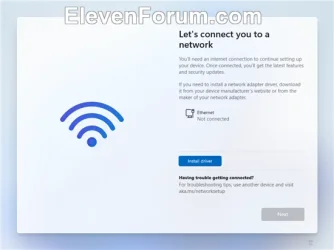
If the installation media lacks the correct Ethernet driver, you will see the following screen. Click on the "Install driver" button.

No_internet.webp
 
Last edited:

My Computers

System One System Two

  • OS
    Windows 11 Pro
    Computer type
    PC/Desktop
    CPU
    AMD Ryzen 9 9950X3D
    Motherboard
    ASRock B650E Taichi Lite
    Memory
    Kingston FURY Beast 64GB (2x32GB) DDR5 6000MT/s
    Graphics Card(s)
    ASUS TUF Gaming Radeon RX 9070 OC Edition 16GB GDDR6
    Hard Drives
    Solidigm P44 Pro 2TB M.2 NVMe SSD
  • Operating System
    Windows 11 Home
    Computer type
    Laptop
    Manufacturer/Model
    Lenovo Legion Pro 7i Gen 10 16"
    CPU
    Intel Core Ultra 9 275HX
    Memory
    64GB (2x 32GB) DDR5-6400
    Graphics card(s)
    NVIDIA GeForce RTX 5080 16GB GDDR7 Laptop GPU
    Hard Drives
    2x 1TB M.2 NVMe SSD (SK Hynix)
Back
Top Bottom