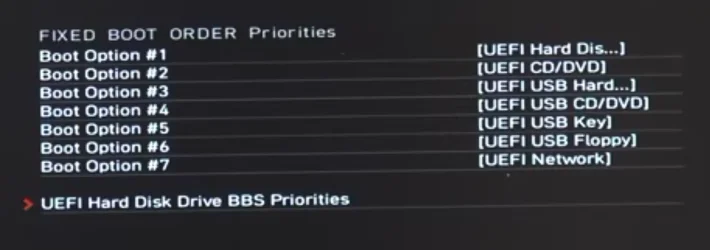
A system for which I had to do an emergency recovery and had a completely empty NVM drive started to install windows after I resolved the BIOS issues. But there was no USB Windows installer connected to the system. I'm wondering how all this was actually possible. How did the windows installer know which version of Windows to install? Before I started this install process I disconnected both Ethernet cable and WiFi antenna. so, I could set up windows with a local admin account rather than a Microsoft account.
When I first started this process, I erased all existing partitions on the NVMe drive. I had some issues with the existing BIOS which is downrev from the current version. That BIOS had bugs in the selection of boot drive options, for example windows manager or USB UEFI drive... I struggled and struggled and struggled but I was never able to boot the system into the windows installer USB.
I had to do an emergency recovery because a BIOS flash was corrupted. Google search helped me to do the recovery and was actually more helpful than the motherboard manufacturer tech support.(MSI X870E Carbon WiFi)
After I was able to do a successful BIOS install (thank you Google) I expected my system to boot into BIOS, because I did not have a USB Windows installer present.at that time. Instead, it booted into windows install or. However, it skipped some of the preliminary steps like the version of Windows I wanted to install, pro versus home had my license. When windows was fully installed, I had a pro version installed, just as I had with my previous Windows install.
When I first started this process, I erased all existing partitions on the NVMe drive. I had some issues with the existing BIOS which is downrev from the current version. That BIOS had bugs in the selection of boot drive options, for example windows manager or USB UEFI drive... I struggled and struggled and struggled but I was never able to boot the system into the windows installer USB.
I had to do an emergency recovery because a BIOS flash was corrupted. Google search helped me to do the recovery and was actually more helpful than the motherboard manufacturer tech support.(MSI X870E Carbon WiFi)
After I was able to do a successful BIOS install (thank you Google) I expected my system to boot into BIOS, because I did not have a USB Windows installer present.at that time. Instead, it booted into windows install or. However, it skipped some of the preliminary steps like the version of Windows I wanted to install, pro versus home had my license. When windows was fully installed, I had a pro version installed, just as I had with my previous Windows install.
- Windows Build/Version
- 262100.8457
Last edited:
My Computer
System One
-
- OS
- Windows 11 2H25
- Computer type
- PC/Desktop
- Manufacturer/Model
- DIY
- CPU
- AMD 9900X
- Motherboard
- MSI X870E Carbon
- Memory
- 64 GB
- Graphics Card(s)
- AMD 9070 XT
- Sound Card
- built-in
- Monitor(s) Displays
- Dell 24"
- Hard Drives
- Sabrent 1 TB NVMe, 4 x SSD (need to check models), 4 x 3.5" HDD, 8-16 TB, all WD
- PSU
- Seasonic 850
- Case
- Fractal Design North XL (which I likw)
- Cooling
- Corsair AIO for CPU, fans for case
- Keyboard
- Das Keyboard 4
- Mouse
- Corsair M65 (white)
- Internet Speed
- 1 TB download
- Browser
- Firefox
- Antivirus
- Bitdefender
- Other Info
- Also have Lenovo T14S laptop (me) and Lenovo Slim 71 (wife)