Windows Management Instrumentation Command-line (WMIC) removal from Windows


 Windows IT Pro Blog:

Starting January 29, 2024, you'll find Windows Management Instrumentation Command line (WMIC) feature "disabled by default" on the insider build of Windows 11. If your application is dependent on WMIC, please migrate away from it using this post as a guide. Let's catch up on the latest and learn how you can use PowerShell and programmatic ways to query WMIC today.

What is WMI command line (WMIC)?​

The WMI command line (WMIC) utility provides a command-line interface for Windows Management Instrumentation (WMI). It's compatible with existing shells and utility commands.

Note: For more information and guidelines on how to use WMIC, see Using Windows Management Instrumentation command line and WMIC—take command-line control over WMI. Look for information on aliases, verbs, switches, and commands.


WMIC deprecation history​

Deprecation is a term used here at Microsoft to describe the stage of the product lifecycle when a feature or functionality is no longer in active development and may be removed in future releases of a product or online service. Usually, it's replaced by something better, more advanced, or more functional. The feature or capability will typically continue to work and is fully supported until it's officially removed. The deprecation notification can span a few months or years. After removal, the feature or capability will no longer work.

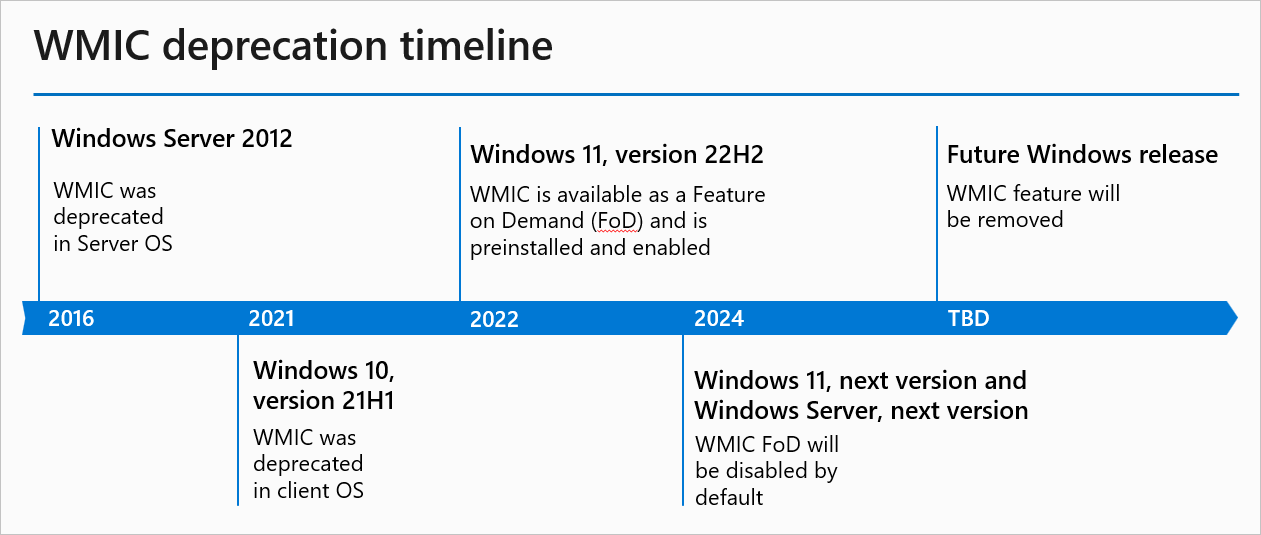
The Windows Management Instrumentation Command line (WMIC) was deprecated in 2016.

Note: If needed, revisit the first two announcements in Features Removed or Deprecated in Windows Server 2012 and Deprecated features in the Windows client.


Since then, WMIC was converted into a Feature on Demand (FoD) as part of Windows 11, version 22H2. FoDs are Windows features that can be added at any time. And up until now, WMIC FoD has been "enabled by default" on Windows 11, version 22H2 and later versions. That's changing in the coming year: in the next OS release of Windows 11, the WMIC FoD will be "disabled by default." If you're on the insider build, you'll start seeing the change after January 29, 2024.

WMIC deprecation timeline​

thumbnail image 1 captioned The timeline graphic showing past and future dates of WMIC deprecation.


The timeline graphic showing past and future dates of WMIC deprecation.

Why was WMIC deprecated?​

The WMIC tool is superseded by Windows PowerShell for WMI. We've been heavily investing in PowerShell in the past few years. The new tools provide a more efficient way of querying WMI. Removing a deprecated component helps reduce complexity while keeping you secure and productive. It will be removed from Windows in a future release.

What should I do if my app has a dependency on WMIC?​

Please use WMIC workarounds such as PowerShell or programmatically query WMI.

PowerShell support​

By default, PowerShell includes cmdlets for working with other technologies such as Windows Management Instrumentation (WMI). There are several native WMI cmdlets that exist in PowerShell without having to install any additional software or modules. Here's an example of how you can replace a familiar WMIC query with a WMI PowerShell cmdlet.

WMICPowerShell
Wmic /namespace:\\>namespace< PATH >Class< Get >Attribute1, Attribute2, … Attribute n<Get-CIMInstance -namespace ' >namespace< ' -query 'select * from >Class<' | ft >Attribute1, Attribute2, … Attribute n<

Alternatively, run the PowerShell command directly from the command prompt (given the setup has PowerShell capabilities):

Code:
C:\Windows\System32> powershell -c "Get_CIMInstance -query 'select * from <Class>' | ft <Attribute1, Attribute 2, … Attribute n>"

Please look at Working with WMI - PowerShell for more information and examples.

Programmatic ways of using WMI​

Apart from PowerShell and other tools like wbemtool.exe, you can use COM APIs to interact with WMI. Specifically, you can write scripts and programs in supported languages like C++, .Net, VBScript, etc.

Please refer to the following documentation for more guidance and examples:
Are you ready for the next step in WMIC deprecation this year? For now, you'll continue to receive WMIC inbox as-is in all the versions prior to Windows 11, version 22H2. As we evaluate the usage of WMIC, we're also planning to remove it in a future Windows release.


 Source:

 
Last edited:

Feature​
Details and mitigation​
Deprecation announced​
Windows Management Instrumentation command-line (WMIC) utility.Deprecation reminder: The WMIC utility is deprecated and will be removed in an upcoming Windows release. This utility is superseded by Windows PowerShell for WMI. This deprecation applies to only the command-line management utility. WMI itself isn't affected.Original announcement: Windows 10, version 21H1

Courtesy reminder: September 2025
 

My Computers

System One System Two

  • OS
    Windows 11 Pro for Workstations
    Computer type
    PC/Desktop
    Manufacturer/Model
    Custom self build
    CPU
    Intel i7-8700K 5 GHz
    Motherboard
    ASUS ROG Maximus XI Formula Z390
    Memory
    64 GB (4x16GB) G.SKILL TridentZ RGB DDR4 3600 MHz (F4-3600C18D-32GTZR)
    Graphics Card(s)
    ASUS ROG-STRIX-GTX1080TI-O11G-GAMING (11GB GDDR5X)
    Sound Card
    Integrated Digital Audio (S/PDIF)
    Monitor(s) Displays
    2 x Samsung Odyssey G75 27"
    Screen Resolution
    2560x1440
    Hard Drives
    1TB Samsung 990 PRO M.2,
    4TB Samsung 990 PRO M.2,
    TerraMaster F8 SSD Plus NAS
    PSU
    Seasonic Prime Titanium 850W
    Case
    Thermaltake Core P3 wall mounted
    Cooling
    Corsair Hydro H115i
    Keyboard
    Amazon Basics Wired Full Keyboard MD005
    Mouse
    Logitech MX Master 4
    Internet Speed
    2 Gbps Download and 100 Mbps Upload
    Browser
    Chrome and Edge
    Antivirus
    Microsoft Defender
    Other Info
    Logitech Z625 speaker system,
    Logitech BRIO 4K Pro webcam,
    HP Color LaserJet Pro MFP M477fdn,
    CyberPower CP1500PFCLCD
    Galaxy S23 Plus phone
  • Operating System
    Windows 11 Pro
    Computer type
    Laptop
    Manufacturer/Model
    Surface Laptop 7 Copilot+ PC
    CPU
    Snapdragon X Elite (12 core) 3.42 GHz
    Memory
    16 GB LPDDR5x-7467 MHz
    Monitor(s) Displays
    15" HDR
    Screen Resolution
    2496 x 1664
    Hard Drives
    1 TB SSD
    Internet Speed
    Wi-Fi 7 and Bluetooth 5.4
    Browser
    Chrome and Edge
    Antivirus
    Microsoft Defender
The Windows Management Instrumentation Command-line (WMIC) tool is progressing toward the next phase for removal from Windows. WMIC will be removed when upgrading to Windows 11, version 25H2. All later releases for Windows 11 will not include WMIC added by default. A new installation of Windows 11, version 24H2 already has WMIC removed by default (it’s only installable as an optional feature). Importantly, only the WMIC tool is being removed – Windows Management Instrumentation (WMI) itself remains part of Windows. Microsoft recommends using PowerShell and other modern tools for any tasks previously done with WMIC. This change will streamline Windows by removing an outdated component without losing any management capabilities in Windows. By preparing now, you can help ensure a smooth transition in Windows.


My Computers

System One System Two

  • OS
    Windows 11 Pro for Workstations
    Computer type
    PC/Desktop
    Manufacturer/Model
    Custom self build
    CPU
    Intel i7-8700K 5 GHz
    Motherboard
    ASUS ROG Maximus XI Formula Z390
    Memory
    64 GB (4x16GB) G.SKILL TridentZ RGB DDR4 3600 MHz (F4-3600C18D-32GTZR)
    Graphics Card(s)
    ASUS ROG-STRIX-GTX1080TI-O11G-GAMING (11GB GDDR5X)
    Sound Card
    Integrated Digital Audio (S/PDIF)
    Monitor(s) Displays
    2 x Samsung Odyssey G75 27"
    Screen Resolution
    2560x1440
    Hard Drives
    1TB Samsung 990 PRO M.2,
    4TB Samsung 990 PRO M.2,
    TerraMaster F8 SSD Plus NAS
    PSU
    Seasonic Prime Titanium 850W
    Case
    Thermaltake Core P3 wall mounted
    Cooling
    Corsair Hydro H115i
    Keyboard
    Amazon Basics Wired Full Keyboard MD005
    Mouse
    Logitech MX Master 4
    Internet Speed
    2 Gbps Download and 100 Mbps Upload
    Browser
    Chrome and Edge
    Antivirus
    Microsoft Defender
    Other Info
    Logitech Z625 speaker system,
    Logitech BRIO 4K Pro webcam,
    HP Color LaserJet Pro MFP M477fdn,
    CyberPower CP1500PFCLCD
    Galaxy S23 Plus phone
  • Operating System
    Windows 11 Pro
    Computer type
    Laptop
    Manufacturer/Model
    Surface Laptop 7 Copilot+ PC
    CPU
    Snapdragon X Elite (12 core) 3.42 GHz
    Memory
    16 GB LPDDR5x-7467 MHz
    Monitor(s) Displays
    15" HDR
    Screen Resolution
    2496 x 1664
    Hard Drives
    1 TB SSD
    Internet Speed
    Wi-Fi 7 and Bluetooth 5.4
    Browser
    Chrome and Edge
    Antivirus
    Microsoft Defender
Good riddance. Bye, Felicia. 👋🏻
 

My Computer

System One

  • OS
    Windows 11 Pro 25H2
    Computer type
    PC/Desktop
    Manufacturer/Model
    Intel NUC12WSHi7
    CPU
    12th Gen Core i7-1260P
    Motherboard
    NUC12WSBi7
    Memory
    64 GB Micron PC4-25600
    Graphics Card(s)
    Intel Iris Xe Graphics
    Sound Card
    on-board Realtek HD Audio
    Monitor(s) Displays
    Dell U3219Q
    Screen Resolution
    3840 x 2160
    Hard Drives
    Samsung SSD 990 PRO 1TB
    Crucial MX500 2 TB
    Antivirus
    Microsoft Defender
Back
Top Bottom