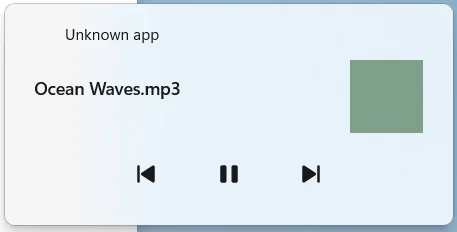
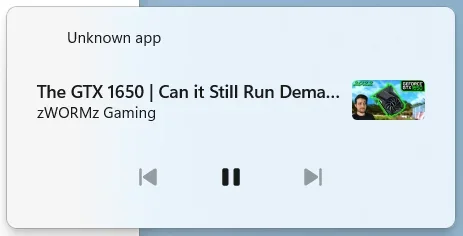
Windows Media Controls always shows the app name as "Unknown app"


weconn0

Member
Local time
10:17 AM
Posts
3
OS
Windows 11 Pro x64
I recently did a Windows Update Repair Install but it did not fix it.

Image with the text "Ocean Waves.mp3" is supposed to say MPC-HC and it shouldn't have that green thumbnail.
Image with the "GTX 1650 video" is supposed to say Microsoft Edge.
 
Windows Build/Version
24H2 26100.3915

Attachments

  • Screenshot 2025-05-10 195534.webp
    Screenshot 2025-05-10 195534.webp
    3.5 KB · Views: 1
  • Screenshot 2025-05-10 195609.webp
    Screenshot 2025-05-10 195609.webp
    7.2 KB · Views: 1

My Computer My Computer

At a glance

Windows 11 Pro x6412th Gen Intel Core i5-12450H 2.50 GHz16 GB DDR4 1600MHz Single ChannelNVIDIA GeForce GTX 1650 DDR6 4GB, Intel UHD G...
OS
Windows 11 Pro x64
Computer type
Laptop
Manufacturer/Model
Casper Excalibur G770
CPU
12th Gen Intel Core i5-12450H 2.50 GHz
Motherboard
NLAK 001 - Type2Version - PCI Express 4.0
Memory
16 GB DDR4 1600MHz Single Channel
Graphics Card(s)
NVIDIA GeForce GTX 1650 DDR6 4GB, Intel UHD Graphics
Monitor(s) Displays
144Hz IPS Built-in Screen
Screen Resolution
1920x1080
Browser
Microsoft Edge
Antivirus
Windows Defender
You can try resetting the default File Association for .mp3 (and other media file types).


My Computer My Computer

At a glance

Windows 7
OS
Windows 7
You can try resetting the default File Association for .mp3 (and other media file types).

I'm afraid that did not help.
 

My Computer My Computer

At a glance

Windows 11 Pro x6412th Gen Intel Core i5-12450H 2.50 GHz16 GB DDR4 1600MHz Single ChannelNVIDIA GeForce GTX 1650 DDR6 4GB, Intel UHD G...
OS
Windows 11 Pro x64
Computer type
Laptop
Manufacturer/Model
Casper Excalibur G770
CPU
12th Gen Intel Core i5-12450H 2.50 GHz
Motherboard
NLAK 001 - Type2Version - PCI Express 4.0
Memory
16 GB DDR4 1600MHz Single Channel
Graphics Card(s)
NVIDIA GeForce GTX 1650 DDR6 4GB, Intel UHD Graphics
Monitor(s) Displays
144Hz IPS Built-in Screen
Screen Resolution
1920x1080
Browser
Microsoft Edge
Antivirus
Windows Defender
You can try uninstalling and re-installing MPC-HC.
 

My Computer My Computer

At a glance

Windows 7
OS
Windows 7
Half the time that Media OSD is dickered!
I'm playing something in AIMP and it shows as playing in Chrome! 🤷‍♂️

9833.webp
 

My Computers My Computers

  • At a glance

    Windows 11 Pro
    OS
    Windows 11 Pro
    Computer type
    PC/Desktop
    Manufacturer/Model
    ASUS ROG Strix
  • At a glance

    Windows 11 Pro
    Operating System
    Windows 11 Pro
    Computer type
    Laptop
    Manufacturer/Model
    ASUS VivoBook
  • ASUS VivoBook 'Lite' ~ Windows 11 Home
I reinstalled K-Lite Codec Pack Standard and that seems to fix it except for that green square.
I also tried repairing MS Edge, it fixed it but the "Unknown app" appeared again after a restart.
 

My Computer My Computer

At a glance

Windows 11 Pro x6412th Gen Intel Core i5-12450H 2.50 GHz16 GB DDR4 1600MHz Single ChannelNVIDIA GeForce GTX 1650 DDR6 4GB, Intel UHD G...
OS
Windows 11 Pro x64
Computer type
Laptop
Manufacturer/Model
Casper Excalibur G770
CPU
12th Gen Intel Core i5-12450H 2.50 GHz
Motherboard
NLAK 001 - Type2Version - PCI Express 4.0
Memory
16 GB DDR4 1600MHz Single Channel
Graphics Card(s)
NVIDIA GeForce GTX 1650 DDR6 4GB, Intel UHD Graphics
Monitor(s) Displays
144Hz IPS Built-in Screen
Screen Resolution
1920x1080
Browser
Microsoft Edge
Antivirus
Windows Defender
I reinstalled K-Lite Codec Pack Standard and that seems to fix it except for that green square.
I also tried repairing MS Edge, it fixed it but the "Unknown app" appeared again after a restart.
Yeah, the thing is buggy and unpredictable, depending on your default player and default browser, etc.!
You have to Restart Explorer for it to dump it's cache!

9841.gif

The Windows 10 OSD just straight up worked, no matter what was playing!
And, the whole thing showed if you had Volume programed into a mouse button/wheel..., the W11 OSD, you have to dig into the System Tray to show it!

9722.webp
 

My Computers My Computers

  • At a glance

    Windows 11 Pro
    OS
    Windows 11 Pro
    Computer type
    PC/Desktop
    Manufacturer/Model
    ASUS ROG Strix
  • At a glance

    Windows 11 Pro
    Operating System
    Windows 11 Pro
    Computer type
    Laptop
    Manufacturer/Model
    ASUS VivoBook
  • ASUS VivoBook 'Lite' ~ Windows 11 Home

Latest Support Threads

Back
Top Bottom