Windows no longer remembers my folder views.


pluviosilla

Member
Local time
6:49 PM
Posts
7
OS
Windows 10 / 11
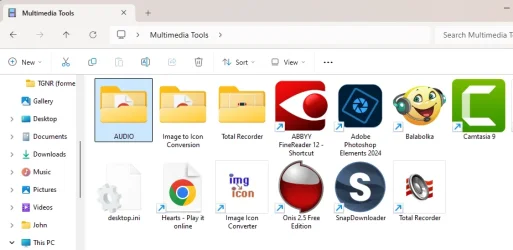
I have vision problems and for years I've made heavy use of Quick Reference folders on my Desktop that contain shortcuts with big icons. I don't want to force ALL folders to have this Large Icon view, just these Quick Reference folders. They allow me to jump to various locations on my machine quickly.

For example:
1760745898716.webp


Note that this is NOT a folder containing multimedia, so I don't get the Large Icon view I want by configuring multimedia folders to be a certain way. This is a regular folder with regular shortcuts. In the past, Windows would just remember my preferred view of Large Icons.

But after the last update, Windows 11 stopped remembering the views in these folders. ChatGPT asked me if the folder containing the shortcuts was ReadOnly. I checked and verified that it was, at which point ChatGPT told me that possibly OneDrive kept changing the permissions on the folder, so I uninstalled OneDrive, since it is not something I use and in fact I need my Microsoft cloud storage for other purposes (not automatically backups) and resent the pushy way Microsoft keeps trying to ram OneDrive down my throat.

But that didn't fix the problem. So ChatGPT recommended a few registry tweaks. Nothing worked.

What might be causing this and how do I fix it?
 

My Computer

System One

  • OS
    Windows 10 / 11
    Computer type
    PC/Desktop

See how many are being remembered now. You can either clear out saved and reconfigure them or try to extended the max number.
 

My Computer

System One

  • OS
    Windows 11 Pro
There are limits to how many changes to folder view settings & the total number of individual folder views Windows can remember at a time.
Increase Folder View Settings Cache - ElevenForumTutorials


Denis


Welcome to ElevenForum.

It's really worth making time to browse through the ElevenForum Tutorial index - there's a shortcut to it at the top of every ElevenForum page [within the Tutorials dropdown list].
- At the foot of the ElevenForum Tutorial index is a shortcut to download it as a spreadsheet.
- I download a new copy each month.
- By downloading it as a spreadsheet I can benefit from Excel's excellent filtering capabilities when I search for topics of interest.
- ElevenForum tutorials are also listed at Tutorials and there's a shortcut to that at the top of every page.

You can search ElevenForum using the search box in the top-right corner of all ElevenForum webpages or using Advanced Search - ElevenForum
- You can also search ElevenForum threads in many general search engines, such as Google, by adding site:elevenforum.com after your search term. For example,
Taskbar setup site:elevenforum.com
- [This is what the search box in the top-right corner of ElevenForum webpages does automatically]
 

My Computer

System One

  • OS
    Windows 11 Home x64 Version 25H2 Build 26200.8037
so I uninstalled OneDrive, since it is not something I use
You do use it if you sign in with a Microsoft account and are syncing your personal folders documents, desktop, pictures, and videos to Onedrive. In that case the default folder location is Onedrive, not a local drive
You can not arbitrarily uninstall Onedrive without first turning off folder syncing and getting your default folders back onto your system drive and then unlinking your account and PC from Onedrive. Is that what you did?
 

My Computers

System One System Two

  • OS
    Windows 11 Pro 25H2
    Computer type
    PC/Desktop
    Manufacturer/Model
    Dell Optiplex 7080
    CPU
    i9-10900 10 core 20 threads
    Motherboard
    DELL 0J37VM
    Memory
    32 gb
    Graphics Card(s)
    none-Intel UHD Graphics 630
    Sound Card
    Integrated Realtek
    Monitor(s) Displays
    Benq 27
    Screen Resolution
    2560x1440
    Hard Drives
    2x1tb Solidigm m.2 nvme /External drives 512gb Samsung m.2 sata+2tb Kingston m2.nvme
    PSU
    500w
    Case
    MT
    Cooling
    Dell Premium
    Keyboard
    Logitech wired
    Mouse
    Logitech wireless
    Internet Speed
    so slow I'm too embarrassed to tell
    Browser
    #1 Edge #2 Firefox
    Antivirus
    Defender+MWB Premium
  • Operating System
    Windows 11 Pro 24H2 26200.8457
    Computer type
    PC/Desktop
    Manufacturer/Model
    Beelink Mini PC SER5
    CPU
    AMD Ryzen 7 6800U
    Memory
    32 gb
    Graphics card(s)
    integrated
    Sound Card
    integrated
    Monitor(s) Displays
    Benq 27
    Screen Resolution
    2560x1440
    Hard Drives
    1TB Crucial nvme
    Keyboard
    Logitech wired
    Mouse
    Logitech wireless
    Internet Speed
    still too embarrassed to tell
    Browser
    Firefox
    Antivirus
    Defender
    Other Info
    System 3 is non compliant Dell 9020 i7-4770/24gb ram Win11 PRO 26200.8457
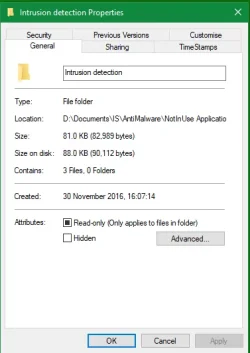
ChatGPT asked me if the folder containing the shortcuts was ReadOnly. I checked and verified that it was
I'm sorry but exactly what did you check?
- Right-click on a folder, select Properties.
- Folder properties.webp
- This darkened checkbox labelled Read-only ...?

It's almost meaningless. It certainly does not mean the folder is read-only.


Denis
 

My Computer

System One

  • OS
    Windows 11 Home x64 Version 25H2 Build 26200.8037
ChatGPT recommended a few registry tweaks
You might as well have asked the ship's cat for advice on editing the Registry.
I hope you kept a list of the changes you made or made a system image beforehand.


Denis
 

My Computer

System One

  • OS
    Windows 11 Home x64 Version 25H2 Build 26200.8037

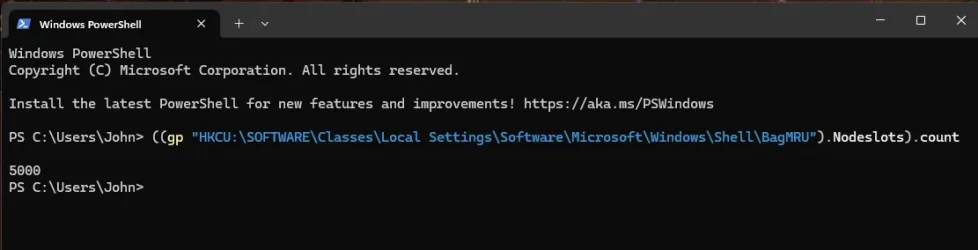
See how many are being remembered now. You can either clear out saved and reconfigure them or try to extended the max number.
Thank you for this rapid reply. Actually, I neglected to mention that one of the things ChatGPT had me do was to augment the view settings cache size. So when I ran the command you recommended in Powershell, I got 5,000 instead of 274.

1760748276609.webp
 

My Computer

System One

  • OS
    Windows 10 / 11
    Computer type
    PC/Desktop
I'm sorry but exactly what did you check?
- Right-click on a folder, select Properties.
- View attachment 149522
- This darkened checkbox labelled Read-only ...?

It's almost meaningless. It certainly does not mean the folder is read-only.


Denis
Thanks for the quick reply. Yes, that's exactly what I was looking at. In any case, changing it didn't have any effect, just as you predict.
 

My Computer

System One

  • OS
    Windows 10 / 11
    Computer type
    PC/Desktop

My Computer

System One

  • OS
    Windows 11 Pro 25H2
    Computer type
    PC/Desktop
    Manufacturer/Model
    Intel NUC12WSHi7
    CPU
    12th Gen Core i7-1260P
    Motherboard
    NUC12WSBi7
    Memory
    64 GB Micron PC4-25600
    Graphics Card(s)
    Intel Iris Xe Graphics
    Sound Card
    on-board Realtek HD Audio
    Monitor(s) Displays
    Dell U3219Q
    Screen Resolution
    3840 x 2160
    Hard Drives
    Samsung SSD 990 PRO 1TB
    Crucial MX500 2 TB
    Antivirus
    Microsoft Defender
Last edited:

My Computer

System One

  • OS
    Windows 11 Home x64 Version 25H2 Build 26200.8037
when I ran the command you recommended in Powershell, I got 5,000
So you need to
- reset the current number of views set, and/or
- increase the number of views it can remember.

So read tutorial Options 2 & 3.


Denis
 

My Computer

System One

  • OS
    Windows 11 Home x64 Version 25H2 Build 26200.8037
Denis (@Try3) has provided the correct answer.

Alternatively, you can use WinSetView to set your preferred folder view defaults. Doing so will clear out all saved views, so that 5000 saved view limit will no longer be an issue. Then simply set those few folders containing shortcuts to large icons and the views will stick.
 

My Computer

System One

  • OS
    Windows 10/11
    Computer type
    Laptop
    Manufacturer/Model
    Acer
So you need to
- reset the current number of views set, and/or
- increase the number of views it can remember.

So read tutorial Options 2 & 3.


Denis
Denis (@Try3) has provided the correct answer.

Alternatively, you can use WinSetView to set your preferred folder view defaults. Doing so will clear out all saved views, so that 5000 saved view limit will no longer be an issue. Then simply set those few folders containing shortcuts to large icons and the views will stick.
Yes, when I created this thread, the platform provided a link to a related post and the author of the post was recommending two tools:

WinSetView, and
SwitchExplorer

I installed both of them, but I didn't think of using WinSetView to homogenize all the folders as a way of taking a load off the cache. That makes a lot of sense. Thanks for that suggestion!! I just ran it, and I think that may have fixed the problem. I'll know for sure in about an hour.
 

My Computer

System One

  • OS
    Windows 10 / 11
    Computer type
    PC/Desktop
Back
Top Bottom