windows restart needed to finish setting up device


rsbrux

Well-known member
Local time
8:02 PM
Posts
40
OS
Windows 11 Pro 25H2 Build 26200.7623
Almost every time I start up my Lenovo X1 running build 26200.7623, a "toast" pops up at the lower right with a message like the title of this thread.
It goes away almost immediately. If I happen to be quick enough to click on it before that, nothing happens.
I haven't installed any new devices on the system for about half a year and Windows Update doesn't show any pending restart.
Why do I get this persistent prompt?
Is there a way to get rid of it?
 

My Computers

System One System Two

  • OS
    Windows 11 Pro 25H2 Build 26200.7623
    Computer type
    PC/Desktop
    Manufacturer/Model
    Gigabyte mainboard in FSC case
    CPU
    Intel i5-12400
    Motherboard
    Gigabyte H610 S2H V2 DDR4
    Memory
    16GB
    Graphics Card(s)
    none (INTEL UHD graphics 730 onboard)
    Sound Card
    none (7.1 channel Realtek HDA onboard)
    Monitor(s) Displays
    Panasonic TV
    Screen Resolution
    3840x2160
    Hard Drives
    KIOXIA-EXCERIA SSD 512GB
    TOSHIBA MQ01ABB200 2TB
    Case
    FSC SCALEO E
    Cooling
    ARCTIC CPU fan, 2 powersupply fans
    Keyboard
    various
    Mouse
    various
  • Operating System
    Windows 11 Pro 25H2 Build 26200.7623
    Computer type
    Laptop
    Manufacturer/Model
    Lenovo X1 2-in-1
    CPU
    Intel(R) Core(TM) Ultra 7 165U (1.70 GHz)
    Motherboard
    Lenovo
    Memory
    64.0 GB (63.5 GB usable)
    Graphics card(s)
    128 MB Intel Graphics
    Sound Card
    none
    Monitor(s) Displays
    Philips 27B2U6903
    Screen Resolution
    3840x2160
    Hard Drives
    1 GB built-in SSD
    Mouse
    Kensington Expert Mouse (trackball)
    Browser
    Firefox
this maybe of help

best of luck Steve ..
 

My Computers

System One System Two

  • OS
    Windows 11 Home
    Computer type
    PC/Desktop
    Manufacturer/Model
    HP 24" AiO
    CPU
    Ryzen 7 5825u
    Motherboard
    HP
    Memory
    64GB DDR4 3200
    Graphics Card(s)
    Ryzen 7 5825u
    Sound Card
    RealTek
    Monitor(s) Displays
    24" HP AiO
    Screen Resolution
    1920 x 1080 @60 Hz
    Hard Drives
    1TB WD Blue SN580 M2 SSD Partitioned.
    2x 1TB USB HDD External Backup/Storage.
    PSU
    90W external power brick
    Case
    24" All in One
    Cooling
    Default Air Cooling
    Keyboard
    HP WiFi UK extended
    Mouse
    HP WiFi 3 Button
    Internet Speed
    1GB full fibre
    Browser
    Edge & Firefox
    Antivirus
    AVG Internet Security/Windows Defender
    Other Info
    Mainly Open Source Software
  • Operating System
    Ubuntu 22.04.5 LTS
    Computer type
    Laptop
    Manufacturer/Model
    Dell 13" Latitude 2017
    CPU
    i5 7200u
    Motherboard
    Dell
    Memory
    16GB DDR4
    Graphics card(s)
    Intel
    Sound Card
    Intel
    Monitor(s) Displays
    13" Dell Laptop
    Hard Drives
    250GB Crucial 2.5" SSD
    Mouse
    Generic WiFi 3 button
    Internet Speed
    WiFi only
    Browser
    Firefox
    Antivirus
    ClamAV TK
    Other Info
    Mainly Open Source Software
Thanks, but I don't think that's the issue. I don't get a "Let's finish setting up your device" dialog, just a brief popup at lower right. It also doesn't appear at every startup, but often enough to be annoying.

I have already changed the settings as indicated in the tutorial and when I check
Code:
[HKEY_CURRENT_USER\Software\Microsoft\Windows\CurrentVersion\UserProfileEngagement]
in regedit, it is set to zero, i.e. disabled.
 

My Computers

System One System Two

  • OS
    Windows 11 Pro 25H2 Build 26200.7623
    Computer type
    PC/Desktop
    Manufacturer/Model
    Gigabyte mainboard in FSC case
    CPU
    Intel i5-12400
    Motherboard
    Gigabyte H610 S2H V2 DDR4
    Memory
    16GB
    Graphics Card(s)
    none (INTEL UHD graphics 730 onboard)
    Sound Card
    none (7.1 channel Realtek HDA onboard)
    Monitor(s) Displays
    Panasonic TV
    Screen Resolution
    3840x2160
    Hard Drives
    KIOXIA-EXCERIA SSD 512GB
    TOSHIBA MQ01ABB200 2TB
    Case
    FSC SCALEO E
    Cooling
    ARCTIC CPU fan, 2 powersupply fans
    Keyboard
    various
    Mouse
    various
  • Operating System
    Windows 11 Pro 25H2 Build 26200.7623
    Computer type
    Laptop
    Manufacturer/Model
    Lenovo X1 2-in-1
    CPU
    Intel(R) Core(TM) Ultra 7 165U (1.70 GHz)
    Motherboard
    Lenovo
    Memory
    64.0 GB (63.5 GB usable)
    Graphics card(s)
    128 MB Intel Graphics
    Sound Card
    none
    Monitor(s) Displays
    Philips 27B2U6903
    Screen Resolution
    3840x2160
    Hard Drives
    1 GB built-in SSD
    Mouse
    Kensington Expert Mouse (trackball)
    Browser
    Firefox
Check out the Event Viewer once you start up the computer, and look for something that would have to do with hardware.
 

My Computer

System One

  • OS
    Windows 11
    Computer type
    PC/Desktop
    Manufacturer/Model
    Custom Built
I wouldn't worry (unless you have yellow marks in the Device Manager or similar "consistent" stuff). It looks like the ones I'm getting in my Windows 10 computer, not always, notifications in this case so I don't have to be quick with them. It can be 0, 1 or both of (the phrases aren't literal, I only recall their approximate meaning) "your account has a problem" (if I click it leds me to shared experiences with a button to "correct" the issue, except once that appeared moving dots indicating it's doing things and afterwards "all is okay") or something about the AV/FW (if I click I see 4 messages indicating that Windows Defender has handed FW and AV off to my 3rd party program, that is working fine). My theory is that windows has something too "quick" or "impatient" to signal things that are in progress hence in a somewhat inconsistent state as "permanent" failures.

Imagine a restaurant. A table might be laid, with people eating, to be cleared, and cleared, but it can also be in intermediate states, like with the clean plates laid but not the glasses. No waiter can lay a table instataneously (not even in a computer running at billions of Hz). The entity that raises these messages isn't perfect either, that's why it signals them sometimes yes sometimes not.

I know this is very uncertain, but it's what it looks like.
 

My Computer

System One

  • OS
    Windows 11
    Manufacturer/Model
    MeLE Quieter 2Q (fanless miniPC)
    CPU
    Celeron J4125 (10th gen)
    Memory
    8GB DDR4
    Monitor(s) Displays
    Samsung SyncMaster T260
    Screen Resolution
    1920x1200
    Hard Drives
    256GB eMMC (Windows)
    2TB USB3 HDD Toshiba (Data)
Settings > System > Notifications > Windows.SystemToast.CapabilityAccess > Off.
Additional settings > untick both boxes.

Settings > Accessibility > Visual effects > Dismiss notifications after this amount of time > I changed that to 15 secs easier to follow up, the default is 5 secs.

The whole of the Notifications area and sub areas needs looking at and configuring occasionally, especially after a version update, things can turned on by default.

That particular one goes away in time, so no worries.
 

My Computer

System One

  • OS
    Windows 11
This nag message might be from a Lenovo tool. Which is why you don't see in Action Center, or elsewhere.
 

My Computer

System One

  • OS
    Windows 7
Settings > System > Notifications > Windows.SystemToast.CapabilityAccess > Off.
Additional settings > untick both boxes.

Settings > Accessibility > Visual effects > Dismiss notifications after this amount of time > I changed that to 15 secs easier to follow up, the default is 5 secs.

The whole of the Notifications area and sub areas needs looking at and configuring occasionally, especially after a version update, things can turned on by default.

That particular one goes away in time, so no worries.
I don't find Windows.SystemToast.CapabilityAccess on my system, but all 3 boxes under Additional settings are unticked.
I have increased the timeout to 15 seconds as you suggest. Maybe that will help me understand what's going on.
Thanks for the tips!
 

My Computers

System One System Two

  • OS
    Windows 11 Pro 25H2 Build 26200.7623
    Computer type
    PC/Desktop
    Manufacturer/Model
    Gigabyte mainboard in FSC case
    CPU
    Intel i5-12400
    Motherboard
    Gigabyte H610 S2H V2 DDR4
    Memory
    16GB
    Graphics Card(s)
    none (INTEL UHD graphics 730 onboard)
    Sound Card
    none (7.1 channel Realtek HDA onboard)
    Monitor(s) Displays
    Panasonic TV
    Screen Resolution
    3840x2160
    Hard Drives
    KIOXIA-EXCERIA SSD 512GB
    TOSHIBA MQ01ABB200 2TB
    Case
    FSC SCALEO E
    Cooling
    ARCTIC CPU fan, 2 powersupply fans
    Keyboard
    various
    Mouse
    various
  • Operating System
    Windows 11 Pro 25H2 Build 26200.7623
    Computer type
    Laptop
    Manufacturer/Model
    Lenovo X1 2-in-1
    CPU
    Intel(R) Core(TM) Ultra 7 165U (1.70 GHz)
    Motherboard
    Lenovo
    Memory
    64.0 GB (63.5 GB usable)
    Graphics card(s)
    128 MB Intel Graphics
    Sound Card
    none
    Monitor(s) Displays
    Philips 27B2U6903
    Screen Resolution
    3840x2160
    Hard Drives
    1 GB built-in SSD
    Mouse
    Kensington Expert Mouse (trackball)
    Browser
    Firefox
This nag message might be from a Lenovo tool. Which is why you don't see in Action Center, or elsewhere.
I think you have a point.
I could see a reference to the Lenovo (Intel) WiFi module (whose driver was recently updated) in today's toast. I tried to capture it in a screenshot, but no joy.
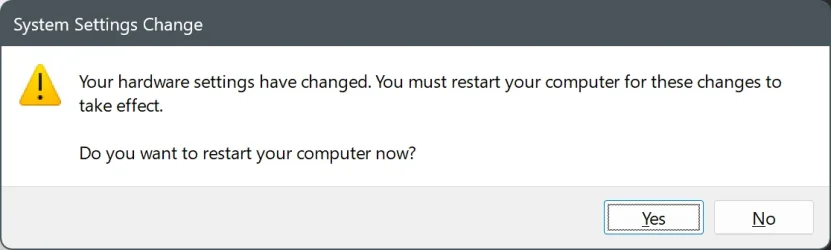
When I opened devmgmt.msc (as an unprivileged user, therefor read-only) to examine the driver, closing it delivered the following error message, even though I could not have changed anything:
1770796794017.webp
Trying a restart now.

P.S. No toast on restart; I guess that was it.
 
Last edited:

My Computers

System One System Two

  • OS
    Windows 11 Pro 25H2 Build 26200.7623
    Computer type
    PC/Desktop
    Manufacturer/Model
    Gigabyte mainboard in FSC case
    CPU
    Intel i5-12400
    Motherboard
    Gigabyte H610 S2H V2 DDR4
    Memory
    16GB
    Graphics Card(s)
    none (INTEL UHD graphics 730 onboard)
    Sound Card
    none (7.1 channel Realtek HDA onboard)
    Monitor(s) Displays
    Panasonic TV
    Screen Resolution
    3840x2160
    Hard Drives
    KIOXIA-EXCERIA SSD 512GB
    TOSHIBA MQ01ABB200 2TB
    Case
    FSC SCALEO E
    Cooling
    ARCTIC CPU fan, 2 powersupply fans
    Keyboard
    various
    Mouse
    various
  • Operating System
    Windows 11 Pro 25H2 Build 26200.7623
    Computer type
    Laptop
    Manufacturer/Model
    Lenovo X1 2-in-1
    CPU
    Intel(R) Core(TM) Ultra 7 165U (1.70 GHz)
    Motherboard
    Lenovo
    Memory
    64.0 GB (63.5 GB usable)
    Graphics card(s)
    128 MB Intel Graphics
    Sound Card
    none
    Monitor(s) Displays
    Philips 27B2U6903
    Screen Resolution
    3840x2160
    Hard Drives
    1 GB built-in SSD
    Mouse
    Kensington Expert Mouse (trackball)
    Browser
    Firefox
Look in Windows Updates...Update history. Are there any failed updates?
 

My Computers

System One System Two

  • OS
    Windows 11 Pro 25H2 26200.8524
    Computer type
    Laptop
    Manufacturer/Model
    Acemagic LX15PRO
    CPU
    AMD Ryzen 7 5825U with Radeon Graphics
    Memory
    16GB
    Screen Resolution
    1920 x 1080
    Hard Drives
    SSD 2TB
    Internet Speed
    30 Mbps
    Browser
    Brave
    Antivirus
    Webroot Secure Anywhere
    Other Info
    System 3

    Acer Swift SF114-34 laptop
    OS Windows 11 Pro 26200.8524
    CPU Pentium Silver N6000
    RAM 4GB
    SSD Samsung 970 EVO Plus SSD 2TB (an upgrade)
  • Operating System
    Windows 11 Pro 23H2 22631.2506
    Computer type
    Laptop
    Manufacturer/Model
    HP Mini 210-1090NR PC (bought in late 2009!)
    CPU
    Atom N450 1.66GHz
    Memory
    2GB
    Browser
    Brave
    Antivirus
    Webroot
Check out the Event Viewer once you start up the computer, and look for something that would have to do with hardware.
There are so many errors in the Event Viewer I wouldn't know where to start:
 

My Computers

System One System Two

  • OS
    Windows 11 Pro 25H2 Build 26200.7623
    Computer type
    PC/Desktop
    Manufacturer/Model
    Gigabyte mainboard in FSC case
    CPU
    Intel i5-12400
    Motherboard
    Gigabyte H610 S2H V2 DDR4
    Memory
    16GB
    Graphics Card(s)
    none (INTEL UHD graphics 730 onboard)
    Sound Card
    none (7.1 channel Realtek HDA onboard)
    Monitor(s) Displays
    Panasonic TV
    Screen Resolution
    3840x2160
    Hard Drives
    KIOXIA-EXCERIA SSD 512GB
    TOSHIBA MQ01ABB200 2TB
    Case
    FSC SCALEO E
    Cooling
    ARCTIC CPU fan, 2 powersupply fans
    Keyboard
    various
    Mouse
    various
  • Operating System
    Windows 11 Pro 25H2 Build 26200.7623
    Computer type
    Laptop
    Manufacturer/Model
    Lenovo X1 2-in-1
    CPU
    Intel(R) Core(TM) Ultra 7 165U (1.70 GHz)
    Motherboard
    Lenovo
    Memory
    64.0 GB (63.5 GB usable)
    Graphics card(s)
    128 MB Intel Graphics
    Sound Card
    none
    Monitor(s) Displays
    Philips 27B2U6903
    Screen Resolution
    3840x2160
    Hard Drives
    1 GB built-in SSD
    Mouse
    Kensington Expert Mouse (trackball)
    Browser
    Firefox
Please run the V2 log collector > post a share link


My Computer

System One

  • OS
    Windows 10
    Computer type
    Laptop
    Manufacturer/Model
    HP
    CPU
    Intel(R) Core(TM) i7-4800MQ CPU @ 2.70GHz
    Motherboard
    Product : 190A Version : KBC Version 94.56
    Memory
    16 GB Total: Manufacturer : Samsung MemoryType : DDR3 FormFactor : SODIMM Capacity : 8GB Speed : 1600
    Graphics Card(s)
    NVIDIA Quadro K3100M; Intel(R) HD Graphics 4600
    Sound Card
    IDT High Definition Audio CODEC; PNP Device ID HDAUDIO\FUNC_01&VEN_111D&DEV_76E0
    Hard Drives
    Model Hitachi HTS727575A9E364
    Antivirus
    Microsoft Defender
    Other Info
    Mobile Workstation
Thanks, but I am reluctant to run a privileged Powershell script, much less publish the very extensive results,
I am not experiencing crashes, much less a BSOD. Is there something specific you are looking for?
 

My Computers

System One System Two

  • OS
    Windows 11 Pro 25H2 Build 26200.7623
    Computer type
    PC/Desktop
    Manufacturer/Model
    Gigabyte mainboard in FSC case
    CPU
    Intel i5-12400
    Motherboard
    Gigabyte H610 S2H V2 DDR4
    Memory
    16GB
    Graphics Card(s)
    none (INTEL UHD graphics 730 onboard)
    Sound Card
    none (7.1 channel Realtek HDA onboard)
    Monitor(s) Displays
    Panasonic TV
    Screen Resolution
    3840x2160
    Hard Drives
    KIOXIA-EXCERIA SSD 512GB
    TOSHIBA MQ01ABB200 2TB
    Case
    FSC SCALEO E
    Cooling
    ARCTIC CPU fan, 2 powersupply fans
    Keyboard
    various
    Mouse
    various
  • Operating System
    Windows 11 Pro 25H2 Build 26200.7623
    Computer type
    Laptop
    Manufacturer/Model
    Lenovo X1 2-in-1
    CPU
    Intel(R) Core(TM) Ultra 7 165U (1.70 GHz)
    Motherboard
    Lenovo
    Memory
    64.0 GB (63.5 GB usable)
    Graphics card(s)
    128 MB Intel Graphics
    Sound Card
    none
    Monitor(s) Displays
    Philips 27B2U6903
    Screen Resolution
    3840x2160
    Hard Drives
    1 GB built-in SSD
    Mouse
    Kensington Expert Mouse (trackball)
    Browser
    Firefox
Is there something specific you are looking for?

V2 is a multipurpose log collector.

The collected files (event viewer, dxdiag, msinfo32, etc.) can be scanned for various problems.
 

My Computer

System One

  • OS
    Windows 10
    Computer type
    Laptop
    Manufacturer/Model
    HP
    CPU
    Intel(R) Core(TM) i7-4800MQ CPU @ 2.70GHz
    Motherboard
    Product : 190A Version : KBC Version 94.56
    Memory
    16 GB Total: Manufacturer : Samsung MemoryType : DDR3 FormFactor : SODIMM Capacity : 8GB Speed : 1600
    Graphics Card(s)
    NVIDIA Quadro K3100M; Intel(R) HD Graphics 4600
    Sound Card
    IDT High Definition Audio CODEC; PNP Device ID HDAUDIO\FUNC_01&VEN_111D&DEV_76E0
    Hard Drives
    Model Hitachi HTS727575A9E364
    Antivirus
    Microsoft Defender
    Other Info
    Mobile Workstation

Latest Support Threads

Back
Top Bottom