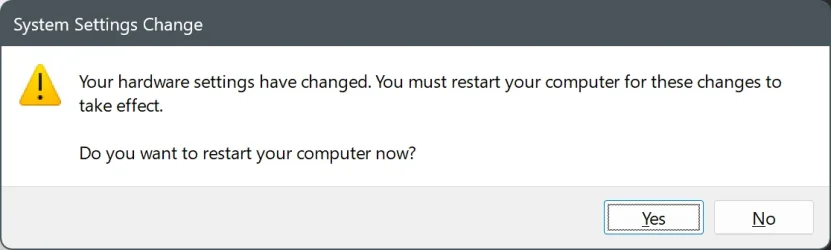
Almost every time I start up my Lenovo X1 running build 26200.7623, a "toast" pops up at the lower right with a message like the title of this thread.
It goes away almost immediately. If I happen to be quick enough to click on it before that, nothing happens.
I haven't installed any new devices on the system for about half a year and Windows Update doesn't show any pending restart.
Why do I get this persistent prompt?
Is there a way to get rid of it?
It goes away almost immediately. If I happen to be quick enough to click on it before that, nothing happens.
I haven't installed any new devices on the system for about half a year and Windows Update doesn't show any pending restart.
Why do I get this persistent prompt?
Is there a way to get rid of it?
My Computers
-
At a glance
Windows 11 Pro 25H2 Build 26200.7623Intel i5-1240016GBnone (INTEL UHD graphics 730 onboard)- OS
- Windows 11 Pro 25H2 Build 26200.7623
- Computer type
- PC/Desktop
- Manufacturer/Model
- Gigabyte mainboard in FSC case
- CPU
- Intel i5-12400
- Motherboard
- Gigabyte H610 S2H V2 DDR4
- Memory
- 16GB
- Graphics Card(s)
- none (INTEL UHD graphics 730 onboard)
- Sound Card
- none (7.1 channel Realtek HDA onboard)
- Monitor(s) Displays
- Panasonic TV
- Screen Resolution
- 3840x2160
- Hard Drives
- KIOXIA-EXCERIA SSD 512GB
TOSHIBA MQ01ABB200 2TB
- Case
- FSC SCALEO E
- Cooling
- ARCTIC CPU fan, 2 powersupply fans
- Keyboard
- various
- Mouse
- various
-
At a glance
Windows 11 Pro 25H2 Build 26200.7623Intel(R) Core(TM) Ultra 7 165U (1.70 GHz)64.0 GB (63.5 GB usable)128 MB Intel Graphics- Operating System
- Windows 11 Pro 25H2 Build 26200.7623
- Computer type
- Laptop
- Manufacturer/Model
- Lenovo X1 2-in-1
- CPU
- Intel(R) Core(TM) Ultra 7 165U (1.70 GHz)
- Motherboard
- Lenovo
- Memory
- 64.0 GB (63.5 GB usable)
- Graphics card(s)
- 128 MB Intel Graphics
- Sound Card
- none
- Monitor(s) Displays
- Philips 27B2U6903
- Screen Resolution
- 3840x2160
- Hard Drives
- 1 GB built-in SSD
- Mouse
- Kensington Expert Mouse (trackball)
- Browser
- Firefox