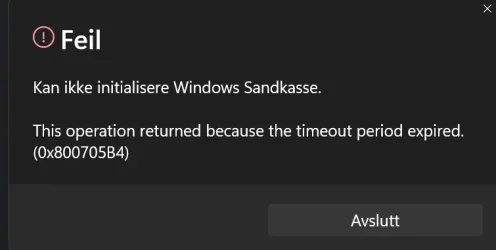
windows sandbox just spinning at start ? 25h2 26200.7462


I giving you why 0x800705B4 error code happens, it's timeout you use command line to install Windows Sandbox, so there is no problem with installation but for some reason Windows Sandbox won't open, and it times out with error code 0x800705B4.

Have you executed Sfc /Scannow the command if not try it.
Yes dsim sfc and no error present all people in thge github link I posted and all alright the tmeout the bug its not for isntalling windows sandbox its when U start de sandbox windows create a virtual machine, this machine when run fine before de bug size its ober 200-300 MB but the bug as U can read below up to 1Gb and growing and when the sandbox get the timeout I supose into the code and U can see the error number....

Its a bug many user for many contries have this same issue.... its not a fail from a corrupted system....

Windows Sandbox logo will stall for ten minutes or so and an error code, 0x800705B4, will pop up. In C:\ProgramData\Microsoft\Windows\Containers\ContainerStorages, if I double-click a GUID (for example, ab243dfa-20dl-2k33-hjg8-2934hb767yh4), a sandbox.vhdx file will grow up to 1GB. After this, it gets deleted and Windows Sandbox exits with a 0x800705B4 error code.
 

My Computer

System One

  • OS
    Windows 11
    Computer type
    PC/Desktop
    Manufacturer/Model
    Asus
    CPU
    inte core i7 13th generation
    Motherboard
    PRIME Z790M-PLUS
    Memory
    12 GB
    Graphics Card(s)
    nvidia rtx 3600
    Sound Card
    REaltek integrated
    Monitor(s) Displays
    LG 4k 27''
    Screen Resolution
    3840*2160
    Hard Drives
    ssd nve kigntom 2 TB
Yes dsim sfc and no error present all people in thge github link I posted and all alright the tmeout the bug its not for isntalling windows sandbox its when U start de sandbox windows create a virtual machine, this machine when run fine before de bug size its ober 200-300 MB but the bug as U can read below up to 1Gb and growing and when the sandbox get the timeout I supose into the code and U can see the error number....

Its a bug many user for many contries have this same issue.... its not a fail from a corrupted system....

Windows Sandbox logo will stall for ten minutes or so and an error code, 0x800705B4, will pop up. In C:\ProgramData\Microsoft\Windows\Containers\ContainerStorages, if I double-click a GUID (for example, ab243dfa-20dl-2k33-hjg8-2934hb767yh4), a sandbox.vhdx file will grow up to 1GB. After this, it gets deleted and Windows Sandbox exits with a 0x800705B4 error code.
same, Sfc /Scannow etc finds nothing wrong. have some vmware machines, but faster to use sandbox sometimes.Skjermbilde 2026-01-06 185416.webp
 

My Computer

System One

  • OS
    win11

Christophe Sperandio in github create a great post why the sandbox is not working​


So, I had some time to investigate this a little deeper.


Summary​

After installing KB5070311 (or maybe a previous patch) on Windows 11 Insider (Release Preview, build 26200.7462), Windows Sandbox no longer starts and fails with 0x800705B4 (timeout).

Root cause​

The directory C:\ProgramData\Microsoft\Windows\Containers\BaseImages is empty after the update. Sandbox cannot initialize without a base image and hangs until timeout.

Notes​

  • Hyper‑V and WSL continue to work normally.
  • Required features and services are enabled and running.
  • Reinstalling the Sandbox feature does not recreate the BaseImages directory.
  • Sandbox launches vmcompute and vmwp successfully, but never enters the Containers provisioning path. No container image resolution or storage access is attempted. This appears to be a regression in Sandbox scenario activation rather than a missing image or configuration issue.

Impact​

Windows Sandbox is completely unusable on affected systems.

Suspected regression​

Provisioning of Windows Sandbox base images appears broken starting with KB5070311 (or maybe a previous one).

Summary​

After installing KB5070311 (or maybe a previous patch) on Windows 11 Insider (Release Preview, build 26200.7462), Windows Sandbox no longer starts and fails with 0x800705B4 (timeout).

Root cause​

The directory C:\ProgramData\Microsoft\Windows\Containers\BaseImages is empty after the update. Sandbox cannot initialize without a base image and hangs until timeout.

Notes​

  • Hyper‑V and WSL continue to work normally.
  • Required features and services are enabled and running.
  • Reinstalling the Sandbox feature does not recreate the BaseImages directory.
  • Sandbox launches vmcompute and vmwp successfully, but never enters the Containers provisioning path. No container image resolution or storage access is attempted. This appears to be a regression in Sandbox scenario activation rather than a missing image or configuration issue.

Impact​

Windows Sandbox is completely unusable on affected systems.

Suspected regression​

Provisioning of Windows Sandbox base images appears broken starting with KB5070311 (or maybe a previous one).

Summary​

After installing KB5070311 (or maybe a previous patch) on Windows 11 Insider (Release Preview, build 26200.7462), Windows Sandbox no longer starts and fails with 0x800705B4 (timeout).

Root cause​

The directory C:\ProgramData\Microsoft\Windows\Containers\BaseImages is empty after the update. Sandbox cannot initialize without a base image and hangs until timeout.

Notes​

  • Hyper‑V and WSL continue to work normally.
  • Required features and services are enabled and running.
  • Reinstalling the Sandbox feature does not recreate the BaseImages directory.
  • Sandbox launches vmcompute and vmwp successfully, but never enters the Containers provisioning path. No container image resolution or storage access is attempted. This appears to be a regression in Sandbox scenario activation rather than a missing image or configuration issue.

Impact​

Windows Sandbox is completely unusable on affected systems.

Suspected regression​

Provisioning of Windows Sandbox base images appears broken starting with KB5070311 (or maybe a previous one).
 

My Computer

System One

  • OS
    Windows 11
    Computer type
    PC/Desktop
    Manufacturer/Model
    Asus
    CPU
    inte core i7 13th generation
    Motherboard
    PRIME Z790M-PLUS
    Memory
    12 GB
    Graphics Card(s)
    nvidia rtx 3600
    Sound Card
    REaltek integrated
    Monitor(s) Displays
    LG 4k 27''
    Screen Resolution
    3840*2160
    Hard Drives
    ssd nve kigntom 2 TB
Windows 11 pro jan 2016 update installed, the bug still here....

Win11 25h2 26200.7623
 

My Computer

System One

  • OS
    Windows 11
    Computer type
    PC/Desktop
    Manufacturer/Model
    Asus
    CPU
    inte core i7 13th generation
    Motherboard
    PRIME Z790M-PLUS
    Memory
    12 GB
    Graphics Card(s)
    nvidia rtx 3600
    Sound Card
    REaltek integrated
    Monitor(s) Displays
    LG 4k 27''
    Screen Resolution
    3840*2160
    Hard Drives
    ssd nve kigntom 2 TB
the user OReactko in github os windows sanbox issue opened wrote this

A little more technical details now that I could grab a whole trace with ProcMon:

1. Hyper-V Infrastructure Healthy:​

* vmms.exe (PID 4048) and vmcompute.exe (PID 4356) successfully create/load VM config files (.vmcx), mappings for C32.dll/exe.<br><br>* All FileSystemControl, CreateFileMapping, QuerySecurityFile operations on system files (32.dll, .sdb) return SUCCESS.<br><br>* No ACCESS_DENIED, STATUS_FILE_LOCKED, or I/O timeouts in early VM setup phase.

2. Sandbox VHDX Creation & Growth:​

* Sandbox VHDX: C67c5896-3699-4e6f-9b26-5cb6aa5dd754.vhdx (for the run I traced down).<br><br>* Phase 1 (Sysprep): vmmemCmSysprep (PID 74012) writes continuously ~295MB+ offsets, 4-65KB blocks, all SUCCESS non-cached IO.<br><br>* Phase 2 (FirstBoot): Transitions to vmmemCmFirstBoot (PID 53304), reads/writes high offsets (341MB+, up to 820MB+), indicating guest OS OOBE/config in progress.<br><br>* VHDX grows as expected during boot sequence, no disk/NTFS errors.

3. Failure Pattern:​

* No explicit errors (IRP_MJ_DEVICE_CONTROL, DeviceIoControl failures) explaining timeout.<br><br>* Activity continues post-Sysprep into FirstBoot, but Sandbox UI times out (likely 0x800705B4) waiting for guest readiness signal.<br><br>* Container orchestration fails handshake despite VM I/O healthy.

Environment:​

* Windows 11 25H2 Build 26200.7462<br><br>* Windows Sandbox 0.5.13 (Microsoft Store, 2025-09-11)<br><br>* Hyper-V features enabled, no WSL/VMware conflicts visible.
Implication: Product bug in Sandbox boot orchestration, not host storage/Hyper-V fault.

yeah, when I tried run Hyper-V VM, it was ok
 

My Computer

System One

  • OS
    Windows 11
    Computer type
    PC/Desktop
    Manufacturer/Model
    Asus
    CPU
    inte core i7 13th generation
    Motherboard
    PRIME Z790M-PLUS
    Memory
    12 GB
    Graphics Card(s)
    nvidia rtx 3600
    Sound Card
    REaltek integrated
    Monitor(s) Displays
    LG 4k 27''
    Screen Resolution
    3840*2160
    Hard Drives
    ssd nve kigntom 2 TB
Windows sandbox is working just fine on my work and my personal desktop, with all updates completed. No issues here. Both intel and amd systems.

If your having issues, I suspect some type of corruption.
 

My Computers

System One System Two

  • OS
    Windows 11 Pro
    Computer type
    PC/Desktop
    Manufacturer/Model
    Custom Built
    CPU
    Ryzen 7 5700 X3D
    Motherboard
    MSI MPG B550 GAMING PLUS
    Memory
    64 GB DDR4 3600mhz Gskill Ripjaws V
    Graphics Card(s)
    RTX 4070 Super , 12GB VRAM Asus EVO Overclock
    Monitor(s) Displays
    Gigabyte M27Q (rev. 2.0) 2560 x 1440 @ 170hz HDR
    Hard Drives
    2TB Samsung nvme ssd
    4TB Western Digital nvme ssd
    PSU
    CORSAIR RMx SHIFT Series™ RM750x 80 PLUS Gold Fully Modular ATX Power Supply
    Case
    CORSAIR 3500X ARGB Mid-Tower ATX PC Case – Black
    Cooling
    ID-COOLING FROSTFLOW X 240 CPU Water Cooler
    Keyboard
    Logitech G213
    Mouse
    Logitech G203
    Internet Speed
    1.2gbps Fiber 😎
  • Operating System
    Chrome OS
    Computer type
    Laptop
    Manufacturer/Model
    HP Chromebook
    CPU
    Intel Pentium Quad Core
    Memory
    4GB LPDDR4
    Monitor(s) Displays
    14 Inch HD SVA anti glare micro edge display
    Hard Drives
    64 GB emmc
Windows sandbox is working just fine on my work and my personal desktop, with all updates completed. No issues here. Both intel and amd systems.

If your having issues, I suspect some type of corruption.

You're lucky you haven't been affected by the bug that's impacting thousands of PCs and laptops running Windows 11. I don't know why it works for you, but I can assure you it's not because your system is corrupted. As I mentioned above, I've run all sorts of tests and system diagnostics, and there are no errors of any kind, just like most people experiencing this bug.In fact, if you look at the analyses in the GitHub thread by Sandbox and others, they offer a lot of detail about what the bug is and which processes are failing.And everyone's waiting for Microsoft to release a fix or a new version correcting the error.Regards
 

My Computer

System One

  • OS
    Windows 11
    Computer type
    PC/Desktop
    Manufacturer/Model
    Asus
    CPU
    inte core i7 13th generation
    Motherboard
    PRIME Z790M-PLUS
    Memory
    12 GB
    Graphics Card(s)
    nvidia rtx 3600
    Sound Card
    REaltek integrated
    Monitor(s) Displays
    LG 4k 27''
    Screen Resolution
    3840*2160
    Hard Drives
    ssd nve kigntom 2 TB
If a bunch of people are having issues then there must be something connected or related. Software or something
 

My Computers

System One System Two

  • OS
    Windows 11 Pro
    Computer type
    PC/Desktop
    Manufacturer/Model
    Custom Built
    CPU
    Ryzen 7 5700 X3D
    Motherboard
    MSI MPG B550 GAMING PLUS
    Memory
    64 GB DDR4 3600mhz Gskill Ripjaws V
    Graphics Card(s)
    RTX 4070 Super , 12GB VRAM Asus EVO Overclock
    Monitor(s) Displays
    Gigabyte M27Q (rev. 2.0) 2560 x 1440 @ 170hz HDR
    Hard Drives
    2TB Samsung nvme ssd
    4TB Western Digital nvme ssd
    PSU
    CORSAIR RMx SHIFT Series™ RM750x 80 PLUS Gold Fully Modular ATX Power Supply
    Case
    CORSAIR 3500X ARGB Mid-Tower ATX PC Case – Black
    Cooling
    ID-COOLING FROSTFLOW X 240 CPU Water Cooler
    Keyboard
    Logitech G213
    Mouse
    Logitech G203
    Internet Speed
    1.2gbps Fiber 😎
  • Operating System
    Chrome OS
    Computer type
    Laptop
    Manufacturer/Model
    HP Chromebook
    CPU
    Intel Pentium Quad Core
    Memory
    4GB LPDDR4
    Monitor(s) Displays
    14 Inch HD SVA anti glare micro edge display
    Hard Drives
    64 GB emmc
It is running fine on my system. I wish I knew how to use it.
 

My Computer

System One

  • OS
    Win11 Pro 25H2 26200.8524
    Computer type
    Laptop
    Manufacturer/Model
    Lenovo IdeaPad 3 15IAU7
    CPU
    Processor: 12th Gen Intel(R) Core(TM) i7-1255U
    Memory
    40 GB
    Graphics Card(s)
    Intel
    Monitor(s) Displays
    15.6 FHD and 31.5 HP
    Screen Resolution
    1920x1080
    Hard Drives
    Numerous
    Mouse
    Track Ball EM01 NL Bluetooth
    Browser
    FireFox
    Antivirus
    MS
Finally with the lasts updates Microsoft fix the bug and the sandbox run again.
 

Attachments

  • imagen_2026-01-30_132137604.webp
    imagen_2026-01-30_132137604.webp
    16.6 KB · Views: 1

My Computer

System One

  • OS
    Windows 11
    Computer type
    PC/Desktop
    Manufacturer/Model
    Asus
    CPU
    inte core i7 13th generation
    Motherboard
    PRIME Z790M-PLUS
    Memory
    12 GB
    Graphics Card(s)
    nvidia rtx 3600
    Sound Card
    REaltek integrated
    Monitor(s) Displays
    LG 4k 27''
    Screen Resolution
    3840*2160
    Hard Drives
    ssd nve kigntom 2 TB
Back
Top Bottom