Windows Seach and Windows Security Dialog Box appearing


MiguelAngel11

Well-known member
Member
VIP
Local time
6:26 AM
Posts
320
Location
Santiago
OS
Windows 11 Pro
Hi :

With 24H2 Windows Security dialog box appers when you search into documents using Windows Search and apparently is an unsolved glitch. Finally discovered how to trigger the nagging dialog box appearing.

Step 1. When you log into your machine if you got Windows Hello enabled with face recognition or finger print it happens if you instead type your PIN (it could happen if for some reason or other you can't authenticate with Windows Hello (Face recognition or Finger Print).

Step 2. Search by anything you want to search , let's say "summer", after that it will popup the Search results window , with web based results, maybe some files, etc. , but choose Documents the button at the top , besides All, Apps, Setting , and Web.

Step 3. Choose Search in File Explorer instead, knowing that you don't have a file named "summer".

Step 4. Windows Security dialog box prompts warning "Internet Security prevented one or more files opening. These files might be harmful.....", with the options Open and Cancel

Step 5. Press "Details" and it will show you the SID key of your user account S-1-5-21..... ending in 1001.

Resetting Internet Zone , or Intranet Zone don't solve this issue. This only happens with version 24H2. To solve it you have to reset Windows

The image I post was copied from Internet

Windows 11 26100.3037
 

Attachments
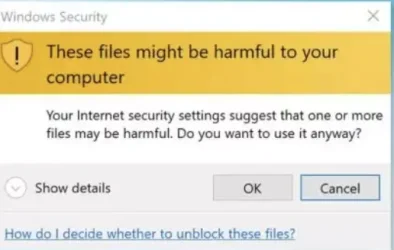
  • Captura de pantalla 2025-02-08 135114.webp
    Captura de pantalla 2025-02-08 135114.webp
    15.5 KB · Views: 1
Last edited:

My Computers My Computers

  • At a glance

    Windows 11 ProIntel Core i9-14900HX32 GBIntel UHD Graphics, NVIDIA RTX 4070 Laptop
    OS
    Windows 11 Pro
    Computer type
    Laptop
    Manufacturer/Model
    Lenovo Legion 7i 16IRX9
    CPU
    Intel Core i9-14900HX
    Motherboard
    LENOVO LNVNB161216 Chipset HM 770
    Memory
    32 GB
    Graphics Card(s)
    Intel UHD Graphics, NVIDIA RTX 4070 Laptop
    Sound Card
    Realtek in-built
    Screen Resolution
    3200x2000 200% Scale
    Hard Drives
    C: HDD 1 TB SAMSUNG MZVL21T0HCLR-00BL2
    D: HDD 1 TB CRUCIAL CT1000P3PSSD8
    Antivirus
    BitDefender Free
  • At a glance

    Windows 11 ProI7 10750H32 GBIntel UHD - NVIDIA 1650 Ti Max-Q
    Operating System
    Windows 11 Pro
    Computer type
    Laptop
    Manufacturer/Model
    Lenovo ThinkPad X1 3Gen Extreme
    CPU
    I7 10750H
    Motherboard
    Intel MW-490
    Memory
    32 GB
    Graphics card(s)
    Intel UHD - NVIDIA 1650 Ti Max-Q
    Sound Card
    Realtek in-built
    Screen Resolution
    3840x2160 225% Scale
    Hard Drives
    C: WDC PC SN730 SDBQNTY-1T00-1001 (1 TB)
    D: KINGSTON SNV2S2000G (2 TB)
    Antivirus
    BitDefender
Got to lunch , but if you can't log with Windows Hello don't type your PIN .
Choose Don't remember my PIN, and log with your Microsoft account, it will ask to type a new PIN (anyway can be the same) and log in.
Then you can continue.
 
Last edited:

My Computers My Computers

  • At a glance

    Windows 11 ProIntel Core i9-14900HX32 GBIntel UHD Graphics, NVIDIA RTX 4070 Laptop
    OS
    Windows 11 Pro
    Computer type
    Laptop
    Manufacturer/Model
    Lenovo Legion 7i 16IRX9
    CPU
    Intel Core i9-14900HX
    Motherboard
    LENOVO LNVNB161216 Chipset HM 770
    Memory
    32 GB
    Graphics Card(s)
    Intel UHD Graphics, NVIDIA RTX 4070 Laptop
    Sound Card
    Realtek in-built
    Screen Resolution
    3200x2000 200% Scale
    Hard Drives
    C: HDD 1 TB SAMSUNG MZVL21T0HCLR-00BL2
    D: HDD 1 TB CRUCIAL CT1000P3PSSD8
    Antivirus
    BitDefender Free
  • At a glance

    Windows 11 ProI7 10750H32 GBIntel UHD - NVIDIA 1650 Ti Max-Q
    Operating System
    Windows 11 Pro
    Computer type
    Laptop
    Manufacturer/Model
    Lenovo ThinkPad X1 3Gen Extreme
    CPU
    I7 10750H
    Motherboard
    Intel MW-490
    Memory
    32 GB
    Graphics card(s)
    Intel UHD - NVIDIA 1650 Ti Max-Q
    Sound Card
    Realtek in-built
    Screen Resolution
    3840x2160 225% Scale
    Hard Drives
    C: WDC PC SN730 SDBQNTY-1T00-1001 (1 TB)
    D: KINGSTON SNV2S2000G (2 TB)
    Antivirus
    BitDefender
Right click on the executable file for the context menu -> Properties -> "General" tab -> In the end text that the app is potentially harmful and a checkbox "Unblock". After clicking this checkbox I was able to run the file as usual.
 

My Computer My Computer

At a glance

Windows 11AMD Ryzen 7 5700GMicron Technology DDR4-3200 16GBNVIDIA GeForce RTX 3060
OS
Windows 11
Computer type
PC/Desktop
Manufacturer/Model
HP Pavilion
CPU
AMD Ryzen 7 5700G
Motherboard
Erica6
Memory
Micron Technology DDR4-3200 16GB
Graphics Card(s)
NVIDIA GeForce RTX 3060
Sound Card
Realtek ALC671
Monitor(s) Displays
Samsung SyncMaster U28E590
Screen Resolution
3840 x 2160
Hard Drives
SAMSUNG MZVLQ1T0HALB-000H1
Right click on the executable file for the context menu -> Properties -> "General" tab -> In the end text that the app is potentially harmful and a checkbox "Unblock". After clicking this checkbox I was able to run the file as usual.
The right click applies to a file. I was talking about a glitch related to Windows Search triggering Windows Security

Here is my original post Post #135
 

My Computers My Computers

  • At a glance

    Windows 11 ProIntel Core i9-14900HX32 GBIntel UHD Graphics, NVIDIA RTX 4070 Laptop
    OS
    Windows 11 Pro
    Computer type
    Laptop
    Manufacturer/Model
    Lenovo Legion 7i 16IRX9
    CPU
    Intel Core i9-14900HX
    Motherboard
    LENOVO LNVNB161216 Chipset HM 770
    Memory
    32 GB
    Graphics Card(s)
    Intel UHD Graphics, NVIDIA RTX 4070 Laptop
    Sound Card
    Realtek in-built
    Screen Resolution
    3200x2000 200% Scale
    Hard Drives
    C: HDD 1 TB SAMSUNG MZVL21T0HCLR-00BL2
    D: HDD 1 TB CRUCIAL CT1000P3PSSD8
    Antivirus
    BitDefender Free
  • At a glance

    Windows 11 ProI7 10750H32 GBIntel UHD - NVIDIA 1650 Ti Max-Q
    Operating System
    Windows 11 Pro
    Computer type
    Laptop
    Manufacturer/Model
    Lenovo ThinkPad X1 3Gen Extreme
    CPU
    I7 10750H
    Motherboard
    Intel MW-490
    Memory
    32 GB
    Graphics card(s)
    Intel UHD - NVIDIA 1650 Ti Max-Q
    Sound Card
    Realtek in-built
    Screen Resolution
    3840x2160 225% Scale
    Hard Drives
    C: WDC PC SN730 SDBQNTY-1T00-1001 (1 TB)
    D: KINGSTON SNV2S2000G (2 TB)
    Antivirus
    BitDefender
Resetting Internet Zone , or Intranet Zone don't solve this issue. This only happens with version 24H2. To solve it you have to reset Windows
Have you now resetted windows?
Or not yet, and trying to find out a other solution?
Details" and it will show you the SID key of your user account S-1-5-21..... ending in 1001.
The first account is usually 1000, you have other accounts on machine aswell? Did it show the SID id, or user? because it it show the SID id, that would suggest, the useraccount does not exsist as a user, but still has it indentifier on items.

Check with powershell, if that sid is corresponding with your user account: powershell: Get-WmiObject win32_useraccount | Select name,sid

I have had this message on other machines pre win24h2 aswell, usually manual solved by resetting some settings.
 

My Computer My Computer

At a glance

Windows 11
OS
Windows 11
Computer type
PC/Desktop
Have you now resetted windows?
Or not yet, and trying to find out a other solution?

The first account is usually 1000, you have other accounts on machine aswell? Did it show the SID id, or user? because it it show the SID id, that would suggest, the useraccount does not exsist as a user, but still has it indentifier on items.

Check with powershell, if that sid is corresponding with your user account: powershell: Get-WmiObject win32_useraccount | Select name,sid

I have had this message on other machines pre win24h2 aswell, usually manual solved by resetting some settings.
Hi :
The SID shown in details belongs to my user account. I ran the powershell you sent me. It shows me several accounts that are recognized like Administrator, DefaulAccount, Guest, WDAGUtilityAccount, WsiAccount and my user. I compared it before the SID and matches with my user account. So I know that is not an alien SID , its the nagging that bothers me. The SID ending with 1001 belongs to the authenticated user Thank you for helping me
As I spotted before, the only solution is resetting Windows. Sorry for my English
 
Last edited:

My Computers My Computers

  • At a glance

    Windows 11 ProIntel Core i9-14900HX32 GBIntel UHD Graphics, NVIDIA RTX 4070 Laptop
    OS
    Windows 11 Pro
    Computer type
    Laptop
    Manufacturer/Model
    Lenovo Legion 7i 16IRX9
    CPU
    Intel Core i9-14900HX
    Motherboard
    LENOVO LNVNB161216 Chipset HM 770
    Memory
    32 GB
    Graphics Card(s)
    Intel UHD Graphics, NVIDIA RTX 4070 Laptop
    Sound Card
    Realtek in-built
    Screen Resolution
    3200x2000 200% Scale
    Hard Drives
    C: HDD 1 TB SAMSUNG MZVL21T0HCLR-00BL2
    D: HDD 1 TB CRUCIAL CT1000P3PSSD8
    Antivirus
    BitDefender Free
  • At a glance

    Windows 11 ProI7 10750H32 GBIntel UHD - NVIDIA 1650 Ti Max-Q
    Operating System
    Windows 11 Pro
    Computer type
    Laptop
    Manufacturer/Model
    Lenovo ThinkPad X1 3Gen Extreme
    CPU
    I7 10750H
    Motherboard
    Intel MW-490
    Memory
    32 GB
    Graphics card(s)
    Intel UHD - NVIDIA 1650 Ti Max-Q
    Sound Card
    Realtek in-built
    Screen Resolution
    3840x2160 225% Scale
    Hard Drives
    C: WDC PC SN730 SDBQNTY-1T00-1001 (1 TB)
    D: KINGSTON SNV2S2000G (2 TB)
    Antivirus
    BitDefender
Right click on the executable file for the context menu -> Properties -> "General" tab -> In the end text that the app is potentially harmful and a checkbox "Unblock". After clicking this checkbox I was able to run the file as usual.
Here is the dialog box
Hi :
The SID shown in details belongs to my user account. I ran the powershell you sent me. It shows me several accounts that are recognized like Administrator, DefaulAccount, Guest, WDAGUtilityAccount, WsiAccount and my user. I compared it before the SID and matches with my user account. So I know that is not an alien SID , its the nagging that bothers me. The SID ending with 1001 belongs to the authenticated user Thank you for helping me
As I spotted before, the only solution is resetting Windows. Sorry for my English
This is the dialog box showing the user account SID when searching
 

Attachments

  • Captura de pantalla 2025-02-07 135956.webp
    Captura de pantalla 2025-02-07 135956.webp
    45 KB · Views: 1

My Computers My Computers

  • At a glance

    Windows 11 ProIntel Core i9-14900HX32 GBIntel UHD Graphics, NVIDIA RTX 4070 Laptop
    OS
    Windows 11 Pro
    Computer type
    Laptop
    Manufacturer/Model
    Lenovo Legion 7i 16IRX9
    CPU
    Intel Core i9-14900HX
    Motherboard
    LENOVO LNVNB161216 Chipset HM 770
    Memory
    32 GB
    Graphics Card(s)
    Intel UHD Graphics, NVIDIA RTX 4070 Laptop
    Sound Card
    Realtek in-built
    Screen Resolution
    3200x2000 200% Scale
    Hard Drives
    C: HDD 1 TB SAMSUNG MZVL21T0HCLR-00BL2
    D: HDD 1 TB CRUCIAL CT1000P3PSSD8
    Antivirus
    BitDefender Free
  • At a glance

    Windows 11 ProI7 10750H32 GBIntel UHD - NVIDIA 1650 Ti Max-Q
    Operating System
    Windows 11 Pro
    Computer type
    Laptop
    Manufacturer/Model
    Lenovo ThinkPad X1 3Gen Extreme
    CPU
    I7 10750H
    Motherboard
    Intel MW-490
    Memory
    32 GB
    Graphics card(s)
    Intel UHD - NVIDIA 1650 Ti Max-Q
    Sound Card
    Realtek in-built
    Screen Resolution
    3840x2160 225% Scale
    Hard Drives
    C: WDC PC SN730 SDBQNTY-1T00-1001 (1 TB)
    D: KINGSTON SNV2S2000G (2 TB)
    Antivirus
    BitDefender
I wonder if this also happens if you create a new account on the same machine and test inside that account.
 

My Computer My Computer

At a glance

Windows 11
OS
Windows 11
Computer type
PC/Desktop
I logged with the inbuilt Administrator account and it happened with that account, I didn't try crating a new account.
 

My Computers My Computers

  • At a glance

    Windows 11 ProIntel Core i9-14900HX32 GBIntel UHD Graphics, NVIDIA RTX 4070 Laptop
    OS
    Windows 11 Pro
    Computer type
    Laptop
    Manufacturer/Model
    Lenovo Legion 7i 16IRX9
    CPU
    Intel Core i9-14900HX
    Motherboard
    LENOVO LNVNB161216 Chipset HM 770
    Memory
    32 GB
    Graphics Card(s)
    Intel UHD Graphics, NVIDIA RTX 4070 Laptop
    Sound Card
    Realtek in-built
    Screen Resolution
    3200x2000 200% Scale
    Hard Drives
    C: HDD 1 TB SAMSUNG MZVL21T0HCLR-00BL2
    D: HDD 1 TB CRUCIAL CT1000P3PSSD8
    Antivirus
    BitDefender Free
  • At a glance

    Windows 11 ProI7 10750H32 GBIntel UHD - NVIDIA 1650 Ti Max-Q
    Operating System
    Windows 11 Pro
    Computer type
    Laptop
    Manufacturer/Model
    Lenovo ThinkPad X1 3Gen Extreme
    CPU
    I7 10750H
    Motherboard
    Intel MW-490
    Memory
    32 GB
    Graphics card(s)
    Intel UHD - NVIDIA 1650 Ti Max-Q
    Sound Card
    Realtek in-built
    Screen Resolution
    3840x2160 225% Scale
    Hard Drives
    C: WDC PC SN730 SDBQNTY-1T00-1001 (1 TB)
    D: KINGSTON SNV2S2000G (2 TB)
    Antivirus
    BitDefender
Back
Top Bottom