Windows Search Indexing keeps restarting from scratch after reboot in Windows 11


jacobacci

Well-known member
Member
Local time
2:42 AM
Posts
64
OS
Windows 11 25H2
A complete Windows index on my Win 11 24H2 machine has around 500'000 items. Every now and then I notice that search becomes extremely hit and miss. When I look at the indexing status, I notice that Windows has restarted indexing from scratch. After indexing is complete (which can take several days), search works normally - until Windows decides to restart indexing from scratch again.
This makes search practically unusable on my machine.
I have disabled indexing backoff.
Is there anything I can do to fix this (clearly not working as designed) behaviour?
 
Windows Build/Version
Win 11 24H2 26100.6584

My Computer

System One

  • OS
    Windows 11 25H2
    Computer type
    PC/Desktop
    Manufacturer/Model
    MSI
    CPU
    i7-12700F
    Motherboard
    MSI PRO B660-A DDR4
    Memory
    CORSAIR Vengeance LPX - DDR4 - kit - 32 GB: 2 x 16 GB
    Graphics Card(s)
    NVIDIA GeForce GTX 1050 Ti
    Sound Card
    onboard
    Monitor(s) Displays
    ASUS PA32UCX
    Screen Resolution
    3840x2160
    Hard Drives
    ADATA SP900
    AVAGO MR9361-8i SCSI with 3x Exos X20
    PSU
    Corsair RM650X
    Case
    Fractal Design Define R5 Blackout Edition
    Cooling
    Noctua CPU and Case Fans
    Keyboard
    Unicomp Model M
    Mouse
    Logitech MX Master
    Internet Speed
    1Gb/s
    Browser
    MS Edge
    Antivirus
    Microsoft Defender
Try this tutorial:
 

My Computer

System One

  • OS
    Windows 11
    Computer type
    PC/Desktop
    Manufacturer/Model
    Custom Built
I'd suggest disabling Window indexing & search and using Everything instead: voidtools
 

My Computer

System One

  • OS
    W11
    Computer type
    PC/Desktop
    Manufacturer/Model
    2 HP Desktops, 1 Dell Desktop, 2 Dell XPS Laptops, 1 HP Laptop
    Keyboard
    Logitech
    Mouse
    Logitech MX Master 4 & 3
    Internet Speed
    500 mps
    Browser
    Firefox
    Antivirus
    Bitdefender
Thanks @pepanee
Disabling SearchEngine-Client-Package worked. Then did a restart.
but
dism /Online /Enable-Feature /FeatureName:"SearchEngine-Client-Package"
gave the following result:

Code:
C:\Windows\System32>dism /Online /Enable-Feature /FeatureName:"SearchEngine-Client-Package"

Deployment Image Servicing and Management tool
Version: 10.0.26100.5074

Image Version: 10.0.26100.6584


Error: 0x800f080c

Feature name SearchEngine-Client-Package is unknown.
A Windows feature name was not recognized.
Use the /Get-Features option to find the name of the feature in the image and try the command again.

The DISM log file can be found at C:\WINDOWS\Logs\DISM\dism.log

After a few tries, the enable command worked, but there was no prompt to restart the computer.
The dism.log does not show any entries with the correct timestamp.
 

My Computer

System One

  • OS
    Windows 11 25H2
    Computer type
    PC/Desktop
    Manufacturer/Model
    MSI
    CPU
    i7-12700F
    Motherboard
    MSI PRO B660-A DDR4
    Memory
    CORSAIR Vengeance LPX - DDR4 - kit - 32 GB: 2 x 16 GB
    Graphics Card(s)
    NVIDIA GeForce GTX 1050 Ti
    Sound Card
    onboard
    Monitor(s) Displays
    ASUS PA32UCX
    Screen Resolution
    3840x2160
    Hard Drives
    ADATA SP900
    AVAGO MR9361-8i SCSI with 3x Exos X20
    PSU
    Corsair RM650X
    Case
    Fractal Design Define R5 Blackout Edition
    Cooling
    Noctua CPU and Case Fans
    Keyboard
    Unicomp Model M
    Mouse
    Logitech MX Master
    Internet Speed
    1Gb/s
    Browser
    MS Edge
    Antivirus
    Microsoft Defender
I'd suggest disabling Window indexing & search and using Everything instead: voidtools
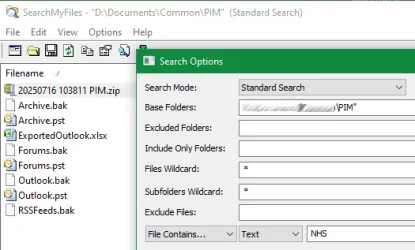
It doesn't look like Everything can search Outlook pst files, which is a must for me.
 

My Computer

System One

  • OS
    Windows 11 25H2
    Computer type
    PC/Desktop
    Manufacturer/Model
    MSI
    CPU
    i7-12700F
    Motherboard
    MSI PRO B660-A DDR4
    Memory
    CORSAIR Vengeance LPX - DDR4 - kit - 32 GB: 2 x 16 GB
    Graphics Card(s)
    NVIDIA GeForce GTX 1050 Ti
    Sound Card
    onboard
    Monitor(s) Displays
    ASUS PA32UCX
    Screen Resolution
    3840x2160
    Hard Drives
    ADATA SP900
    AVAGO MR9361-8i SCSI with 3x Exos X20
    PSU
    Corsair RM650X
    Case
    Fractal Design Define R5 Blackout Edition
    Cooling
    Noctua CPU and Case Fans
    Keyboard
    Unicomp Model M
    Mouse
    Logitech MX Master
    Internet Speed
    1Gb/s
    Browser
    MS Edge
    Antivirus
    Microsoft Defender
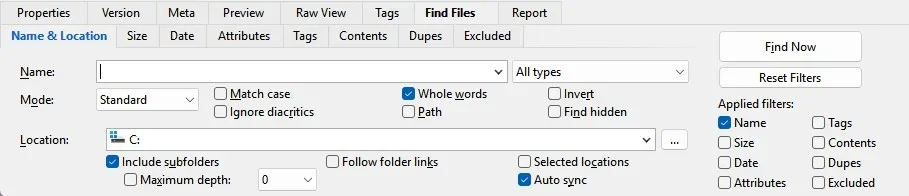
I disable indexing and just use XYplorer for searching.
I like that I can search for contents in the file to find the file if I can not remember the exact file name but remember some of the words in the file.
I have paid lifetime but their is a free version.

Screenshot 2025-10-07 120804.webp
 

My Computer

System One

  • OS
    Windows 11 Pro
It doesn't look like Everything can search Outlook pst files, which is a must for me.
Set indexing to just index Outlook and use Everything for all searches except Outlook
 

My Computer

System One

  • OS
    W11
    Computer type
    PC/Desktop
    Manufacturer/Model
    2 HP Desktops, 1 Dell Desktop, 2 Dell XPS Laptops, 1 HP Laptop
    Keyboard
    Logitech
    Mouse
    Logitech MX Master 4 & 3
    Internet Speed
    500 mps
    Browser
    Firefox
    Antivirus
    Bitdefender

My Computer

System One

  • OS
    Windows 11 Home x64 Version 25H2 Build 26200.8037
Thanks guys for all your tips. I will look at those 3rd party search engines. For the time being I have put together a "indexing deep reset" batch from several web sources and things seem back to normal for windows indexing. The batch needs to be run as admin.

Code:
Sc config wsearch start=disabled
Net stop wsearch
REG ADD "HKLM\SOFTWARE\Microsoft\Windows Search" /v SetupCompletedSuccessfully /t REG_DWORD /d 0 /f
del %PROGRAMDATA%\Microsoft\Search\Data\Applications\Windows\Windows.db
Sc config wsearch start=delayed-auto
Net start wsearch
pause

The batch removes Outlook from indexing locations, so at the end I need to add Outlook to the search locations. In Outlook set this in File / Options / Search and then Outlook reappears as an indexing location in indexing options.
 

My Computer

System One

  • OS
    Windows 11 25H2
    Computer type
    PC/Desktop
    Manufacturer/Model
    MSI
    CPU
    i7-12700F
    Motherboard
    MSI PRO B660-A DDR4
    Memory
    CORSAIR Vengeance LPX - DDR4 - kit - 32 GB: 2 x 16 GB
    Graphics Card(s)
    NVIDIA GeForce GTX 1050 Ti
    Sound Card
    onboard
    Monitor(s) Displays
    ASUS PA32UCX
    Screen Resolution
    3840x2160
    Hard Drives
    ADATA SP900
    AVAGO MR9361-8i SCSI with 3x Exos X20
    PSU
    Corsair RM650X
    Case
    Fractal Design Define R5 Blackout Edition
    Cooling
    Noctua CPU and Case Fans
    Keyboard
    Unicomp Model M
    Mouse
    Logitech MX Master
    Internet Speed
    1Gb/s
    Browser
    MS Edge
    Antivirus
    Microsoft Defender
I always recommend Everything as an alternative to the native Windows search to pretty much everyone. Results are instantaneous, it's lightweight, it works with all recent Windows versions, and it's free.
 

My Computer

System One

  • OS
    W11
    Computer type
    PC/Desktop
    Manufacturer/Model
    2 HP Desktops, 1 Dell Desktop, 2 Dell XPS Laptops, 1 HP Laptop
    Keyboard
    Logitech
    Mouse
    Logitech MX Master 4 & 3
    Internet Speed
    500 mps
    Browser
    Firefox
    Antivirus
    Bitdefender
Code:
C:\Windows\System32>dism /Online /Enable-Feature /FeatureName:"SearchEngine-Client-Package"

Deployment Image Servicing and Management tool
Version: 10.0.26100.5074

Image Version: 10.0.26100.6584


Error: 0x800f080c

Feature name SearchEngine-Client-Package is unknown.
A Windows feature name was not recognized.
Use the /Get-Features option to find the name of the feature in the image and try the command again.

The DISM log file can be found at C:\WINDOWS\Logs\DISM\dism.log
The issue seems to have been that I used the commands in a batch file. Using them in an elevated PowerShell7 box (without any quotes in the command) works reliably.
 

My Computer

System One

  • OS
    Windows 11 25H2
    Computer type
    PC/Desktop
    Manufacturer/Model
    MSI
    CPU
    i7-12700F
    Motherboard
    MSI PRO B660-A DDR4
    Memory
    CORSAIR Vengeance LPX - DDR4 - kit - 32 GB: 2 x 16 GB
    Graphics Card(s)
    NVIDIA GeForce GTX 1050 Ti
    Sound Card
    onboard
    Monitor(s) Displays
    ASUS PA32UCX
    Screen Resolution
    3840x2160
    Hard Drives
    ADATA SP900
    AVAGO MR9361-8i SCSI with 3x Exos X20
    PSU
    Corsair RM650X
    Case
    Fractal Design Define R5 Blackout Edition
    Cooling
    Noctua CPU and Case Fans
    Keyboard
    Unicomp Model M
    Mouse
    Logitech MX Master
    Internet Speed
    1Gb/s
    Browser
    MS Edge
    Antivirus
    Microsoft Defender

Latest Support Threads

Back
Top Bottom