Solved Windows security actions needed


Bikeit

Well-known member
Member
VIP
Local time
11:03 AM
Posts
261
OS
Windows 11 pro
I update my laptop earlier and all went well but now the little Windows Defender logo in the taskbar has a yellow triangle on it now, after investigating im getting this info, any one offer any help how to slove this issue?
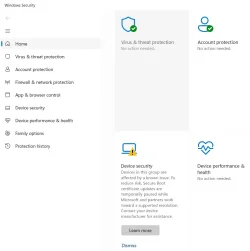
Screenshot 2026-08-01 182825.webp
 

My Computer My Computer

At a glance

Windows 11 proIntel(R) Core(TM) i7-8850H CPU @ 2.60GHz 2.59...32GBNvidia Quadro P3200
OS
Windows 11 pro
Computer type
Laptop
Manufacturer/Model
HP Zbook
CPU
Intel(R) Core(TM) i7-8850H CPU @ 2.60GHz 2.59 GHz
Motherboard
HP 842D
Memory
32GB
Graphics Card(s)
Nvidia Quadro P3200
Hard Drives
Samsung 980 1TB M.2
Toshiba KXG50ZNV512G M.2
Crucial P5 Plus 2TB M.2
Mouse
MX Master 3
Internet Speed
500MBPS
Browser
Chrome, Edge
Antivirus
Windows defender
.....................any help how to slove this issue?
Apart from accepting any BIOS updates and making sure Windows Updates are enabled, there's nothing for you to do. When Microsoft and your device manufacturer come up with a fix then it'll be applied automatically.

It'll solve itself - don't go fiddling with things.
 

My Computer My Computer

At a glance

Windows 11
OS
Windows 11
Please see my post from yesterday which has very helpful information from @garlin .

Secure Boot Certificate Upgrade Paused.​


My Computer My Computer

At a glance

Windows 11 Home
OS
Windows 11 Home
Assuming it's your HP ZBook, MS and HP have identified a known problem with Secure Boot cert updates on this specific model.

Windows has been instructed to hold, pending some action from HP (presumably to release a new BIOS version). If a new BIOS is eventually released, it might be available from HP's support site or provided thru Windows Update. You can ask HP support if they know if a fix is pending right now.

The problem is you won't be actively notified as to when/if the problem will be resolved. Your PC is blocked from Secure Boot updates, so it will continue operating as before. What you will be missing are some future security fixes until the problem is solved.

In some cases, "unsupported" PC's can be updated by other means. For now, it's best to wait for HP to provide you more information.
 

My Computer My Computer

At a glance

Windows 7
OS
Windows 7
Apart from accepting any BIOS updates and making sure Windows Updates are enabled, there's nothing for you to do. When Microsoft and your device manufacturer come up with a fix then it'll be applied automatically.

It'll solve itself - don't go fiddling with things.
Thank you, definitely no fiddling :-)
 

My Computer My Computer

At a glance

Windows 11 proIntel(R) Core(TM) i7-8850H CPU @ 2.60GHz 2.59...32GBNvidia Quadro P3200
OS
Windows 11 pro
Computer type
Laptop
Manufacturer/Model
HP Zbook
CPU
Intel(R) Core(TM) i7-8850H CPU @ 2.60GHz 2.59 GHz
Motherboard
HP 842D
Memory
32GB
Graphics Card(s)
Nvidia Quadro P3200
Hard Drives
Samsung 980 1TB M.2
Toshiba KXG50ZNV512G M.2
Crucial P5 Plus 2TB M.2
Mouse
MX Master 3
Internet Speed
500MBPS
Browser
Chrome, Edge
Antivirus
Windows defender

Latest Support Threads

Back
Top Bottom