Windows Security Actions Recommended but no actions listed


Local time
9:08 PM
Posts
65
OS
Windows 11
Since the past few weeks I am having a problem with the Windows Security icon in the taskbar. It shows Action recommended with a yellow exclamation mark. Please see the screenshot given below for more details
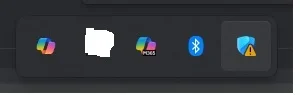
Windows Security Center - Action Required.webp

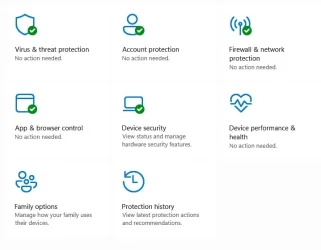
When I go inside the Windows security windows, I see green check mark across all the "Virus & Threat protection", "Account Protection", "Firewall & network protection" and "App & Browser control" Please see the screenshot given below for more details
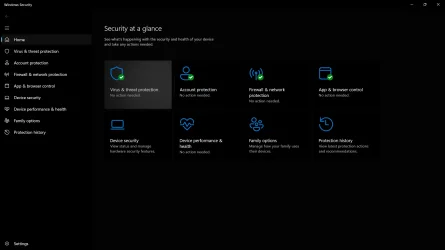
1771304417979.webp

The things that I have tried
I have run a quick scan after updating the AntiVirus definitions and still the issue persists after a reboot. I have Windows Defender Antivirus as my security provider. The definitions of Windows Defender Antivirus are upto date as of my posting this thread.
I have enabled Reputation based protection (Windows Security > App & Browser Control > Reputation based protection) and still the issue persists after a reboot.

How do I fix this issue? Is there some action that is hidden that has to be carried out? Is the computer at risk?
 
Windows Build/Version
Win11 25H2

My Computer

System One

  • OS
    Windows 11
    Computer type
    Laptop
    CPU
    Intel
    Memory
    16 GB
    Graphics Card(s)
    Intel UHD Integrated
    Mouse
    Inbuilt
    Browser
    Firefox
    Antivirus
    Microsoft Defender
Have you clicked on each of the categories in Windows Security to see if there any warnings in the individual categories?
If there is not any warnings you can reset Windows 11 Security to default.
There are a couple of methods to do this use your favourite search engine to see which method you are most comfortable with.
 

My Computer

System One

  • OS
    Windows 11
    Computer type
    PC/Desktop
    Manufacturer/Model
    Generic
    CPU
    AMD Ryzen 8700G
    Motherboard
    Gigabyte B650 UD AC
    Memory
    64 GB
    Graphics Card(s)
    Onboard
    Sound Card
    Onboard
    Monitor(s) Displays
    Del U2723QE
    Screen Resolution
    3840 x 2160
    Hard Drives
    Corsiar MP600 1TB
    PSU
    Silverstone 750 GOLD
    Case
    Silverstone FARA 513
Yes I checked the setting under each of the heading.

In App & Browser Control > Exploit protection, everything is on, i.e. Control Flow Guard, DEP, Mandatory ASLR, Bottom-up ASLR, etc is on.
In App & Browser Control > Reputation Based protection almost all of the items are enabled. Smart Screen for Microsoft Edge, Potentially Unwanted App Blocking, Smartscreen for Microsoft Store Apps is on. Phishing protection is on with the option "Warn me about malicious apps and sites" is enabled. This is the only option that is enabled.
In App & Browser Control > Smart App Control is on.

Firewall and Network protection is on with Windows Firewall being on. Only Web Protection is not enabled as there are no providers.

In Device Security, Secured-core PC is enabled. So are all the options under "Core Isolation". Security Processor and Secure Boot is also enabled.

In Device performance in Health, the Health report is all green.
 

My Computer

System One

  • OS
    Windows 11
    Computer type
    Laptop
    CPU
    Intel
    Memory
    16 GB
    Graphics Card(s)
    Intel UHD Integrated
    Mouse
    Inbuilt
    Browser
    Firefox
    Antivirus
    Microsoft Defender
Is there any way to go into the Event Manager or any log file to check why the exclamation mark with the "Actions recommended" is being triggered?

Some PowerShell command which can give this information?
 

My Computer

System One

  • OS
    Windows 11
    Computer type
    Laptop
    CPU
    Intel
    Memory
    16 GB
    Graphics Card(s)
    Intel UHD Integrated
    Mouse
    Inbuilt
    Browser
    Firefox
    Antivirus
    Microsoft Defender
In event viewer you can check the security logs.
Is the system fully patched, no failed Windows updates?
Have you ran any DISM Commands to check for system file problems?
Open Command Prompt or Terminal as Admin and run
DISM /Online /Cleanup-Image /ScanHealth
If a problem is found run
DISM /Online /Cleanup-Image /RestoreHealth
If No Problem is found or when the RestoreHealth finishes the run
sfc /scannow
 

My Computer

System One

  • OS
    Windows 11
    Computer type
    PC/Desktop
    Manufacturer/Model
    Generic
    CPU
    AMD Ryzen 8700G
    Motherboard
    Gigabyte B650 UD AC
    Memory
    64 GB
    Graphics Card(s)
    Onboard
    Sound Card
    Onboard
    Monitor(s) Displays
    Del U2723QE
    Screen Resolution
    3840 x 2160
    Hard Drives
    Corsiar MP600 1TB
    PSU
    Silverstone 750 GOLD
    Case
    Silverstone FARA 513
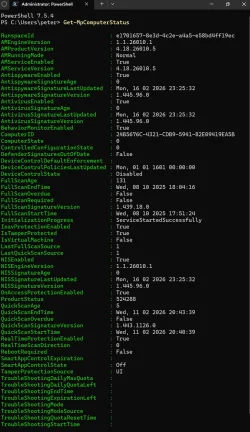
Run
Get-MpComputerStatus
in PowerShell. This is my list and compare:

Snipaste_2026-02-17_06-53-09.webp
 

My Computers

System One System Two

  • OS
    Win 11 Pro
    Computer type
    Laptop
    Manufacturer/Model
    ASUS Vivobook
    CPU
    AMD Ryzen™ 7 7730U
    Motherboard
    M1605YA
    Memory
    24GB Dual-Channel DDR4 @ 1596MHz (22-22-22-52)
    Graphics Card(s)
    512MB ATI AMD Radeon Graphics (ASUStek Computer Inc)
    Monitor(s) Displays
    Generic PnP Monitor (1920x1200@60Hz) - P1 PLUS (1920x1080@59Hz)
    Screen Resolution
    1920 X 1200
    Hard Drives
    953GB Western Digital WD
    PSU
    45 Watts
    Mouse
    Lenovo Bluetooth.
    Internet Speed
    500 Mbps
    Browser
    Edge
    Antivirus
    Defender
  • Operating System
    Windows 11
    Computer type
    Laptop
    Manufacturer/Model
    ACER NITRO
    CPU
    AMD Ryzen 7 5800H / 3.2 GHz
    Motherboard
    CZ Scala_CAS (FP6)
    Memory
    32 GB DDR4 SDRAM 3200 MHz
    Graphics card(s)
    NVIDIA GeForce RTX 3060 6 GB GDDR6 SDRAM
    Sound Card
    Realtek Audio. NVIDIA High Definition Audio
    Monitor(s) Displays
    15.6" LED backlight 1920 x 1080 (Full HD) 144 Hz
    Screen Resolution
    1920 x 1080 (Full HD)
    Hard Drives
    Samsung 970 Evo Plus 2TB NVMe M.2
    PSU
    180 Watt, 19.5 V
    Mouse
    Lenovo Bluetooth
    Internet Speed
    500 Mbps
    Browser
    Edge
    Antivirus
    Defender
Run
Get-MpComputerStatus
in PowerShell. This is my list and compare:

View attachment 163534
Apart from the following keys all the other values are the same. The "FullScan" values maybe different because I have never run a full scan on the computer till date. The QuickScanSignatureVersion field is different maybe because I did the scan yesterday.
FullScanAge: For me it is 5 but in the screenshot it is 5.
FullScanEndTime - Field is empty
FullScanSignatureVersion - Field is empty
FullScanStartTime - Field is Empty
LastFullScanSource - Is 0 for me but 1 is given in the screenshot.
QuickScanAge - Is 1 for me but it is 5 in the screenshot.
QuickScanSignatureVersion: 1.445.94.0. Higher than what is given in the screenshot.
SmartAppControlState: Is "On" for me but is "OFF" in the screenshot.
TamperProtectionSource: Is "Signatures" for me but is "UI" in the screenshot.

I have omitted comparing the dates, like QuickScanEndTime, AntivirusSignatureLastUpdated, etc since the screenshot will have a different timestamp compared to mine due to timestamp and timezone differences.

Among the items that are given above anything that stands out that I should be focusing on?
 

My Computer

System One

  • OS
    Windows 11
    Computer type
    Laptop
    CPU
    Intel
    Memory
    16 GB
    Graphics Card(s)
    Intel UHD Integrated
    Mouse
    Inbuilt
    Browser
    Firefox
    Antivirus
    Microsoft Defender
In event viewer you can check the security logs.
Is the system fully patched, no failed Windows updates?
Have you ran any DISM Commands to check for system file problems?
Open Command Prompt or Terminal as Admin and run
DISM /Online /Cleanup-Image /ScanHealth
If a problem is found run
DISM /Online /Cleanup-Image /RestoreHealth
If No Problem is found or when the RestoreHealth finishes the run
sfc /scannow
I checked the Event Viewer security logs (Path: Windows Logs > Security). There was no log with the level of Critical or Error or Warning. All the logs were of the level information. Is there some specific Task Category that I should be looking for?

Yes the system is fully patched, with no failed Windows update. I checked in Settings > Windows update. Is there a command or a PowerShell snippet that I can run to confirm the same?

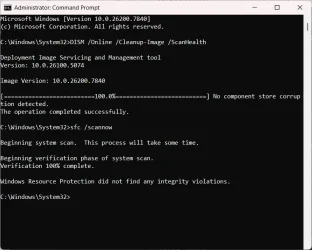
I have not run the DISM commands to check for system file problems on this system for a long time. I ran the command DISM /Online /Cleanup-Image /ScanHealth in an elevated administrator command prompt. It did not return any error. The output is given below
Batch:
Microsoft Windows [Version 10.0.26200.7840]
(c) Microsoft Corporation. All rights reserved.

C:\Windows\System32>DISM /Online /Cleanup-Image /ScanHealth

Deployment Image Servicing and Management tool
Version: 10.0.26100.5074

Image Version: 10.0.26200.7840

[==========================100.0%==========================] No component store corruption detected.
The operation completed successfully.

C:\Windows\System32>@AdvancedKeySettingsNotification.png

I did not run the second command, i.e. DISM /Online /Cleanup-Image /RestoreHealth, since the first command as given above did not show any error or warning message.

I then ran the command sfc /scannow. That also completed without any error. Its output is given below
Batch:
C:\Windows\System32>sfc /scannow

Beginning system scan.  This process will take some time.

Beginning verification phase of system scan.
Verification 100% complete.

Windows Resource Protection did not find any integrity violations.
C:\Windows\System32>

Is there something else that I do to fix this issue?


The screen shot from the elevated command prompt where the commands were run is given below
1771433069605.webp
 

My Computer

System One

  • OS
    Windows 11
    Computer type
    Laptop
    CPU
    Intel
    Memory
    16 GB
    Graphics Card(s)
    Intel UHD Integrated
    Mouse
    Inbuilt
    Browser
    Firefox
    Antivirus
    Microsoft Defender
I did a web search and there was mentions of similar issues to yours from some time ago but no solutions.
It was put down as being a bug / glitch.
The only other thing I can suggest is to reset Windows 11 Security.
If you are running standard settings it is a not an issue, but if you have tweaked your settings, edited Group Policy etc then you lose those settings.
 

My Computer

System One

  • OS
    Windows 11
    Computer type
    PC/Desktop
    Manufacturer/Model
    Generic
    CPU
    AMD Ryzen 8700G
    Motherboard
    Gigabyte B650 UD AC
    Memory
    64 GB
    Graphics Card(s)
    Onboard
    Sound Card
    Onboard
    Monitor(s) Displays
    Del U2723QE
    Screen Resolution
    3840 x 2160
    Hard Drives
    Corsiar MP600 1TB
    PSU
    Silverstone 750 GOLD
    Case
    Silverstone FARA 513
I have had this happen to me and it just goes away in a couple of days.
 

My Computers

System One System Two

  • OS
    Windows 11 25H2 26200.7705
    Computer type
    PC/Desktop
    Manufacturer/Model
    Dell xps8910
    CPU
    Intel core I7 6700
    Motherboard
    OWPMFG Z170 Skylake
    Memory
    32gbytes DDR4 1066mhz dual
    Graphics Card(s)
    nvidia GT730
    Sound Card
    Nvidia GK 208
    Monitor(s) Displays
    Dell del40e8
    Screen Resolution
    1920X1080
    Hard Drives
    Intel M.2 512G NVME / Samsung SSD 850 250G / Toshiba 1TB / WD 1TB
    PSU
    450W
    Case
    Mid
    Cooling
    Standard
    Keyboard
    Wired Perixx
    Mouse
    Logitech wireless MX Master
    Internet Speed
    150 Mbs Starlink
    Browser
    Firefox and Edge
    Antivirus
    Windows defender
  • Operating System
    Windows 11 Pro 25H2 26200.6584
    Computer type
    Laptop
    Manufacturer/Model
    Asus BR1100CKA
    CPU
    Intel Celeron N4500 @ 1.10 GHz
    Motherboard
    Asustek
    Memory
    4.00 GB
    Graphics card(s)
    On board
    Sound Card
    On board
    Monitor(s) Displays
    standard
    Screen Resolution
    1366x768
    Hard Drives
    Crucial 500Gb NVME M.2 SSD / 58GB Factory SSD
    Case
    Laptop
    Cooling
    Heatsink
    Keyboard
    Builtin
    Mouse
    Touchpad
    Internet Speed
    25mbs/Viasat
    Browser
    Edge/Firefox
    Antivirus
    Windows
Were you using Windows Defender as your security provider? Or was it something else? And what were you using for Web protection?
 

My Computer

System One

  • OS
    Windows 11
    Computer type
    Laptop
    CPU
    Intel
    Memory
    16 GB
    Graphics Card(s)
    Intel UHD Integrated
    Mouse
    Inbuilt
    Browser
    Firefox
    Antivirus
    Microsoft Defender
Did you check Protection history in Windows security

Sometimes it's waiting for action decision in that area?

In Virus & Threat protection area, Protection History
 

My Computers

System One System Two

  • OS
    Windows 11 Pro 25H2 26200.8037
    Computer type
    PC/Desktop
    Manufacturer/Model
    PreBuilt
    CPU
    AMD Ryzen 7700X
    Motherboard
    MSI B650 VC WIfi Rev 1.0
    Memory
    32GB DDR 5 RGB 5600Mhz
    Graphics Card(s)
    Radeon 7800XT
    Sound Card
    Onboard Audio
    Monitor(s) Displays
    Asus VG245H
    Screen Resolution
    1920x1080
    Hard Drives
    Samsung 990 Evo Plus NVMe Boot
    Samsung 990 Pro 1TB Game NVMe


    External
    Western Digital Elements 500GB
    Western Digital My Passport 2TB Blue
    Western Digital My Passport 2TB Red
    Toshiba 2TB in External Enclosure
    Seagate 8TB in External Enclosure
    Seagate 1TB Portable USB 3 External Drive
    Western Digital My Book 8TB (Primary Backup drive)
    Western Digital Black 4TB In External Enclosure
    PSU
    750 Watt High Power
    Case
    Lian Li Lan Cool 216 ARGB Airflow
    Cooling
    2 160MM Front, 1 140MM Rear Exhaust
    Keyboard
    Logitech G513
    Mouse
    Logitech G502 X
    Internet Speed
    Gigabit 1100Mb/35 Upload
    Browser
    MS Edge Chromium and Bing Search
    Antivirus
    Windows Defender, Malwarebytes Premium
    Other Info
    UEFI, Secure Boot, TPM 2.0, Macrium Reflect X
  • Operating System
    Windows 11 Pro 25H2 26200.8037
    Computer type
    Laptop
    Manufacturer/Model
    Asus TUF A16 Advantage Edition FA617NT.A16.R7700
    CPU
    Ryzen 7 7735HS
    Motherboard
    OEM Asus Motherboard
    Memory
    16GB DDR 5
    Graphics card(s)
    AMD Radeon™ 680M & Radeon 7700S
    Sound Card
    Onboard
    Monitor(s) Displays
    16inch FHD 165hz
    Screen Resolution
    1920x1080
    Hard Drives
    512GB NVMe Boot Drive
    PSU
    Laptop PSU
    Case
    Laptop Case
    Cooling
    OEM Cooling
    Keyboard
    OEM Laptop Keyboard
    Mouse
    Touchpad & G502 Hero
    Internet Speed
    Gigabit 1100 Download/35 Upload
    Browser
    MS Edge with Bing search
    Antivirus
    Windows Defender & Malwarebytes Premium
    Other Info
    Macrium Reflect X
On my system Device Security also has a checkmark.

Screenshot 2026-02-22 085022.webp
 

My Computer

System One

  • OS
    Windows 11 Pro

Latest Support Threads

Back
Top Bottom