Windows Security doesn't open or crashes


sevenone

Member
Local time
12:46 PM
Posts
10
OS
Windows 11
I had this issue a while ago after an update. I restored the system to earlier point and Windows security worked again, even after the update. Now since a few days ago I have exactly the same issue.

What's going on? I tried all the uselless sh*t like reset , repair the app, scan the system and so on. Is it exppected that Microsoft will fix it with an update? I don;t use 3rd party anti virus. Windows 11 is a clean install. Not an update.

What can I do? Follow a list of a dozen links with instructions? Or just wait?
 
Windows Build/Version
Edition Windows 11 Home Version 22H2 Installed on ‎2/‎13/‎2023 OS build 22621.1635 Experience Windows Feature Experience Pack 1000.22641.1000.0

My Computer My Computer

At a glance

Windows 11
OS
Windows 11
Hi sevenone,
Sorry about your issue.
Can you try from powershell console: (as admin)
Get-AppxPackage Microsoft.SecHealthUI -AllUsers | Reset-AppxPackage <enter>
 

My Computers My Computers

  • At a glance

    All Branches but StableAMD Ryzen 7 7735HS 3200-4500 Mhz 8 cores x 232 GB DDR5Radeon Graphic / NVIDIA GeForce RTX 4060 8 GB...
    OS
    All Branches but Stable
    Computer type
    Laptop
    Manufacturer/Model
    Acer Nitro ANV15-51
    CPU
    AMD Ryzen 7 7735HS 3200-4500 Mhz 8 cores x 2
    Motherboard
    Sportage_RBH
    Memory
    32 GB DDR5
    Graphics Card(s)
    Radeon Graphic / NVIDIA GeForce RTX 4060 8 GB GDDR6
    Sound Card
    AMD/Realtek(R) Audio
    Monitor(s) Displays
    Integrated Monitor (15.3"vis)
    Screen Resolution
    FHD 1920X1080 16:9 144Hz
    Hard Drives
    KINGSTON OM8SEP4512Q-AA 1TB
    Western Digital 256GB
    PSU
    19V DC 6.32 A 120 W
    Cooling
    Dual Fans
    Mouse
    MS Bluetooth
    Internet Speed
    Fiber 1GB Cox -us & 1GB Orange-fr
    Browser
    Edge Canary- Firefox Nightly-Chrome Dev-Chrome Dev
    Antivirus
    Windows Defender
  • At a glance

    Windows 11 BetaAMD A9-94208 GB of DDR4AMD Radeon R5
    Operating System
    Windows 11 Beta
    Computer type
    Laptop
    Manufacturer/Model
    Asus X751BP
    CPU
    AMD A9-9420
    Memory
    8 GB of DDR4
    Graphics card(s)
    AMD Radeon R5
    Screen Resolution
    1600x900
    Hard Drives
    Seagate 1 TB
Hi sevenone,
Sorry about your issue.
Can you try from poweshell console:
Get-AppxPackage Microsoft.SecHealthUI -AllUsers | Reset-AppxPackage <enter>
Thank you. I just did it. The Windows Security Icon in the taskbar has still the yellow warning triangle and I can't open it.
 

My Computer My Computer

At a glance

Windows 11
OS
Windows 11
Thank you. I just did it. The Windows Security Icon in the taskbar has still the yellow warning triangle and I can't open it.
Can you reboot, then try to create a new user and see if the problem is not user data corruption?
or use admin:
(from command line) net user administrator /active:yes
 

My Computers My Computers

  • At a glance

    All Branches but StableAMD Ryzen 7 7735HS 3200-4500 Mhz 8 cores x 232 GB DDR5Radeon Graphic / NVIDIA GeForce RTX 4060 8 GB...
    OS
    All Branches but Stable
    Computer type
    Laptop
    Manufacturer/Model
    Acer Nitro ANV15-51
    CPU
    AMD Ryzen 7 7735HS 3200-4500 Mhz 8 cores x 2
    Motherboard
    Sportage_RBH
    Memory
    32 GB DDR5
    Graphics Card(s)
    Radeon Graphic / NVIDIA GeForce RTX 4060 8 GB GDDR6
    Sound Card
    AMD/Realtek(R) Audio
    Monitor(s) Displays
    Integrated Monitor (15.3"vis)
    Screen Resolution
    FHD 1920X1080 16:9 144Hz
    Hard Drives
    KINGSTON OM8SEP4512Q-AA 1TB
    Western Digital 256GB
    PSU
    19V DC 6.32 A 120 W
    Cooling
    Dual Fans
    Mouse
    MS Bluetooth
    Internet Speed
    Fiber 1GB Cox -us & 1GB Orange-fr
    Browser
    Edge Canary- Firefox Nightly-Chrome Dev-Chrome Dev
    Antivirus
    Windows Defender
  • At a glance

    Windows 11 BetaAMD A9-94208 GB of DDR4AMD Radeon R5
    Operating System
    Windows 11 Beta
    Computer type
    Laptop
    Manufacturer/Model
    Asus X751BP
    CPU
    AMD A9-9420
    Memory
    8 GB of DDR4
    Graphics card(s)
    AMD Radeon R5
    Screen Resolution
    1600x900
    Hard Drives
    Seagate 1 TB
You can try :
1. sfc/scannow within Windows Terminal (Administrative rights).
Or
2. Go to Settings-> Apps->Installed Apps
a. Here navigate to find Windows Security
b. Click the 3 dots and select Advanced Settings
3. Navigate to the Repair (Will keep data) or Reset (Will reset the Windows App deleting all the data).

Hope it solve it.
 

My Computers My Computers

  • At a glance

    Windows 11 ProIntel Core i9-14900HX32 GBIntel UHD Graphics, NVIDIA RTX 4070 Laptop
    OS
    Windows 11 Pro
    Computer type
    Laptop
    Manufacturer/Model
    Lenovo Legion 7i 16IRX9
    CPU
    Intel Core i9-14900HX
    Motherboard
    LENOVO LNVNB161216 Chipset HM 770
    Memory
    32 GB
    Graphics Card(s)
    Intel UHD Graphics, NVIDIA RTX 4070 Laptop
    Sound Card
    Realtek in-built
    Screen Resolution
    3200x2000 200% Scale
    Hard Drives
    C: HDD 1 TB SAMSUNG MZVL21T0HCLR-00BL2
    D: HDD 1 TB CRUCIAL CT1000P3PSSD8
    Antivirus
    BitDefender Free
  • At a glance

    Windows 11 ProI7 10750H32 GBIntel UHD - NVIDIA 1650 Ti Max-Q
    Operating System
    Windows 11 Pro
    Computer type
    Laptop
    Manufacturer/Model
    Lenovo ThinkPad X1 3Gen Extreme
    CPU
    I7 10750H
    Motherboard
    Intel MW-490
    Memory
    32 GB
    Graphics card(s)
    Intel UHD - NVIDIA 1650 Ti Max-Q
    Sound Card
    Realtek in-built
    Screen Resolution
    3840x2160 225% Scale
    Hard Drives
    C: WDC PC SN730 SDBQNTY-1T00-1001 (1 TB)
    D: KINGSTON SNV2S2000G (2 TB)
    Antivirus
    BitDefender
Can you reboot, then try to create a new user and see if the problem is not user data corruption?
or use admin:
(from command line) net user administrator /active:yes
I tried (from command line) net user administrator /active:yes
but changed nothing.

But I think I was still the same account who was and is logged in.

To add a new user I really have to enter all the account information? Can't I just create a guest user?
 

My Computer My Computer

At a glance

Windows 11
OS
Windows 11
You can try :
1. sfc/scannow within Windows Terminal (Administrative rights).
Or
2. Go to Settings-> Apps->Installed Apps
a. Here navigate to find Windows Security
b. Click the 3 dots and select Advanced Settings
3. Navigate to the Repair (Will keep data) or Reset (Will reset the Windows App deleting all the data).

Hope it solve it.
Yeah that's what I can find everywhere. It does absolutely nothing. SFC/Scannow found some errors. But I don't know what to do with it.
A question: Was it Microsofts intention to destroy my system? I mean, It happens two times after a fresh install. Am I even secured now, or is this unknown?
 

My Computer My Computer

At a glance

Windows 11
OS
Windows 11
Can you reboot, then try to create a new user and see if the problem is not user data corruption?
or use admin:
(from command line) net user administrator /active:yes
I logged in as Admin. Same issue.

Edit: Now I logged in with my microsoft account. The default onw which I use all the time. I can open Windows Security, and all seems to be ok. But the icon in taskbar still has the warning sign.

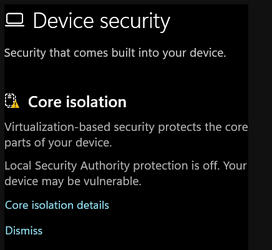
Edit: Devices Security - Core Isolation has a warning sign. All I could do is click on Dismiss. Should I?
 
Last edited:

My Computer My Computer

At a glance

Windows 11
OS
Windows 11
Restart explorer and the icon should display OK.
 

My Computers My Computers

  • At a glance

    All Branches but StableAMD Ryzen 7 7735HS 3200-4500 Mhz 8 cores x 232 GB DDR5Radeon Graphic / NVIDIA GeForce RTX 4060 8 GB...
    OS
    All Branches but Stable
    Computer type
    Laptop
    Manufacturer/Model
    Acer Nitro ANV15-51
    CPU
    AMD Ryzen 7 7735HS 3200-4500 Mhz 8 cores x 2
    Motherboard
    Sportage_RBH
    Memory
    32 GB DDR5
    Graphics Card(s)
    Radeon Graphic / NVIDIA GeForce RTX 4060 8 GB GDDR6
    Sound Card
    AMD/Realtek(R) Audio
    Monitor(s) Displays
    Integrated Monitor (15.3"vis)
    Screen Resolution
    FHD 1920X1080 16:9 144Hz
    Hard Drives
    KINGSTON OM8SEP4512Q-AA 1TB
    Western Digital 256GB
    PSU
    19V DC 6.32 A 120 W
    Cooling
    Dual Fans
    Mouse
    MS Bluetooth
    Internet Speed
    Fiber 1GB Cox -us & 1GB Orange-fr
    Browser
    Edge Canary- Firefox Nightly-Chrome Dev-Chrome Dev
    Antivirus
    Windows Defender
  • At a glance

    Windows 11 BetaAMD A9-94208 GB of DDR4AMD Radeon R5
    Operating System
    Windows 11 Beta
    Computer type
    Laptop
    Manufacturer/Model
    Asus X751BP
    CPU
    AMD A9-9420
    Memory
    8 GB of DDR4
    Graphics card(s)
    AMD Radeon R5
    Screen Resolution
    1600x900
    Hard Drives
    Seagate 1 TB
Restart explorer and the icon should display OK.
I just edited my last post


Edit: Devices Security - Core Isolation has a warning sign. All I could do is click on Dismiss. Should I?

After restarting Explorer the warning sign is still there.
 

My Computer My Computer

At a glance

Windows 11
OS
Windows 11
www.png

Finish with weird puzzles. I clicked on dismiss and the warning sign is gone. If this has something to do with UAC, yes I disabled it.
 

My Computer My Computer

At a glance

Windows 11
OS
Windows 11

My Computers My Computers

  • At a glance

    Windows 11 Pro 25H2 26200.9457i9-10900 10 core 20 threads32 gbnone-Intel UHD Graphics 630
    OS
    Windows 11 Pro 25H2 26200.9457
    Computer type
    PC/Desktop
    Manufacturer/Model
    Dell Optiplex 7080
    CPU
    i9-10900 10 core 20 threads
    Motherboard
    DELL 0J37VM
    Memory
    32 gb
    Graphics Card(s)
    none-Intel UHD Graphics 630
    Sound Card
    Integrated Realtek
    Monitor(s) Displays
    Benq 27
    Screen Resolution
    2560x1440
    Hard Drives
    2x1tb Solidigm m.2 nvme /External drives 512gb Samsung m.2 sata+2tb Kingston m2.nvme
    PSU
    500w
    Case
    MT
    Cooling
    Dell Premium
    Keyboard
    Logitech wired
    Mouse
    Logitech wireless
    Internet Speed
    so slow I'm too embarrassed to tell
    Browser
    #1 Edge #2 Firefox
    Antivirus
    Defender+MWB Premium
  • At a glance

    Windows 11 Pro 24H2 26200.9457AMD Ryzen 7 6800U32 gbintegrated
    Operating System
    Windows 11 Pro 24H2 26200.9457
    Computer type
    PC/Desktop
    Manufacturer/Model
    Beelink Mini PC SER5
    CPU
    AMD Ryzen 7 6800U
    Memory
    32 gb
    Graphics card(s)
    integrated
    Sound Card
    integrated
    Monitor(s) Displays
    Benq 27
    Screen Resolution
    2560x1440
    Hard Drives
    1TB Crucial nvme
    Keyboard
    Logitech wired
    Mouse
    Logitech wireless
    Internet Speed
    still too embarrassed to tell
    Browser
    Firefox
    Antivirus
    Defender
  • System 3 is non compliant Dell 9020 i7-4770/24gb ram Win11 PRO 26200.9457
Windows Security LSA is off? Use the tutorial listed there.
I'm pretty sure LSA is completely useless. At least Micrsofoft destroyed it. And I don;t trut this hole farce anyway. What will bring the next update? More issues? Windows 11 is for people who like to solve puzzles. It's crap, that;s because it's free. Free crap.

Edit: LSA is activated but restart is required. For today, enough restarts.
 
Last edited:

My Computer My Computer

At a glance

Windows 11
OS
Windows 11
Thanks for your help guys. Today I restarted the Notebook and 2023-05 Cumulative Update for Windows 11 Version 22H2 for x64-based Systems (KB5026372) got installed. Now it seems everything is fine. Just now another update got installed: 2023-04 Update for Windows 11 Version 22H2 for x64-based Systems (KB4023057)
 

My Computer My Computer

At a glance

Windows 11
OS
Windows 11
Back
Top Bottom