Windows Security is always asking for password when accessing Chrome saved passwords


325xle

Well-known member
Local time
12:43 PM
Posts
51
OS
Windows 11
How do I disable this?
 

My Computer My Computer

At a glance

Windows 11See link in Other Info field below.See link in Other Info field below.See link in Other Info field below.
OS
Windows 11
Computer type
PC/Desktop
Manufacturer/Model
Lenovo
CPU
See link in Other Info field below.
Motherboard
See link in Other Info field below.
Memory
See link in Other Info field below.
Graphics Card(s)
See link in Other Info field below.
Sound Card
See link in Other Info field below.
Monitor(s) Displays
See link in Other Info field below.
Screen Resolution
See link in Other Info field below.
Hard Drives
See link in Other Info field below.
PSU
See link in Other Info field below.
Case
See link in Other Info field below.
Cooling
See link in Other Info field below.
Keyboard
See link in Other Info field below.
Mouse
See link in Other Info field below.
Internet Speed
See link in Other Info field below.
Browser
See link in Other Info field below.
Antivirus
See link in Other Info field below.
Other Info
Link to specs: https://www.lenovo.com/us/en/p/desktops/thinkcentre/m-series-aio/thinkcentre-m90a-pro-gen-4-27-inch-intel/len102c0039#models
That's a security feature, you have to re-authenticate to access your chrome password manager. If you disable that feature malware can more easily steal your saved credentials.

If you really want to disable it,
In Chrome
  1. Type chrome://flags in the address bar
  2. Look for Disable Password Manager Re-authentication and disable it
  3. Restart Chrome
 

My Computer My Computer

At a glance

Linux Mint
OS
Linux Mint
Computer type
Laptop
Manufacturer/Model
System76 Lemur Pro
That's a security feature, you have to re-authenticate to access your chrome password manager. If you disable that feature malware can more easily steal your saved credentials.

If you really want to disable it,
In Chrome
  1. Type chrome://flags in the address bar
  2. Look for Disable Password Manager Re-authentication and disable it
  3. Restart Chrome
That option is not there. Here is what is appearing with password.

Show autofill signatures.​

Annotates web forms with Autofill signatures as HTML attributes. Also marks password fields suitable for password generation. – Mac, Windows, Linux, ChromeOS, Android

#enable-show-autofill-signatures
Disabled Enabled

Fill​

Filling of passwords when an account is explicitly selected by the user rather than autofilling credentials on page load. – Mac, Windows, Linux, ChromeOS, Android

#fill-on-account-select
Default Enabled Disabled

Password​

Enables triggering password suggestions through the context menu – Mac, Windows, Linux, ChromeOS

#password-manual-fallback-available
Default Enabled Disabled

Showing​

Enables showing password suggestions without requiring the user to click on the already focused field if the field was autofocused on the page load. – Mac, Windows, Linux, ChromeOS, Android

#pwm-show-suggestions-on-autofocus
Default Enabled Disabled

Enable automatic passkey upgrades in Google​

Enable the WebAuthn Conditional Create feature and let websites automatically create passkeys in GPM if there is a matching password credential for the same user. – Mac, Windows, Linux, ChromeOS

#web-authentication-passkey-upgrade
Default Enabled Disabled

Clientside​

Enable usage of new password form classifier on the client. – Mac, Windows, Linux, ChromeOS, Android

#password-form-clientside-classifier
Default Enabled Disabled

Pending Mode​

Enables an autofill promo on passwords when the user is is pending state. The promo prompts the user to signin to access passwords saved in their account – Mac, Windows, Linux

#enable-pending-mode-passwords-promo
Default Enabled Disabled

Improved​

Experimental feature, which offers automatic password change to the user when they sign in with a credential known to be leaked. – Mac, Windows, Linux, ChromeOS

#improved-password-change-service
Default Enabled Disabled

Mark all credential as leaked​

Will pop up the leaked check dialog on every password form submission. This should be used in combination with #improved-password-change-service to better test the improved password change service – Mac, Windows, Linux, ChromeOS

#mark-all-credentials-as-leaked
Default Enabled Disabled

Revamped Delete Browsing Data dialog​

Enables a revamped Delete Browsing Data dialog on Desktop. This includes UI changes and removal of the bulk password deletion option from the dialog. – Mac, Windows, Linux, ChromeOS

#dbd-revamp-desktop

 

My Computer My Computer

At a glance

Windows 11See link in Other Info field below.See link in Other Info field below.See link in Other Info field below.
OS
Windows 11
Computer type
PC/Desktop
Manufacturer/Model
Lenovo
CPU
See link in Other Info field below.
Motherboard
See link in Other Info field below.
Memory
See link in Other Info field below.
Graphics Card(s)
See link in Other Info field below.
Sound Card
See link in Other Info field below.
Monitor(s) Displays
See link in Other Info field below.
Screen Resolution
See link in Other Info field below.
Hard Drives
See link in Other Info field below.
PSU
See link in Other Info field below.
Case
See link in Other Info field below.
Cooling
See link in Other Info field below.
Keyboard
See link in Other Info field below.
Mouse
See link in Other Info field below.
Internet Speed
See link in Other Info field below.
Browser
See link in Other Info field below.
Antivirus
See link in Other Info field below.
Other Info
Link to specs: https://www.lenovo.com/us/en/p/desktops/thinkcentre/m-series-aio/thinkcentre-m90a-pro-gen-4-27-inch-intel/len102c0039#models
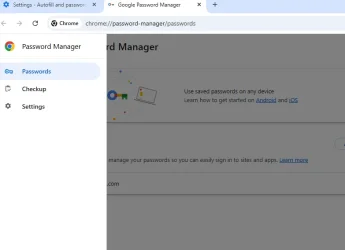
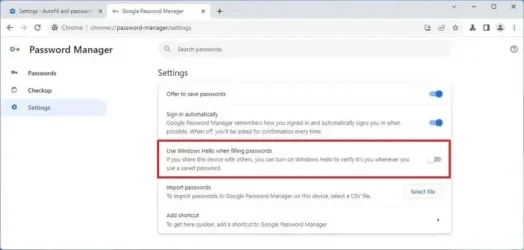
In Chrome, under password manager > settings is there an option for using Windows hello for password fill?
 

My Computer My Computer

At a glance

Linux Mint
OS
Linux Mint
Computer type
Laptop
Manufacturer/Model
System76 Lemur Pro

My Computer My Computer

At a glance

Windows 11See link in Other Info field below.See link in Other Info field below.See link in Other Info field below.
OS
Windows 11
Computer type
PC/Desktop
Manufacturer/Model
Lenovo
CPU
See link in Other Info field below.
Motherboard
See link in Other Info field below.
Memory
See link in Other Info field below.
Graphics Card(s)
See link in Other Info field below.
Sound Card
See link in Other Info field below.
Monitor(s) Displays
See link in Other Info field below.
Screen Resolution
See link in Other Info field below.
Hard Drives
See link in Other Info field below.
PSU
See link in Other Info field below.
Case
See link in Other Info field below.
Cooling
See link in Other Info field below.
Keyboard
See link in Other Info field below.
Mouse
See link in Other Info field below.
Internet Speed
See link in Other Info field below.
Browser
See link in Other Info field below.
Antivirus
See link in Other Info field below.
Other Info
Link to specs: https://www.lenovo.com/us/en/p/desktops/thinkcentre/m-series-aio/thinkcentre-m90a-pro-gen-4-27-inch-intel/len102c0039#models
These settings
1748879653217.webp

Either way it looks like Google ignores disabling 'use windows hello', so you may be stuck with it
 

My Computer My Computer

At a glance

Linux Mint
OS
Linux Mint
Computer type
Laptop
Manufacturer/Model
System76 Lemur Pro
Is your Windows a Local or Microsoft Account?

How do I disable this?

If you can't see it in chrome://flags/#use-authentication-api-for-autofill

Try a registry fix. I don't have Windows Hello on, which is not ideal if you still want Hello elsewhere. So I can't confirm.


HKEY_LOCAL_MACHINE\SOFTWARE\Policies\Google\Chrome

  • (Create the path if it doesn’t exist.)
  • Create a new DWORD (32-bit) Value:
    • Name: PasswordManagerUseNativeBackend
    • Value: 0
  • Restart Chrome.
 

My Computers My Computers

  • At a glance

    Windows 11 Pro 25H2 Build 26200.8655Intel(R) Core(TM) i7-4770K CPU @ 3.50GHz32.0 GB of I forget and the box is in storage.Gigabyte nVidia GeForce GTX 1660 Super OC 6GB
    OS
    Windows 11 Pro 25H2 Build 26200.8655
    Computer type
    PC/Desktop
    Manufacturer/Model
    Sin-built 2013
    CPU
    Intel(R) Core(TM) i7-4770K CPU @ 3.50GHz
    Motherboard
    ASUS ROG Maximus VI Formula
    Memory
    32.0 GB of I forget and the box is in storage.
    Graphics Card(s)
    Gigabyte nVidia GeForce GTX 1660 Super OC 6GB
    Sound Card
    ROG SupremeFX Formula 8-Channel High Definition Audio
    Monitor(s) Displays
    5 x LG 25MS500-B - 1 x 24MK430H-B - 1 x Wacom Pro 22" Touch Screen Tablet
    Screen Resolution
    All over the place
    Hard Drives
    Too many to list. OS on Samsung 1TB 870 QVO SATA
    PSU
    Silverstone 1500
    Case
    NZXT Phantom 820 Full-Tower Case
    Cooling
    Noctua NH-D15 Elite Class Dual Tower CPU Cooler / 6 x EziDIY 120mm / 2 x Corsair 140mm somethings / 1 x 140mm Thermaltake something / 2 x 200mm Corsair.
    Keyboard
    Corsair K95 / Logitech diNovo Edge Wireless
    Mouse
    Logitech: G402 / G502 / Mx Masters / Mx Air Cordless
    Internet Speed
    2000/500Mbps
    Browser
    All sorts
    Antivirus
    Kaspersky Premium
    Other Info
    ㅤㅤㅤㅤㅤㅤㅤㅤㅤㅤㅤㅤㅤㅤㅤㅤㅤㅤㅤㅤㅤㅤㅤㅤㅤㅤㅤㅤㅤㅤㅤㅤㅤㅤㅤㅤㅤㅤㅤㅤ⠀⠀⠀⠀⠀⠀⠀⠀⠀⠀
    TP-Link BE9300 WiFi 7 Bluetooth 5.4 (Archer TBE550E)
    TP-Link TX201 V1 2.5GB Lan

    Grandstream HT812 - VoIP
    ASUS DSL-AX82U - Mesh
    ASUS RT-AC68U - Mesh
    ASUS RT-BE88U Router

    Brother MFC-L2880DW Printer

    I’m on a horse.
  • At a glance

    Windows 11 Pro 25H2 Build 26200.8655 (Wifes)13th Generation Intel® Core™ i5-1340P Process...16GB LPDDR5-52001x Intel® Iris® Xe Graphics
    Operating System
    Windows 11 Pro 25H2 Build 26200.8655 (Wifes)
    Computer type
    Laptop
    Manufacturer/Model
    LENOVO Yoga 7 14IRL8 - Type 82YL
    CPU
    13th Generation Intel® Core™ i5-1340P Processor(Core™ i5-1340P)
    Memory
    16GB LPDDR5-5200
    Graphics card(s)
    1x Intel® Iris® Xe Graphics
    Sound Card
    Optimized with Dolby Atmos®
    Screen Resolution
    QHD 2880 x 1800 OLED
    Hard Drives
    M.2 512 GB SSD PCIe
    Mouse
    Logiteck MX Master 3S
    Internet Speed
    2000/500
    Antivirus
    Defender / Malwarebytes
    Other Info
    …still on a horse.


    Wireless Network: Wi-Fi 6E 2x2 AX; Bluetooth® 5.1 or above
    Ports: 1x 1 Novo button; 2 in 1 Audio Combo jack; Micro SD Card Reader; HDMI 1.4b; 2 x USB Type-C (TBT4)
    USB 3.2 Gen 2 DP 1.4a
    PD 3.0); 1 x USB 3.2 Gen1 Type A
    Camera
    1x 1080P FHD IR/RGB Hybrid with Privacy Shutter and Dual Array Microphone
    Graphics
    1x Intel® Iris® Xe Graphics
    Monitor
    14" WUXGA
    Form Factor
    Convertible Notebook
  • Windows 11 Pro 25H2 Build 26200.8655 (Wifes)

    Yoga 7 2-in-1 14IML9 - Type 83DJ

    Processor: Intel® Core™ Ultra 7 155H Processor(Core™ Ultra 7 155H)

    Memory: 32GB LPD5X-7467

    Hard Drive: 1 TB SSD PCIe

    Wireless Network: 1x Wi-Fi 6E 2x2 AX; Bluetooth® 5.1 or above

    Ports: 1 x HDMI 2.1 TMDS; 1 x Novo Button; 1 x Combo Audio Jack
    2 x USB-C (USB 4.0)
    1 x USB-A 3.2 Gen 1

    Camera: 1080P FHD IR Hybrid with Dual Microphone

    Graphics: Intel® Arc™ Graphics

    Monitor: 14" 2.8K

    ...Where's my horse?
To add (Just discovered):

As of Chrome versions 114 and later, Google enforces the Windows re-authentication prompt when trying to view saved passwords in chrome://settings/passwords.

  • This behavior is hardcoded, not policy-controlled.
  • It applies even if you're the only user on the PC.
  • The old flag #disable-password-manager-reauthentication was removed for security and compliance reasons.


Also, sometimes Windows Security prompts are more aggressive when:

  • You're using a local account with no password.
  • You’ve set up a weak or blank credential setup.
 

My Computers My Computers

  • At a glance

    Windows 11 Pro 25H2 Build 26200.8655Intel(R) Core(TM) i7-4770K CPU @ 3.50GHz32.0 GB of I forget and the box is in storage.Gigabyte nVidia GeForce GTX 1660 Super OC 6GB
    OS
    Windows 11 Pro 25H2 Build 26200.8655
    Computer type
    PC/Desktop
    Manufacturer/Model
    Sin-built 2013
    CPU
    Intel(R) Core(TM) i7-4770K CPU @ 3.50GHz
    Motherboard
    ASUS ROG Maximus VI Formula
    Memory
    32.0 GB of I forget and the box is in storage.
    Graphics Card(s)
    Gigabyte nVidia GeForce GTX 1660 Super OC 6GB
    Sound Card
    ROG SupremeFX Formula 8-Channel High Definition Audio
    Monitor(s) Displays
    5 x LG 25MS500-B - 1 x 24MK430H-B - 1 x Wacom Pro 22" Touch Screen Tablet
    Screen Resolution
    All over the place
    Hard Drives
    Too many to list. OS on Samsung 1TB 870 QVO SATA
    PSU
    Silverstone 1500
    Case
    NZXT Phantom 820 Full-Tower Case
    Cooling
    Noctua NH-D15 Elite Class Dual Tower CPU Cooler / 6 x EziDIY 120mm / 2 x Corsair 140mm somethings / 1 x 140mm Thermaltake something / 2 x 200mm Corsair.
    Keyboard
    Corsair K95 / Logitech diNovo Edge Wireless
    Mouse
    Logitech: G402 / G502 / Mx Masters / Mx Air Cordless
    Internet Speed
    2000/500Mbps
    Browser
    All sorts
    Antivirus
    Kaspersky Premium
    Other Info
    ㅤㅤㅤㅤㅤㅤㅤㅤㅤㅤㅤㅤㅤㅤㅤㅤㅤㅤㅤㅤㅤㅤㅤㅤㅤㅤㅤㅤㅤㅤㅤㅤㅤㅤㅤㅤㅤㅤㅤㅤ⠀⠀⠀⠀⠀⠀⠀⠀⠀⠀
    TP-Link BE9300 WiFi 7 Bluetooth 5.4 (Archer TBE550E)
    TP-Link TX201 V1 2.5GB Lan

    Grandstream HT812 - VoIP
    ASUS DSL-AX82U - Mesh
    ASUS RT-AC68U - Mesh
    ASUS RT-BE88U Router

    Brother MFC-L2880DW Printer

    I’m on a horse.
  • At a glance

    Windows 11 Pro 25H2 Build 26200.8655 (Wifes)13th Generation Intel® Core™ i5-1340P Process...16GB LPDDR5-52001x Intel® Iris® Xe Graphics
    Operating System
    Windows 11 Pro 25H2 Build 26200.8655 (Wifes)
    Computer type
    Laptop
    Manufacturer/Model
    LENOVO Yoga 7 14IRL8 - Type 82YL
    CPU
    13th Generation Intel® Core™ i5-1340P Processor(Core™ i5-1340P)
    Memory
    16GB LPDDR5-5200
    Graphics card(s)
    1x Intel® Iris® Xe Graphics
    Sound Card
    Optimized with Dolby Atmos®
    Screen Resolution
    QHD 2880 x 1800 OLED
    Hard Drives
    M.2 512 GB SSD PCIe
    Mouse
    Logiteck MX Master 3S
    Internet Speed
    2000/500
    Antivirus
    Defender / Malwarebytes
    Other Info
    …still on a horse.


    Wireless Network: Wi-Fi 6E 2x2 AX; Bluetooth® 5.1 or above
    Ports: 1x 1 Novo button; 2 in 1 Audio Combo jack; Micro SD Card Reader; HDMI 1.4b; 2 x USB Type-C (TBT4)
    USB 3.2 Gen 2 DP 1.4a
    PD 3.0); 1 x USB 3.2 Gen1 Type A
    Camera
    1x 1080P FHD IR/RGB Hybrid with Privacy Shutter and Dual Array Microphone
    Graphics
    1x Intel® Iris® Xe Graphics
    Monitor
    14" WUXGA
    Form Factor
    Convertible Notebook
  • Windows 11 Pro 25H2 Build 26200.8655 (Wifes)

    Yoga 7 2-in-1 14IML9 - Type 83DJ

    Processor: Intel® Core™ Ultra 7 155H Processor(Core™ Ultra 7 155H)

    Memory: 32GB LPD5X-7467

    Hard Drive: 1 TB SSD PCIe

    Wireless Network: 1x Wi-Fi 6E 2x2 AX; Bluetooth® 5.1 or above

    Ports: 1 x HDMI 2.1 TMDS; 1 x Novo Button; 1 x Combo Audio Jack
    2 x USB-C (USB 4.0)
    1 x USB-A 3.2 Gen 1

    Camera: 1080P FHD IR Hybrid with Dual Microphone

    Graphics: Intel® Arc™ Graphics

    Monitor: 14" 2.8K

    ...Where's my horse?
@author
please specify whether it annoys you to enter a masterpassword when viewing or editing passwords in chrome's internal password manager, or during auto-insertion of passwords. That are two different things.

Also FYI: setting up a the master password for chrome's pw manager does not in any way prevent external (non-chrome) processes from reading the passwords. That is not common knowledge. Please try it out and get afraid: Recover lost passwords stored in your Web browser
So you execute some malware and it just retrieves all passwords, disregarding the master password completely. Now try the same in firefox - there, setting up a master pw really makes a difference.
 

My Computer My Computer

At a glance

Win11
OS
Win11
To add (Just discovered):

As of Chrome versions 114 and later, Google enforces the Windows re-authentication prompt when trying to view saved passwords in chrome://settings/passwords.

  • This behavior is hardcoded, not policy-controlled.
  • It applies even if you're the only user on the PC.
  • The old flag #disable-password-manager-reauthentication was removed for security and compliance reasons.


Also, sometimes Windows Security prompts are more aggressive when:

  • You're using a local account with no password.
  • You’ve set up a weak or blank credential setup.

Does this mean the fix suggested in post #7 won't work? It is a Microsoft Account.

@author
please specify whether it annoys you to enter a masterpassword when viewing or editing passwords in chrome's internal password manager, or during auto-insertion of passwords. That are two different things.

It is during auto-insertion.

Would the fix in post #7 in this thread possibly work?
 

My Computer My Computer

At a glance

Windows 11See link in Other Info field below.See link in Other Info field below.See link in Other Info field below.
OS
Windows 11
Computer type
PC/Desktop
Manufacturer/Model
Lenovo
CPU
See link in Other Info field below.
Motherboard
See link in Other Info field below.
Memory
See link in Other Info field below.
Graphics Card(s)
See link in Other Info field below.
Sound Card
See link in Other Info field below.
Monitor(s) Displays
See link in Other Info field below.
Screen Resolution
See link in Other Info field below.
Hard Drives
See link in Other Info field below.
PSU
See link in Other Info field below.
Case
See link in Other Info field below.
Cooling
See link in Other Info field below.
Keyboard
See link in Other Info field below.
Mouse
See link in Other Info field below.
Internet Speed
See link in Other Info field below.
Browser
See link in Other Info field below.
Antivirus
See link in Other Info field below.
Other Info
Link to specs: https://www.lenovo.com/us/en/p/desktops/thinkcentre/m-series-aio/thinkcentre-m90a-pro-gen-4-27-inch-intel/len102c0039#models

My Computer My Computer

At a glance

Windows 11See link in Other Info field below.See link in Other Info field below.See link in Other Info field below.
OS
Windows 11
Computer type
PC/Desktop
Manufacturer/Model
Lenovo
CPU
See link in Other Info field below.
Motherboard
See link in Other Info field below.
Memory
See link in Other Info field below.
Graphics Card(s)
See link in Other Info field below.
Sound Card
See link in Other Info field below.
Monitor(s) Displays
See link in Other Info field below.
Screen Resolution
See link in Other Info field below.
Hard Drives
See link in Other Info field below.
PSU
See link in Other Info field below.
Case
See link in Other Info field below.
Cooling
See link in Other Info field below.
Keyboard
See link in Other Info field below.
Mouse
See link in Other Info field below.
Internet Speed
See link in Other Info field below.
Browser
See link in Other Info field below.
Antivirus
See link in Other Info field below.
Other Info
Link to specs: https://www.lenovo.com/us/en/p/desktops/thinkcentre/m-series-aio/thinkcentre-m90a-pro-gen-4-27-inch-intel/len102c0039#models
During auto insertion? If you wanted to, you could turn off asking altogether, that's another option in the depicted chrome password menu ("sign in automatically")
 

My Computer My Computer

At a glance

Win11
OS
Win11

Latest Support Threads

Back
Top Bottom