Windows taskbar peek/preview is blank


empleat

Well-known member
Local time
5:30 PM
Posts
116
OS
Windows 11 Pro 22H2 22621.963
I don't know how it calls, i am talking about this: Taskbar Thumbnail Preview not working in Windows 11/10

When you hover over a window on the taskbar e.g. browser, you get preview of opened windows from taskbar.

But sometimes it shows only one big blank rectangle instead of windows. All things in appearance are on and i tried some troubleshoting, but couldn't find solution yet. This is pretty vital to anything! Need to fix this ASAP!

Thanks!
 

My Computer My Computer

At a glance

Windows 11 Pro 22H2 22621.963I5 9600 KfG.Skill Trident Z 3200mhz 2x8GBRTX 3070
OS
Windows 11 Pro 22H2 22621.963
Computer type
PC/Desktop
CPU
I5 9600 Kf
Motherboard
ASUS Z390-i Gaming
Memory
G.Skill Trident Z 3200mhz 2x8GB
Graphics Card(s)
RTX 3070
Monitor(s) Displays
AOC G2590fx
Screen Resolution
1920x1080
Hard Drives
NVME:
Adata XPG8200 Pro (1024GB)
HDD:
WDC WD40EZRZ-00GXCB0
PSU
Corsair RX650RM .2018
Keyboard
Cooler master Nova Touch PRO
Mouse
MX VERTICAL ADVANCED ERGONOMIC MOUSE
Browser
Chrome, Firefox
Did you try system file checker SFC if so what were the results ? What other troubleshooting have you done ?
 

My Computer My Computer

At a glance

Windows 11 ProIntel Core i7 10700KF 3.8 MHzG.Skill Trident RGB Series 64GB DDR4-3600MHzASUS ROG Strix GeForce RTX 3060 Ti OC Edition
OS
Windows 11 Pro
Computer type
PC/Desktop
Manufacturer/Model
jds63 /self built
CPU
Intel Core i7 10700KF 3.8 MHz
Motherboard
ASUS ROG Strix Z490-E Gaming
Memory
G.Skill Trident RGB Series 64GB DDR4-3600MHz
Graphics Card(s)
ASUS ROG Strix GeForce RTX 3060 Ti OC Edition
Sound Card
Creative Sound BlasterX AE-5 Plus
Monitor(s) Displays
ASUS VG28UQL1A 28" 144 Mhz 4K Monitor
Screen Resolution
3840 X 2160p HDR
Hard Drives
Samsung 970 EVO Plus NVMe 500GB M.2 Drive, (2) Samsung 870 EVO 1TB SATA III Internal SSD, (2) Samsung 860 EVO 1TB SATA III Internal SSD & Seagate Barracuda 2TB
PSU
ASUS ROG Thor 850 80+ Platinum 850W Fully Modular RGB Power Supply
Case
Lian Li Lancool II Mesh Performance
Cooling
Noctua NH-U12A CPU Cooler, (5) Noctua NF-A12x15 chromax.black.swap 120mm, (3) Lepa BOL.Quiet PWM LED 120mm
Keyboard
Logitech MX Keys
Mouse
Logitech MX Ergo Trackball
Internet Speed
325Mbps/ 20Mbps
Browser
Mozilla Firefox 64-bit, Microsoft Edge
Antivirus
Kaspersky Plus 2023
Other Info
Pioneer Blu-Ray/DVD Burner 209DBK, Logitech Z906 5.1 Speakers and Epson XP7100 All-in-One Printer
Yes. I just fresly updated, so it shouldn't be also a problem.

Dunno, there is not much I found! It is bugging since Update!
 

My Computer My Computer

At a glance

Windows 11 Pro 22H2 22621.963I5 9600 KfG.Skill Trident Z 3200mhz 2x8GBRTX 3070
OS
Windows 11 Pro 22H2 22621.963
Computer type
PC/Desktop
CPU
I5 9600 Kf
Motherboard
ASUS Z390-i Gaming
Memory
G.Skill Trident Z 3200mhz 2x8GB
Graphics Card(s)
RTX 3070
Monitor(s) Displays
AOC G2590fx
Screen Resolution
1920x1080
Hard Drives
NVME:
Adata XPG8200 Pro (1024GB)
HDD:
WDC WD40EZRZ-00GXCB0
PSU
Corsair RX650RM .2018
Keyboard
Cooler master Nova Touch PRO
Mouse
MX VERTICAL ADVANCED ERGONOMIC MOUSE
Browser
Chrome, Firefox
Yes. I just fresly updated, so it shouldn't be also a problem.

Dunno, there is not much I found! It is bugging since Update!
Guess you disabled and enabled feature ? Least some of stuff mentioned in article you posted.
Again system file checker found nothing ? Using any third party programs for start menu or themes ?
 

My Computer My Computer

At a glance

Windows 11 ProIntel Core i7 10700KF 3.8 MHzG.Skill Trident RGB Series 64GB DDR4-3600MHzASUS ROG Strix GeForce RTX 3060 Ti OC Edition
OS
Windows 11 Pro
Computer type
PC/Desktop
Manufacturer/Model
jds63 /self built
CPU
Intel Core i7 10700KF 3.8 MHz
Motherboard
ASUS ROG Strix Z490-E Gaming
Memory
G.Skill Trident RGB Series 64GB DDR4-3600MHz
Graphics Card(s)
ASUS ROG Strix GeForce RTX 3060 Ti OC Edition
Sound Card
Creative Sound BlasterX AE-5 Plus
Monitor(s) Displays
ASUS VG28UQL1A 28" 144 Mhz 4K Monitor
Screen Resolution
3840 X 2160p HDR
Hard Drives
Samsung 970 EVO Plus NVMe 500GB M.2 Drive, (2) Samsung 870 EVO 1TB SATA III Internal SSD, (2) Samsung 860 EVO 1TB SATA III Internal SSD & Seagate Barracuda 2TB
PSU
ASUS ROG Thor 850 80+ Platinum 850W Fully Modular RGB Power Supply
Case
Lian Li Lancool II Mesh Performance
Cooling
Noctua NH-U12A CPU Cooler, (5) Noctua NF-A12x15 chromax.black.swap 120mm, (3) Lepa BOL.Quiet PWM LED 120mm
Keyboard
Logitech MX Keys
Mouse
Logitech MX Ergo Trackball
Internet Speed
325Mbps/ 20Mbps
Browser
Mozilla Firefox 64-bit, Microsoft Edge
Antivirus
Kaspersky Plus 2023
Other Info
Pioneer Blu-Ray/DVD Burner 209DBK, Logitech Z906 5.1 Speakers and Epson XP7100 All-in-One Printer
Yeah I tried disabled enable it in appearance. No third party programs for taskbar, or themes and that sort-of thing...
 

My Computer My Computer

At a glance

Windows 11 Pro 22H2 22621.963I5 9600 KfG.Skill Trident Z 3200mhz 2x8GBRTX 3070
OS
Windows 11 Pro 22H2 22621.963
Computer type
PC/Desktop
CPU
I5 9600 Kf
Motherboard
ASUS Z390-i Gaming
Memory
G.Skill Trident Z 3200mhz 2x8GB
Graphics Card(s)
RTX 3070
Monitor(s) Displays
AOC G2590fx
Screen Resolution
1920x1080
Hard Drives
NVME:
Adata XPG8200 Pro (1024GB)
HDD:
WDC WD40EZRZ-00GXCB0
PSU
Corsair RX650RM .2018
Keyboard
Cooler master Nova Touch PRO
Mouse
MX VERTICAL ADVANCED ERGONOMIC MOUSE
Browser
Chrome, Firefox
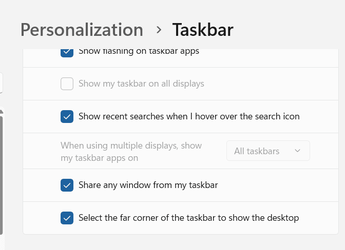
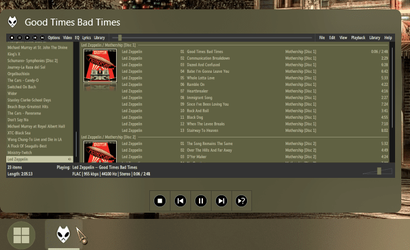
I find on my Win11 computers [2 Desktops and 1 Notebook] that the Peek of Win10 isn't the same, doesn't have the Hover to make programs transparent, only has the click to minimize and click again to restore.

Image attach didn't make it, trying again.

1671915780731.png
 
Last edited:

My Computers My Computers

  • At a glance

    Win11 Pro RTM Version 24H2 Build 26100.4202Intel Core i5 11th Gen. 2.40GHz12GB
    OS
    Win11 Pro RTM Version 24H2 Build 26100.4202
    Computer type
    Laptop
    Manufacturer/Model
    Dell Vostro 3400
    CPU
    Intel Core i5 11th Gen. 2.40GHz
    Memory
    12GB
    Hard Drives
    256GB SSD NVMe M.2
  • At a glance

    Win11 Pro RTM Version 24H2 Build 26100.4202Intel Core i5 10th Gen. 2.90GHz16GBOnboard, no VGA, using a DisplayPort-to-VGA a...
    Operating System
    Win11 Pro RTM Version 24H2 Build 26100.4202
    Computer type
    PC/Desktop
    Manufacturer/Model
    Dell Vostro 5890
    CPU
    Intel Core i5 10th Gen. 2.90GHz
    Memory
    16GB
    Graphics card(s)
    Onboard, no VGA, using a DisplayPort-to-VGA adapter
    Monitor(s) Displays
    24" Dell
    Hard Drives
    512GB SSD NVMe, 4TB Seagate HDD
    Browser
    Firefox, Edge
    Antivirus
    Windows Defender/Microsoft Security
What there?
 

My Computer My Computer

At a glance

Windows 11 Pro 22H2 22621.963I5 9600 KfG.Skill Trident Z 3200mhz 2x8GBRTX 3070
OS
Windows 11 Pro 22H2 22621.963
Computer type
PC/Desktop
CPU
I5 9600 Kf
Motherboard
ASUS Z390-i Gaming
Memory
G.Skill Trident Z 3200mhz 2x8GB
Graphics Card(s)
RTX 3070
Monitor(s) Displays
AOC G2590fx
Screen Resolution
1920x1080
Hard Drives
NVME:
Adata XPG8200 Pro (1024GB)
HDD:
WDC WD40EZRZ-00GXCB0
PSU
Corsair RX650RM .2018
Keyboard
Cooler master Nova Touch PRO
Mouse
MX VERTICAL ADVANCED ERGONOMIC MOUSE
Browser
Chrome, Firefox
Joodis Preece!
Thread after thread after thread about how fecked up W11 Explorer is!
Shop around for an alternative shell. StartAllBack is a good one.

0002177.png
 

My Computers My Computers

  • At a glance

    Windows 11 Pro
    OS
    Windows 11 Pro
    Computer type
    PC/Desktop
    Manufacturer/Model
    ASUS ROG Strix
  • At a glance

    Windows 11 Pro
    Operating System
    Windows 11 Pro
    Computer type
    Laptop
    Manufacturer/Model
    ASUS VivoBook
  • ASUS VivoBook 'Lite' ~ Windows 11 Home
Joodis Preece!
Thread after thread after thread about how fecked up W11 Explorer is!
Shop around for an alternative shell. StartAllBack is a good one.
I will rather switch to Linux, I can't just right now I suffer from chronic pain, it is tons of work...
 

My Computer My Computer

At a glance

Windows 11 Pro 22H2 22621.963I5 9600 KfG.Skill Trident Z 3200mhz 2x8GBRTX 3070
OS
Windows 11 Pro 22H2 22621.963
Computer type
PC/Desktop
CPU
I5 9600 Kf
Motherboard
ASUS Z390-i Gaming
Memory
G.Skill Trident Z 3200mhz 2x8GB
Graphics Card(s)
RTX 3070
Monitor(s) Displays
AOC G2590fx
Screen Resolution
1920x1080
Hard Drives
NVME:
Adata XPG8200 Pro (1024GB)
HDD:
WDC WD40EZRZ-00GXCB0
PSU
Corsair RX650RM .2018
Keyboard
Cooler master Nova Touch PRO
Mouse
MX VERTICAL ADVANCED ERGONOMIC MOUSE
Browser
Chrome, Firefox
This starts to annoying me is there some fix for it?
 

My Computer My Computer

At a glance

Windows 11 Pro 22H2 22621.963I5 9600 KfG.Skill Trident Z 3200mhz 2x8GBRTX 3070
OS
Windows 11 Pro 22H2 22621.963
Computer type
PC/Desktop
CPU
I5 9600 Kf
Motherboard
ASUS Z390-i Gaming
Memory
G.Skill Trident Z 3200mhz 2x8GB
Graphics Card(s)
RTX 3070
Monitor(s) Displays
AOC G2590fx
Screen Resolution
1920x1080
Hard Drives
NVME:
Adata XPG8200 Pro (1024GB)
HDD:
WDC WD40EZRZ-00GXCB0
PSU
Corsair RX650RM .2018
Keyboard
Cooler master Nova Touch PRO
Mouse
MX VERTICAL ADVANCED ERGONOMIC MOUSE
Browser
Chrome, Firefox
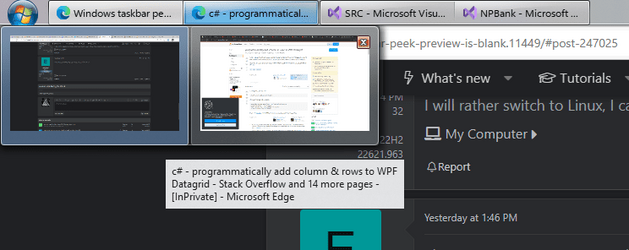
If I understood correctly, you're talking about these previews
1674058186895.png
I had that issue before, when I first upgraded from Win10 to 11. I didn't know how to fix it, so I just ended up clean reinstalling Win11 which resolved the issue. Unfortunately, I can't offer you any better advice.
I'm using StartAllBack here, and it truly is amazing, at least for my needs.
 

My Computer My Computer

At a glance

Windows 11
OS
Windows 11
Interesting this bug is still happening! Even after I installed StartAllBack!!!
 

My Computer My Computer

At a glance

Windows 11 Pro 22H2 22621.963I5 9600 KfG.Skill Trident Z 3200mhz 2x8GBRTX 3070
OS
Windows 11 Pro 22H2 22621.963
Computer type
PC/Desktop
CPU
I5 9600 Kf
Motherboard
ASUS Z390-i Gaming
Memory
G.Skill Trident Z 3200mhz 2x8GB
Graphics Card(s)
RTX 3070
Monitor(s) Displays
AOC G2590fx
Screen Resolution
1920x1080
Hard Drives
NVME:
Adata XPG8200 Pro (1024GB)
HDD:
WDC WD40EZRZ-00GXCB0
PSU
Corsair RX650RM .2018
Keyboard
Cooler master Nova Touch PRO
Mouse
MX VERTICAL ADVANCED ERGONOMIC MOUSE
Browser
Chrome, Firefox

My Computer My Computer

At a glance

Windows 10
OS
Windows 10
Computer type
Laptop
Manufacturer/Model
Lenovo ThinkPad P1 Gen 6

Latest Support Threads

Back
Top Bottom