
Windows Update Problem


boy1der

Member
Local time
3:53 AM
Posts
1
Location
Breckenridge, TX
OS
Windows 11
Windows 11
Can't get rid of the "2024-10 Cumulative Update for Windows 11 Version 22H2 for x64-based Systems (KB5044285)". I can't update past it. I've tried all the troubleshooting steps and suggestions, and it persists. I go to Update History and there is 50 to 60 of the same (above update) listed. I've tried the "Uninstall Updates" option, and it didn't work either.
I've even tried to reinstall the Windows OS, and it runs and runs, then fails.

I'm 80 yrs old and not real tech savvy, but can follow step by step instructions fairly well.

PLEASE HELP.
Thanks
 
Windows Build/Version
Windows 11 Version 22H2 for x64-based Systems (OS Build 22621.755)

Attachments
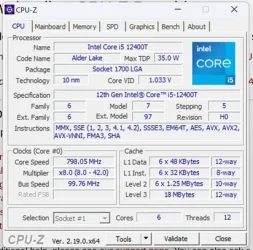
  • CPU-Z_Run Results.webp
    CPU-Z_Run Results.webp
    34.8 KB · Views: 1

My Computer

System One

  • OS
    Windows 11
    Computer type
    PC/Desktop
    Manufacturer/Model
    HP All-In-One
    CPU
    12th Gen Intel(R) Core(TM) i5-12400T
    Motherboard
    SSD 892C 94.33
    Memory
    16 GB
    Graphics Card(s)
    Intel(R) UHD Graphics 730
    Sound Card
    Realtek High Definition Audio
Please run these scripts > post share links

Drop box

Google drive

GoFile.io


1) V2 log collector


2) tuneup_plus_log.bat


3) upgrade_failure_info.bat


4) List any of these installed non-Microsoft software:
a) Antivirus
b) Firewall
c) Drive encryption
 

My Computer

System One

  • OS
    Windows 10
    Computer type
    Laptop
    Manufacturer/Model
    HP
    CPU
    Intel(R) Core(TM) i7-4800MQ CPU @ 2.70GHz
    Motherboard
    Product : 190A Version : KBC Version 94.56
    Memory
    16 GB Total: Manufacturer : Samsung MemoryType : DDR3 FormFactor : SODIMM Capacity : 8GB Speed : 1600
    Graphics Card(s)
    NVIDIA Quadro K3100M; Intel(R) HD Graphics 4600
    Sound Card
    IDT High Definition Audio CODEC; PNP Device ID HDAUDIO\FUNC_01&VEN_111D&DEV_76E0
    Hard Drives
    Model Hitachi HTS727575A9E364
    Antivirus
    Microsoft Defender
    Other Info
    Mobile Workstation
The following are general WU troubleshooting steps. Your device should be fully compatible yet you are running 22h2 22621.755 which means you have received no updates since Oct. 2022. Since 11 is now at 25h2, you ares 3 1/2 years and 3 versions behind plus many updates. Unless you have been updating your drivers manually, that also means you have gotten no driver updates in over 3 years. I recommend you jump straight to step 5. Download the iso and attempt an in-place upgrade.(also known as a repair install) Create installation media with that iso in case a clean install is required. Also I suggest you backup your user files, 3rd party software license keys, browser favorites, just in case the upgrade fails (which is likely to happen) and you end up having to do a clean install. Create Windows 11 Bootable USB Installation Media

WINDOWS UPDATE PROBLEMS general troubleshooting things to try

1. Run troubleshooter-settings-system-troubleshoot-other troubleshooters-windows update-RUN.

2. Reset Windows update using Brink's tutorial Reset Windows Update in Windows 11 Tutorial

3. Open command prompt as administrator. Enter this command.
dism /online /cleanup-image /restorehealth
When complete, Restart computer

Then open command prompt as admin again and run sfc /scannow
Pay attention to the scan results to see if SFC found anything it could not repair

4. CLEAN UP COMPONENT STORE - dism /online /cleanup-image /startcomponentcleanup
Analyze and Clean Up Component Store (WinSxS folder) in Windows 11 Tutorial

5. Do a repair install. This usually works when nothing else will. Repair Install Windows 11 with an In-place Upgrade Tutorial

Worse comes to worse, use the install usb you created to clean install. Clean Install Windows 11
 

My Computers

System One System Two

  • OS
    Windows 11 Pro 25H2
    Computer type
    PC/Desktop
    Manufacturer/Model
    Dell Optiplex 7080
    CPU
    i9-10900 10 core 20 threads
    Motherboard
    DELL 0J37VM
    Memory
    32 gb
    Graphics Card(s)
    none-Intel UHD Graphics 630
    Sound Card
    Integrated Realtek
    Monitor(s) Displays
    Benq 27
    Screen Resolution
    2560x1440
    Hard Drives
    2x1tb Solidigm m.2 nvme /External drives 512gb Samsung m.2 sata+2tb Kingston m2.nvme
    PSU
    500w
    Case
    MT
    Cooling
    Dell Premium
    Keyboard
    Logitech wired
    Mouse
    Logitech wireless
    Internet Speed
    so slow I'm too embarrassed to tell
    Browser
    #1 Edge #2 Firefox
    Antivirus
    Defender+MWB Premium
  • Operating System
    Windows 11 Pro 24H2 26200.8457
    Computer type
    PC/Desktop
    Manufacturer/Model
    Beelink Mini PC SER5
    CPU
    AMD Ryzen 7 6800U
    Memory
    32 gb
    Graphics card(s)
    integrated
    Sound Card
    integrated
    Monitor(s) Displays
    Benq 27
    Screen Resolution
    2560x1440
    Hard Drives
    1TB Crucial nvme
    Keyboard
    Logitech wired
    Mouse
    Logitech wireless
    Internet Speed
    still too embarrassed to tell
    Browser
    Firefox
    Antivirus
    Defender
    Other Info
    System 3 is non compliant Dell 9020 i7-4770/24gb ram Win11 PRO 26200.8457

Latest Support Threads

Back
Top Bottom



