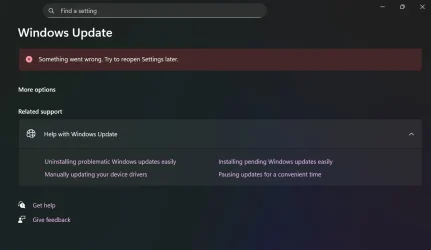
Windows update | Something went wrong. Try to reopen Settings later


Bazooka Joe

Member
Local time
6:08 PM
Posts
3
OS
Windows 11
Hi All,

I hope this problem will interest someone and help us solve it.
For the past couple of mounts, we were upgrading Win10 to Win11, over Intune with Update rings, and we noticed that versions 24H2 and 25H2 have some glitch in the settings app. Whenever you open it, it opens normally for a split of a second the update tab, and then the red banner pops up.
Version 23H2is not affected.
Updates are working normally, they are downloading and installing, but UI part and "control" is not showing. This is causing a lot of tickets for the Intune Team.

We tried probably everything, DSIM, SFC, Update repair, Reg keys, re-register settings app. uninstall every update KB showing. We triple checked update policies, rings, config files, even Microsoft said "it's not Intune, it's a Windows problem" and sent the case to Windows Team.

I'm not confident in their help, so I'm asking here for the help.

(short video)

Untitled.webp
 
Windows Build/Version
Windows 11 Enterprise 24H2 26100.7623

My Computer

System One

  • OS
    Windows 11
    Computer type
    Laptop
    Manufacturer/Model
    Lenovo
Use Windows Update Troubleshooter.


  • Right-click on Start button and pick Settings
  • Go to System > Troubleshoot
  • Click on Other Troubleshooters > Windows Update and click Run button.


Download Windows updates manually.


  • Go to the official Microsoft update catalog;
  • Enter a specific update code, for example, KB4481031
  • Select the correct version and click Download
  • Click on the link and Windows will update your computer


Resetting the Windows Update components can usually solve these types of issues.


My Computer

System One

  • OS
    Windows 11
    Computer type
    PC/Desktop
    Manufacturer/Model
    HP Pavilion
    CPU
    AMD Ryzen 7 5700G
    Motherboard
    Erica6
    Memory
    Micron Technology DDR4-3200 16GB
    Graphics Card(s)
    NVIDIA GeForce RTX 3060
    Sound Card
    Realtek ALC671
    Monitor(s) Displays
    Samsung SyncMaster U28E590
    Screen Resolution
    3840 x 2160
    Hard Drives
    SAMSUNG MZVLQ1T0HALB-000H1
Use Windows Update Troubleshooter.


  • Right-click on Start button and pick Settings
  • Go to System > Troubleshoot
  • Click on Other Troubleshooters > Windows Update and click Run button.


Download Windows updates manually.


  • Go to the official Microsoft update catalog;
  • Enter a specific update code, for example, KB4481031
  • Select the correct version and click Download
  • Click on the link and Windows will update your computer


Resetting the Windows Update components can usually solve these types of issues.

Thanks FreeBooster, but we already tried all that, we have at least 10 machines running 24 and 25H2 with the same problem, every new laptop that upgrades from 23H2 gets the same issue.

But my hope is still alive :')
 

My Computer

System One

  • OS
    Windows 11
    Computer type
    Laptop
    Manufacturer/Model
    Lenovo

My Computer

System One

  • OS
    Windows 11
    Computer type
    PC/Desktop
    Manufacturer/Model
    HP Pavilion
    CPU
    AMD Ryzen 7 5700G
    Motherboard
    Erica6
    Memory
    Micron Technology DDR4-3200 16GB
    Graphics Card(s)
    NVIDIA GeForce RTX 3060
    Sound Card
    Realtek ALC671
    Monitor(s) Displays
    Samsung SyncMaster U28E590
    Screen Resolution
    3840 x 2160
    Hard Drives
    SAMSUNG MZVLQ1T0HALB-000H1
Thanks FreeBooster, but we already tried all that, we have at least 10 machines running 24 and 25H2 with the same problem, every new laptop that upgrades from 23H2 gets the same issue.

But my hope is still alive :')
Some folks have mentioned on Reddit, that forcing an (one-time) update thru PS "fixed" their issue.


My Computer

System One

  • OS
    Windows 7
Please select one computer.


1) Add WMIC:


2) Run upgrade_failure_info.bat > post a share link


3) Run tuneup_plus_log.bat > post a share link


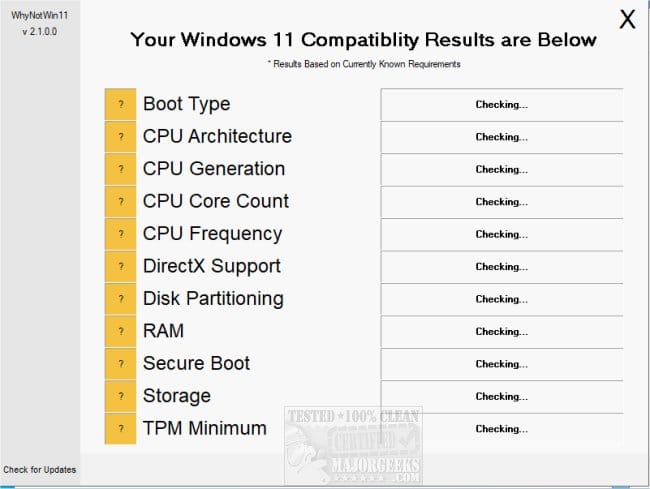
4) Run whynotwin11 > post a share link


5) Run the V2 log collector > post a share link


My Computer

System One

  • OS
    Windows 10
    Computer type
    Laptop
    Manufacturer/Model
    HP
    CPU
    Intel(R) Core(TM) i7-4800MQ CPU @ 2.70GHz
    Motherboard
    Product : 190A Version : KBC Version 94.56
    Memory
    16 GB Total: Manufacturer : Samsung MemoryType : DDR3 FormFactor : SODIMM Capacity : 8GB Speed : 1600
    Graphics Card(s)
    NVIDIA Quadro K3100M; Intel(R) HD Graphics 4600
    Sound Card
    IDT High Definition Audio CODEC; PNP Device ID HDAUDIO\FUNC_01&VEN_111D&DEV_76E0
    Hard Drives
    Model Hitachi HTS727575A9E364
    Antivirus
    Microsoft Defender
    Other Info
    Mobile Workstation
Hi Everyone, sorry for my late response.
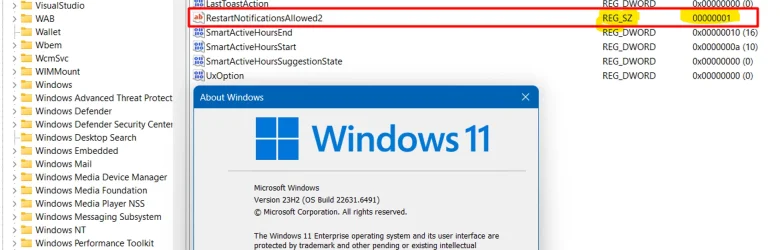
I was in the Hospital, if that counts. In the mean time, my colleagues were in contact with the Microsoft and they found that Intune Policy or a Config file is changing one REG key. We are still waiting for them to pin point the exact source of the problem.

When we recreate the key to DWORD value 1, red banner disappears and everything works as it should.
HKEY_LOCAL_MACHINE\SOFTWARE\Microsoft\WindowsUpdate\UX\Settings

1771420981058.webp

Thanks everyone for the help, and I hope this info helps someone in the future.
 

My Computer

System One

  • OS
    Windows 11
    Computer type
    Laptop
    Manufacturer/Model
    Lenovo

Latest Support Threads

Back
Top Bottom