
Solved Windows Update trying to install NVIDIA Display Driver Update (32.0.16.1088)


Onionbelly

New member
Local time
11:23 AM
Posts
6
OS
Windows 11
Hello,

As per the title and screenshot, Windows 11 (26H2) automatically downloaded this NVIDIA Display Driver Update. To my knowledge, these NVIDIA updates are only automatically downloaded and installed on a fresh Windows 11 installation when no other display drivers are present. I already have NVIDIA driver version 596.49 installed (I prefer this version), so I am not sure why Windows is pushing an update I do not even need. It looks like it has already downloaded the driver and will install it automatically in the future, so I suspect that Wushowhide will not do anything.

There is a user on other forum who has the latest NVIDIA update (617.42) experiencing the same issue, so this seems like a bug. Does anyone know a fix for this?
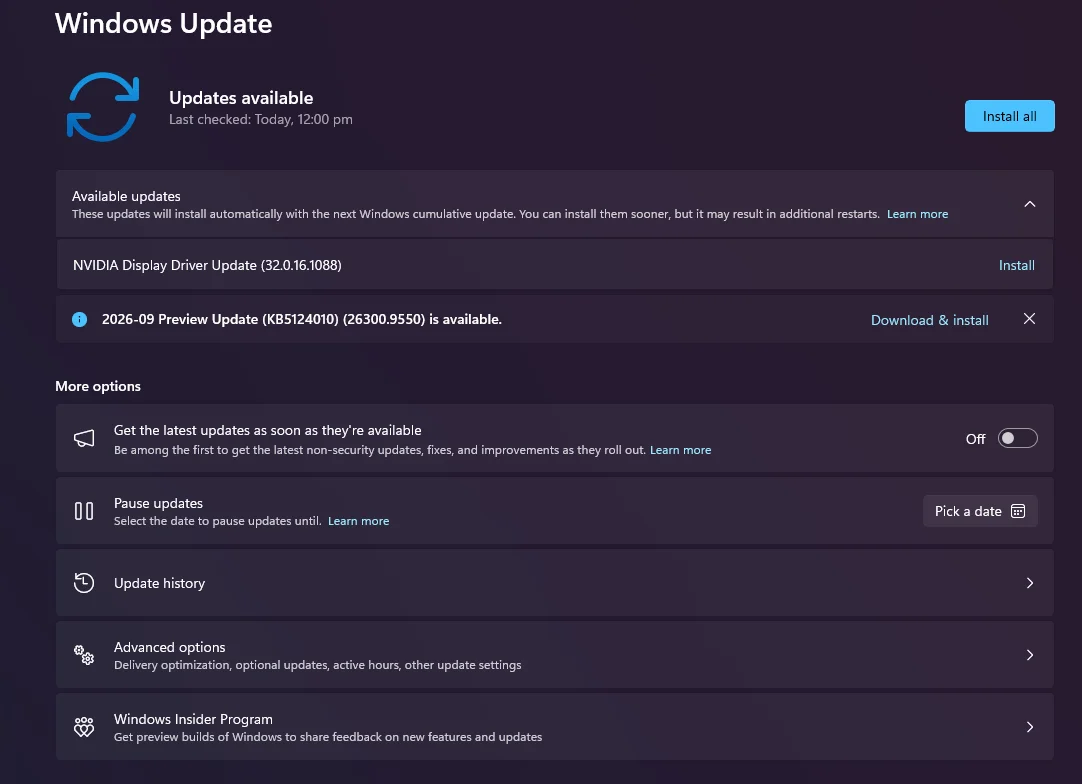
1791367492103.webp
 
Windows Build/Version
26H2 (26300.9457)

My Computer My Computer

At a glance

Windows 11
OS
Windows 11
Computer type
PC/Desktop

My Computer My Computer

At a glance

Windows 11 Pro 25H2 26200.7922Intel Core i9 13900F2 x Kingston Fury 32gb DDR5 5600 BeastGigabyte Eagle (Nvidia) RTX 3060
OS
Windows 11 Pro 25H2 26200.7922
Computer type
PC/Desktop
Manufacturer/Model
Local shop built (KC Computers Ltd)
CPU
Intel Core i9 13900F
Motherboard
Gigabyte Z690 Gaming X (rev. 1.0/1.1) - (BIOS: F32 09 18 2025)
Memory
2 x Kingston Fury 32gb DDR5 5600 Beast
Graphics Card(s)
Gigabyte Eagle (Nvidia) RTX 3060
Sound Card
Chord Async USB 44.1kHz - 384kHz 2Qute DAC
Monitor(s) Displays
Gigabyte AORUS FO32U2 32” OLED Flat Gaming Monitor, 0.03ms, KVM, 250 cd/m2, FreeSync Premium Pro, HDR True Black 400
Screen Resolution
3840 x 2160 (UHD), 240Hz
Hard Drives
1 x KINGSTON NVMe M.2 SSDSKC3000D2048G 2TB
1 x Samsung SSD 870 EVO 250GB
2 x Crucial CT4000MX500SSD1 4TB
2 x Crucial CT2000MX500SSD1 2TB
1 x Crucial CT250MX500SSD1 250.0 GB
PSU
Gigabyte 750w
Case
Fractal Torrent
Cooling
Stock Intel CPU, 2 x Fractal 180mm PWM (front), 3 x Fractal 140mm PWM (bottom)
Keyboard
Logitech MX Mechanical Wireless Illuminated Performance Keyboard
Mouse
Logitech MX Master 3S Wireless Performance Mouse
Internet Speed
900 Mbps/900 Mbps Trooli FTTP
Browser
Firefox
Antivirus
Eset Nod32
There is no issue, install it.
You can always roll it back.
Been using Nvidia drivers and updates for 25+ years and they make very little difference except maybe for people on the latest Graphics Card/games.
I do run an App that goes through all Graphics features for testing purposes.

Install the second one as well whilst only a preview it did fix one issue in a feature I use. the 'real' one comes along in 2 weeks or so anyway.
 

My Computer My Computer

At a glance

Windows 11
OS
Windows 11
There is no issue, install it.
You can always roll it back.
Been using Nvidia drivers and updates for 25+ years and they make very little difference except maybe for people on the latest Graphics Card/games.
I do run an App that goes through all Graphics features for testing purposes.

Install the second one as well whilst only a preview it did fix one issue in a feature I use. the 'real' one comes along in 2 weeks or so anyway.

There have been frame pacing issues with smooth motion enabled on later driver versions, so I prefer 596.49. I find it more stable.

Updating the NVIDIA driver via Windows Update doesn't even install the latest driver, so for users with the most recent driver version (617.42), Windows Update will downgrade the driver, which makes absolutely no sense.
 

My Computer My Computer

At a glance

Windows 11
OS
Windows 11
Computer type
PC/Desktop
The latest driver version according to Device Manager is v32.0.16.1742. I'm currently using the latest official Studio Drivers Version 617.42 released on 6th October (not beta). The Game Ready drivers currently have the same version number 617.42.
 

My Computer My Computer

At a glance

Windows 11 Pro 25H2 26200.7922Intel Core i9 13900F2 x Kingston Fury 32gb DDR5 5600 BeastGigabyte Eagle (Nvidia) RTX 3060
OS
Windows 11 Pro 25H2 26200.7922
Computer type
PC/Desktop
Manufacturer/Model
Local shop built (KC Computers Ltd)
CPU
Intel Core i9 13900F
Motherboard
Gigabyte Z690 Gaming X (rev. 1.0/1.1) - (BIOS: F32 09 18 2025)
Memory
2 x Kingston Fury 32gb DDR5 5600 Beast
Graphics Card(s)
Gigabyte Eagle (Nvidia) RTX 3060
Sound Card
Chord Async USB 44.1kHz - 384kHz 2Qute DAC
Monitor(s) Displays
Gigabyte AORUS FO32U2 32” OLED Flat Gaming Monitor, 0.03ms, KVM, 250 cd/m2, FreeSync Premium Pro, HDR True Black 400
Screen Resolution
3840 x 2160 (UHD), 240Hz
Hard Drives
1 x KINGSTON NVMe M.2 SSDSKC3000D2048G 2TB
1 x Samsung SSD 870 EVO 250GB
2 x Crucial CT4000MX500SSD1 4TB
2 x Crucial CT2000MX500SSD1 2TB
1 x Crucial CT250MX500SSD1 250.0 GB
PSU
Gigabyte 750w
Case
Fractal Torrent
Cooling
Stock Intel CPU, 2 x Fractal 180mm PWM (front), 3 x Fractal 140mm PWM (bottom)
Keyboard
Logitech MX Mechanical Wireless Illuminated Performance Keyboard
Mouse
Logitech MX Master 3S Wireless Performance Mouse
Internet Speed
900 Mbps/900 Mbps Trooli FTTP
Browser
Firefox
Antivirus
Eset Nod32
The latest driver version according to Device Manager is v32.0.16.1742. I'm currently using the latest official Studio Drivers Version 617.42 released on 6th October (not beta). The Game Ready drivers currently have the same version number 617.42.
Thanks for the reply. I downloaded the latest Game Ready Driver (617.42) to test this, but Windows Update still pushes 32.0.16.1088, and it installs 610.74 driver.

EDIT: To clarify, When I installed that 32.0.16.1088 driver while on driver 596.49, it installed 610.74, but after installing 617.42 downloaded from NVIDIA website, installing that 32.0.16.1088 update didn't change the driver version after a reboot. I assume Windows noticed that I have a more recent driver and cancelled the update. Strange regardless.
 
Last edited:

My Computer My Computer

At a glance

Windows 11
OS
Windows 11
Computer type
PC/Desktop
I installed that driver yesterday via Windows Update; there were no issues.
 

My Computer My Computer

At a glance

Windows 11 Professional 25H2Intel Core i9 11900K64GBNVIDIA GeForce GTX 1650
OS
Windows 11 Professional 25H2
Computer type
PC/Desktop
Manufacturer/Model
Digital Storm VELOX
CPU
Intel Core i9 11900K
Motherboard
ASUS PRIME Z590-P
Memory
64GB
Graphics Card(s)
NVIDIA GeForce GTX 1650
Sound Card
Realtek onboard
Monitor(s) Displays
Acer R221Q 21.5"
Screen Resolution
1920 x 1080
Hard Drives
2 x Samsung SSD 990 EVO Plus (1 TB)
2 x Seagate ST4000NE001 (4 TB)
PSU
None
Case
VELOX
Cooling
Cooler Master
Keyboard
Logitech
Mouse
Kensington trackball
Browser
Firefox, Chrome
Antivirus
Windows Defender, Malwarebytes
A few days ago I installed the latest NVidia GPU driver but Windows Update offered an older version - see Windows Update Offering Old NVidia Driver Update

I couldn't easily block the update and the only button displayed was to download and install the update with no option to rescan. I just paused then renabled updates then the driver updates pushed by Windows disappeared and hasn't been offered since. Just another example of shoddy software engineering by MS.
 

My Computer My Computer

At a glance

Windows 11 ProCore i7-13700K64 GB Kingston Fury Beast DDR5Gigabyte GeForce RTX 2060 Super Gaming OC 8G
OS
Windows 11 Pro
Computer type
PC/Desktop
Manufacturer/Model
Self build
CPU
Core i7-13700K
Motherboard
Asus TUF Gaming Plus WiFi Z790
Memory
64 GB Kingston Fury Beast DDR5
Graphics Card(s)
Gigabyte GeForce RTX 2060 Super Gaming OC 8G
Sound Card
Realtek S1200A
Monitor(s) Displays
Viewsonic VP2770 & Dell (secondary)
Screen Resolution
2560 x 1440
Hard Drives
Kingston KC3000 2TB NVME SSD & SATA HDDs & SSD
PSU
EVGA SuperNova G2 850W
Case
Nanoxia Deep Silence 1
Cooling
Noctua NH-D14
Keyboard
Microsoft Digital Media Pro
Mouse
Logitech Wireless
Internet Speed
80 Mb / s
Browser
Chrome
Antivirus
Defender, Malwarebytes Free & AdwCleaner
Save as .reg file and run. This prevents Windows from forcefully updating your drivers

Code:
Windows Registry Editor Version 5.00

[HKEY_LOCAL_MACHINE\SOFTWARE\Policies\Microsoft\Windows\Device Metadata]
"PreventDeviceMetadataFromNetwork"=dword:00000001

[HKEY_LOCAL_MACHINE\SOFTWARE\Policies\Microsoft\Windows\DriverSearching]
"SearchOrderConfig"=dword:00000000

[HKEY_LOCAL_MACHINE\SOFTWARE\Policies\Microsoft\Windows\WindowsUpdate]
"ExcludeWUDriversInQualityUpdate"=dword:00000001

Use WUMT to manually update drivers whenever you want.
 

My Computer My Computer

At a glance

Windows 119800X3DPatriot 8200MTs DDR5 CL38Galax RTX 4090ST
OS
Windows 11
Computer type
PC/Desktop
Manufacturer/Model
Asus
CPU
9800X3D
Motherboard
Asus X870E ProArt
Memory
Patriot 8200MTs DDR5 CL38
Graphics Card(s)
Galax RTX 4090ST
PSU
Asus Strix 1000W
Case
Lian Li O11 Vision
In this case this is business as normal. Let Windows install this driver part. I have seen in the past many updates like this.

If you are talking about drivers; there are always 2 parts: One on the MS Windows side and one on the manufacturer side. Those need to talk to each other to make sure the driver keep on working correctly. I suspect that NVIDIA is pushing more and more forwards and finetuning introducing DLSS 4,5. That needs some adjustment to the MS Windows NVIDIA driver side. If you have a NVIDIA graphics card Windows always install a basic and general driver for it. It can not handle (or is intended) all what that card is capable of doing. In order to get this you must install the latest driver from the manufacturer. (NVIDIA) The same applies for a mouse device. By default it works but to get more out the mouse itself you must also install the driver from the manufacturer. My Logitech G502 Hero has some light features that not will work with the basic Windows driver. Installing the driver from Logitech it is capable to have some nice light features.

I just looked and I found out there was a new Canon Driver update was waiting to be implemented. This is not a Canon driver released by the manufactuur but by Microsoft itself. When you install Windows Microsoft always installs a set of drivers to make your equipment work. In case of NVIDIA they update their driver side of things to finetune, de-bug, and introduce new capability's.

This what I received today like your NVIDIA MS driver earlier.
MS Canon Update.webp


If I look at the driver update list I can see other updates of different parts of my system has already been installed. Depending what kind of hardware you have.
MS History Driver Updates.webp


The drivers that has been released by NVIDIA is a separate part of driver. I am sitting now on 617.42 just released 2 days ago. If you look at the changes it fixed a bug inside a certain game and are introducing an optimum settings and support for 5 future or already released games.

Frequent update from Microsoft is just also a part of the game. You have to look at that as 2 separate things. Both are needed to get the most out of your card.
 

My Computers My Computers

  • At a glance

    Win 11 Pro 26H2 Build 26300.9550, Zorin OS ProIntel® Core™ i7-12700KF 12th Gen. (S1700)32GB DDR5 5600-36 Vengeance (2x16)PCIe4.0 Asus NVIDIA RTX3060Ti
    OS
    Win 11 Pro 26H2 Build 26300.9550, Zorin OS Pro
    Computer type
    PC/Desktop
    Manufacturer/Model
    Self built
    CPU
    Intel® Core™ i7-12700KF 12th Gen. (S1700)
    Motherboard
    ASUS Prime Z690-A, BIOS v4505 (Z690 Intel Chipset)
    Memory
    32GB DDR5 5600-36 Vengeance (2x16)
    Graphics Card(s)
    PCIe4.0 Asus NVIDIA RTX3060Ti
    Sound Card
    Onboard; Realtek
    Monitor(s) Displays
    34" LG 34UC79G-B Curved 21:9 144Hz
    Screen Resolution
    2560x1080 (No HDR)
    Hard Drives
    250Gb Samsung 870PRO NVMe (Win 11 Pro)
    1Tb Samsung 980PRO NVMe
    1Tb Samsung 970EVO NVMe
    2Tb Samsung 990PRO NVMe with heatsink.
    4Tb WDC WD40EZRZ Blue SATA (Int.)
    4Tb WDC WD40EZRZ Blue SATA (Int.)
    3Tb WDC WD30EFRZ Red SATA (Int.)
    256Gb Samsung 840PRO SSD (RHEL 9,5)
    256Gb Samsung 850PRO SSD (Zorin OS Pro 18)
    PSU
    Coolermaster 850W V2 Gold with internal 12cm exaust fan
    Case
    Be-Quiet Pure Base 600.
    Cooling
    3x Be-Quiet! 12/14cm "Silent Wings 4" casefans, 1x Arctic Freezer i35 CPU towerblock with fan.
    Keyboard
    Steelseries APEX 7 keyboard.
    Mouse
    Logitech G-502 Hero
    Internet Speed
    1Gb
    Browser
    Brave
    Antivirus
    F-Secure
    Other Info
    No Noise system.
    256Gb Kingston Travler USB 3.0 drive.
    64Gb Sandisk USB 3.2 drive. (Ventoy)
    8Gb Philips USB 3.0 drive. (Win. Inst.)
    8Gb Philips USB 3.0 drive. (Rescue disk)
    2Tb WD USB 3.0 Passport drive.
    USB Ext. 500Gb WD SATA drive.
    External USB 3.0 C.A. CD/DVD* burner.
  • At a glance

    Windows 11 Pro 26H2Intel® Core™ i7-6700K 6th Gen. (S1151)32Gb DDR4 2400 Corsair Vengeance (4x8)ASUS GeForce GTX1080
    Operating System
    Windows 11 Pro 26H2
    Computer type
    PC/Desktop
    Manufacturer/Model
    Selfbuild
    CPU
    Intel® Core™ i7-6700K 6th Gen. (S1151)
    Motherboard
    ASUS Maximus VIII Ranger (Intel Chipset Z170)
    Memory
    32Gb DDR4 2400 Corsair Vengeance (4x8)
    Graphics card(s)
    ASUS GeForce GTX1080
    Sound Card
    Onboard; Realtek
    Monitor(s) Displays
    LG IPS277L 27" WideLED, IPS
    Screen Resolution
    1920x1080
    Hard Drives
    Samsung 850 Pro SSD
    PSU
    Zalman ZM600-HP with internal exhaust fan. Heatpipes & Modular cables.
    Case
    Cooler Master Aero
    Cooling
    Scythe Mugen 4 dual fan towerblock.
    Keyboard
    Red Dragon
    Mouse
    Red Dragon
    Internet Speed
    1Gb
    Browser
    Brave
    Antivirus
    F-Secure
Drivers newer than 491.x have some VRR issues on gens older than 50 gen.

Surprised at the replies you got as this form has a lot of tweaking content, you can as in one of the replies disable automatic driver updates from WU.

The way I configure WU is to allow it to install if no driver exist (makes it easier to gets drivers on a fresh install) but forbid it when existing drivers are already installed.
 

My Computer My Computer

At a glance

Windows 11 24H213700k32 Gig 3200CL12Nvidia 4800 Super RTX
OS
Windows 11 24H2
Computer type
PC/Desktop
CPU
13700k
Motherboard
Asrock Steel Legend D4 Z690
Memory
32 Gig 3200CL12
Graphics Card(s)
Nvidia 4800 Super RTX
Sound Card
Creative AE9
Monitor(s) Displays
LG 27GL850
Screen Resolution
2560x1440
Hard Drives
980 PRO 1TB
SN850X 2TB
SN850X 4TB
DC P4600 2TB
860 EVO 1TB
WD SA510 4TB
3 x 3TB WD Red
1 x 4TB WD Red
PSU
Antec HCG 750 Gold
Case
Fractal Define R4
Cooling
Noctua NH-D15S
Internet Speed
1200/1200
Browser
Firefox
Antivirus
Windows Defender
There have been frame pacing issues with smooth motion enabled on later driver versions
That is out of Nvidia's release notes. Users cannot objectively test.

I find it more stable.
In that case you would be using professional Nvidia graphics cards and Studio drivers.

Updating the NVIDIA driver via Windows Update doesn't even install the latest driver, so for users with the most recent driver version (617.42), Windows Update will downgrade the driver, which makes absolutely no sense.
Considering the large number of Game Ready drivers issued in a year by Nvidia ~20 that is not surprising. It is competition from AMD that makes Nvidia do that to look good in gamer benchmarks.
 

My Computer My Computer

At a glance

Windows 11
OS
Windows 11
In the Search box type---dxdiag---run as admin---.
In the Systems page,uncheck the WHQL box and power off shutdown and restart.
This stops Windows from only allowing approved drivers to download.
 

My Computer My Computer

At a glance

win 10amd ryzen 5-2600ng skill sniper x 16gbnvidea gtx 1050
OS
win 10
Computer type
PC/Desktop
Manufacturer/Model
home built
CPU
amd ryzen 5-2600
Motherboard
gigabyte b450m-ds3h
Memory
ng skill sniper x 16gb
Graphics Card(s)
nvidea gtx 1050
Monitor(s) Displays
benq fp 92
Hard Drives
samsung 860 evo 500gb m2 ssd
PSU
antec ea550g
Case
nzxt noctis 450
Browser
edge
A few days ago I installed the latest NVidia GPU driver but Windows Update offered an older version - see Windows Update Offering Old NVidia Driver Update

I couldn't easily block the update and the only button displayed was to download and install the update with no option to rescan. I just paused then renabled updates then the driver updates pushed by Windows disappeared and hasn't been offered since. Just another example of shoddy software engineering by MS.
Thanks, I will try this.
 

My Computer My Computer

At a glance

Windows 11
OS
Windows 11
Computer type
PC/Desktop
That is out of Nvidia's release notes. Users cannot objectively test.


In that case you would be using professional Nvidia graphics cards and Studio drivers.


Considering the large number of Game Ready drivers issued in a year by Nvidia ~20 that is not surprising. It is competition from AMD that makes Nvidia do that to look good in gamer benchmarks.
The frame pacing problem when G-SYNC is enabled can be tested and replicated, and has been reported in the NVIDIA forum by many users. This is why NVIDIA addressed the issue and, according to their 610.62 release notes, it says that the specific issue is fixed, but it still persists on certain games. This is why I rolled back to 596.49, which completely fixes the problem for me.

All of this is irrelevant, however, since Windows is only supposed to automatically download and install NVIDIA Display Drivers when no display drivers are installed (i.e., during a fresh Windows 11 install). It shouldn't force different versions on its users unless 596.49 (which was released on May 2026) has some severe compatibility with Windows, which I highly doubt. If people want to update their graphics driver whenever latest drivers are available, they can choose to do it themselves via the NVIDIA App or official website. Many people prefer this because new updates can introduce unnecessary problems.
 

My Computer My Computer

At a glance

Windows 11
OS
Windows 11
Computer type
PC/Desktop

Latest Support Threads

Back
Top Bottom




