Windows XLite


pewa

Banned
Local time
8:37 AM
Posts
420
OS
Win 7,8.1,10,11, Mint, Kde Plasma, Debian
My project is rubbish when compared to a professionally-done bloatfree software like Windows X-Lite.

I recommend X-Lite Optimum 10 Classic.
X-Lite Micro is good too. They are simply brilliant.

There is no Edge. Bing, Copilot, OneDrive, OneNote, Windows Update, etc.

Perfect!

ultralight
 
Last edited:

My Computer My Computer

At a glance

Win 7,8.1,10,11, Mint, Kde Plasma, DebianIntel(R) Core(TM) i7-6500U CPU @ 2.50GHz16 GBIntel(R) HD Graphics 520/Nvidia GeForce 930M
OS
Win 7,8.1,10,11, Mint, Kde Plasma, Debian
Computer type
Laptop
Manufacturer/Model
Dell
CPU
Intel(R) Core(TM) i7-6500U CPU @ 2.50GHz
Memory
16 GB
Graphics Card(s)
Intel(R) HD Graphics 520/Nvidia GeForce 930M
Sound Card
Intel(R) Display Audio/RealtekAudio
Monitor(s) Displays
Generic Pnp Monitor
Screen Resolution
1366 X 768
Hard Drives
ST2000LM024-1EJ164
Keyboard
Eng (US)
Mouse
Sanwa Supply
Browser
Firefox
Antivirus
Avast One
Other Info
Too many laptops with different system specifications.
It depends... What if any other app needs the removed features? Are there any known drawbacks/incompatibilities for removing them? Can you add them if you need them some time later? In the reply is no, then I would rather install the standard Windows 11 Pro version and make it lighter myself by DISABLING unused features, not removing them. So any time one of these is needed, I can just enable it back. How do you update Windows if you remove Windows Update?
 

My Computers My Computers

  • At a glance

    Windows 11 Pro 23H2 (5699), 25H2 (8655)Mobile DualCore Intel Core 2 Duo T7250, 2000 MHz4GBMobile Intel(R) GMA 4500M (Mobile 4 series)
    OS
    Windows 11 Pro 23H2 (5699), 25H2 (8655)
    Computer type
    Laptop
    Manufacturer/Model
    Acer Extensa 5630EZ
    CPU
    Mobile DualCore Intel Core 2 Duo T7250, 2000 MHz
    Motherboard
    Acer Extensa 5630
    Memory
    4GB
    Graphics Card(s)
    Mobile Intel(R) GMA 4500M (Mobile 4 series)
    Sound Card
    Realtek ALC268 @ Intel 82801IB ICH9 - High Definition Audio Controller
    Monitor(s) Displays
    1
    Screen Resolution
    1280x800
    Hard Drives
    Samsung SSD 850 EVO 250GB SATA Device (250 GB, SATA-III)
    Internet Speed
    VDSL 50 Mbps
    Browser
    MICROSOFT EDGE
    Antivirus
    WINDOWS DEFENDER
    Other Info
    Legacy MBR installation, no TPM, no Secure Boot, no WDDM 2.0 graphics drivers, no SSE4.2, cannot get more unsupported ;) This is only my test laptop. I had installed Windows 11 here before upgrading my main PC. For my main PC I use everyday see my 2nd system specs.
  • At a glance

    Windows 11 Pro v25H2 (build 26200.8655)Intel Core-i7 3770 3.40GHz s1155 (3rd generat...2x Kingston Hyper-X Blu 8GB DDR3-1600GIGABYTE GeForce RTX 3050 WINDFORCE OC V2 6GB...
    Operating System
    Windows 11 Pro v25H2 (build 26200.8655)
    Computer type
    PC/Desktop
    Manufacturer/Model
    Custom-built PC
    CPU
    Intel Core-i7 3770 3.40GHz s1155 (3rd generation)
    Motherboard
    Asus P8H61 s1155 ATX
    Memory
    2x Kingston Hyper-X Blu 8GB DDR3-1600
    Graphics card(s)
    GIGABYTE GeForce RTX 3050 WINDFORCE OC V2 6GB (GV-N3050WF2OCV2-6GD)
    Sound Card
    Realtek HD audio (ALC887)
    Monitor(s) Displays
    Sony Bravia KDL-19L4000 19" LCD TV via VGA
    Screen Resolution
    1440x900 32-bit 60Hz
    Hard Drives
    WD Blue SA510 2.5 1000GB SSD as system disk, Western Digital Caviar Purple 4TB SATA III (WD40PURZ) as second
    PSU
    Thermaltake Litepower RGB 550W Full Wired
    Case
    SUPERCASE MIDI-TOWER
    Cooling
    Deepcool Gamma Archer CPU cooler, 1x 8cm fan at the back
    Keyboard
    Mitsumi 101-key PS/2
    Mouse
    Sunnyline OptiEye PS/2
    Internet Speed
    100Mbps
    Browser
    Microsoft Edge, Mozilla Firefox
    Antivirus
    Microsoft Windows Defender
    Other Info
    Legacy BIOS (MBR) installation, no TPM, no Secure Boot, WDDM 3.0 graphics drivers, WEI score 7.4
If you install the Windows 11 version, you can turn Windows Update Service on or off under X-Lite Tools.
 

My Computer My Computer

At a glance

Win 7,8.1,10,11, Mint, Kde Plasma, DebianIntel(R) Core(TM) i7-6500U CPU @ 2.50GHz16 GBIntel(R) HD Graphics 520/Nvidia GeForce 930M
OS
Win 7,8.1,10,11, Mint, Kde Plasma, Debian
Computer type
Laptop
Manufacturer/Model
Dell
CPU
Intel(R) Core(TM) i7-6500U CPU @ 2.50GHz
Memory
16 GB
Graphics Card(s)
Intel(R) HD Graphics 520/Nvidia GeForce 930M
Sound Card
Intel(R) Display Audio/RealtekAudio
Monitor(s) Displays
Generic Pnp Monitor
Screen Resolution
1366 X 768
Hard Drives
ST2000LM024-1EJ164
Keyboard
Eng (US)
Mouse
Sanwa Supply
Browser
Firefox
Antivirus
Avast One
Other Info
Too many laptops with different system specifications.
Holy cow! Using X-Lite Micro, I was able to shed more than 10 GB off the OS.

That’s insane!
 

My Computer My Computer

At a glance

Win 7,8.1,10,11, Mint, Kde Plasma, DebianIntel(R) Core(TM) i7-6500U CPU @ 2.50GHz16 GBIntel(R) HD Graphics 520/Nvidia GeForce 930M
OS
Win 7,8.1,10,11, Mint, Kde Plasma, Debian
Computer type
Laptop
Manufacturer/Model
Dell
CPU
Intel(R) Core(TM) i7-6500U CPU @ 2.50GHz
Memory
16 GB
Graphics Card(s)
Intel(R) HD Graphics 520/Nvidia GeForce 930M
Sound Card
Intel(R) Display Audio/RealtekAudio
Monitor(s) Displays
Generic Pnp Monitor
Screen Resolution
1366 X 768
Hard Drives
ST2000LM024-1EJ164
Keyboard
Eng (US)
Mouse
Sanwa Supply
Browser
Firefox
Antivirus
Avast One
Other Info
Too many laptops with different system specifications.
Holy cow! Using X-Lite Micro, I was able to shed more than 10 GB off the OS.

That’s insane!
That's great!

Now use it AS IS for about a month...no changes to your activity, just use the OS and do everything you normally do. If it still works great and regular maintenance and backups work fine, then your set. More power to you!

In my case, I have tried X-Lite and other slim and extra slim Windows versions and I was either running into issues that would normally work but needed additional software or other fixes, or I couldn't get them to work at all. In my case, I was having issues streaming and gaming at the same time under a couple of the slimmed down versions so in the end I went back to a regular Win11 install and either removed things I didn't need or (as in most cases) ensured that things didn't start up but were still installed due to other software dependencies.
 

My Computer My Computer

At a glance

Windows 11 Pro 25H2 (26200.8457)AMD Ryzen 7 7800X3D32gb Team Group (T-Force) DDR5-6000Zotac nVidia GeForce RTX 4070 SUPER - 12gb
OS
Windows 11 Pro 25H2 (26200.8457)
Computer type
PC/Desktop
Manufacturer/Model
Pre-built
CPU
AMD Ryzen 7 7800X3D
Motherboard
MSI Pro B650-VC WiFi
Memory
32gb Team Group (T-Force) DDR5-6000
Graphics Card(s)
Zotac nVidia GeForce RTX 4070 SUPER - 12gb
Sound Card
Sound BlasterX G6
Monitor(s) Displays
Koorui G2421V and ViewSonic VX2453
Screen Resolution
P:2560x1440 S:1920x1080
Hard Drives
WD Blue SN5000 - 500gb NVME
WD Blue SN580 - 2TB NVME
Seagate 4TB HDD - ST4000VN008-2DR166
Keyboard
Mountain Everest
Mouse
Logitech G502 Hero
Internet Speed
T-Mobile Home Internet
Browser
Firefox
Other Info
QNAP TS-469 Pro NAS
TP-Link W7200 (2 unit mesh network)
Elgato Streamdeck
It feels too skinny and that makes me nervous. Just my gut instinct. The photos in my album don’t look that good to me. And it will be a disaster if I cannot install my Linux distros on my VMware Workstation.

A couple of my commands I added to the registry did not work. I can’t stop ‘Suggested’ on the search menu.

I am going to try Win X-Lite Optimum 10 tomorrow. That one should be a better option. Even the word ‘Optimum’ sounds more re-assuring.

Anyway, no Windows Defender, Edge, Bing, Copilot, OneDrive and OneNote.
And no Windows Update.

That’s perfect! I never did like those features.
 
Last edited:

My Computer My Computer

At a glance

Win 7,8.1,10,11, Mint, Kde Plasma, DebianIntel(R) Core(TM) i7-6500U CPU @ 2.50GHz16 GBIntel(R) HD Graphics 520/Nvidia GeForce 930M
OS
Win 7,8.1,10,11, Mint, Kde Plasma, Debian
Computer type
Laptop
Manufacturer/Model
Dell
CPU
Intel(R) Core(TM) i7-6500U CPU @ 2.50GHz
Memory
16 GB
Graphics Card(s)
Intel(R) HD Graphics 520/Nvidia GeForce 930M
Sound Card
Intel(R) Display Audio/RealtekAudio
Monitor(s) Displays
Generic Pnp Monitor
Screen Resolution
1366 X 768
Hard Drives
ST2000LM024-1EJ164
Keyboard
Eng (US)
Mouse
Sanwa Supply
Browser
Firefox
Antivirus
Avast One
Other Info
Too many laptops with different system specifications.
Nope, I am trying out the latest Windows X-Lite Optimum 10 Pro 6 instead of Classic. Will let you guys know how good it is later.
I don't use the recommended Rufus but my own PE USB disk which I created some time back for situations like this. I just need to extract the ISO to the disk.
 

My Computer My Computer

At a glance

Win 7,8.1,10,11, Mint, Kde Plasma, DebianIntel(R) Core(TM) i7-6500U CPU @ 2.50GHz16 GBIntel(R) HD Graphics 520/Nvidia GeForce 930M
OS
Win 7,8.1,10,11, Mint, Kde Plasma, Debian
Computer type
Laptop
Manufacturer/Model
Dell
CPU
Intel(R) Core(TM) i7-6500U CPU @ 2.50GHz
Memory
16 GB
Graphics Card(s)
Intel(R) HD Graphics 520/Nvidia GeForce 930M
Sound Card
Intel(R) Display Audio/RealtekAudio
Monitor(s) Displays
Generic Pnp Monitor
Screen Resolution
1366 X 768
Hard Drives
ST2000LM024-1EJ164
Keyboard
Eng (US)
Mouse
Sanwa Supply
Browser
Firefox
Antivirus
Avast One
Other Info
Too many laptops with different system specifications.
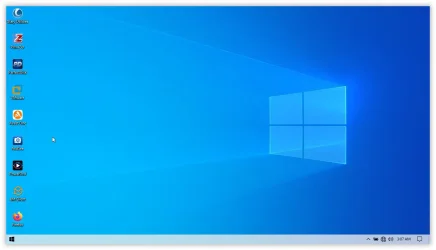
Windows X-Lite Optimum 10 Pro 6 is just excellent. The sound quality is superb and the picture and video quality is not excellent but still very good. I highly recommend this version.

I use my own wallpaper for my desktop background. The original was blurry and was sort of a bokeh look. I also use my own lock screen. I specially created one for my personal use and so will not display it here to prevent theft.

As for the taskbar, I have made it more transparent, a sort of light blue tinge if you will. It is also evident on the start menu.

1763387002081.webp
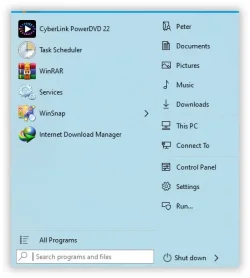
The setup has been highly configured. On my end, I also tweaked it a lot. I deleted all the application folders on my Start Menu and replaced them with short-cut application icons. I also chopped, changed and added several entries in the registry.

1763387249812.webp
Not surprisingly, my SFC detected a lot of errors and corrected most of them. Then I used DISM to successfully repair the rest online. It took about 15 minutes.

Here's a heads-up. The StartIsBack v2.9.20 app which comes with the setup will prompt you for the registration key. If you don't have one, you can always uninstall it. The StartIsBack app displays the Windows 8 start menu.

When you start up, you will see a choice of of operating systems. If you don't know how to disable the boot options, let me know and I will tell you how.

The links to the Micro, Optimum Classic and Pro 6 versions are all on the devs' website.

There are also Windows 11 Build versions. Go check them out.

Have a nice day!
 
Last edited:

My Computer My Computer

At a glance

Win 7,8.1,10,11, Mint, Kde Plasma, DebianIntel(R) Core(TM) i7-6500U CPU @ 2.50GHz16 GBIntel(R) HD Graphics 520/Nvidia GeForce 930M
OS
Win 7,8.1,10,11, Mint, Kde Plasma, Debian
Computer type
Laptop
Manufacturer/Model
Dell
CPU
Intel(R) Core(TM) i7-6500U CPU @ 2.50GHz
Memory
16 GB
Graphics Card(s)
Intel(R) HD Graphics 520/Nvidia GeForce 930M
Sound Card
Intel(R) Display Audio/RealtekAudio
Monitor(s) Displays
Generic Pnp Monitor
Screen Resolution
1366 X 768
Hard Drives
ST2000LM024-1EJ164
Keyboard
Eng (US)
Mouse
Sanwa Supply
Browser
Firefox
Antivirus
Avast One
Other Info
Too many laptops with different system specifications.
I've been using X-Lite for a few months now. Amazingly, no slowdown after updating to 24H2 26100.7019. All I had to do was remove smartscreen and then add a few tweaks of my own to stop windows from "repairing" itself, which invariably results in a lot of unwanted 'features' and settings reinstalling themselves.
 

My Computer My Computer

At a glance

Windows 11 22H2 Pro (X-lite Micro 11 version)i7 13850HX (20 cores, 28 threads)32GB DDR5Intel UHD/ RTX 1000 ADA
OS
Windows 11 22H2 Pro (X-lite Micro 11 version)
Computer type
Laptop
Manufacturer/Model
Dell/ Precision 7680
CPU
i7 13850HX (20 cores, 28 threads)
Motherboard
Dell
Memory
32GB DDR5
Graphics Card(s)
Intel UHD/ RTX 1000 ADA
Sound Card
Realtek
Monitor(s) Displays
4K UHD Touchscreen
Screen Resolution
3840 x 2400
Hard Drives
Samsung 512GB system drive
WD Blue 1TB game drive
PSU
240W AC adapter, 1800W when docked
Internet Speed
1 gigabit symmetrical
Browser
Firefox, Librewolf
Antivirus
None. Manully configured so nobody except me can change any critical system files. (Don't ask how, it's probably against some rule somewhere)
I'll second @DJNelson, I've been using XLite Optimum 22621.1992 and I like the performance and look of it. Although I must confess I run it in a VHD and boot directly into it, using it that way it doesn't have any underlying virtualization software.
 

My Computer My Computer

At a glance

Windows 11 (Build 22000)Intel Core i7-10700 Octacore @ 3.8Ghz16GBNVIDIA GEFORCE GTX 1660 SUPER 6GB
OS
Windows 11 (Build 22000)
Computer type
PC/Desktop
Manufacturer/Model
Home Build
CPU
Intel Core i7-10700 Octacore @ 3.8Ghz
Motherboard
Gigabyte H410M H V2
Memory
16GB
Graphics Card(s)
NVIDIA GEFORCE GTX 1660 SUPER 6GB
Sound Card
ONBOARD 6 CHANNEL (5.1) HIGH DEF AUDIO
Monitor(s) Displays
DELL S2421HSX 16:10 Widescreen
Hard Drives
Samsung SSD 970 EVO Plus 250GB Nvme, SanDisk SDSSDHP256G, CT500MX500SSD1
PSU
CORSAIR 550W CV SERIES
Case
CORSAIR iCUE 220T
Cooling
PCS FrostFlow 100 V3
Keyboard
Lenovo Black Silk
Mouse
CoolerMaster MS110
Internet Speed
Kcom 50MB FTC
Browser
Firefox
Antivirus
AVG
Funny how sandboxing the OS makes it run a lot faster...
 

My Computer My Computer

At a glance

Windows 11 22H2 Pro (X-lite Micro 11 version)i7 13850HX (20 cores, 28 threads)32GB DDR5Intel UHD/ RTX 1000 ADA
OS
Windows 11 22H2 Pro (X-lite Micro 11 version)
Computer type
Laptop
Manufacturer/Model
Dell/ Precision 7680
CPU
i7 13850HX (20 cores, 28 threads)
Motherboard
Dell
Memory
32GB DDR5
Graphics Card(s)
Intel UHD/ RTX 1000 ADA
Sound Card
Realtek
Monitor(s) Displays
4K UHD Touchscreen
Screen Resolution
3840 x 2400
Hard Drives
Samsung 512GB system drive
WD Blue 1TB game drive
PSU
240W AC adapter, 1800W when docked
Internet Speed
1 gigabit symmetrical
Browser
Firefox, Librewolf
Antivirus
None. Manully configured so nobody except me can change any critical system files. (Don't ask how, it's probably against some rule somewhere)
Funny how sandboxing the OS makes it run a lot faster...
Placebo effect - obviously.

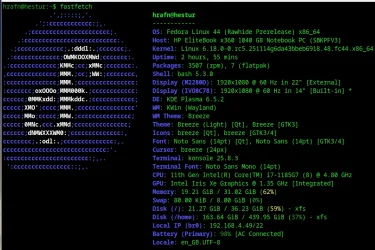
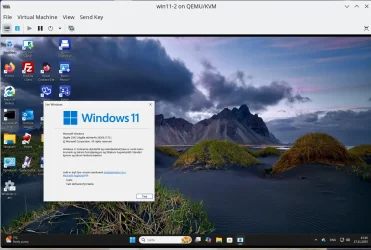
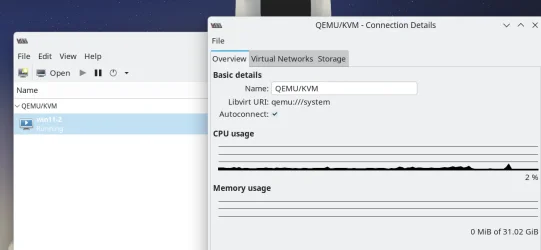
For pure speed - just try any decent Linux up to date host running KVM/QEMU with a guest Windows system on a Virtio disk device with a virtio Nic adapter -- I've tested this on a decent i7 8 core laptop with 32GB RAM and a 512GB Nvme (SSD type) internal HDD -- a 100 GB Windows VM runs a lot better than the same OS on the physical machine with identical apps installed !!!
Screenshot_20251117_151157.webp

Screenshot_20251117_151403.webp

Screenshot_20251117_151606.webp
The VirtIO disk system and NIC also as virtio is infinitely more efficient than NTFS which is part of the Windows problems - it's an ageing file system -robust enough but not mega efficient).

Sandboxing also requires a whole underlying "Psuedo Virtual Machine" layer between the running OS and the sandboxed machine plus of course there's also the added problems with persistence and if you need to install / test software or make configuration changes that require a reboot then your changes are usually lost.

Sandboxing was a passable idea around 1990 to 2010 -- but on decent modern hardware -- just forget it !!!!.

Cheers
jimbo
 
Last edited:

My Computer My Computer

At a glance

Windows XP,11 Linux Fedora Rawhide pre-releas...2 X Intel i7
OS
Windows XP,11 Linux Fedora Rawhide pre-release 45
Computer type
PC/Desktop
CPU
2 X Intel i7
Screen Resolution
4KUHD X 2
If it were possible to play high end Windows games from a VM with a Linux host, that's how I would set up my machine.. I trust Linux not to steal my data. Can't say the same for Windows, at least until after it's been properly contained.. I don't have the patience and technical skills to get anything running in WINE.
 

My Computer My Computer

At a glance

Windows 11 22H2 Pro (X-lite Micro 11 version)i7 13850HX (20 cores, 28 threads)32GB DDR5Intel UHD/ RTX 1000 ADA
OS
Windows 11 22H2 Pro (X-lite Micro 11 version)
Computer type
Laptop
Manufacturer/Model
Dell/ Precision 7680
CPU
i7 13850HX (20 cores, 28 threads)
Motherboard
Dell
Memory
32GB DDR5
Graphics Card(s)
Intel UHD/ RTX 1000 ADA
Sound Card
Realtek
Monitor(s) Displays
4K UHD Touchscreen
Screen Resolution
3840 x 2400
Hard Drives
Samsung 512GB system drive
WD Blue 1TB game drive
PSU
240W AC adapter, 1800W when docked
Internet Speed
1 gigabit symmetrical
Browser
Firefox, Librewolf
Antivirus
None. Manully configured so nobody except me can change any critical system files. (Don't ask how, it's probably against some rule somewhere)
@spapakons

You are right! This set up is dangerous. It worked just fine on my Dell Inspiron. But it screwed up big time on my HP EliteBook.

I had boot up problems and couldn’t use my backup tool. In the end, I solved the boot problem by using HP factory install online (an hour wasted solving the problem).

I am going to stick to my own solution (project). Install the basic Windows and de-bloat whatever I don’t need.
 

My Computer My Computer

At a glance

Win 7,8.1,10,11, Mint, Kde Plasma, DebianIntel(R) Core(TM) i7-6500U CPU @ 2.50GHz16 GBIntel(R) HD Graphics 520/Nvidia GeForce 930M
OS
Win 7,8.1,10,11, Mint, Kde Plasma, Debian
Computer type
Laptop
Manufacturer/Model
Dell
CPU
Intel(R) Core(TM) i7-6500U CPU @ 2.50GHz
Memory
16 GB
Graphics Card(s)
Intel(R) HD Graphics 520/Nvidia GeForce 930M
Sound Card
Intel(R) Display Audio/RealtekAudio
Monitor(s) Displays
Generic Pnp Monitor
Screen Resolution
1366 X 768
Hard Drives
ST2000LM024-1EJ164
Keyboard
Eng (US)
Mouse
Sanwa Supply
Browser
Firefox
Antivirus
Avast One
Other Info
Too many laptops with different system specifications.
That's the best approach.
 

My Computers My Computers

  • At a glance

    Windows 11 Pro 23H2 (5699), 25H2 (8655)Mobile DualCore Intel Core 2 Duo T7250, 2000 MHz4GBMobile Intel(R) GMA 4500M (Mobile 4 series)
    OS
    Windows 11 Pro 23H2 (5699), 25H2 (8655)
    Computer type
    Laptop
    Manufacturer/Model
    Acer Extensa 5630EZ
    CPU
    Mobile DualCore Intel Core 2 Duo T7250, 2000 MHz
    Motherboard
    Acer Extensa 5630
    Memory
    4GB
    Graphics Card(s)
    Mobile Intel(R) GMA 4500M (Mobile 4 series)
    Sound Card
    Realtek ALC268 @ Intel 82801IB ICH9 - High Definition Audio Controller
    Monitor(s) Displays
    1
    Screen Resolution
    1280x800
    Hard Drives
    Samsung SSD 850 EVO 250GB SATA Device (250 GB, SATA-III)
    Internet Speed
    VDSL 50 Mbps
    Browser
    MICROSOFT EDGE
    Antivirus
    WINDOWS DEFENDER
    Other Info
    Legacy MBR installation, no TPM, no Secure Boot, no WDDM 2.0 graphics drivers, no SSE4.2, cannot get more unsupported ;) This is only my test laptop. I had installed Windows 11 here before upgrading my main PC. For my main PC I use everyday see my 2nd system specs.
  • At a glance

    Windows 11 Pro v25H2 (build 26200.8655)Intel Core-i7 3770 3.40GHz s1155 (3rd generat...2x Kingston Hyper-X Blu 8GB DDR3-1600GIGABYTE GeForce RTX 3050 WINDFORCE OC V2 6GB...
    Operating System
    Windows 11 Pro v25H2 (build 26200.8655)
    Computer type
    PC/Desktop
    Manufacturer/Model
    Custom-built PC
    CPU
    Intel Core-i7 3770 3.40GHz s1155 (3rd generation)
    Motherboard
    Asus P8H61 s1155 ATX
    Memory
    2x Kingston Hyper-X Blu 8GB DDR3-1600
    Graphics card(s)
    GIGABYTE GeForce RTX 3050 WINDFORCE OC V2 6GB (GV-N3050WF2OCV2-6GD)
    Sound Card
    Realtek HD audio (ALC887)
    Monitor(s) Displays
    Sony Bravia KDL-19L4000 19" LCD TV via VGA
    Screen Resolution
    1440x900 32-bit 60Hz
    Hard Drives
    WD Blue SA510 2.5 1000GB SSD as system disk, Western Digital Caviar Purple 4TB SATA III (WD40PURZ) as second
    PSU
    Thermaltake Litepower RGB 550W Full Wired
    Case
    SUPERCASE MIDI-TOWER
    Cooling
    Deepcool Gamma Archer CPU cooler, 1x 8cm fan at the back
    Keyboard
    Mitsumi 101-key PS/2
    Mouse
    Sunnyline OptiEye PS/2
    Internet Speed
    100Mbps
    Browser
    Microsoft Edge, Mozilla Firefox
    Antivirus
    Microsoft Windows Defender
    Other Info
    Legacy BIOS (MBR) installation, no TPM, no Secure Boot, WDDM 3.0 graphics drivers, WEI score 7.4
I've been using X-Lite for a few months now. Amazingly, no slowdown after updating to 24H2 26100.7019. All I had to do was remove smartscreen and then add a few tweaks of my own to stop windows from "repairing" itself, which invariably results in a lot of unwanted 'features' and settings reinstalling themselves.
I think it depends on your pc.
My Dell Inspiron was fine with Windows X-Lite. But my HP EliteBook went totally nuts. The boot up system was all messed up.

After recommending it, I felt a little stupid condemning it. This setup is way too dangerous. It leaves you with a corrupted system.

So I decided to continue with my own project. The footprint is not as small as Win X-Lite. But is way smaller than the usual Win 10 Pro OS (about 5 GB smaller).

I couldn't uninstall Edge, Bing, OneDrive and OneNote without consequences as my laptops were not acquired from the EU region. They were made in Brazil and Japan respectively.

So the next best option is to disable them. And that I did successfully.

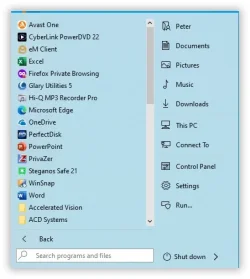
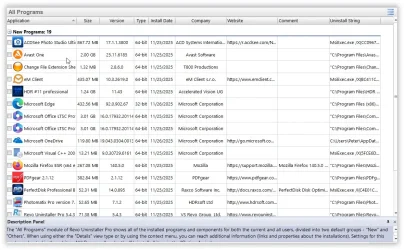
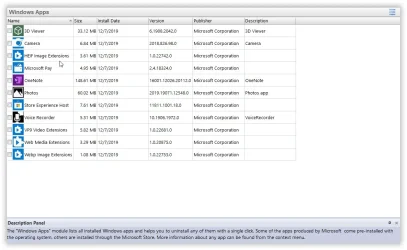
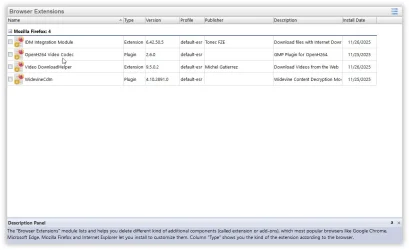
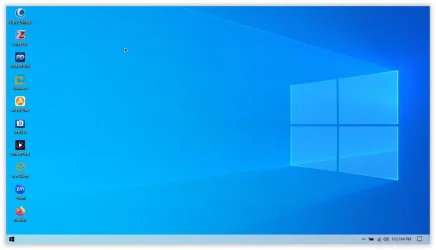
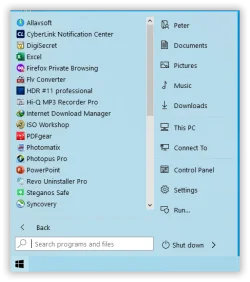
Here are some snapshots of my new project:

Desktop.webp
1764096071147.webp
1764096146154.webp

These are from Revo Uninstaller:

1764096205279.webp
1764096235405.webp
1764096265036.webp
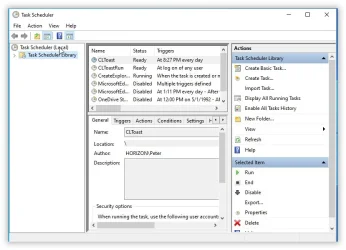
And my Task Scheduler:

1764096306091.webp
Cheers! Have a nice day guys!
 

My Computer My Computer

At a glance

Win 7,8.1,10,11, Mint, Kde Plasma, DebianIntel(R) Core(TM) i7-6500U CPU @ 2.50GHz16 GBIntel(R) HD Graphics 520/Nvidia GeForce 930M
OS
Win 7,8.1,10,11, Mint, Kde Plasma, Debian
Computer type
Laptop
Manufacturer/Model
Dell
CPU
Intel(R) Core(TM) i7-6500U CPU @ 2.50GHz
Memory
16 GB
Graphics Card(s)
Intel(R) HD Graphics 520/Nvidia GeForce 930M
Sound Card
Intel(R) Display Audio/RealtekAudio
Monitor(s) Displays
Generic Pnp Monitor
Screen Resolution
1366 X 768
Hard Drives
ST2000LM024-1EJ164
Keyboard
Eng (US)
Mouse
Sanwa Supply
Browser
Firefox
Antivirus
Avast One
Other Info
Too many laptops with different system specifications.
Back
Top Bottom