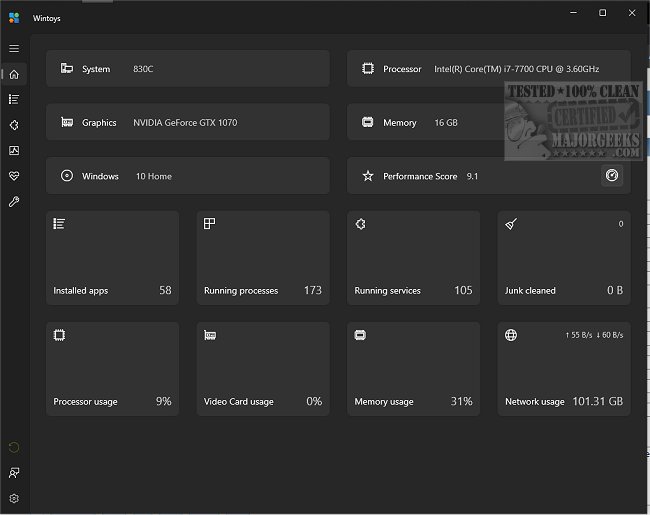
Wintoys v2.4.6.0 (25H2 ready update) • Oct 4, 2025


Wolfzz

Well-known member
Guru
VIP
Local time
9:16 PM
Posts
1,936
Location
Perth Australia
OS
Windows 11 Pro

Wintoys changelog​

  • bumped minimum supported application version from 19041.0 to 19044.1706 (this will make sure the OS contains the update that allows the application to run elevated, as 1706 servicing update is required and MSIX does not yet cover this scenario, (Windows 10 will still be supported despite the fact that official suport is ending this month)
  • improved welcome screen end presentation flow UX (the button will now be easier to spot)
  • Storage cleaner improvements:
    • added support for all browser release channels (Beta, Dev, Canary, Nightly, etc.)
    • added label with the free space available on disk C
    • added a lot of new paths to scan for temporary files in the already existing categories like LiveKernelReports folder
    • relocated the tooltip details to be always visible
    • renamed the junk cleaner to storage cleaner, as not everything is junk (icon updated as well)
    • items from the tree that don’t occupy space on the disk will no longer be displayed (except for the System category)
    • improved performance of the deletion process
    • added new items:
      • Logs (Windows logs)
      • Others (only apps or services that come packaged with Windows, like Remote Desktop, Widgets, or Nuget, for developers)
    • fixed a bug showing an incorrect number of files deleted in the toast notification
    • fixed bug where the MEMORY.DMP file would not be deleted
    • fixed an issue where scanning would fail due to the root directory not existing
  • New advanced reset/troubleshoot network dialog that’s replacing the flushing DNS one, with multiple options:
    • DNS cache
    • Windows socket catalog
    • TCP/IP protocol:
    • HTTP proxy
    • Firewall rules
    • Network adapters
    • IP adress
  • Startup apps:
    • added startup items from the Startup folder execution delay option
    • relocated the list of applications, will be displayed in a content dialog for a better scrolling experience
    • added a default focus on the application name field when opening the dialog to add a new startup app
  • DMA improvements and fixes:
    • fixed a bug where DMA status would be incorrectly displayed in certain scenarios like choosing an EEA region during Windows installation setup and then changing it to one outside EEA
    • in EEA countries the DMA option will no longer be displayed since it’s on by default
    • added a tooltip detail regarding SFC reverting the effect of DMA
    • added a FAQ section for LTSC versions of Windows not supporting the uninstallation of Microsoft Edge
  • Performance benchmark:
    • updated the performance score icon to be less confusing (the star suggested a 5 star rating system)
    • removed GamingScore as it was hardcoded to 9.9 due to winsat no longer supporting it (the score might drop because of this)
    • added the maximum score legend when hovering over the score (maximum is 9.9, not 10)
  • added num lock on by default option under tweaks/system
  • added co-installers option under health page
  • added driver updates option under health page
  • the system model should now display a more reliable value on the home page
  • rewritten messages for File Explorer and Microsoft Store dialog options from the cleanup section
  • added the total used space of restore points and a backup warning to the system restore dialog from the cleanup section
  • when setting the Windows updating mode to manual, notifications will no longer annoy the user, being fully manual
  • added application window minimum height and width
  • default app size takes scaling into consideration
  • added a debounce to all input fields for better validation performance and a better user experience

Bug fixes​

  • gracefully handled access denied error
  • fixed 1 is not a supported codepage error when trying to run DISM
  • fixed crashes when resizing on some scalings
  • fixed an issue where multiple ultimate performance power plan entries were created when turning the option on/off in some cases
  • fixed an issue where app updates option would no longer work, after a recent Microsoft Store update
  • fixed Snipping Key option not reflecting the OS state
  • fixed Windowed mode optimization option not reflecting the OS state on a clean system install
  • fixed an issue where some options would be displayed as disabled when loaded on the landing page
  • fixed some issues where certain apps were missing from the apps page like Remote Desktop Connection (uninstallable starting from Windows 11 version 23H2), Paint (uninstallable starting from Windows 10 22H2 19045.3758), Snipping Tool (uninstallable starting from Windows 10 22H2 19045.3758), NVIDIA HD Audio Driver, etc.
  • fixed an issue where apps with major version 0 were not having the version displayed (for example PowerToys with version 0.94.0.0)
  • fixed an issue where apps where displayed using the Store display name instead of the system name (for example Files App will now be displayed as Files, Windows Calculator as Calculator)
  • fixed an unhandled exception when the store context might not be available on the device
  • fixed an issue where a removed profile option will break the compatibility scanning
  • fixed showing empty space for the memory frequency on some virtual machines
  • potential fix for not terminating Dropbox promotion app

Technical​

  • upgraded to .NET 9
  • upgraded to Windows App SDK 1.7
  • updated libraries
  • replaced custom titlebar theming with the new native API introduced in 1.7
  • replaced getting UBR (Windows revision version) from registry with native API
 

My Computer

System One

  • OS
    Windows 11 Pro
    Computer type
    PC/Desktop
    Manufacturer/Model
    Custom Build
    CPU
    Intel Core i9 12900KF
    Motherboard
    ASUS ROG Maximus Z690 Hero
    Memory
    Corsair 64GB DDR5 Vengeance C40 5200Mhz
    Graphics Card(s)
    ASUS GeForce RTX 3090 ROG Strix OC 24GB
    Sound Card
    OnBoard
    Monitor(s) Displays
    Acer Predator XB323UGP 32" QHD G-SYNC-C 144Hz 1MS IPS LED
    Screen Resolution
    2560 x 1440
    Hard Drives
    1x Samsung 980 Pro Series Gen4 250GB M.2 NVMe
    1x Samsung 980 Pro Series Gen4 500GB M.2 NVMe
    2x Samsung 980 Pro Series Gen4 2TB M.2 NVMe
    PSU
    Corsair AX1200i 1200W 80PLUS Titanium Modular
    Case
    Corsair 4000D Black Case w/ Tempered Glass Side Panel
    Cooling
    Noctua NH-U12A Chromax Black CPU Cooler, 4x Noctua 120mm Fans
    Keyboard
    Logitech MK545
    Mouse
    Logitech MX Master 3
    Internet Speed
    Fixed Wireless 150mbps/75mbps
    Browser
    Firefox
    Antivirus
    Kaspersky
    Other Info
    Thrustmaster TS-PC RACER
    Fanatec CSL Elite Pedals with the Load Cell Kit
    Yamaha Amp with Bose Speakers
This days, there's tons of Windows Tweaking apps - with similar functions - but this one is rather well put together - both for tweaking... For example: Windows (and 3rd Party) Services - come with a informative description - and it can even display only the Useless services (safe to Disable services - tho, worth checking the description - in case you in particular actually need that feature - like printing or part of a local network). And also Maintenance + quick access to most of the basic fixing options included in Windows (via CLI). Rather useful for average an intermediate user - since it's fairly safe to use (if you read the descriptions OFC).
 

My Computer

System One

  • OS
    WinDOS 25H2
    Computer type
    Laptop
    CPU
    Intel & AMD
    Memory
    SO-DIMM SK Hynix 15.8 GB Dual-Channel DDR4-2666 (2 x 8 GB) 1329MHz (19-19-19-43)
    Graphics Card(s)
    nVidia RTX 2060 6GB Mobile GPU (TU106M)
    Sound Card
    Onbord Realtek ALC1220
    Screen Resolution
    1920 x 1080
    Hard Drives
    1x Samsung PM981 NVMe PCIe M.2 512GB / 1x Seagate Expansion ST1000LM035 1TB
This days, there's tons of Windows Tweaking apps - with similar functions - but this one is rather well put together - both for tweaking... For example: Windows (and 3rd Party) Services - come with a informative description - and it can even display only the Useless services (safe to Disable services - tho, worth checking the description - in case you in particular actually need that feature - like printing or part of a local network). And also Maintenance + quick access to most of the basic fixing options included in Windows (via CLI). Rather useful for average an intermediate user - since it's fairly safe to use (if you read the descriptions OFC).
I totally agree. This is a very well put together app making use of the new design.
Some serious effort has gone into it.
 

My Computers

System One System Two

  • OS
    All Branches but Release
    Computer type
    Laptop
    Manufacturer/Model
    Acer Nitro ANV15-51
    CPU
    AMD Ryzen 7 7735HS 3200-4500 Mhz 8 cores x 2
    Motherboard
    Sportage_RBH
    Memory
    32 GB DDR5
    Graphics Card(s)
    Radeon Graphic / NVIDIA GeForce RTX 4060 8 GB GDDR6
    Sound Card
    AMD/Realtek(R) Audio
    Monitor(s) Displays
    Integrated Monitor (15.3"vis)
    Screen Resolution
    FHD 1920X1080 16:9 144Hz
    Hard Drives
    KINGSTON OM8SEP4512Q-AA 1TB
    Western Digital 256GB
    PSU
    19V DC 6.32 A 120 W
    Cooling
    Dual Fans
    Mouse
    MS Bluetooth
    Internet Speed
    Fiber 1GB Cox -us & 1GB Orange-fr
    Browser
    Edge Canary- Firefox Nightly-Chrome Dev-Chrome Dev
    Antivirus
    Windows Defender
  • Operating System
    Windows 11 Beta
    Computer type
    Laptop
    Manufacturer/Model
    Asus X751BP
    CPU
    AMD A9-9420
    Memory
    8 GB of DDR4
    Graphics card(s)
    AMD Radeon R5
    Screen Resolution
    1600x900
    Hard Drives
    Seagate 1 TB
This app has a very ordened overview for all settings that can be set as well via the Windows settings app, but that app is very much less organized. There's a lot of places to look for different settings in the Windows settings app.

The problem for me is that all Windows settings are in Dutch language and this app does not support that language. There are a lot of functions of which it is not clear for me what the Dutch equivalent would be. And I would have to search for each term to compare the Dutch meaning with the English meaning. That would be a lot of work, beside that I might make mistakes with it and spoil my system settings.

So although this app really seems to be very handy, I will not use it. Would it come out in Dutch language as well some day, I certainly would test it again!

But I appreciate that @Wolfzz introduced it! (y)
 

My Computer

System One

  • OS
    Windows 11 Pro 25H2 26200.8457
    Computer type
    PC/Desktop
    Manufacturer/Model
    Build by vendor to my specs
    CPU
    AMD Ryzen 7 5700G
    Motherboard
    MSI PRO B550M-P Gen3
    Memory
    Kingston FURY Beast 2x16GB DIMM DDR4 2666 CL16
    Graphics Card(s)
    MSI GeForce GT 730 2GB LP V1
    Sound Card
    Creative Sound Blaster Audigy FX
    Monitor(s) Displays
    Samsung S24E450F 24"
    Screen Resolution
    1920 x 1080
    Hard Drives
    1. SSD Crucial P5 Plus 500GB PCIe M.2
    2. SSD-SATA Crucial MX500-2TB
    PSU
    Corsair CV650W
    Case
    Cooler Master Silencio S400
    Cooling
    Cooler Master Hyper H412R with Be Quiet Pure Wings 2 PWM BL038 fan
    Keyboard
    Cherry Stream (wired, scissor keys)
    Mouse
    Asus WT465 (wireless)
    Internet Speed
    70 Mbps down / 80 Mbps up
    Browser
    Firefox 130.0
    Antivirus
    F-Secure (Internetprovider version)
    Other Info
    Router: FRITZBox 7490
    Oracle VirtualBox 7 for testing software on Win 10 or 11
This is one of the apps that I always install when I do a clean install of Windows.

It's just that good.
 

My Computer

System One

  • OS
    Windows 11 Pro 25H2 (26200.8457)
    Computer type
    PC/Desktop
    Manufacturer/Model
    Pre-built
    CPU
    AMD Ryzen 7 7800X3D
    Motherboard
    MSI Pro B650-VC WiFi
    Memory
    32gb Team Group (T-Force) DDR5-6000
    Graphics Card(s)
    Zotac nVidia GeForce RTX 4070 SUPER - 12gb
    Sound Card
    Sound BlasterX G6
    Monitor(s) Displays
    Koorui G2421V and ViewSonic VX2453
    Screen Resolution
    P:2560x1440 S:1920x1080
    Hard Drives
    WD Blue SN5000 - 500gb NVME
    WD Blue SN580 - 2TB NVME
    Seagate 4TB HDD - ST4000VN008-2DR166
    Keyboard
    Mountain Everest
    Mouse
    Logitech G502 Hero
    Internet Speed
    T-Mobile Home Internet
    Browser
    Firefox
    Other Info
    QNAP TS-469 Pro NAS
    TP-Link W7200 (2 unit mesh network)
    Elgato Streamdeck

Wintoys 2.4.12.0 (Oct 5, 2025)​

Wintoys changelog​

  • added app execution alias, now the app can be launched from the command line (the execution alias is also used to create the app shortcut on desktop), all you need to do is open the Terminal, or the old command prompt, type wintoys and press enter
  • fixed an issue where apps won’t load due to old MSI installers adding unhandled value types in the registry
  • fixed an issue that would cause an exception when the device setup region is missing from the registry
  • fixed an issue where checking for a service’s active dependents when trying to stop it would fail due to localization resources not being found
  • fixed an issue where the UCPD option would not load because the ucpd service does not exist


My Computer

System One

  • OS
    Windows 11 Pro
    Computer type
    PC/Desktop
    Manufacturer/Model
    Custom Build
    CPU
    Intel Core i9 12900KF
    Motherboard
    ASUS ROG Maximus Z690 Hero
    Memory
    Corsair 64GB DDR5 Vengeance C40 5200Mhz
    Graphics Card(s)
    ASUS GeForce RTX 3090 ROG Strix OC 24GB
    Sound Card
    OnBoard
    Monitor(s) Displays
    Acer Predator XB323UGP 32" QHD G-SYNC-C 144Hz 1MS IPS LED
    Screen Resolution
    2560 x 1440
    Hard Drives
    1x Samsung 980 Pro Series Gen4 250GB M.2 NVMe
    1x Samsung 980 Pro Series Gen4 500GB M.2 NVMe
    2x Samsung 980 Pro Series Gen4 2TB M.2 NVMe
    PSU
    Corsair AX1200i 1200W 80PLUS Titanium Modular
    Case
    Corsair 4000D Black Case w/ Tempered Glass Side Panel
    Cooling
    Noctua NH-U12A Chromax Black CPU Cooler, 4x Noctua 120mm Fans
    Keyboard
    Logitech MK545
    Mouse
    Logitech MX Master 3
    Internet Speed
    Fixed Wireless 150mbps/75mbps
    Browser
    Firefox
    Antivirus
    Kaspersky
    Other Info
    Thrustmaster TS-PC RACER
    Fanatec CSL Elite Pedals with the Load Cell Kit
    Yamaha Amp with Bose Speakers
Back
Top Bottom