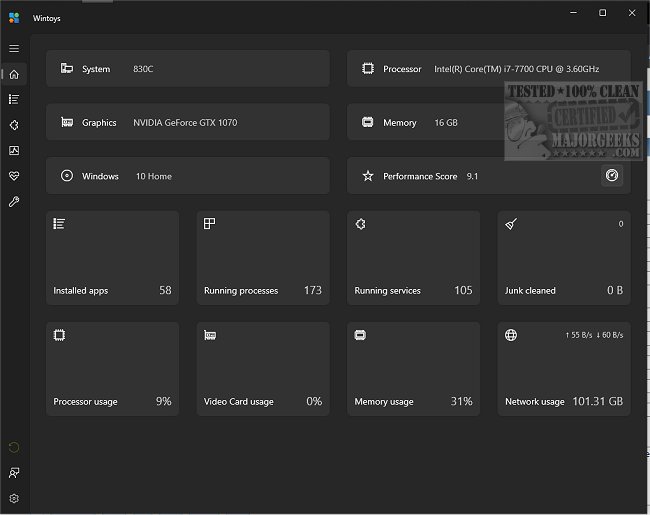
Wintoys v2.4.6.0 (25H2 ready update) • Oct 4, 2025


Wolfzz

Well-known member
Guru
VIP
Local time
2:14 AM
Posts
2,183
Location
Perth Australia
OS
Windows 11 Pro

Wintoys changelog​

  • bumped minimum supported application version from 19041.0 to 19044.1706 (this will make sure the OS contains the update that allows the application to run elevated, as 1706 servicing update is required and MSIX does not yet cover this scenario, (Windows 10 will still be supported despite the fact that official suport is ending this month)
  • improved welcome screen end presentation flow UX (the button will now be easier to spot)
  • Storage cleaner improvements:
    • added support for all browser release channels (Beta, Dev, Canary, Nightly, etc.)
    • added label with the free space available on disk C
    • added a lot of new paths to scan for temporary files in the already existing categories like LiveKernelReports folder
    • relocated the tooltip details to be always visible
    • renamed the junk cleaner to storage cleaner, as not everything is junk (icon updated as well)
    • items from the tree that don’t occupy space on the disk will no longer be displayed (except for the System category)
    • improved performance of the deletion process
    • added new items:
      • Logs (Windows logs)
      • Others (only apps or services that come packaged with Windows, like Remote Desktop, Widgets, or Nuget, for developers)
    • fixed a bug showing an incorrect number of files deleted in the toast notification
    • fixed bug where the MEMORY.DMP file would not be deleted
    • fixed an issue where scanning would fail due to the root directory not existing
  • New advanced reset/troubleshoot network dialog that’s replacing the flushing DNS one, with multiple options:
    • DNS cache
    • Windows socket catalog
    • TCP/IP protocol:
    • HTTP proxy
    • Firewall rules
    • Network adapters
    • IP adress
  • Startup apps:
    • added startup items from the Startup folder execution delay option
    • relocated the list of applications, will be displayed in a content dialog for a better scrolling experience
    • added a default focus on the application name field when opening the dialog to add a new startup app
  • DMA improvements and fixes:
    • fixed a bug where DMA status would be incorrectly displayed in certain scenarios like choosing an EEA region during Windows installation setup and then changing it to one outside EEA
    • in EEA countries the DMA option will no longer be displayed since it’s on by default
    • added a tooltip detail regarding SFC reverting the effect of DMA
    • added a FAQ section for LTSC versions of Windows not supporting the uninstallation of Microsoft Edge
  • Performance benchmark:
    • updated the performance score icon to be less confusing (the star suggested a 5 star rating system)
    • removed GamingScore as it was hardcoded to 9.9 due to winsat no longer supporting it (the score might drop because of this)
    • added the maximum score legend when hovering over the score (maximum is 9.9, not 10)
  • added num lock on by default option under tweaks/system
  • added co-installers option under health page
  • added driver updates option under health page
  • the system model should now display a more reliable value on the home page
  • rewritten messages for File Explorer and Microsoft Store dialog options from the cleanup section
  • added the total used space of restore points and a backup warning to the system restore dialog from the cleanup section
  • when setting the Windows updating mode to manual, notifications will no longer annoy the user, being fully manual
  • added application window minimum height and width
  • default app size takes scaling into consideration
  • added a debounce to all input fields for better validation performance and a better user experience

Bug fixes​

  • gracefully handled access denied error
  • fixed 1 is not a supported codepage error when trying to run DISM
  • fixed crashes when resizing on some scalings
  • fixed an issue where multiple ultimate performance power plan entries were created when turning the option on/off in some cases
  • fixed an issue where app updates option would no longer work, after a recent Microsoft Store update
  • fixed Snipping Key option not reflecting the OS state
  • fixed Windowed mode optimization option not reflecting the OS state on a clean system install
  • fixed an issue where some options would be displayed as disabled when loaded on the landing page
  • fixed some issues where certain apps were missing from the apps page like Remote Desktop Connection (uninstallable starting from Windows 11 version 23H2), Paint (uninstallable starting from Windows 10 22H2 19045.3758), Snipping Tool (uninstallable starting from Windows 10 22H2 19045.3758), NVIDIA HD Audio Driver, etc.
  • fixed an issue where apps with major version 0 were not having the version displayed (for example PowerToys with version 0.94.0.0)
  • fixed an issue where apps where displayed using the Store display name instead of the system name (for example Files App will now be displayed as Files, Windows Calculator as Calculator)
  • fixed an unhandled exception when the store context might not be available on the device
  • fixed an issue where a removed profile option will break the compatibility scanning
  • fixed showing empty space for the memory frequency on some virtual machines
  • potential fix for not terminating Dropbox promotion app

Technical​

  • upgraded to .NET 9
  • upgraded to Windows App SDK 1.7
  • updated libraries
  • replaced custom titlebar theming with the new native API introduced in 1.7
  • replaced getting UBR (Windows revision version) from registry with native API
 

My Computer My Computer

At a glance

Windows 11 ProIntel Core i9 12900KFCorsair 64GB DDR5 Vengeance C40 5200MhzASUS GeForce RTX 3090 ROG Strix OC 24GB
OS
Windows 11 Pro
Computer type
PC/Desktop
Manufacturer/Model
Custom Build
CPU
Intel Core i9 12900KF
Motherboard
ASUS ROG Maximus Z690 Hero
Memory
Corsair 64GB DDR5 Vengeance C40 5200Mhz
Graphics Card(s)
ASUS GeForce RTX 3090 ROG Strix OC 24GB
Sound Card
OnBoard
Monitor(s) Displays
Acer Predator XB323UGP 32" QHD G-SYNC-C 144Hz 1MS IPS LED
Screen Resolution
2560 x 1440
Hard Drives
1x Samsung 980 Pro Series Gen4 250GB M.2 NVMe
1x Samsung 980 Pro Series Gen4 500GB M.2 NVMe
2x Samsung 980 Pro Series Gen4 2TB M.2 NVMe
PSU
Corsair AX1200i 1200W 80PLUS Titanium Modular
Case
Corsair 4000D Black Case w/ Tempered Glass Side Panel
Cooling
Noctua NH-U12A Chromax Black CPU Cooler, 4x Noctua 120mm Fans
Keyboard
Logitech MK545
Mouse
Logitech MX Master 3
Internet Speed
Fixed Wireless 150mbps/75mbps
Browser
Firefox
Antivirus
Kaspersky
Other Info
Thrustmaster TS-PC RACER
Fanatec CSL Elite Pedals with the Load Cell Kit
Yamaha Amp with Bose Speakers
This days, there's tons of Windows Tweaking apps - with similar functions - but this one is rather well put together - both for tweaking... For example: Windows (and 3rd Party) Services - come with a informative description - and it can even display only the Useless services (safe to Disable services - tho, worth checking the description - in case you in particular actually need that feature - like printing or part of a local network). And also Maintenance + quick access to most of the basic fixing options included in Windows (via CLI). Rather useful for average an intermediate user - since it's fairly safe to use (if you read the descriptions OFC).
 

My Computer My Computer

At a glance

WinDOS 25H2Intel & AMDSO-DIMM SK Hynix 15.8 GB Dual-Channel DDR4-26...nVidia RTX 2060 6GB Mobile GPU (TU106M)
OS
WinDOS 25H2
Computer type
Laptop
CPU
Intel & AMD
Memory
SO-DIMM SK Hynix 15.8 GB Dual-Channel DDR4-2666 (2 x 8 GB) 1329MHz (19-19-19-43)
Graphics Card(s)
nVidia RTX 2060 6GB Mobile GPU (TU106M)
Sound Card
Onbord Realtek ALC1220
Screen Resolution
1920 x 1080
Hard Drives
1x Samsung PM981 NVMe PCIe M.2 512GB / 1x Seagate Expansion ST1000LM035 1TB
This days, there's tons of Windows Tweaking apps - with similar functions - but this one is rather well put together - both for tweaking... For example: Windows (and 3rd Party) Services - come with a informative description - and it can even display only the Useless services (safe to Disable services - tho, worth checking the description - in case you in particular actually need that feature - like printing or part of a local network). And also Maintenance + quick access to most of the basic fixing options included in Windows (via CLI). Rather useful for average an intermediate user - since it's fairly safe to use (if you read the descriptions OFC).
I totally agree. This is a very well put together app making use of the new design.
Some serious effort has gone into it.
 

My Computers My Computers

  • At a glance

    All Branches but StableAMD Ryzen 7 7735HS 3200-4500 Mhz 8 cores x 232 GB DDR5Radeon Graphic / NVIDIA GeForce RTX 4060 8 GB...
    OS
    All Branches but Stable
    Computer type
    Laptop
    Manufacturer/Model
    Acer Nitro ANV15-51
    CPU
    AMD Ryzen 7 7735HS 3200-4500 Mhz 8 cores x 2
    Motherboard
    Sportage_RBH
    Memory
    32 GB DDR5
    Graphics Card(s)
    Radeon Graphic / NVIDIA GeForce RTX 4060 8 GB GDDR6
    Sound Card
    AMD/Realtek(R) Audio
    Monitor(s) Displays
    Integrated Monitor (15.3"vis)
    Screen Resolution
    FHD 1920X1080 16:9 144Hz
    Hard Drives
    KINGSTON OM8SEP4512Q-AA 1TB
    Western Digital 256GB
    PSU
    19V DC 6.32 A 120 W
    Cooling
    Dual Fans
    Mouse
    MS Bluetooth
    Internet Speed
    Fiber 1GB Cox -us & 1GB Orange-fr
    Browser
    Edge Canary- Firefox Nightly-Chrome Dev-Chrome Dev
    Antivirus
    Windows Defender
  • At a glance

    Windows 11 BetaAMD A9-94208 GB of DDR4AMD Radeon R5
    Operating System
    Windows 11 Beta
    Computer type
    Laptop
    Manufacturer/Model
    Asus X751BP
    CPU
    AMD A9-9420
    Memory
    8 GB of DDR4
    Graphics card(s)
    AMD Radeon R5
    Screen Resolution
    1600x900
    Hard Drives
    Seagate 1 TB
This app has a very ordened overview for all settings that can be set as well via the Windows settings app, but that app is very much less organized. There's a lot of places to look for different settings in the Windows settings app.

The problem for me is that all Windows settings are in Dutch language and this app does not support that language. There are a lot of functions of which it is not clear for me what the Dutch equivalent would be. And I would have to search for each term to compare the Dutch meaning with the English meaning. That would be a lot of work, beside that I might make mistakes with it and spoil my system settings.

So although this app really seems to be very handy, I will not use it. Would it come out in Dutch language as well some day, I certainly would test it again!

But I appreciate that @Wolfzz introduced it! (y)
 

My Computer My Computer

At a glance

Windows 11 Pro 25H2AMD Ryzen 7 5700GKingston FURY Beast 2x16GB DIMM DDR4 2666 CL16MSI GeForce GT 730 2GB LP V1
OS
Windows 11 Pro 25H2
Computer type
PC/Desktop
Manufacturer/Model
Build by vendor to my specs
CPU
AMD Ryzen 7 5700G
Motherboard
MSI PRO B550M-P Gen3
Memory
Kingston FURY Beast 2x16GB DIMM DDR4 2666 CL16
Graphics Card(s)
MSI GeForce GT 730 2GB LP V1
Sound Card
Creative Sound Blaster Audigy FX
Monitor(s) Displays
Samsung S24E450F 24"
Screen Resolution
1920 x 1080
Hard Drives
1. SSD Crucial P5 Plus 500GB PCIe M.2
2. SSD-SATA Crucial MX500-2TB
PSU
Corsair CV650W
Case
Cooler Master Silencio S400
Cooling
Cooler Master Hyper H412R with Be Quiet Pure Wings 2 PWM BL038 fan
Keyboard
Cherry Stream (wired, scissor keys)
Mouse
Asus WT465 (wireless)
Internet Speed
70 Mbps down / 80 Mbps up
Browser
Firefox 130.0
Antivirus
F-Secure (Internetprovider version)
Other Info
Router: FRITZBox 7490
Oracle VirtualBox 7 for testing software on Win 10 or 11
This is one of the apps that I always install when I do a clean install of Windows.

It's just that good.
 

My Computer My Computer

At a glance

Windows 11 Pro 25H2 (26200.9168)AMD Ryzen 7 7800X3D32gb Team Group (T-Force) DDR5-6000Zotac nVidia GeForce RTX 4070 SUPER - 12gb
OS
Windows 11 Pro 25H2 (26200.9168)
Computer type
PC/Desktop
Manufacturer/Model
Pre-built
CPU
AMD Ryzen 7 7800X3D
Motherboard
MSI Pro B650-VC WiFi
Memory
32gb Team Group (T-Force) DDR5-6000
Graphics Card(s)
Zotac nVidia GeForce RTX 4070 SUPER - 12gb
Sound Card
Sound BlasterX G6
Monitor(s) Displays
Koorui G2421V and ViewSonic VX2453
Screen Resolution
P:2560x1440 S:1920x1080
Hard Drives
WD Blue SN5000 - 500gb NVME
WD Blue SN580 - 2TB NVME
Seagate 4TB HDD - ST4000VN008-2DR166
Keyboard
Mountain Everest
Mouse
Logitech G502 Hero
Internet Speed
T-Mobile Home Internet
Browser
Firefox
Other Info
QNAP TS-469 Pro NAS
TP-Link W7200 (2 unit mesh network)
Elgato Streamdeck

Wintoys 2.4.12.0 (Oct 5, 2025)​

Wintoys changelog​

  • added app execution alias, now the app can be launched from the command line (the execution alias is also used to create the app shortcut on desktop), all you need to do is open the Terminal, or the old command prompt, type wintoys and press enter
  • fixed an issue where apps won’t load due to old MSI installers adding unhandled value types in the registry
  • fixed an issue that would cause an exception when the device setup region is missing from the registry
  • fixed an issue where checking for a service’s active dependents when trying to stop it would fail due to localization resources not being found
  • fixed an issue where the UCPD option would not load because the ucpd service does not exist


My Computer My Computer

At a glance

Windows 11 ProIntel Core i9 12900KFCorsair 64GB DDR5 Vengeance C40 5200MhzASUS GeForce RTX 3090 ROG Strix OC 24GB
OS
Windows 11 Pro
Computer type
PC/Desktop
Manufacturer/Model
Custom Build
CPU
Intel Core i9 12900KF
Motherboard
ASUS ROG Maximus Z690 Hero
Memory
Corsair 64GB DDR5 Vengeance C40 5200Mhz
Graphics Card(s)
ASUS GeForce RTX 3090 ROG Strix OC 24GB
Sound Card
OnBoard
Monitor(s) Displays
Acer Predator XB323UGP 32" QHD G-SYNC-C 144Hz 1MS IPS LED
Screen Resolution
2560 x 1440
Hard Drives
1x Samsung 980 Pro Series Gen4 250GB M.2 NVMe
1x Samsung 980 Pro Series Gen4 500GB M.2 NVMe
2x Samsung 980 Pro Series Gen4 2TB M.2 NVMe
PSU
Corsair AX1200i 1200W 80PLUS Titanium Modular
Case
Corsair 4000D Black Case w/ Tempered Glass Side Panel
Cooling
Noctua NH-U12A Chromax Black CPU Cooler, 4x Noctua 120mm Fans
Keyboard
Logitech MK545
Mouse
Logitech MX Master 3
Internet Speed
Fixed Wireless 150mbps/75mbps
Browser
Firefox
Antivirus
Kaspersky
Other Info
Thrustmaster TS-PC RACER
Fanatec CSL Elite Pedals with the Load Cell Kit
Yamaha Amp with Bose Speakers

Wintoys 2.6.69.0 (07/25/26)​

A Lot of Changes and Bug Fixes

Improvements and new features:

- performance improvements that reduce memory usage by up to 30%, including a lot of improvements and fixes for the applications page, services page and startup entries page
- added the option to enable or disable the recommended section under Tweaks > Start menu for all Windows 11 editions
- added the option to to enable or disable recent items tracking (opened documents, projects, etc) so that they can appear in File Explorer or Jump Lists under Tweaks > Start menu for both Windows 10 / 11
- added Device metadata option under Health, to prevent devices from installing apps without consent like the recent LG Monitor Installer App
- the welcome experience now supports keyboard navigation
- added the acrylic backdrop for Windows 10 and 11 (on Windows 10, acrylic will be applied by default and the only option available)

Bug fixes:

- fix for an issue where newly added system settings via updates won't be restored to their initial values accordingly
- fix for an issue where modifiying a setting in Windows that would require a restart, then restarting without opening the application, would display the Action required button when opening the app after the restart, even though the setting was already in effect because of the restart
- fix for an issue where network stats won't load on devices with VMs and/or third-party VPNs installed

Full changelog can be found here: Wintoys changelog


My Computer My Computer

At a glance

Windows 11 ProIntel Core i9 12900KFCorsair 64GB DDR5 Vengeance C40 5200MhzASUS GeForce RTX 3090 ROG Strix OC 24GB
OS
Windows 11 Pro
Computer type
PC/Desktop
Manufacturer/Model
Custom Build
CPU
Intel Core i9 12900KF
Motherboard
ASUS ROG Maximus Z690 Hero
Memory
Corsair 64GB DDR5 Vengeance C40 5200Mhz
Graphics Card(s)
ASUS GeForce RTX 3090 ROG Strix OC 24GB
Sound Card
OnBoard
Monitor(s) Displays
Acer Predator XB323UGP 32" QHD G-SYNC-C 144Hz 1MS IPS LED
Screen Resolution
2560 x 1440
Hard Drives
1x Samsung 980 Pro Series Gen4 250GB M.2 NVMe
1x Samsung 980 Pro Series Gen4 500GB M.2 NVMe
2x Samsung 980 Pro Series Gen4 2TB M.2 NVMe
PSU
Corsair AX1200i 1200W 80PLUS Titanium Modular
Case
Corsair 4000D Black Case w/ Tempered Glass Side Panel
Cooling
Noctua NH-U12A Chromax Black CPU Cooler, 4x Noctua 120mm Fans
Keyboard
Logitech MK545
Mouse
Logitech MX Master 3
Internet Speed
Fixed Wireless 150mbps/75mbps
Browser
Firefox
Antivirus
Kaspersky
Other Info
Thrustmaster TS-PC RACER
Fanatec CSL Elite Pedals with the Load Cell Kit
Yamaha Amp with Bose Speakers
Wintoys 2.6.71.0 (08/23/26)

  • availability to download the MSIX application package via winget download command; (requires an organization account)
  • fix for a crash due to Windows Event Log service access being restricted - a descriptive error message will now appear instead
  • fix for an issue where loading apps, services or startup entries would remain in an infinite loading loop if any error occurred during the load operation


My Computer My Computer

At a glance

Windows 11 ProIntel Core i9 12900KFCorsair 64GB DDR5 Vengeance C40 5200MhzASUS GeForce RTX 3090 ROG Strix OC 24GB
OS
Windows 11 Pro
Computer type
PC/Desktop
Manufacturer/Model
Custom Build
CPU
Intel Core i9 12900KF
Motherboard
ASUS ROG Maximus Z690 Hero
Memory
Corsair 64GB DDR5 Vengeance C40 5200Mhz
Graphics Card(s)
ASUS GeForce RTX 3090 ROG Strix OC 24GB
Sound Card
OnBoard
Monitor(s) Displays
Acer Predator XB323UGP 32" QHD G-SYNC-C 144Hz 1MS IPS LED
Screen Resolution
2560 x 1440
Hard Drives
1x Samsung 980 Pro Series Gen4 250GB M.2 NVMe
1x Samsung 980 Pro Series Gen4 500GB M.2 NVMe
2x Samsung 980 Pro Series Gen4 2TB M.2 NVMe
PSU
Corsair AX1200i 1200W 80PLUS Titanium Modular
Case
Corsair 4000D Black Case w/ Tempered Glass Side Panel
Cooling
Noctua NH-U12A Chromax Black CPU Cooler, 4x Noctua 120mm Fans
Keyboard
Logitech MK545
Mouse
Logitech MX Master 3
Internet Speed
Fixed Wireless 150mbps/75mbps
Browser
Firefox
Antivirus
Kaspersky
Other Info
Thrustmaster TS-PC RACER
Fanatec CSL Elite Pedals with the Load Cell Kit
Yamaha Amp with Bose Speakers

Latest Support Threads

Back
Top Bottom