tataouinea
Member
- Local time
- 12:03 PM
- Posts
- 1
- OS
- Windows 11 24H2
After countless hours trying to get Spotlight to work on my laptop (it worked for a few days, maybe weeks in the past), I gave up entirely and decided to use the popular wallpaper site wallhaven.cc to customize my wallpaper and lock screen image.
Since the available Windows desktop clients for wallhaven are all outdated, I decided to build my own.
I'm sharing it with you on this forum because this was where I spent most of my time reading threads and comments on how to fix Spotlight, and I'm pretty sure many regulars would find it useful, especially if they also like wallhaven (like me).
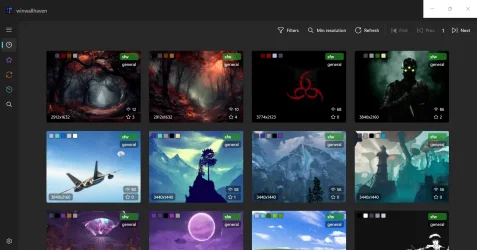
The app is called winwallhaven, and is available on the Microsoft Store: winwallhaven - Free download and install on Windows | Microsoft Store
It's free and open source (GitHub - tataouinea/winwallhaven: Your fast, modern, and private way to explore, search, and set stunning wallpapers from wallhaven.cc on Windows 10/11.) and has a native look and feel thanks to C# and WinUI 3.
By the way, the app doesn't require any permissions (except using your internet connection to download the wallpapers, obviously), so those of you who are privacy-conscious can be assured the app is 100% safe and secure.
Please leave your feedback in this thread and/or on the Microsoft Store if you find the app useful.
Logo:
Screenshot:
Thank you.
Since the available Windows desktop clients for wallhaven are all outdated, I decided to build my own.
I'm sharing it with you on this forum because this was where I spent most of my time reading threads and comments on how to fix Spotlight, and I'm pretty sure many regulars would find it useful, especially if they also like wallhaven (like me).
The app is called winwallhaven, and is available on the Microsoft Store: winwallhaven - Free download and install on Windows | Microsoft Store
It's free and open source (GitHub - tataouinea/winwallhaven: Your fast, modern, and private way to explore, search, and set stunning wallpapers from wallhaven.cc on Windows 10/11.) and has a native look and feel thanks to C# and WinUI 3.
By the way, the app doesn't require any permissions (except using your internet connection to download the wallpapers, obviously), so those of you who are privacy-conscious can be assured the app is 100% safe and secure.
Please leave your feedback in this thread and/or on the Microsoft Store if you find the app useful.
Logo:
Screenshot:
Thank you.
My Computer
At a glance
Windows 11 24H2
- OS
- Windows 11 24H2
- Computer type
- Laptop