Solved wmic thread count command


shoober420

Well-known member
Member
VIP
Local time
11:23 AM
Posts
231
OS
Windows 11 27965
Using code from garlin, I think I came up with a string that can query cpu thread count and apply to registry keys if desired. I wanted to double check the code, especially with @garlin to make sure I did it correctly. Also I wanted to simply share it if someone finds it useful.

Code:
for /f "tokens=2 delims=^=" %%t in ('wmic cpu get NumberOfLogicalProcessors /value ^| find "="') do set Threads=%%t

Code:
reg add "HKLM\SYSTEM\CurrentControlSet\Services\Ndis\Parameters" /v "MaxNumRssThreads" /t REG_DWORD /d "%%t" /f       
reg add "HKLM\SYSTEM\CurrentControlSet\Services\Tcpip\Parameters" /v "MaxNumRssThreads" /t REG_DWORD /d "%%t" /f
 
Windows Build/Version
Windows 11 27729

My Computer My Computer

At a glance

Windows 11 27965Intel i7 7700 @4.0ghz64gb DDR4Radeon RX 5500 XT
OS
Windows 11 27965
Computer type
PC/Desktop
CPU
Intel i7 7700 @4.0ghz
Memory
64gb DDR4
Graphics Card(s)
Radeon RX 5500 XT
Sound Card
Topping D50s
Hard Drives
NVMe
PSU
Corsair
Keyboard
Stelseries G6v2
Mouse
Zowie EC2
Other Info
https://www.youtube.com/shoober420
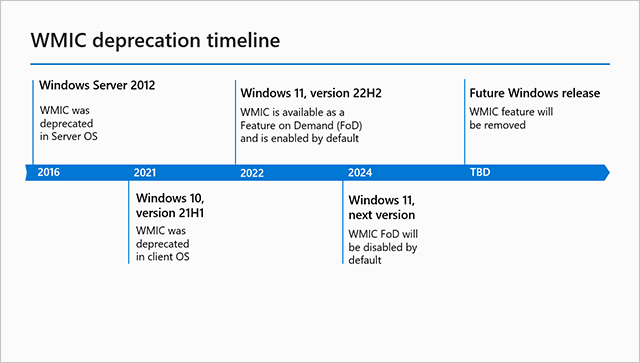
Microsoft has deprecated wmic commands.


My Computer My Computer

At a glance

Windows 10Intel(R) Core(TM) i7-4800MQ CPU @ 2.70GHz16 GB Total: Manufacturer : Samsung MemoryTyp...NVIDIA Quadro K3100M; Intel(R) HD Graphics 4600
OS
Windows 10
Computer type
Laptop
Manufacturer/Model
HP
CPU
Intel(R) Core(TM) i7-4800MQ CPU @ 2.70GHz
Motherboard
Product : 190A Version : KBC Version 94.56
Memory
16 GB Total: Manufacturer : Samsung MemoryType : DDR3 FormFactor : SODIMM Capacity : 8GB Speed : 1600
Graphics Card(s)
NVIDIA Quadro K3100M; Intel(R) HD Graphics 4600
Sound Card
IDT High Definition Audio CODEC; PNP Device ID HDAUDIO\FUNC_01&VEN_111D&DEV_76E0
Hard Drives
Model Hitachi HTS727575A9E364
Antivirus
Microsoft Defender
Other Info
Mobile Workstation
I think you got it from here.
 

My Computer My Computer

At a glance

Windows 7
OS
Windows 7
Very odd, but when using "%%t", when executing the script it only reads as "%t" and returns an error. When updating it to "%Threads%", it does indeed work as intended.

Code:
reg add "HKLM\SYSTEM\CurrentControlSet\Services\Ndis\Parameters" /v "MaxNumRssThreads" /t REG_DWORD /d "%Threads%" /f       
reg add "HKLM\SYSTEM\CurrentControlSet\Services\Tcpip\Parameters" /v "MaxNumRssThreads" /t REG_DWORD /d "%Threads%" /f
 

My Computer My Computer

At a glance

Windows 11 27965Intel i7 7700 @4.0ghz64gb DDR4Radeon RX 5500 XT
OS
Windows 11 27965
Computer type
PC/Desktop
CPU
Intel i7 7700 @4.0ghz
Memory
64gb DDR4
Graphics Card(s)
Radeon RX 5500 XT
Sound Card
Topping D50s
Hard Drives
NVMe
PSU
Corsair
Keyboard
Stelseries G6v2
Mouse
Zowie EC2
Other Info
https://www.youtube.com/shoober420
%%[letter] isn't a persistent variable, it disappears after the for-loop is exited. You must use it immediately, or copy its value to another named variable.
 

My Computer My Computer

At a glance

Windows 7
OS
Windows 7
I think im starting to get it.

Code:
for /f %%t in ('wmic cpu get NumberOfLogicalProcessors /value ^| find "="') do (
reg add "HKLM\SYSTEM\CurrentControlSet\Services\Ndis\Parameters" /v "MaxNumRssThreads" /t REG_DWORD /d "%%t" /f       
reg add "HKLM\SYSTEM\CurrentControlSet\Services\Tcpip\Parameters" /v "MaxNumRssThreads" /t REG_DWORD /d "%%t" /f
)

Im going to try this and see if it works.
 

My Computer My Computer

At a glance

Windows 11 27965Intel i7 7700 @4.0ghz64gb DDR4Radeon RX 5500 XT
OS
Windows 11 27965
Computer type
PC/Desktop
CPU
Intel i7 7700 @4.0ghz
Memory
64gb DDR4
Graphics Card(s)
Radeon RX 5500 XT
Sound Card
Topping D50s
Hard Drives
NVMe
PSU
Corsair
Keyboard
Stelseries G6v2
Mouse
Zowie EC2
Other Info
https://www.youtube.com/shoober420
dang it, thats not it either. i could just use the %Threads% method and call it a day, but i would like to know how to do it the way im trying to do. or maybe its not possible using %%X method @garlin?
 

My Computer My Computer

At a glance

Windows 11 27965Intel i7 7700 @4.0ghz64gb DDR4Radeon RX 5500 XT
OS
Windows 11 27965
Computer type
PC/Desktop
CPU
Intel i7 7700 @4.0ghz
Memory
64gb DDR4
Graphics Card(s)
Radeon RX 5500 XT
Sound Card
Topping D50s
Hard Drives
NVMe
PSU
Corsair
Keyboard
Stelseries G6v2
Mouse
Zowie EC2
Other Info
https://www.youtube.com/shoober420
You should probably brush up on CMD scripting, %%t is correctly carried thru the loop, but you removed the parsing instructions.
Code:
for /f "tokens=2 delims=^=" %%t in ('wmic cpu get NumberOfLogicalProcessors /value ^| find "="') do (
   echo reg add 1 %%t
   echo reg add 2 %%t
)
 

My Computer My Computer

At a glance

Windows 7
OS
Windows 7
Thank you for your patience and lessons. I believe i understand this now. The token instruction correlates with how many variables (%%X) are in the whole code string. The delims instruction will connect whats in the brackets to the %%X variable.
 
Last edited:

My Computer My Computer

At a glance

Windows 11 27965Intel i7 7700 @4.0ghz64gb DDR4Radeon RX 5500 XT
OS
Windows 11 27965
Computer type
PC/Desktop
CPU
Intel i7 7700 @4.0ghz
Memory
64gb DDR4
Graphics Card(s)
Radeon RX 5500 XT
Sound Card
Topping D50s
Hard Drives
NVMe
PSU
Corsair
Keyboard
Stelseries G6v2
Mouse
Zowie EC2
Other Info
https://www.youtube.com/shoober420
It appears its not working @garlin, Im still getting an error when using this code.

Code:
for /f "tokens=2 delims=^=" %%t in ('wmic cpu get NumberOfLogicalProcessors /value ^| find "="') do (
reg add "HKLM\SYSTEM\CurrentControlSet\Services\Ndis\Parameters" /v "MaxNumRssThreads" /t REG_DWORD /d %%t /f  
reg add "HKLM\SYSTEM\CurrentControlSet\Services\Tcpip\Parameters" /v "MaxNumRssThreads" /t REG_DWORD /d %%t /f
)

PAUSE


Code:
C:\Windows\System32>(
 /f add   KLM\SYSTEM\CurrentControlSet\Services\Ndis\Parameters" /v "MaxNumRssThreads" /t REG_DWORD /d 8
 /f  add "HKLM\SYSTEM\CurrentControlSet\Services\Tcpip\Parameters" /v "MaxNumRssThreads" /t REG_DWORD /d 8
)
ERROR: Invalid syntax. Specify valid numeric value for '/d'.
Type "REG ADD /?" for usage.
ERROR: Invalid syntax. Specify valid numeric value for '/d'.
Type "REG ADD /?" for usage.
 

My Computer My Computer

At a glance

Windows 11 27965Intel i7 7700 @4.0ghz64gb DDR4Radeon RX 5500 XT
OS
Windows 11 27965
Computer type
PC/Desktop
CPU
Intel i7 7700 @4.0ghz
Memory
64gb DDR4
Graphics Card(s)
Radeon RX 5500 XT
Sound Card
Topping D50s
Hard Drives
NVMe
PSU
Corsair
Keyboard
Stelseries G6v2
Mouse
Zowie EC2
Other Info
https://www.youtube.com/shoober420

Ok, so when i add the echo string, it doesnt add it to registry, it just spits out the whole registry key as is without adding it to registry. removing echo gives the error posted above. im really not entirely sure whats going on.
 

My Computer My Computer

At a glance

Windows 11 27965Intel i7 7700 @4.0ghz64gb DDR4Radeon RX 5500 XT
OS
Windows 11 27965
Computer type
PC/Desktop
CPU
Intel i7 7700 @4.0ghz
Memory
64gb DDR4
Graphics Card(s)
Radeon RX 5500 XT
Sound Card
Topping D50s
Hard Drives
NVMe
PSU
Corsair
Keyboard
Stelseries G6v2
Mouse
Zowie EC2
Other Info
https://www.youtube.com/shoober420

i see that tokens= does correlate with how many code strings are inside the brackets seperated by the pipe, and i also saw that delims= is how the value is written for the %%t variable when playing around with the code to get it to work. i still cant figure out why it doesnt write to the registry though. echo seems like it shouldnt be used since it just spits out what comes after it and doesnt actually execute what comes thereafter. im completely lost.
 

My Computer My Computer

At a glance

Windows 11 27965Intel i7 7700 @4.0ghz64gb DDR4Radeon RX 5500 XT
OS
Windows 11 27965
Computer type
PC/Desktop
CPU
Intel i7 7700 @4.0ghz
Memory
64gb DDR4
Graphics Card(s)
Radeon RX 5500 XT
Sound Card
Topping D50s
Hard Drives
NVMe
PSU
Corsair
Keyboard
Stelseries G6v2
Mouse
Zowie EC2
Other Info
https://www.youtube.com/shoober420

someone on stack overflow was able to get a working string.
Code:
@For /F "Tokens=2 Delims==" %%G In ('%SystemRoot%\System32\wbem\WMIC.exe CPU Get NumberOfLogicalProcessors /Value 2^>NUL ^| %SystemRoot%\System32\find.exe "="') Do @For /F %%H In ("%%G") Do @For %%I In (Ndis Tcpip) Do @%SystemRoot%\System32\reg.exe Add "HKLM\SYSTEM\CurrentControlSet\Services\%%I\Parameters" /V "MaxNumRssThreads" /T REG_DWORD /D %%H /F 1>NUL

the network tweak script is now complete. im going to finally share it
 

My Computer My Computer

At a glance

Windows 11 27965Intel i7 7700 @4.0ghz64gb DDR4Radeon RX 5500 XT
OS
Windows 11 27965
Computer type
PC/Desktop
CPU
Intel i7 7700 @4.0ghz
Memory
64gb DDR4
Graphics Card(s)
Radeon RX 5500 XT
Sound Card
Topping D50s
Hard Drives
NVMe
PSU
Corsair
Keyboard
Stelseries G6v2
Mouse
Zowie EC2
Other Info
https://www.youtube.com/shoober420

Latest Support Threads

Back
Top Bottom