Wrong Snipping Tool shortcut icon in 24H2


pokeefe0001

Well-known member
Member
VIP
Local time
8:21 AM
Posts
299
Location
Pacific Northwest USA
OS
Windows 11
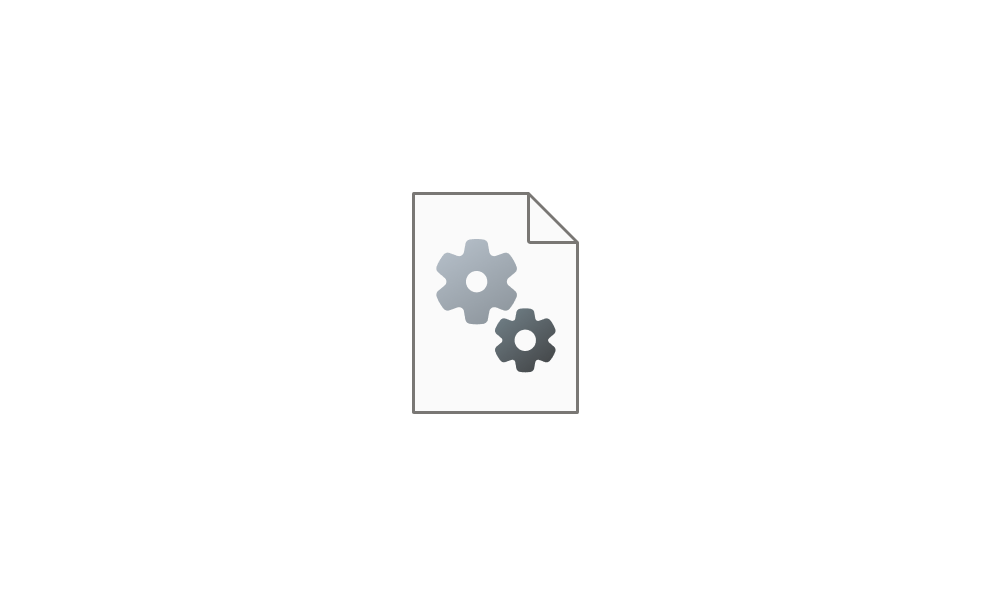
I just upgraded to 24H2 and noticed that the icon icon on my Snipping Tool desktop shortcut had changed to 1751658764314.webp.
The correct icon was used if I pinned Snipping Tool to my Start menu or Taskbar but not for a desktop shortcut. I tried deleting the shortcut and created a new one by dragging Snipping Tool from the Apps pull-down list in Start but that had the same outcome. The correct icon was displayed in the Apps list but it changed to the document icon when I dragged it to the desktop.

I found a scissors icon in %SystemRoot%\System32\SHELL32.dll and am using that, but that seems like a tacky workaround. I'm pretty sure the correct icon was used in 23H2.
 
Windows Build/Version
Win11 Pro 24H2 build 26100.4349

My Computers My Computers

  • At a glance

    Windows 11Intel Core i5-840016GBIntel UHD Graphics 630
    OS
    Windows 11
    Computer type
    PC/Desktop
    Manufacturer/Model
    Microsoft
    CPU
    Intel Core i5-8400
    Motherboard
    ASUS PRIME H370-PLUS
    Memory
    16GB
    Graphics Card(s)
    Intel UHD Graphics 630
    Sound Card
    On board
    Monitor(s) Displays
    Samsung SyncMaster 2043BWX
    Screen Resolution
    1680 x 1050
    Hard Drives
    Samsung SSD 850 256GB
    WDC 1TB NVMe
    WD 3TB external USB drive
    PSU
    I don't remember
    Case
    Corsair something-or-other
    Cooling
    Air CPU + 2 case fans
    Keyboard
    DAS S Pro (Cherry Brown)
    Mouse
    Logitech USB of some sort
  • At a glance

    Windows 10 21H1i5-840016GBon board
    Operating System
    Windows 10 21H1
    Computer type
    PC/Desktop
    Manufacturer/Model
    Homegrown
    CPU
    i5-8400
    Motherboard
    ASUS PRIME H370-PLUS
    Memory
    16GB
    Graphics card(s)
    on board
    Sound Card
    on board
    Monitor(s) Displays
    Samsung SyncMaster 2043 BWX
    Screen Resolution
    1280 x 1024
    Hard Drives
    Samsung SSD 850 EVO 250GB, WDS100T3X0C-00SJG0
    PSU
    don't remember
    Case
    Corsair Carbide 100r
    Cooling
    stock
    Keyboard
    DAC something or other
    Mouse
    Logitech M-U-0007
    Internet Speed
    80/6 Mbs
    Browser
    FireFox
    Antivirus
    Kaspersky Internet security

I just upgraded to 24H2 and noticed that the icon icon on my Snipping Tool desktop shortcut had changed to View attachment 138455.
The correct icon was used if I pinned Snipping Tool to my Start menu or Taskbar but not for a desktop shortcut. I tried deleting the shortcut and created a new one by dragging Snipping Tool from the Apps pull-down list in Start but that had the same outcome. The correct icon was displayed in the Apps list but it changed to the document icon when I dragged it to the desktop.

I found a scissors icon in %SystemRoot%\System32\SHELL32.dll and am using that, but that seems like a tacky workaround. I'm pretty sure the correct icon was used in 23H2.
Run this, create a shortcut from there by right-clicking.
%windir%\explorer.exe shell:AppsFolder

You might need to refresh your icon cache as well.
 

My Computers My Computers

  • At a glance

    All Branches but StableAMD Ryzen 7 7735HS 3200-4500 Mhz 8 cores x 232 GB DDR5Radeon Graphic / NVIDIA GeForce RTX 4060 8 GB...
    OS
    All Branches but Stable
    Computer type
    Laptop
    Manufacturer/Model
    Acer Nitro ANV15-51
    CPU
    AMD Ryzen 7 7735HS 3200-4500 Mhz 8 cores x 2
    Motherboard
    Sportage_RBH
    Memory
    32 GB DDR5
    Graphics Card(s)
    Radeon Graphic / NVIDIA GeForce RTX 4060 8 GB GDDR6
    Sound Card
    AMD/Realtek(R) Audio
    Monitor(s) Displays
    Integrated Monitor (15.3"vis)
    Screen Resolution
    FHD 1920X1080 16:9 144Hz
    Hard Drives
    KINGSTON OM8SEP4512Q-AA 1TB
    Western Digital 256GB
    PSU
    19V DC 6.32 A 120 W
    Cooling
    Dual Fans
    Mouse
    MS Bluetooth
    Internet Speed
    Fiber 1GB Cox -us & 1GB Orange-fr
    Browser
    Edge Canary- Firefox Nightly-Chrome Dev-Chrome Dev
    Antivirus
    Windows Defender
  • At a glance

    Windows 11 BetaAMD A9-94208 GB of DDR4AMD Radeon R5
    Operating System
    Windows 11 Beta
    Computer type
    Laptop
    Manufacturer/Model
    Asus X751BP
    CPU
    AMD A9-9420
    Memory
    8 GB of DDR4
    Graphics card(s)
    AMD Radeon R5
    Screen Resolution
    1600x900
    Hard Drives
    Seagate 1 TB
Thanks. That worked. On one computer your suggestion worked with no additional steps. On another I had to rebuild the icon cache (maybe). I definitely had to restart File Explorer, but that may be because I use ExplorerPatcher - it may have been getting in the way.
 

My Computers My Computers

  • At a glance

    Windows 11Intel Core i5-840016GBIntel UHD Graphics 630
    OS
    Windows 11
    Computer type
    PC/Desktop
    Manufacturer/Model
    Microsoft
    CPU
    Intel Core i5-8400
    Motherboard
    ASUS PRIME H370-PLUS
    Memory
    16GB
    Graphics Card(s)
    Intel UHD Graphics 630
    Sound Card
    On board
    Monitor(s) Displays
    Samsung SyncMaster 2043BWX
    Screen Resolution
    1680 x 1050
    Hard Drives
    Samsung SSD 850 256GB
    WDC 1TB NVMe
    WD 3TB external USB drive
    PSU
    I don't remember
    Case
    Corsair something-or-other
    Cooling
    Air CPU + 2 case fans
    Keyboard
    DAS S Pro (Cherry Brown)
    Mouse
    Logitech USB of some sort
  • At a glance

    Windows 10 21H1i5-840016GBon board
    Operating System
    Windows 10 21H1
    Computer type
    PC/Desktop
    Manufacturer/Model
    Homegrown
    CPU
    i5-8400
    Motherboard
    ASUS PRIME H370-PLUS
    Memory
    16GB
    Graphics card(s)
    on board
    Sound Card
    on board
    Monitor(s) Displays
    Samsung SyncMaster 2043 BWX
    Screen Resolution
    1280 x 1024
    Hard Drives
    Samsung SSD 850 EVO 250GB, WDS100T3X0C-00SJG0
    PSU
    don't remember
    Case
    Corsair Carbide 100r
    Cooling
    stock
    Keyboard
    DAC something or other
    Mouse
    Logitech M-U-0007
    Internet Speed
    80/6 Mbs
    Browser
    FireFox
    Antivirus
    Kaspersky Internet security

  • Like
Reactions: OAT
Back
Top Bottom