2 computers with vastly different upload speeds on the same connection (but same download)


Sunder

Member
Local time
7:41 AM
Posts
2
OS
Windows 11 pro
Hey, looking for some help figuring something out.. been at this problem for several days now, but i'm not a network guy so couldn't find a solution...

I have 2 PCs in my local network, call it PC 1 (main with 2.5 GbE port) and PC 2 (minipc with 1 GbE port), both are hardwired to the router and both run Win11 pro. both PCs, when I do speed test to a local server (i.e. within the country), get max speed (I have a 2Gbps down 1Gbps up plan, so PC 1 is getting 2gb down and 1gb up and PC 2 is getting 1gb down/up) but when I do a speed test to a different country, with PC 1 I get severely reduced upload (up to 80% less in some cases - 200Mbps) compared to PC 2, which gets near max, download is almost unaffected in both cases.

The worst case I recorded was PC 1 getting 200Mbps upload vs PC 2 that gets 950Mbps upload (download speed is within 100Mbps of each other)

The test was done with speedtest.net mostly, but I also tested using other services (Netflix, Google, Cloudflare, etc), results all showed that PC 1 has much lower upload speed.
I tried those tests in Firefox, Chrome, and Edge

I cannot figure out for the life of me why both PCs will get max speed in local speed test (to the same server!), but vastly different results when testing to further away servers (again, to the same server).

This is what I tried:

* Tested with another ISP
* Swapped ports on the router
* Tested with only 1 PC plugged into the router at a time, and tested all ports
* Swapped router
* Swapped cables (I got cat 5e and PC 2 is actually further away than PC 1, but at most we're looking at 10-12 meters)
* Updated drivers
* Downgraded drivers
* Copied network settings from PC 2 to PC 1
* Tested with a 3rd PC, which also had reduced speeds like PC 1.
* Tested with Android phone (this was done with 5g wifi) - got max speed down/up no matter the server.
* Did tracert on both PCs to several speed test servers, all were identical.
* Tried safe mode /w network on PC 1 - wasn't better.
* Tried with a different NIC, as in, different chipset - no change.
* changed countless settings under the Advanced tab of each NIC (where you have Large Send Offload and Speed & Duplex, etc).
* made a VM on PC 1 with a win11 pro install and Ubuntu to test within the VM, the win 11 VM had extremely bad speeds, both down and up, while the Ubuntu showed better upload than PC 1 by about 50%.

I later on got my hands on a realtek NIC (8111c) and tried some more tests:

* I booted Linux Mint from USB on PC 1, and there I saw something different... Tested to a local server both NICs had max speed (as before), but tested to a further away server, the realtek NIC had almost max up/down speeds (~850Mbps to far away servers) and with the intel NIC I had about 50% uplift with the upload.
* I had a spare SSD so decided to install a fresh win11pro copy and... the speeds there were much much worse to further away server: download was pretty max but my upload was stuck at 20-25Mbps (compared to the 200Mbps on OG OS).
Speeds to local server were fine again (i.e. max in both up and down).

I even took PC 2 to where PC 1 is, connected it to same power splitter and plugged it using PC 1's ethernet cable and still the same: when PC 1 is connected with the cable, i get lowered upload speed, when PC 2 is connected i get max upload speed (download speed is fine). PC 2 (the one with the faster net) is usually sitting behind a dumb switch, so I tried putting PC 1 behind that same switch, no change.

There's no packet loss, the ping is the same...

Here are the specs:
PC 1 has an MSI pro z790-p wifi mobo with Intel i225-V rev03 (2.5 Gbe) controller, and PC 2 is a mini pc (Beelink S12 Pro) with a Realtek GBE family controller.
Both PCs run Windows 11 pro, version 24H2 (OS build 26100.4061)

So to recap: 2 PCs, both cap net speed when tested to a local server (within the country), but when tested to a foreign server, PC 1 sees up to 80% less upload speed compared to PC 2. Download speed is mostly unaffected.

At this point I'm pretty sure it's not a hardware issue.
Also, every test I've ran at least 5 times before moving to the next one (and always tested the same servers when doing local vs remote).
The linux mint test really confused me...

Any, and I mean ANY help is appreciated.
 
Windows Build/Version
ver 24H2, build 26100.4061

My Computer

System One

  • OS
    Windows 11 pro
    Computer type
    PC/Desktop
    CPU
    13700k
    Motherboard
    MSI PRO Z790-P WIFI
    Memory
    G.SKILL 96GB DDR5-6400 (2x48)
    Graphics Card(s)
    RTX 4070 Ti
    Internet Speed
    2 Gbps down / 1 Gbps up
Sorry but there's little I can add that might be helpful but did want to welcome you to the forum and commend your thorough troubleshooting and excellent explanation. You have certainly gone above and beyond in your efforts.
It is a very weird issue so if you are able to solve it, please post back the solution. We have a lot of experienced folks here so I'm sure someone will offer some suggestions.
 

My Computers

System One System Two

  • OS
    Windows 11 Pro 25H2
    Computer type
    PC/Desktop
    Manufacturer/Model
    Dell Optiplex 7080
    CPU
    i9-10900 10 core 20 threads
    Motherboard
    DELL 0J37VM
    Memory
    32 gb
    Graphics Card(s)
    none-Intel UHD Graphics 630
    Sound Card
    Integrated Realtek
    Monitor(s) Displays
    Benq 27
    Screen Resolution
    2560x1440
    Hard Drives
    2x1tb Solidigm m.2 nvme /External drives 512gb Samsung m.2 sata+2tb Kingston m2.nvme
    PSU
    500w
    Case
    MT
    Cooling
    Dell Premium
    Keyboard
    Logitech wired
    Mouse
    Logitech wireless
    Internet Speed
    so slow I'm too embarrassed to tell
    Browser
    #1 Edge #2 Firefox
    Antivirus
    Defender+MWB Premium
  • Operating System
    Windows 11 Pro 24H2 26200.8457
    Computer type
    PC/Desktop
    Manufacturer/Model
    Beelink Mini PC SER5
    CPU
    AMD Ryzen 7 6800U
    Memory
    32 gb
    Graphics card(s)
    integrated
    Sound Card
    integrated
    Monitor(s) Displays
    Benq 27
    Screen Resolution
    2560x1440
    Hard Drives
    1TB Crucial nvme
    Keyboard
    Logitech wired
    Mouse
    Logitech wireless
    Internet Speed
    still too embarrassed to tell
    Browser
    Firefox
    Antivirus
    Defender
    Other Info
    System 3 is non compliant Dell 9020 i7-4770/24gb ram Win11 PRO 26200.8457
Sorry but there's little I can add that might be helpful but did want to welcome you to the forum and commend your thorough troubleshooting and excellent explanation. You have certainly gone above and beyond in your efforts.
It is a very weird issue so if you are able to solve it, please post back the solution. We have a lot of experienced folks here so I'm sure someone will offer some suggestions.
Thanks, this unexpected adventure is slowly causing me to descend into madness :D
 

My Computer

System One

  • OS
    Windows 11 pro
    Computer type
    PC/Desktop
    CPU
    13700k
    Motherboard
    MSI PRO Z790-P WIFI
    Memory
    G.SKILL 96GB DDR5-6400 (2x48)
    Graphics Card(s)
    RTX 4070 Ti
    Internet Speed
    2 Gbps down / 1 Gbps up
Bumping thread... experiencing a very similar issue!

Hey folks, I’ve been chasing down a persistent LAN upload throttling issue on my Windows 11 desktop and could use some fresh eyes. I’ve done extensive troubleshooting across hardware, OS, and drivers, and I’m convinced this is a Windows 11-specific problem.

🧠 System Overview​

  • Desktop PC running Windows 11 24H2
  • NICs tested:
    • Realtek RTL8125B (onboard 2.5GbE)
    • Intel I210AT (PCIe NIC)
    • TP-Link UE300C (USB 3.0)
    • UGREEN USB LAN (Realtek RTL8153)
  • ISP/router/cables all verified clean
  • Upload speed on this machine: ~8–10 Mbps
  • Download speed: ~900 Mbps+

✅ Reference Systems​

  • Toshiba laptop (Windows 10 22H2) with Realtek PCIe NIC gets ~47 Mbps upload
  • Same desktop running Ubuntu gets full upload speed
  • So it’s not the NIC, cable, router, or ISP—it’s Windows 11.

🔍 Troubleshooting Done So Far​

Drivers & Device Manager​

  • Realtek NIC shows “requires further installation”
  • Cleaned out legacy drivers using pnputil
  • Reinstalled latest drivers from Realtek and motherboard vendor
  • Tried both Intel and Realtek NICs—same result

Offload & Power Settings​

  • Disabled all NIC offloads: LSO, checksum, flow control, interrupt moderation
  • Disabled USB selective suspend
  • Disabled Energy Efficient Ethernet
  • No change

Registry Tweaks​

  • Added:
    • DisableTaskOffload = 1
    • TcpAckFrequency = 1
    • Rebooted, retested—no improvement

🧪 Confirmed Findings​

  • Windows 11 is the only variable causing upload throttling
  • Ubuntu and Windows 10 perform normally
  • Realtek and USB NICs behave identically under Win11
  • No chipset congestion (SSD/NIC lane mapping verified)

🧰 What I’m Looking For​

  • Anyone else seeing LAN upload throttling on Windows 11?
  • Any hidden services, stack-level tweaks, or driver mods that helped?
  • Is this a known regression in 24H2?
Thanks in advance—this has been driving me nuts and I’ve ruled out everything I can think of.
 

My Computer

System One

  • OS
    Windows 11
    Computer type
    PC/Desktop
    CPU
    AMD Ryzen 9 7900
    Motherboard
    Asus Tuf Gaming x670e-plus wifi
    Memory
    32GB
    Graphics Card(s)
    Asus AMD Radeon RX 7900 XTX
    Internet Speed
    1000/50
just a thought please check.
control panel > network and sharing > 'your connection'

in this window > properties
at the top of this window > configure

in this window the 'advanced tab'

there you can check and review the connection settings
the one setting i change is 'jumbo frame'
and set it to 4088

there are other settings there you can a just like link speed/dublex

best of luck, Steve ..
 

My Computers

System One System Two

  • OS
    Debian 13 KDE .. Windows 11 Home
    Computer type
    PC/Desktop
    Manufacturer/Model
    HP 24" AiO
    CPU
    Ryzen 7 5825u
    Motherboard
    HP
    Memory
    64GB DDR4 3200
    Graphics Card(s)
    Ryzen 7 5825u
    Sound Card
    RealTek
    Monitor(s) Displays
    24" HP AiO
    Screen Resolution
    1920 x 1080 @60 Hz
    Hard Drives
    1TB WD Blue SN580 M2 SSD Partitioned.
    2x 1TB USB HDD External Backup/Storage.
    PSU
    90W external power brick
    Case
    24" All in One
    Cooling
    Default Air Cooling
    Keyboard
    HP WiFi UK extended
    Mouse
    HP WiFi 3 Button
    Internet Speed
    1GB full fibre
    Browser
    Edge & Firefox
    Antivirus
    AVG Internet Security/Windows Defender
    Other Info
    Mainly Open Source Software
  • Operating System
    Ubuntu 22.04.5 LTS
    Computer type
    Laptop
    Manufacturer/Model
    Dell 13" Latitude 2017
    CPU
    i5 7200u
    Motherboard
    Dell
    Memory
    16GB DDR4
    Graphics card(s)
    Intel
    Sound Card
    Intel
    Monitor(s) Displays
    13" Dell Laptop
    Hard Drives
    250GB Crucial 2.5" SSD
    Mouse
    Generic WiFi 3 button
    Internet Speed
    WiFi only
    Browser
    Firefox
    Antivirus
    ClamAV TK
    Other Info
    Mainly Open Source Software
Bumping thread... experiencing a very similar issue!

Hey folks, I’ve been chasing down a persistent LAN upload throttling issue on my Windows 11 desktop and could use some fresh eyes. I’ve done extensive troubleshooting across hardware, OS, and drivers, and I’m convinced this is a Windows 11-specific problem.

I doubt this is a known issue with 24H2, I don't see anything like this with 24H2 or 25H2 here.
 

My Computers

System One System Two

  • OS
    Win 11 Pro 25H2, Build 26200.8524
    Computer type
    PC/Desktop
    Manufacturer/Model
    Home Brew
    CPU
    Intel Core i5 14500
    Motherboard
    Gigabyte B760M G P WIFI
    Memory
    64GB DDR4
    Graphics Card(s)
    GeForce RTX 4060
    Sound Card
    Chipset Realtek
    Monitor(s) Displays
    LG 45" Ultragear, Acer 24" 1080p
    Screen Resolution
    5120x1440, 1920x1080
    Hard Drives
    Crucial P310 2TB 2280 PCIe Gen4 3D NAND NVMe M.2 SSD (O/S)
    Silicon Power 2TB US75 NVMe PCIe Gen4 M.2 2280 SSD (backup)
    Crucial BX500 2TB 3D NAND (2nd backup)
    Seagate 4TB Ironwolf, rotating HDD archive files
    External off-line backup Drives: 2 NVMe 4TB drives in external enclosures
    PSU
    Thermaltake Toughpower GF3 750W
    Case
    LIAN LI LANCOOL 216 E-ATX PC Case
    Cooling
    Lots of fans!
    Keyboard
    Microsoft Comfort Curve 2000
    Mouse
    Logitech G305
    Internet Speed
    Verizon FiOS 1GB
    Browser
    Firefox
    Antivirus
    Malware Bytes & Windows Defender Security
  • Operating System
    Win 11 Pro 25H2, Build 26200.8524
    Computer type
    PC/Desktop
    Manufacturer/Model
    Home Brew
    CPU
    Intel Core i5 14400
    Motherboard
    Gigabyte B760M DS3H AX
    Memory
    32GB DDR5
    Graphics card(s)
    Intel 700 Embedded GPU
    Sound Card
    Realtek Embedded
    Monitor(s) Displays
    27" HP 1080p
    Screen Resolution
    1920x1080
    Hard Drives
    Crucial P310 2TB 2280 PCIe Gen4 eD NAND PCIe SSD
    Samsung EVO 990 2TB NVMe Gen4 SSD
    Samsung 2TB SATA SSD
    PSU
    Thermaltake Smart BM3 650W
    Case
    Okinos Micro ATX Case
    Cooling
    Fans
    Keyboard
    Microsoft Comfort Curve 2000
    Mouse
    Logitech G305
    Internet Speed
    Verizon FiOS 1GB
    Browser
    Firefox
    Antivirus
    Malware Bytes & Windows Defender Security
I doubt this is a known issue with 24H2, I don't see anything like this with 24H2 or 25H2 here.
just a thought please check.
control panel > network and sharing > 'your connection'

in this window > properties
at the top of this window > configure

in this window the 'advanced tab'

there you can check and review the connection settings
the one setting i change is 'jumbo frame'
and set it to 4088

there are other settings there you can a just like link speed/dublex

best of luck, Steve ..
Thank you both for your replies.

I changed jumbo frame and still the same upload speeds.

I have an old laptop running windows 10 that works just fine with upload speeds, but the desktop which is on win 11 24H2 just can't seem to get past 10mbs. I can see it on speedtest hit like 30mbs for a nano second before being throttled down. When doing speedtests on the desktop via wifi connection, the speed is 47mbs upload.
When I test the LAN device through Ubuntu, it has no issues hitting 47mbs upload speed. It just leads me back to something happening in win 11.
 

My Computer

System One

  • OS
    Windows 11
    Computer type
    PC/Desktop
    CPU
    AMD Ryzen 9 7900
    Motherboard
    Asus Tuf Gaming x670e-plus wifi
    Memory
    32GB
    Graphics Card(s)
    Asus AMD Radeon RX 7900 XTX
    Internet Speed
    1000/50
I just did a speed test connected via NordVpn and the upload speed reaches 47mbps - when disconnected from vpn, 10mbps. So definitely something going on with Windows... Help, this is driving me crazy!
 

My Computer

System One

  • OS
    Windows 11
    Computer type
    PC/Desktop
    CPU
    AMD Ryzen 9 7900
    Motherboard
    Asus Tuf Gaming x670e-plus wifi
    Memory
    32GB
    Graphics Card(s)
    Asus AMD Radeon RX 7900 XTX
    Internet Speed
    1000/50
Have you checked your cable? Gigabit Ethernet drops back to 100Mbit if it doesn't have all eight wires. One missing wire will give you 100Mbit links.
 

My Computers

System One System Two

  • OS
    Win 11 Pro 25H2, Build 26200.8524
    Computer type
    PC/Desktop
    Manufacturer/Model
    Home Brew
    CPU
    Intel Core i5 14500
    Motherboard
    Gigabyte B760M G P WIFI
    Memory
    64GB DDR4
    Graphics Card(s)
    GeForce RTX 4060
    Sound Card
    Chipset Realtek
    Monitor(s) Displays
    LG 45" Ultragear, Acer 24" 1080p
    Screen Resolution
    5120x1440, 1920x1080
    Hard Drives
    Crucial P310 2TB 2280 PCIe Gen4 3D NAND NVMe M.2 SSD (O/S)
    Silicon Power 2TB US75 NVMe PCIe Gen4 M.2 2280 SSD (backup)
    Crucial BX500 2TB 3D NAND (2nd backup)
    Seagate 4TB Ironwolf, rotating HDD archive files
    External off-line backup Drives: 2 NVMe 4TB drives in external enclosures
    PSU
    Thermaltake Toughpower GF3 750W
    Case
    LIAN LI LANCOOL 216 E-ATX PC Case
    Cooling
    Lots of fans!
    Keyboard
    Microsoft Comfort Curve 2000
    Mouse
    Logitech G305
    Internet Speed
    Verizon FiOS 1GB
    Browser
    Firefox
    Antivirus
    Malware Bytes & Windows Defender Security
  • Operating System
    Win 11 Pro 25H2, Build 26200.8524
    Computer type
    PC/Desktop
    Manufacturer/Model
    Home Brew
    CPU
    Intel Core i5 14400
    Motherboard
    Gigabyte B760M DS3H AX
    Memory
    32GB DDR5
    Graphics card(s)
    Intel 700 Embedded GPU
    Sound Card
    Realtek Embedded
    Monitor(s) Displays
    27" HP 1080p
    Screen Resolution
    1920x1080
    Hard Drives
    Crucial P310 2TB 2280 PCIe Gen4 eD NAND PCIe SSD
    Samsung EVO 990 2TB NVMe Gen4 SSD
    Samsung 2TB SATA SSD
    PSU
    Thermaltake Smart BM3 650W
    Case
    Okinos Micro ATX Case
    Cooling
    Fans
    Keyboard
    Microsoft Comfort Curve 2000
    Mouse
    Logitech G305
    Internet Speed
    Verizon FiOS 1GB
    Browser
    Firefox
    Antivirus
    Malware Bytes & Windows Defender Security
Have you checked your cable? Gigabit Ethernet drops back to 100Mbit if it doesn't have all eight wires. One missing wire will give you 100Mbit links.
Yes, all good. I tried my laptop on the same LAN cable (running on win 10) and that gets the same upload speed (47mbps).
 

My Computer

System One

  • OS
    Windows 11
    Computer type
    PC/Desktop
    CPU
    AMD Ryzen 9 7900
    Motherboard
    Asus Tuf Gaming x670e-plus wifi
    Memory
    32GB
    Graphics Card(s)
    Asus AMD Radeon RX 7900 XTX
    Internet Speed
    1000/50
How about file sharing speeds between computers? Do you have the same slow speeds sharing between computers as uploading to the Internet?
 

My Computers

System One System Two

  • OS
    Win 11 Pro 25H2, Build 26200.8524
    Computer type
    PC/Desktop
    Manufacturer/Model
    Home Brew
    CPU
    Intel Core i5 14500
    Motherboard
    Gigabyte B760M G P WIFI
    Memory
    64GB DDR4
    Graphics Card(s)
    GeForce RTX 4060
    Sound Card
    Chipset Realtek
    Monitor(s) Displays
    LG 45" Ultragear, Acer 24" 1080p
    Screen Resolution
    5120x1440, 1920x1080
    Hard Drives
    Crucial P310 2TB 2280 PCIe Gen4 3D NAND NVMe M.2 SSD (O/S)
    Silicon Power 2TB US75 NVMe PCIe Gen4 M.2 2280 SSD (backup)
    Crucial BX500 2TB 3D NAND (2nd backup)
    Seagate 4TB Ironwolf, rotating HDD archive files
    External off-line backup Drives: 2 NVMe 4TB drives in external enclosures
    PSU
    Thermaltake Toughpower GF3 750W
    Case
    LIAN LI LANCOOL 216 E-ATX PC Case
    Cooling
    Lots of fans!
    Keyboard
    Microsoft Comfort Curve 2000
    Mouse
    Logitech G305
    Internet Speed
    Verizon FiOS 1GB
    Browser
    Firefox
    Antivirus
    Malware Bytes & Windows Defender Security
  • Operating System
    Win 11 Pro 25H2, Build 26200.8524
    Computer type
    PC/Desktop
    Manufacturer/Model
    Home Brew
    CPU
    Intel Core i5 14400
    Motherboard
    Gigabyte B760M DS3H AX
    Memory
    32GB DDR5
    Graphics card(s)
    Intel 700 Embedded GPU
    Sound Card
    Realtek Embedded
    Monitor(s) Displays
    27" HP 1080p
    Screen Resolution
    1920x1080
    Hard Drives
    Crucial P310 2TB 2280 PCIe Gen4 eD NAND PCIe SSD
    Samsung EVO 990 2TB NVMe Gen4 SSD
    Samsung 2TB SATA SSD
    PSU
    Thermaltake Smart BM3 650W
    Case
    Okinos Micro ATX Case
    Cooling
    Fans
    Keyboard
    Microsoft Comfort Curve 2000
    Mouse
    Logitech G305
    Internet Speed
    Verizon FiOS 1GB
    Browser
    Firefox
    Antivirus
    Malware Bytes & Windows Defender Security
As soon you are testing against systems that are not on your local network all bets are off. There's a high probability both systems are not following the same route to the remote server. Routing decisions happen on the fly out on the internet plus the servers load may vary greatly at any given point in time.
 

My Computer

System One

  • OS
    Linux Mint
    Computer type
    Laptop
    Manufacturer/Model
    System76 Lemur Pro
Sharing speeds between computers is fine (transfer files between nas and pc), it's just the desktop pc to the internet which is slow but fine using vpn.
 

My Computer

System One

  • OS
    Windows 11
    Computer type
    PC/Desktop
    CPU
    AMD Ryzen 9 7900
    Motherboard
    Asus Tuf Gaming x670e-plus wifi
    Memory
    32GB
    Graphics Card(s)
    Asus AMD Radeon RX 7900 XTX
    Internet Speed
    1000/50
Look at the previous post, this could be something other than that particular system.
 

My Computers

System One System Two

  • OS
    Win 11 Pro 25H2, Build 26200.8524
    Computer type
    PC/Desktop
    Manufacturer/Model
    Home Brew
    CPU
    Intel Core i5 14500
    Motherboard
    Gigabyte B760M G P WIFI
    Memory
    64GB DDR4
    Graphics Card(s)
    GeForce RTX 4060
    Sound Card
    Chipset Realtek
    Monitor(s) Displays
    LG 45" Ultragear, Acer 24" 1080p
    Screen Resolution
    5120x1440, 1920x1080
    Hard Drives
    Crucial P310 2TB 2280 PCIe Gen4 3D NAND NVMe M.2 SSD (O/S)
    Silicon Power 2TB US75 NVMe PCIe Gen4 M.2 2280 SSD (backup)
    Crucial BX500 2TB 3D NAND (2nd backup)
    Seagate 4TB Ironwolf, rotating HDD archive files
    External off-line backup Drives: 2 NVMe 4TB drives in external enclosures
    PSU
    Thermaltake Toughpower GF3 750W
    Case
    LIAN LI LANCOOL 216 E-ATX PC Case
    Cooling
    Lots of fans!
    Keyboard
    Microsoft Comfort Curve 2000
    Mouse
    Logitech G305
    Internet Speed
    Verizon FiOS 1GB
    Browser
    Firefox
    Antivirus
    Malware Bytes & Windows Defender Security
  • Operating System
    Win 11 Pro 25H2, Build 26200.8524
    Computer type
    PC/Desktop
    Manufacturer/Model
    Home Brew
    CPU
    Intel Core i5 14400
    Motherboard
    Gigabyte B760M DS3H AX
    Memory
    32GB DDR5
    Graphics card(s)
    Intel 700 Embedded GPU
    Sound Card
    Realtek Embedded
    Monitor(s) Displays
    27" HP 1080p
    Screen Resolution
    1920x1080
    Hard Drives
    Crucial P310 2TB 2280 PCIe Gen4 eD NAND PCIe SSD
    Samsung EVO 990 2TB NVMe Gen4 SSD
    Samsung 2TB SATA SSD
    PSU
    Thermaltake Smart BM3 650W
    Case
    Okinos Micro ATX Case
    Cooling
    Fans
    Keyboard
    Microsoft Comfort Curve 2000
    Mouse
    Logitech G305
    Internet Speed
    Verizon FiOS 1GB
    Browser
    Firefox
    Antivirus
    Malware Bytes & Windows Defender Security
Also your advertised speed from your ISP is best effort, so even to the CO you're not guaranteed to get your max speed unless you pay more for a business plan where they prioritize your traffic so you are more likely to get the advertised speed.
 

My Computer

System One

  • OS
    Linux Mint
    Computer type
    Laptop
    Manufacturer/Model
    System76 Lemur Pro
Solved!!!

Thank you for your replies. My broadband internet is 1000/50 so I understand that I wouldn't and didn't expect to hit that peak but I do expect to reach somewhere near it.

I got thinking deeper and asked myself (and Co-Pilot) why does my laptop (windows 10) with built in Realtek Gbe NIC manage to achieve the desired upload and download speeds but I can't achieve them on my desktop Realtek 2.5Gbe NIC unless Nord VPN is running. I installed a new router AI Mesh system (Asus ZenWiFi-BT8) a few months and to rule out router issues I enable QoS on it. Low and behold, I managed to get LAN upload of 47Mbps! However, that came at a cost... WiFi upload speeds were then throttled to around 10Mbps so I disabled QoS on the router and everything reverted back to how it was previously.
Still feeling perplexed as to why is this happening given that my desktop is using the same LAN connection, on the same router, but with Nord VPN on, I get upload speeds of 47Mbps which is expected, but without it on, I am only getting about 10Mbps. This is where Co-Pilot came in...

Co-Pilot answered this question advising that Nord VPN uses a different MTU and suggested that I Powershell this code (netsh interface ipv4 set subinterface "Ethernet" mtu=1400 store=persistent) which would change my MTU from 1500. and to test it. As soon as that was changed, I got upload speeds of 47Mbps. I then changed it for ipv6 as well. It has been working flawlessly since.

When quizzing Co-Pilot what was the root cause it said:

1. Realtek NIC Driver Limitations
  • Realtek’s Windows 11 drivers struggle with full-size Ethernet frames (MTU 1500), especially during high-throughput uploads.​
  • Symptoms include TCP retransmissions, QUIC anomalies, and malformed packets observed in Wireshark.​
  • These issues are exacerbated by offloading features like Large Send Offload and Checksum Offload, which misreport packet boundaries or delay ACKs (I already had these disabled).​
2. Windows 11 Network Stack Regression
  • Windows 11 introduced changes to congestion control, flow scheduling, and offload handling that affect Realtek NICs disproportionately.
  • Uploads stall or throttle when NICs fail to negotiate clean MTU boundaries or misalign TCP segments.
  • VPNs like NordLynx bypass this by enforcing a tunnel MTU (e.g. 1420), avoiding fragmentation and offload conflicts.

3. MTU Mismatch and Fragmentation
  • Desktop NIC was using MTU 1500 by default, but couldn’t reliably transmit full-size packets.
  • Router and wireless clients handled 1500 MTU perfectly, confirming the issue was not router-induced.
  • Manual reduction to MTU 1400 resolved fragmentation and retransmission, restoring full upload speed.
4. VPN Masking the Issue
  • NordVPN (NordLynx) consistently improved upload speed by enforcing MTU 1420 and bypassing Realtek’s offload stack.
This confirmed the issue was MTU-related, not ISP or router-based.

Resolution Summary​

  • Set MTU to 1400 on desktop Ethernet interface:
    powershell
    netsh interface ipv4 set subinterface "Ethernet" mtu=1400 store=persistent
    netsh interface ipv6 set subinterface "Ethernet" mtu=1400 store=persistent
  • Disabled offloading features in NIC properties
  • Upload speed restored to 47+ Mbps
  • Wireshark confirmed clean packet flow, no retransmissions

I hope this is able to help others who experience the same things and hope that Microsoft, Realtek, Asus and others are watching and can take some learnings from this!
 

My Computer

System One

  • OS
    Windows 11
    Computer type
    PC/Desktop
    CPU
    AMD Ryzen 9 7900
    Motherboard
    Asus Tuf Gaming x670e-plus wifi
    Memory
    32GB
    Graphics Card(s)
    Asus AMD Radeon RX 7900 XTX
    Internet Speed
    1000/50
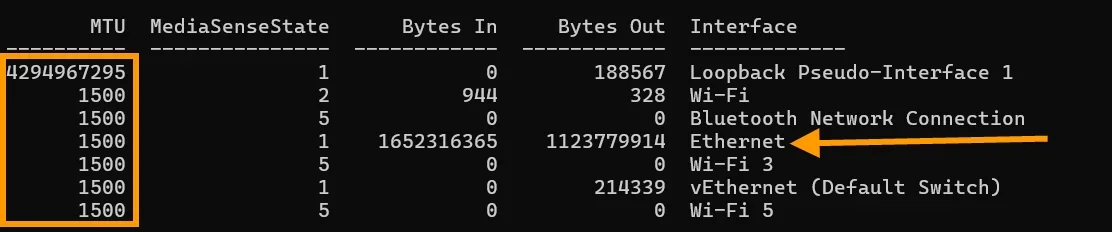
Odd, I'm not using a VPN, and I have stock Realtek network drivers with unmodified MTU settings. Except for the crazy number in the Loopback Interface, all my MTU values are set at 1500, the default value. My connection is currently on the Ethernet, I'm directly connected to my network's main 16 channel switch.

1757597913254.webp

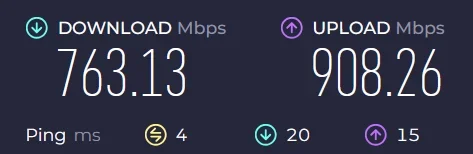
My upload speeds don't seem to suffer at all. This is gigabit fiber.

1757598103620.webp
 

My Computers

System One System Two

  • OS
    Win 11 Pro 25H2, Build 26200.8524
    Computer type
    PC/Desktop
    Manufacturer/Model
    Home Brew
    CPU
    Intel Core i5 14500
    Motherboard
    Gigabyte B760M G P WIFI
    Memory
    64GB DDR4
    Graphics Card(s)
    GeForce RTX 4060
    Sound Card
    Chipset Realtek
    Monitor(s) Displays
    LG 45" Ultragear, Acer 24" 1080p
    Screen Resolution
    5120x1440, 1920x1080
    Hard Drives
    Crucial P310 2TB 2280 PCIe Gen4 3D NAND NVMe M.2 SSD (O/S)
    Silicon Power 2TB US75 NVMe PCIe Gen4 M.2 2280 SSD (backup)
    Crucial BX500 2TB 3D NAND (2nd backup)
    Seagate 4TB Ironwolf, rotating HDD archive files
    External off-line backup Drives: 2 NVMe 4TB drives in external enclosures
    PSU
    Thermaltake Toughpower GF3 750W
    Case
    LIAN LI LANCOOL 216 E-ATX PC Case
    Cooling
    Lots of fans!
    Keyboard
    Microsoft Comfort Curve 2000
    Mouse
    Logitech G305
    Internet Speed
    Verizon FiOS 1GB
    Browser
    Firefox
    Antivirus
    Malware Bytes & Windows Defender Security
  • Operating System
    Win 11 Pro 25H2, Build 26200.8524
    Computer type
    PC/Desktop
    Manufacturer/Model
    Home Brew
    CPU
    Intel Core i5 14400
    Motherboard
    Gigabyte B760M DS3H AX
    Memory
    32GB DDR5
    Graphics card(s)
    Intel 700 Embedded GPU
    Sound Card
    Realtek Embedded
    Monitor(s) Displays
    27" HP 1080p
    Screen Resolution
    1920x1080
    Hard Drives
    Crucial P310 2TB 2280 PCIe Gen4 eD NAND PCIe SSD
    Samsung EVO 990 2TB NVMe Gen4 SSD
    Samsung 2TB SATA SSD
    PSU
    Thermaltake Smart BM3 650W
    Case
    Okinos Micro ATX Case
    Cooling
    Fans
    Keyboard
    Microsoft Comfort Curve 2000
    Mouse
    Logitech G305
    Internet Speed
    Verizon FiOS 1GB
    Browser
    Firefox
    Antivirus
    Malware Bytes & Windows Defender Security
Back
Top Bottom