Solved 2 NVME drives in AHCI


joeT44

Well-known member
Member
VIP
Local time
7:35 PM
Posts
32
Location
Lakewood, N.J.
OS
Windows 11 Pro
I have 2 990 pro drives in my laptop. I'm currently running them in RAID 0 but my startup and shutdown is very slow. I expected just the opposite so I'm going to go back to AHCI. I only had 1 drive installed the last time I was in AHCI and the all around performance was much better. My question is how would I access each drive. Would Windows automatically create a boot menu showing both drives or is the bios the only way to get into the secondary drive? Thank you.
 

My Computer My Computer

At a glance

Windows 11 Pro285HX64GBRTX 5090 Laptop
OS
Windows 11 Pro
Computer type
Laptop
Manufacturer/Model
MSI Raider 18 HX A2XWJG
CPU
285HX
Memory
64GB
Graphics Card(s)
RTX 5090 Laptop
Screen Resolution
3840X2400
Hard Drives
2x Samsung 990 Pro Raid 0

Windows does not create a boot menu when you change disk drive controllers.
If you just switch from RAID to AHCI in BIOS, the computer will subsequently fail to boot into Windows, but there is a work around.
RAID 0 splits the data between two drives. When you break the RAID into two separate disks, you will likely make the data unreadable - but I could be wrong.
Others on this Forum are more expert on this matter than me, notably @NavyLCDR and @Megahertz . They may chime in once they have seen and understood your question.
 

My Computers My Computers

  • At a glance

    Windows 11AMD Ryzen 5 560016 GBSapphire Radeon RX 6500XT (8 GB version)
    OS
    Windows 11
    Computer type
    PC/Desktop
    CPU
    AMD Ryzen 5 5600
    Motherboard
    MSI B550-A Pro
    Memory
    16 GB
    Graphics Card(s)
    Sapphire Radeon RX 6500XT (8 GB version)
    Monitor(s) Displays
    BenQ Mobuiz EX2710Q QHD, Iiyama ProLite X23377HDS
    Hard Drives
    MSI Spatium M461 4TB
  • At a glance

    Windows 11Intel Celeron N4020
    Operating System
    Windows 11
    Computer type
    Laptop
    Manufacturer/Model
    Acer A114
    CPU
    Intel Celeron N4020
You can create a image of your raid array and restore it to a single drive, per @hsehestedt


My Computers My Computers

  • At a glance

    Win 11 Pro 25H2 26200.8655Intel® Core™ i7-14700KG.SKILL Ripjaws S5 Series 64GB (2 x 32GB) DDR5ASUS GeForce RTX 4070 Super 12GB
    OS
    Win 11 Pro 25H2 26200.8655
    Computer type
    PC/Desktop
    Manufacturer/Model
    Self Built
    CPU
    Intel® Core™ i7-14700K
    Motherboard
    ASUS TUF Z690-PLUS WIFI BIOS 4505 11/29/25
    Memory
    G.SKILL Ripjaws S5 Series 64GB (2 x 32GB) DDR5
    Graphics Card(s)
    ASUS GeForce RTX 4070 Super 12GB
    Sound Card
    Sound Blaster AE-5 Plus
    Monitor(s) Displays
    ASUS TUF Gaming 27" 2K HDR Gaming
    Screen Resolution
    2560 x 1440
    Hard Drives
    Samsung 990 Pro 1TB NVMe (Win 11 25H2)
    SK hynix P41 500GB NVMe 25H2 DEV/Games
    SK hynix P41 2TB NVMe (x3)
    Crucial P3 Plus 4TB
    PSU
    Corsair RM850x Shift
    Case
    Antec Dark Phantom DP502 FLUX
    Cooling
    Corsair Nautilus 360 RS AIO
    Keyboard
    Logitech MK 320
    Mouse
    Razer Basilisk V3
    Internet Speed
    750Mbs
    Browser
    Firefox
    Antivirus
    Winows Security
    Other Info
    MR 8.1 Home
  • At a glance

    Win 11 Pro 25H2 26200.8655Intel Core i7-11700F64 GB DDR4MSI GeForce RTX 3060 Ventus 2X 12GB
    Operating System
    Win 11 Pro 25H2 26200.8655
    Computer type
    PC/Desktop
    Manufacturer/Model
    Self Built
    CPU
    Intel Core i7-11700F
    Motherboard
    Asus TUF Gaming Z590 Plus WiFi (BIOS 2803)
    Memory
    64 GB DDR4
    Graphics card(s)
    MSI GeForce RTX 3060 Ventus 2X 12GB
    Sound Card
    SoundBlaster Audigy Fx V2
    Monitor(s) Displays
    Samsung F27T350
    Screen Resolution
    1920x1080
    Hard Drives
    Samsung 980 Pro 1TB
    Samsung 970 EVO Plus 2TB
    Samsung 870 EVO 500GB SSD
    PSU
    Corsair HX750
    Case
    Cougar MX330-G Window
    Cooling
    Thermalright Frozen Edge 240 Black AIO
    Internet Speed
    350Mbps
    Browser
    Firefox
    Antivirus
    Windows Security
  • System Three
    Win 11 Pro 25H2 26200.8655
    ASUS PRIME Z370-P II BIOS 3004 7/12/21
    Intel Core i7-8700 CPU @ 3.20GHz
    32GB DDR4 RAM (4x8)
    iGPU Intel UHD Graphics 630
    Mid-Tower Desktop
or is the bios the only way to get into the secondary drive? Thank you.

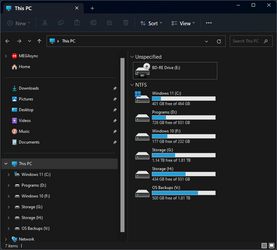
Once you get Windows installed to a single drive, the second drive would be accessible in File Explorer.
Here the C, D, and H drives are NVME and the rest are standard SATA SSD's.

1693549155924.png
 

My Computers My Computers

  • At a glance

    Win 11 Pro 25H2 26200.8655Intel® Core™ i7-14700KG.SKILL Ripjaws S5 Series 64GB (2 x 32GB) DDR5ASUS GeForce RTX 4070 Super 12GB
    OS
    Win 11 Pro 25H2 26200.8655
    Computer type
    PC/Desktop
    Manufacturer/Model
    Self Built
    CPU
    Intel® Core™ i7-14700K
    Motherboard
    ASUS TUF Z690-PLUS WIFI BIOS 4505 11/29/25
    Memory
    G.SKILL Ripjaws S5 Series 64GB (2 x 32GB) DDR5
    Graphics Card(s)
    ASUS GeForce RTX 4070 Super 12GB
    Sound Card
    Sound Blaster AE-5 Plus
    Monitor(s) Displays
    ASUS TUF Gaming 27" 2K HDR Gaming
    Screen Resolution
    2560 x 1440
    Hard Drives
    Samsung 990 Pro 1TB NVMe (Win 11 25H2)
    SK hynix P41 500GB NVMe 25H2 DEV/Games
    SK hynix P41 2TB NVMe (x3)
    Crucial P3 Plus 4TB
    PSU
    Corsair RM850x Shift
    Case
    Antec Dark Phantom DP502 FLUX
    Cooling
    Corsair Nautilus 360 RS AIO
    Keyboard
    Logitech MK 320
    Mouse
    Razer Basilisk V3
    Internet Speed
    750Mbs
    Browser
    Firefox
    Antivirus
    Winows Security
    Other Info
    MR 8.1 Home
  • At a glance

    Win 11 Pro 25H2 26200.8655Intel Core i7-11700F64 GB DDR4MSI GeForce RTX 3060 Ventus 2X 12GB
    Operating System
    Win 11 Pro 25H2 26200.8655
    Computer type
    PC/Desktop
    Manufacturer/Model
    Self Built
    CPU
    Intel Core i7-11700F
    Motherboard
    Asus TUF Gaming Z590 Plus WiFi (BIOS 2803)
    Memory
    64 GB DDR4
    Graphics card(s)
    MSI GeForce RTX 3060 Ventus 2X 12GB
    Sound Card
    SoundBlaster Audigy Fx V2
    Monitor(s) Displays
    Samsung F27T350
    Screen Resolution
    1920x1080
    Hard Drives
    Samsung 980 Pro 1TB
    Samsung 970 EVO Plus 2TB
    Samsung 870 EVO 500GB SSD
    PSU
    Corsair HX750
    Case
    Cougar MX330-G Window
    Cooling
    Thermalright Frozen Edge 240 Black AIO
    Internet Speed
    350Mbps
    Browser
    Firefox
    Antivirus
    Windows Security
  • System Three
    Win 11 Pro 25H2 26200.8655
    ASUS PRIME Z370-P II BIOS 3004 7/12/21
    Intel Core i7-8700 CPU @ 3.20GHz
    32GB DDR4 RAM (4x8)
    iGPU Intel UHD Graphics 630
    Mid-Tower Desktop
Thank all of you guys. This a great forum!
 

My Computer My Computer

At a glance

Windows 11 Pro285HX64GBRTX 5090 Laptop
OS
Windows 11 Pro
Computer type
Laptop
Manufacturer/Model
MSI Raider 18 HX A2XWJG
CPU
285HX
Memory
64GB
Graphics Card(s)
RTX 5090 Laptop
Screen Resolution
3840X2400
Hard Drives
2x Samsung 990 Pro Raid 0

On a RAID 0 array, data is split ted into two drives so you need both drives on the RAID 0 array to access the data on them. Only one drive is useless. You need both drives on the RAID 0 array to save your data.
The RAID 0 array is seen by Windows as a single drive.
What you should do is:
- Create a drive image of the array and save on another drive.
- Remove the array on BIOS (remain with RAID mode)
- Boot from a Win 10 or 11 installation drive, launch a CMD window and with Diskpart, clean and initialize each drive.
- Boot from the image application rescue drive and in one of the 990 restore the drive image created.
Once the the drive is booting, prepare the drive to change from RAID to AHCI on Windows, restart, enter BIOS and change from RAID mode to AHCI.
 

My Computers My Computers

  • At a glance

    Windows 11 Pro - Windows 7 HP 64 - Lubuntui5 6600K - 800MHz to 4400MHz4+4G GSkill DDR4 3000IG - Intel 530
    OS
    Windows 11 Pro - Windows 7 HP 64 - Lubuntu
    Computer type
    PC/Desktop
    Manufacturer/Model
    custom build
    CPU
    i5 6600K - 800MHz to 4400MHz
    Motherboard
    GA-Z170-HD3P
    Memory
    4+4G GSkill DDR4 3000
    Graphics Card(s)
    IG - Intel 530
    Monitor(s) Displays
    Samsung 226BW
    Screen Resolution
    1680x1050
    Hard Drives
    (1) -1 SM951 – 128GB M.2 AHCI PCIe SSD drive for Win 11
    (2) -1 WD SATA 3 - 1T for Data
    (3) -1 WD SATA 3 - 1T for backup
    (4) -1 BX500 SSD - 256G for Windows 7 and Lubuntu
    PSU
    Thermaltake 450W TR2 gold
    Keyboard
    Old and good Chicony mechanical keyboard
    Mouse
    Logitech mX performance - 9 buttons (had to disable some)
    Internet Speed
    500 Mb/s
    Browser
    Firefox 64
  • At a glance

    Windows 11 Proi7-4500U 800- 3000MHz(4+4)G DDR3 1600IG intel 4400 + NVIDIA GeForce GT 745M
    Operating System
    Windows 11 Pro
    Computer type
    Laptop
    Manufacturer/Model
    Asus Q550LF
    CPU
    i7-4500U 800- 3000MHz
    Motherboard
    Asus Q550LF
    Memory
    (4+4)G DDR3 1600
    Graphics card(s)
    IG intel 4400 + NVIDIA GeForce GT 745M
    Sound Card
    Realtek
    Monitor(s) Displays
    LG Display LP156WF4-SPH1
    Screen Resolution
    1920 x 1080
    Hard Drives
    BX500 120G SSD for Windows and programs
    & 1T HDD for data
    Internet Speed
    500 Mb/s
    Browser
    Firefox 64

Latest Support Threads

Back
Top Bottom