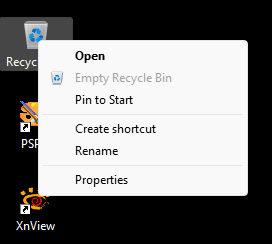
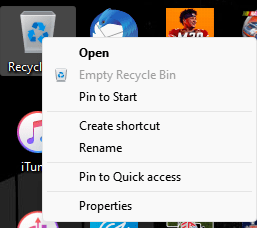
22H2 how can I change the context menu order of recycle bin?


scarzy19

Well-known member
Local time
4:04 AM
Posts
7
OS
Windows 11 Pro 22H2
Using Windows 11 22H2. I have been trying to move the 'Empty Recycle Bin' option above the 'Pin to Quick access' option in the context menu of the recycle bin (see photo below). I have searched around and have not been able to find a resolution or figure out how to do this. I am tired of pinning the recycle bin to the quick access area by mistake when trying to empty the recycle bin. All help is very much appreciated. Thanks!
 

Attachments
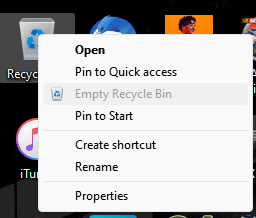
  • Image1.png
    Image1.png
    6.5 KB · Views: 1

My Computer My Computer

At a glance

Windows 11 Pro 22H2
OS
Windows 11 Pro 22H2
Computer type
PC/Desktop
This isn't possible, it's coded that way
 

My Computer My Computer

At a glance

Windows 11 Pro 25H2 (RP channel)AMD Ryzen 7 9800X3D 8-core64GB Corsair Titanium 6000/CL30MSI Suprim 5080 SOC
OS
Windows 11 Pro 25H2 (RP channel)
Computer type
PC/Desktop
Manufacturer/Model
MSI
CPU
AMD Ryzen 7 9800X3D 8-core
Motherboard
MEG X870E Godlike
Memory
64GB Corsair Titanium 6000/CL30
Graphics Card(s)
MSI Suprim 5080 SOC
Sound Card
Soundblaster AE-9
Monitor(s) Displays
ASUS TUF Gaming VG289Q
Screen Resolution
3840x2160
Hard Drives
Samsung 9100 Pro 4TB (gen 5 x4, system drive/games)
Samsung 990 Pro 2TB
Samsung 980 Pro 2TB
Samsung 870 Evo 4TB
Samsung 870 Evo 2TB
Samsung T9 4TB
PSU
Seasonic PX-2200
Case
Bequiet! Dark Base Pro 901
Cooling
Noctua NH-D15S Chromax black
Keyboard
Logitech G915 X (wired)
Mouse
Logitech G903 with PowerPlay charger
Internet Speed
900Mb/sec
Browser
Microsoft Edge
Antivirus
Windows Defender
Using Windows 11 22H2. I have been trying to move the 'Empty Recycle Bin' option above the 'Pin to Quick access' option in the context menu of the recycle bin (see photo below). I have searched around and have not been able to find a resolution or figure out how to do this. I am tired of pinning the recycle bin to the quick access area by mistake when trying to empty the recycle bin. All help is very much appreciated. Thanks!


You CAN remove Pin to Quick Access from the context menu though...


Every time I went to click on Empty Recycle bin, I would end up clicking on that stupid Quick Access thing... so... I removed it. :-)


Image1.png


There's a tutorial for... everything. Ya just have to figure out what it's called so you can search for it. :D
 

My Computers My Computers

  • At a glance

    Win 11 Home ♦♦♦26300.9550 ♦♦♦♦♦♦♦26H2AMD Ryzen 7 3700XG.Skill (F4-3200C14D-16GTZKW)EVGA RTX 2070 (08G-P4-2171-KR)
    OS
    Win 11 Home ♦♦♦26300.9550 ♦♦♦♦♦♦♦26H2
    Computer type
    PC/Desktop
    Manufacturer/Model
    Built by Ghot® [May 2020]
    CPU
    AMD Ryzen 7 3700X
    Motherboard
    Asus Pro WS X570-ACE (BIOS 5302)
    Memory
    G.Skill (F4-3200C14D-16GTZKW)
    Graphics Card(s)
    EVGA RTX 2070 (08G-P4-2171-KR)
    Sound Card
    Realtek ALC1220P / ALC S1220A
    Monitor(s) Displays
    Dell U3011 30"
    Screen Resolution
    2560 x 1600
    Hard Drives
    2x Samsung 860 EVO 500GB,
    WD 4TB Black FZBX - SATA III,
    WD 8TB Black FZBX - SATA III,
    DRW-24B1ST CD/DVD Burner
    PSU
    PC Power & Cooling 750W Quad EPS12V
    Case
    Cooler Master ATCS 840 Tower
    Cooling
    CM Hyper 212 EVO (push/pull)
    Keyboard
    Ducky DK9008 Shine II Blue LED
    Mouse
    Logitech Optical M-100
    Internet Speed
    300/300
    Browser
    Firefox (latest)
    Antivirus
    Bitdefender Total Security
    Other Info
    Speakers: Klipsch Pro Media 2.1
  • At a glance

    Windows XP Pro 32bit w/SP3AMD Athlon 64 X2 5000+ (OC'd @ 3.2Ghz)TWIN2X2048-6400C4DHX (2 x 1GB, DDR2 800)EVGA 256-P2-N758-TR GeForce 8600GT SSC
    Operating System
    Windows XP Pro 32bit w/SP3
    Computer type
    PC/Desktop
    Manufacturer/Model
    Built by Ghot® (not in use)
    CPU
    AMD Athlon 64 X2 5000+ (OC'd @ 3.2Ghz)
    Motherboard
    ASUS M2N32-SLI Deluxe Wireless Edition
    Memory
    TWIN2X2048-6400C4DHX (2 x 1GB, DDR2 800)
    Graphics card(s)
    EVGA 256-P2-N758-TR GeForce 8600GT SSC
    Sound Card
    Onboard
    Monitor(s) Displays
    ViewSonic G90FB Black 19" Professional (CRT)
    Screen Resolution
    up to 2048 x 1536
    Hard Drives
    WD 36GB 10,000rpm Raptor SATA
    Seagate 80GB 7200rpm SATA
    Lite-On LTR-52246S CD/RW
    Lite-On LH-18A1P CD/DVD Burner
    PSU
    PC Power & Cooling Silencer 750 Quad EPS12V
    Case
    Generic Beige case, 80mm fans
    Cooling
    ZALMAN 9500A 92mm CPU Cooler
    Keyboard
    Logitech Classic Keybooard 200
    Mouse
    Logitech Optical M-BT96a
    Internet Speed
    300/300
    Browser
    Firefox 3.x ??
    Antivirus
    Symantec (Norton)
    Other Info
    Still assembled, still runs. Haven't turned it on for 15 years?
How are you getting that menu, when I right click recycle bin I get a different menu.
 

My Computer My Computer

At a glance

windows 11 ProIntel I7 12700k32 GB Corsair Vengeance RGB Pro DDR4 3200EVGA 3070
OS
windows 11 Pro
Computer type
PC/Desktop
Manufacturer/Model
Asus
CPU
Intel I7 12700k
Motherboard
Asus Rog Strix Z690-A Gaming WiFi D4
Memory
32 GB Corsair Vengeance RGB Pro DDR4 3200
Graphics Card(s)
EVGA 3070
Sound Card
On Board
Monitor(s) Displays
Dell S2721QS
Screen Resolution
3840 x 2160
Hard Drives
Samsung 980 pro m.2 1TB pci-express gen 4.0 x 4 NVMe
Samsung 970 EVO Plus m.2 2TB PCIe-express gen 3.0 x 4 NVMe
PSU
Corsair RM 850
Case
Asus Rog Strix Helios GX601
Cooling
Asus Rog Strix LC II 240 ARGB
Mouse
Microsoft
Internet Speed
1 GB
Browser
Edge
Antivirus
Malwarebytes Premium
How are you getting that menu, when I right click recycle bin I get a different menu.


From using classic context menus as in the first link, here...


My Computers My Computers

  • At a glance

    Win 11 Home ♦♦♦26300.9550 ♦♦♦♦♦♦♦26H2AMD Ryzen 7 3700XG.Skill (F4-3200C14D-16GTZKW)EVGA RTX 2070 (08G-P4-2171-KR)
    OS
    Win 11 Home ♦♦♦26300.9550 ♦♦♦♦♦♦♦26H2
    Computer type
    PC/Desktop
    Manufacturer/Model
    Built by Ghot® [May 2020]
    CPU
    AMD Ryzen 7 3700X
    Motherboard
    Asus Pro WS X570-ACE (BIOS 5302)
    Memory
    G.Skill (F4-3200C14D-16GTZKW)
    Graphics Card(s)
    EVGA RTX 2070 (08G-P4-2171-KR)
    Sound Card
    Realtek ALC1220P / ALC S1220A
    Monitor(s) Displays
    Dell U3011 30"
    Screen Resolution
    2560 x 1600
    Hard Drives
    2x Samsung 860 EVO 500GB,
    WD 4TB Black FZBX - SATA III,
    WD 8TB Black FZBX - SATA III,
    DRW-24B1ST CD/DVD Burner
    PSU
    PC Power & Cooling 750W Quad EPS12V
    Case
    Cooler Master ATCS 840 Tower
    Cooling
    CM Hyper 212 EVO (push/pull)
    Keyboard
    Ducky DK9008 Shine II Blue LED
    Mouse
    Logitech Optical M-100
    Internet Speed
    300/300
    Browser
    Firefox (latest)
    Antivirus
    Bitdefender Total Security
    Other Info
    Speakers: Klipsch Pro Media 2.1
  • At a glance

    Windows XP Pro 32bit w/SP3AMD Athlon 64 X2 5000+ (OC'd @ 3.2Ghz)TWIN2X2048-6400C4DHX (2 x 1GB, DDR2 800)EVGA 256-P2-N758-TR GeForce 8600GT SSC
    Operating System
    Windows XP Pro 32bit w/SP3
    Computer type
    PC/Desktop
    Manufacturer/Model
    Built by Ghot® (not in use)
    CPU
    AMD Athlon 64 X2 5000+ (OC'd @ 3.2Ghz)
    Motherboard
    ASUS M2N32-SLI Deluxe Wireless Edition
    Memory
    TWIN2X2048-6400C4DHX (2 x 1GB, DDR2 800)
    Graphics card(s)
    EVGA 256-P2-N758-TR GeForce 8600GT SSC
    Sound Card
    Onboard
    Monitor(s) Displays
    ViewSonic G90FB Black 19" Professional (CRT)
    Screen Resolution
    up to 2048 x 1536
    Hard Drives
    WD 36GB 10,000rpm Raptor SATA
    Seagate 80GB 7200rpm SATA
    Lite-On LTR-52246S CD/RW
    Lite-On LH-18A1P CD/DVD Burner
    PSU
    PC Power & Cooling Silencer 750 Quad EPS12V
    Case
    Generic Beige case, 80mm fans
    Cooling
    ZALMAN 9500A 92mm CPU Cooler
    Keyboard
    Logitech Classic Keybooard 200
    Mouse
    Logitech Optical M-BT96a
    Internet Speed
    300/300
    Browser
    Firefox 3.x ??
    Antivirus
    Symantec (Norton)
    Other Info
    Still assembled, still runs. Haven't turned it on for 15 years?
You CAN remove Pin to Quick Access from the context menu though...


Every time I went to click on Empty Recycle bin, I would end up clicking on that stupid Quick Access thing... so... I removed it. :-)


View attachment 40709


There's a tutorial for... everything. Ya just have to figure out what it's called so you can search for it. :D
Great idea. I will check this out. Thank you!
 

My Computer My Computer

At a glance

Windows 11 Pro 22H2
OS
Windows 11 Pro 22H2
Computer type
PC/Desktop
2022-09-29_16-33-13.png
Merge "Pin to Quick access - bottom.reg" & "Empty Recycle Bin - top.reg"
Code:
Windows Registry Editor Version 5.00

[HKEY_CLASSES_ROOT\Folder\shell\pintohome]
"CommandStateHandler"="{b455f46e-e4af-4035-b0a4-cf18d2f6f28e}"
"CommandStateSync"=""
"MUIVerb"="@shell32.dll,-51377"
"SkipCloudDownload"=dword:00000000
"Position"="bottom"

[HKEY_CLASSES_ROOT\Folder\shell\pintohome\command]
"DelegateExecute"="{b455f46e-e4af-4035-b0a4-cf18d2f6f28e}"
Code:
Windows Registry Editor Version 5.00

[HKEY_CLASSES_ROOT\CLSID\{645FF040-5081-101B-9F08-00AA002F954E}\shell\empty]
"CommandStateHandler"="{c9298eef-69dd-4cdd-b153-bdbc38486781}"
"Description"="@shell32.dll,-31332"
"Icon"="shell32.dll,-254"
"MUIVerb"="@shell32.dll,-10564"
"Position"="top"

[HKEY_CLASSES_ROOT\CLSID\{645FF040-5081-101B-9F08-00AA002F954E}\shell\empty\command]
"DelegateExecute"="{48527bb3-e8de-450b-8910-8c4099cb8624}"
 

Attachments

My Computers My Computers

  • At a glance

    10BMW
    OS
    10
    Computer type
    Tablet
    Graphics Card(s)
    BMW
    Sound Card
    BMW
  • At a glance

    BMW
    Computer type
    Tablet
    Graphics card(s)
    BMW
    Sound Card
    BMW
View attachment 40768
Merge "Pin to Quick access - bottom.reg" & "Empty Recycle Bin - top.reg"
Code:
Windows Registry Editor Version 5.00

[HKEY_CLASSES_ROOT\Folder\shell\pintohome]
"CommandStateHandler"="{b455f46e-e4af-4035-b0a4-cf18d2f6f28e}"
"CommandStateSync"=""
"MUIVerb"="@shell32.dll,-51377"
"SkipCloudDownload"=dword:00000000
"Position"="bottom"

[HKEY_CLASSES_ROOT\Folder\shell\pintohome\command]
"DelegateExecute"="{b455f46e-e4af-4035-b0a4-cf18d2f6f28e}"
Code:
Windows Registry Editor Version 5.00

[HKEY_CLASSES_ROOT\CLSID\{645FF040-5081-101B-9F08-00AA002F954E}\shell\empty]
"CommandStateHandler"="{c9298eef-69dd-4cdd-b153-bdbc38486781}"
"Description"="@shell32.dll,-31332"
"Icon"="shell32.dll,-254"
"MUIVerb"="@shell32.dll,-10564"
"Position"="top"

[HKEY_CLASSES_ROOT\CLSID\{645FF040-5081-101B-9F08-00AA002F954E}\shell\empty\command]
"DelegateExecute"="{48527bb3-e8de-450b-8910-8c4099cb8624}"
This is perfect, thank you very much for your help!!!

Can you assist with moving the Pin to Start down to the bottom like the Pin to Quick Access as well?
 

Attachments

  • Image1.png
    Image1.png
    7.8 KB · Views: 2

My Computer My Computer

At a glance

Windows 11 Pro 22H2
OS
Windows 11 Pro 22H2
Computer type
PC/Desktop
This is perfect, thank you very much for your help!!!

Can you assist with moving the Pin to Start down to the bottom like the Pin to Quick Access as well?
Hi
Sorry for Delay to Answer
i try for that (Pin to Start) but it's seem Difficult to Move
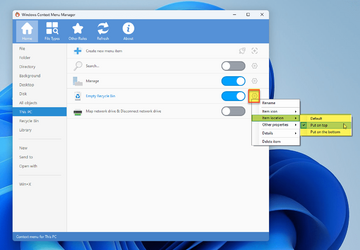
But You Can Add "Empty Recycle Bin" to "Desktop Context Menu" or "This PC Context Menu"

Note: if you add to "Desktop Context Menu" it also add to Deives & Folders Context Menu (in 22h2)


Pics:
2022-10-01_01-16-31.png2022-10-01_01-05-31.png2022-10-01_01-06-46.png
You can Use "ContextMenuManager" for Costomize Context Menu it's Chinese, I almost translate this Utility to English by Google Translate
2022-10-01_01-17-43.png2022-10-01_01-42-51.png

Reg Files
Just User Dic For "ContextMenuManager" Put Beside Exe File

VirusTotal & VirusTotal (False Positive)
 
Last edited:

My Computers My Computers

  • At a glance

    10BMW
    OS
    10
    Computer type
    Tablet
    Graphics Card(s)
    BMW
    Sound Card
    BMW
  • At a glance

    BMW
    Computer type
    Tablet
    Graphics card(s)
    BMW
    Sound Card
    BMW
Hi
Sorry for Delay to Answer
i try for that (Pin to Start) but it's seem Difficult to Move
But You Can Add "Empty Recycle Bin" to "Desktop Context Menu" or "This PC Context Menu"

Note: if you add to "Desktop Context Menu" it also add to Deives & Folders Context Menu (in 22h2)


Pics:
You can Use "ContextMenuManager" for Costomize Context Menu it's Chinese, I almost translate this Utility to English by Google Translate

Reg Files
Just User Dic For "ContextMenuManager" Put Beside Exe File

VirusTotal & VirusTotal (False Positive)
Nice, thanks for the tips. They are very helpful and much appreciated!
 

My Computer My Computer

At a glance

Windows 11 Pro 22H2
OS
Windows 11 Pro 22H2
Computer type
PC/Desktop
@akbar291 Do you know how we can change the "New Items" menu orders?
 

My Computer My Computer

At a glance

Win 11 Enterprisei7
OS
Win 11 Enterprise
Computer type
Laptop
CPU
i7
Hard Drives
SSD
Is there any way to remove both pin options (quick access and start) from recycle bin context menu only? Thanks
 

My Computer My Computer

At a glance

Windows 11 22h2
OS
Windows 11 22h2

Latest Support Threads

Back
Top Bottom