
24' Asus Monitor With Dead Pixels and Redlight?


newmann

Well-known member
VIP
Local time
4:37 AM
Posts
581
OS
Windows 11 Pro
24' Asus C624BQ Monitor With 1920x1200 Resolution


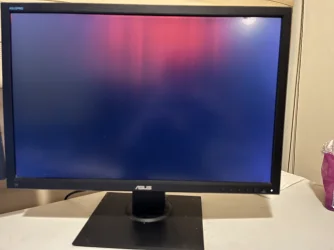
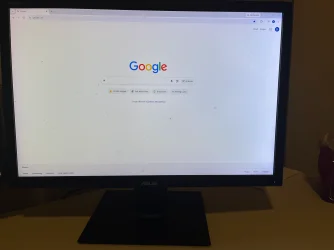
The first picture shows how my monitor looks when I lock it. What is that red light that is there? Is that a big thing? When I use it normally, it looks like the 2nd picture. There isn't any shadow spots on this monitor but notice those tiny black dots. Are these dead pixels? If not, what are they? I use this 2nd monitor for things like YouTube and those small black spots have never bothered me that much.


I spent probably like $290 USD for it a while back. How much is this monitor worth now in this condition? Is this still worth at least $50 USD?
IMG_7162.webpIMG_7165.webp
 

My Computer My Computer

At a glance

Windows 11 Pro
OS
Windows 11 Pro
Very few people will want a faulty monitor like the one you're hoping to sell because the problems could get worse. Someone might want one for spare parts. However, the shipping costs will exceed the value so selling it locally for cash (pickup only) is the most practical option. You'll be lucky to get as much as $50.

PS: They don't look like dead pixels to me because they're too large. They're probably dried on food spots but it's difficult to tell without an extreme close-up of the problem areas.
 

My Computer My Computer

At a glance

Windows 11
OS
Windows 11
The red area looks like a bad TCON board (Timing Control), the black spots are not pixels, looks like dust or bugs (not software, real creepy crawlies). Generally the TCON isn't replaced in a Monitor like a TV, it's possible, but prohibitively expensive

A Guy
 

My Computers My Computers

  • At a glance

    Windows 10 Home x64INTEL Core i5-11400KINGSTON HyperX Fury Black DDR4 16GB (2 x 8GB...EVGA GeForce GTX 750 Superclocked 1GB 128-Bit...
    OS
    Windows 10 Home x64
    Computer type
    PC/Desktop
    Manufacturer/Model
    Custom
    CPU
    INTEL Core i5-11400
    Motherboard
    ASUS PRIME H570-PLUS
    Memory
    KINGSTON HyperX Fury Black DDR4 16GB (2 x 8GB) 3200MHz, CL16
    Graphics Card(s)
    EVGA GeForce GTX 750 Superclocked 1GB 128-Bit GDDR5
    Monitor(s) Displays
    LG 32MA68HY 32" IPS
    Screen Resolution
    1920 x 1080
    Hard Drives
    SAMSUNG 250GB 970 EVO Plus NVMe, M.2 SSD, Crucial 250GB MX500, SEAGATE 500GB Barracuda® 7200.12, SATA 3 Gb/s, 7200 RPM, 16MB cache
    PSU
    CORSAIR RM550x 80 PLUS Gold 550W
    Case
    ANTEC P10 FLUX
    Cooling
    be quiet! Pure Rock 2, 5 x 120 mm Case Fans
    Internet Speed
    480 + Mbps Up/ 12+ Mbps Down
    Browser
    Vivaldi Snapshot
    Antivirus
    Avast
  • At a glance

    Windows 10 Home x64Intel Core i5-750Kingston HyperX Fury Black 8GB (2x4GB) DDR3-1...MSI GeForce GT 240 N240GT-MD1G/D5 1 GB DDR5
    Operating System
    Windows 10 Home x64
    Computer type
    PC/Desktop
    Manufacturer/Model
    Custom
    CPU
    Intel Core i5-750
    Motherboard
    ASUS P7P55D
    Memory
    Kingston HyperX Fury Black 8GB (2x4GB) DDR3-1600MHz CL8
    Graphics card(s)
    MSI GeForce GT 240 N240GT-MD1G/D5 1 GB DDR5
    Monitor(s) Displays
    LG 32MA68HY 32" IPS
    Screen Resolution
    1980x1040
    Hard Drives
    Samsung Electronics 840 EVO 120GB, SEAGATE 500GB Barracuda® 7200.12, SATA 3 Gb/s, 7200 RPM, 16MB cache
    PSU
    Antec TruePower New TP-550 550W
    Case
    Antec 300
    Cooling
    Cooler Master Hyper 212+, 4 Noctua NF-P12 120mm, 1 Noctua NF-P14 FLX
    Internet Speed
    480+ Mbps Down/12+Mbps Up
    Browser
    Vivaldi Snapshot
    Antivirus
    Avast
The red area looks like that only when I lock my laptop and the wallpaper shows up and that is what it shows. It doesn't show any red area when I'm using it normally.

I have tried using lens wipes on those black spots and cannot wipe it out.

Bugs that went inside the monitor you mean? Could it be water damage or something else?
 

My Computer My Computer

At a glance

Windows 11 Pro
OS
Windows 11 Pro
24' Asus C624BQ Monitor With 1920x1200 Resolution


The first picture shows how my monitor looks when I lock it. What is that red light that is there? Is that a big thing? When I use it normally, it looks like the 2nd picture. There isn't any shadow spots on this monitor but notice those tiny black dots. Are these dead pixels? If not, what are they? I use this 2nd monitor for things like YouTube and those small black spots have never bothered me that much.


I spent probably like $290 USD for it a while back. How much is this monitor worth now in this condition? Is this still worth at least $50 USD?

View attachment 183095View attachment 183096
Good condition would get you $50 on ebay. I am not sure why you're asking when you can look all this up yourself and you have the actual items to make a judgment on the condition.
 

My Computer My Computer

At a glance

Windows 11 25H2Broadwell-e 6850K 4.5ghz @1.36v32GB Corsair LPM 3600 C16EVGA RTX 3080Ti FTW
OS
Windows 11 25H2
Computer type
PC/Desktop
Manufacturer/Model
EVGA home brew
CPU
Broadwell-e 6850K 4.5ghz @1.36v
Motherboard
EVGA X99 FTW K
Memory
32GB Corsair LPM 3600 C16
Graphics Card(s)
EVGA RTX 3080Ti FTW
Sound Card
Asus Centurion true 7.1 headset. (5 speakers in each earpeice)
Monitor(s) Displays
LG C4 55"
Screen Resolution
4K 144hz
Hard Drives
Various models of SSDs ~10TB No HDDs installed.
PSU
be quiet! BN516 Straight Power 12-1000w 80 Plus Platinum
Case
Corsair 780T modified to dual 200mm intake fans
Cooling
Corsair H110i
Keyboard
Corsair K95 Platinum
Mouse
Corsair M65 RGB Elite
Internet Speed
50Mbs
The second image has signs of Display panel aging, specifically the White Backlight LEDS. The colour temperature is higher on the right side of the panel. The LEDS have aged and changed their colour temperature.
The blackish marks are either dust/debris on the surface of the panel or within the LCD layers.
Whilst the surface can be cleaned carefully, between the LCD layers means re-assembly of the display panel/new one.

The first image shows the panel to be IPS. The Red blodge possibly damage to the top edge of the panel and lighting.

I have a 2013 Laptop that shows the same display panel characteristics, higher colour temperature on the right side, from new there was a < 1 pixel bit of dust under the Touch screen layer.
I spent probably like $290 USD for it a while back. How much is this monitor worth now in this condition? Is this still worth at least $50 USD?
Not worth anything, you may have problems just giving that away, re-cycling I would think.
 

My Computer My Computer

At a glance

Windows 11
OS
Windows 11
The red area looks like that only when I lock my laptop and the wallpaper shows up and that is what it shows. It doesn't show any red area when I'm using it normally.

I have tried using lens wipes on those black spots and cannot wipe it out.

Bugs that went inside the monitor you mean? Could it be water damage or something else?
If the red area isn't what the monitor displays on purpose/by design, then the no video is when the red displays. If you see it no other time, then it is not a concern unless it does begin showing up on other video. The spots I did mean bugs inside assuming the front of the panel is clean. It's just thinking what could be there. Dust is a real possibility, just uncommon. I was a TV tech for decades and have certainly seen both bugs and dust inside a LCD panel

A Guy
 

My Computers My Computers

  • At a glance

    Windows 10 Home x64INTEL Core i5-11400KINGSTON HyperX Fury Black DDR4 16GB (2 x 8GB...EVGA GeForce GTX 750 Superclocked 1GB 128-Bit...
    OS
    Windows 10 Home x64
    Computer type
    PC/Desktop
    Manufacturer/Model
    Custom
    CPU
    INTEL Core i5-11400
    Motherboard
    ASUS PRIME H570-PLUS
    Memory
    KINGSTON HyperX Fury Black DDR4 16GB (2 x 8GB) 3200MHz, CL16
    Graphics Card(s)
    EVGA GeForce GTX 750 Superclocked 1GB 128-Bit GDDR5
    Monitor(s) Displays
    LG 32MA68HY 32" IPS
    Screen Resolution
    1920 x 1080
    Hard Drives
    SAMSUNG 250GB 970 EVO Plus NVMe, M.2 SSD, Crucial 250GB MX500, SEAGATE 500GB Barracuda® 7200.12, SATA 3 Gb/s, 7200 RPM, 16MB cache
    PSU
    CORSAIR RM550x 80 PLUS Gold 550W
    Case
    ANTEC P10 FLUX
    Cooling
    be quiet! Pure Rock 2, 5 x 120 mm Case Fans
    Internet Speed
    480 + Mbps Up/ 12+ Mbps Down
    Browser
    Vivaldi Snapshot
    Antivirus
    Avast
  • At a glance

    Windows 10 Home x64Intel Core i5-750Kingston HyperX Fury Black 8GB (2x4GB) DDR3-1...MSI GeForce GT 240 N240GT-MD1G/D5 1 GB DDR5
    Operating System
    Windows 10 Home x64
    Computer type
    PC/Desktop
    Manufacturer/Model
    Custom
    CPU
    Intel Core i5-750
    Motherboard
    ASUS P7P55D
    Memory
    Kingston HyperX Fury Black 8GB (2x4GB) DDR3-1600MHz CL8
    Graphics card(s)
    MSI GeForce GT 240 N240GT-MD1G/D5 1 GB DDR5
    Monitor(s) Displays
    LG 32MA68HY 32" IPS
    Screen Resolution
    1980x1040
    Hard Drives
    Samsung Electronics 840 EVO 120GB, SEAGATE 500GB Barracuda® 7200.12, SATA 3 Gb/s, 7200 RPM, 16MB cache
    PSU
    Antec TruePower New TP-550 550W
    Case
    Antec 300
    Cooling
    Cooler Master Hyper 212+, 4 Noctua NF-P12 120mm, 1 Noctua NF-P14 FLX
    Internet Speed
    480+ Mbps Down/12+Mbps Up
    Browser
    Vivaldi Snapshot
    Antivirus
    Avast
I have no issue using this monitor though as those spots isn't a big issue. But is this monitor worth $50 or not much at all? Thing is it has 1920x1200 resolution which is a big difference compared to 1080P.

When you lock the computer, the screen should be black. It isn't supposed to be red.

I would be selling it in person and not shipping it. I"m curious if it's worth $50 or not in this condition. I have no issue using this monitor at all since I mainly use it as a secondary monitor.
 

My Computer My Computer

At a glance

Windows 11 Pro
OS
Windows 11 Pro

My Computer My Computer

At a glance

windows 11 Pro11th Gen Intel(R) Core(TM) i7-11800H @ 2.30GH...16 GBNVIDIA GeForce RTX 3050 Ti
OS
windows 11 Pro
Computer type
Laptop
Manufacturer/Model
Dell XPS 15 9510
CPU
11th Gen Intel(R) Core(TM) i7-11800H @ 2.30GHz (16 CPUs
Memory
16 GB
Graphics Card(s)
NVIDIA GeForce RTX 3050 Ti
Hard Drives
512GB Solid State Drive
Browser
Firefox

Latest Support Threads

Back
Top Bottom


