
Hi, pLEEzee heLp!
I have a system with 3 routers, my newest was a (non-WiFi) TP_Link (192.168.0.1) router and a Netgear Access Point (192.168.0.2 SSID MyNetwork). It all worked fine.
My old router was an Asus that has all of my smart home devices linked to. It is now plugged into the TP-Link router and it's IP is set to 192.168.1.1 . It shows in my main router (the TP-Link) as 192.168.0.3 SSID SmartHome .
My third router is a similar setup that has a VPN, 192.168.2.1 SSID MNVPN.
The primary, second, and third routers show on my computer WiFi SSID list and I can use any one of them. It all works perfect. Of course I need to be signed to that routers SSID on my computer to be able to login to the router settings, BUT IT WORKS.
The IP I set was in the ASUS' router LAN settings.
I just switched to Quantum Fiber. They have different names, but basically they provide a Fiber to Internet modem, and a WiFi box that is essentially an access point with 2 ethernet ports. I added extra ports are added with a switch.
It still works great for those keeping score.
All of the above is just background, but basically I previously used my own router and switch, my main SSID was MyNetwork, my smart home SSID was SmartHome, and my VPN was MNVPN.
Since Quantum supplies it's own WiFi device that uses the main routers SSID and 192.168.0.1, I would like to change the old Netlink AP IP like I did with the Asus routers. I would like to change it to 192.168.3.1 . I am in the AP's setup page and see the setting. when I try to change it I get an error. Can you see what I am doing wrong?
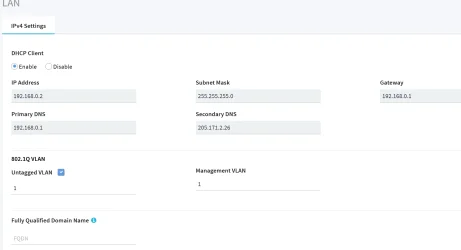
Untouched settings
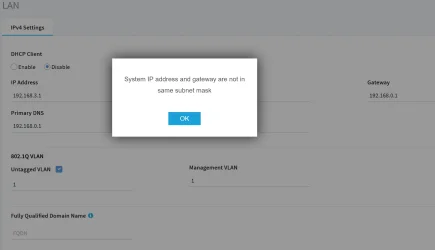
When I change the IP to 192.168.3.1 I get this error popup.
Does anyone know what the solution to make the Netgear Access Point's IP 192.168.3.1
192.168.0.2 is what shows while I am on the main SSID which is expected, but when I am on this AP's SSID I want to access it with 192.168.3.1
Thanks. sorry for the long post, but I hope I described my goal and question properly. Also please forgive any wrong terminology, but I hope I explained well enough to allow for any wrong terms.
I have a system with 3 routers, my newest was a (non-WiFi) TP_Link (192.168.0.1) router and a Netgear Access Point (192.168.0.2 SSID MyNetwork). It all worked fine.
My old router was an Asus that has all of my smart home devices linked to. It is now plugged into the TP-Link router and it's IP is set to 192.168.1.1 . It shows in my main router (the TP-Link) as 192.168.0.3 SSID SmartHome .
My third router is a similar setup that has a VPN, 192.168.2.1 SSID MNVPN.
The primary, second, and third routers show on my computer WiFi SSID list and I can use any one of them. It all works perfect. Of course I need to be signed to that routers SSID on my computer to be able to login to the router settings, BUT IT WORKS.
The IP I set was in the ASUS' router LAN settings.
I just switched to Quantum Fiber. They have different names, but basically they provide a Fiber to Internet modem, and a WiFi box that is essentially an access point with 2 ethernet ports. I added extra ports are added with a switch.
It still works great for those keeping score.
All of the above is just background, but basically I previously used my own router and switch, my main SSID was MyNetwork, my smart home SSID was SmartHome, and my VPN was MNVPN.
Since Quantum supplies it's own WiFi device that uses the main routers SSID and 192.168.0.1, I would like to change the old Netlink AP IP like I did with the Asus routers. I would like to change it to 192.168.3.1 . I am in the AP's setup page and see the setting. when I try to change it I get an error. Can you see what I am doing wrong?
Untouched settings
When I change the IP to 192.168.3.1 I get this error popup.
Does anyone know what the solution to make the Netgear Access Point's IP 192.168.3.1
192.168.0.2 is what shows while I am on the main SSID which is expected, but when I am on this AP's SSID I want to access it with 192.168.3.1
Thanks. sorry for the long post, but I hope I described my goal and question properly. Also please forgive any wrong terminology, but I hope I explained well enough to allow for any wrong terms.
My Computer
At a glance
Windows 11
- OS
- Windows 11






