
3080 Ti SUPRIM X 12GB RGB control


RedLad

Active member
Member
Local time
1:41 PM
Posts
196
OS
Windows 11 Professional
Hi,

If this is not the correct location for this, please let me know.

My graphics card on my new PC (MSI 3080 Ti SUPRIM X 12GB) has RGB. But the RGB on it seems to have a life of its own and doesn't have any options to change it in my iCUE software. It is in a continuous cycle of rainbow colours, with a soft repeat/pulse whatever it is usually called. The guy that built the machine for me said that he tried installing MSI's own RGB software for the graphics card, but it was causing conflicts. Not sure if he meant crashing or conflicts with the iCUE software.

Can anyone recommend what to do in order to get control of the RGB on the graphics card? Or, if these's no way, even a way of turning it off completely.

Thank you.
 

My Computer My Computer

At a glance

Windows 11 ProfessionalAMD Ryzen™ 9 7950XDOMINATOR® PLATINUM RGB 64GB (2x32GB) DDR5 DR...MSI GeForce RTX™ 3080 Ti SUPRIM X 12GB
OS
Windows 11 Professional
Computer type
PC/Desktop
Manufacturer/Model
Custom build
CPU
AMD Ryzen™ 9 7950X
Motherboard
ASUS ROG Strix X670E-E Gaming WiFi
Memory
DOMINATOR® PLATINUM RGB 64GB (2x32GB) DDR5 DRAM 5200MHz
Graphics Card(s)
MSI GeForce RTX™ 3080 Ti SUPRIM X 12GB
Hard Drives
980 PRO NVMe M.2 SSD 1TB
970 EVO Plus NVMe M.2 SSD 2TB
PSU
Corsair HX1000 1000 W 80+ Platinum
Case
Fractal Design Meshify 2
Cooling
iCUE H150i ELITE LCD Display Liquid CPU Cooler
Hi,

If this is not the correct location for this, please let me know.

My graphics card on my new PC (MSI 3080 Ti SUPRIM X 12GB) has RGB. But the RGB on it seems to have a life of its own and doesn't have any options to change it in my iCUE software. It is in a continuous cycle of rainbow colours, with a soft repeat/pulse whatever it is usually called. The guy that built the machine for me said that he tried installing MSI's own RGB software for the graphics card, but it was causing conflicts. Not sure if he meant crashing or conflicts with the iCUE software.

Can anyone recommend what to do in order to get control of the RGB on the graphics card? Or, if these's no way, even a way of turning it off completely.

Thank you.


Apparently... you need this software...


My Computers My Computers

  • At a glance

    Win 11 Home ♦♦♦26200.8737 ♦♦♦♦♦♦♦25H2AMD Ryzen 7 3700XG.Skill (F4-3200C14D-16GTZKW)EVGA RTX 2070 (08G-P4-2171-KR)
    OS
    Win 11 Home ♦♦♦26200.8737 ♦♦♦♦♦♦♦25H2
    Computer type
    PC/Desktop
    Manufacturer/Model
    Built by Ghot® [May 2020]
    CPU
    AMD Ryzen 7 3700X
    Motherboard
    Asus Pro WS X570-ACE (BIOS 5302)
    Memory
    G.Skill (F4-3200C14D-16GTZKW)
    Graphics Card(s)
    EVGA RTX 2070 (08G-P4-2171-KR)
    Sound Card
    Realtek ALC1220P / ALC S1220A
    Monitor(s) Displays
    Dell U3011 30"
    Screen Resolution
    2560 x 1600
    Hard Drives
    2x Samsung 860 EVO 500GB,
    WD 4TB Black FZBX - SATA III,
    WD 8TB Black FZBX - SATA III,
    DRW-24B1ST CD/DVD Burner
    PSU
    PC Power & Cooling 750W Quad EPS12V
    Case
    Cooler Master ATCS 840 Tower
    Cooling
    CM Hyper 212 EVO (push/pull)
    Keyboard
    Ducky DK9008 Shine II Blue LED
    Mouse
    Logitech Optical M-100
    Internet Speed
    300/300
    Browser
    Firefox (latest)
    Antivirus
    Bitdefender Total Security
    Other Info
    Speakers: Klipsch Pro Media 2.1
  • At a glance

    Windows XP Pro 32bit w/SP3AMD Athlon 64 X2 5000+ (OC'd @ 3.2Ghz)TWIN2X2048-6400C4DHX (2 x 1GB, DDR2 800)EVGA 256-P2-N758-TR GeForce 8600GT SSC
    Operating System
    Windows XP Pro 32bit w/SP3
    Computer type
    PC/Desktop
    Manufacturer/Model
    Built by Ghot® (not in use)
    CPU
    AMD Athlon 64 X2 5000+ (OC'd @ 3.2Ghz)
    Motherboard
    ASUS M2N32-SLI Deluxe Wireless Edition
    Memory
    TWIN2X2048-6400C4DHX (2 x 1GB, DDR2 800)
    Graphics card(s)
    EVGA 256-P2-N758-TR GeForce 8600GT SSC
    Sound Card
    Onboard
    Monitor(s) Displays
    ViewSonic G90FB Black 19" Professional (CRT)
    Screen Resolution
    up to 2048 x 1536
    Hard Drives
    WD 36GB 10,000rpm Raptor SATA
    Seagate 80GB 7200rpm SATA
    Lite-On LTR-52246S CD/RW
    Lite-On LH-18A1P CD/DVD Burner
    PSU
    PC Power & Cooling Silencer 750 Quad EPS12V
    Case
    Generic Beige case, 80mm fans
    Cooling
    ZALMAN 9500A 92mm CPU Cooler
    Keyboard
    Logitech Classic Keybooard 200
    Mouse
    Logitech Optical M-BT96a
    Internet Speed
    300/300
    Browser
    Firefox 3.x ??
    Antivirus
    Symantec (Norton)
    Other Info
    Still assembled, still runs. Haven't turned it on for 15 years?
I have this card. I installed MSI Center software and the lighting control module. Once I'd configured the lighting it stays that way (I guess the setting is written to the card's BIOS). I uninstalled the software and the card stays the same. I have mine on fixed blue.
 

My Computer My Computer

At a glance

Windows 11 Pro 25H2 (RP channel)AMD Ryzen 7 9800X3D 8-core64GB Corsair Titanium 6000/CL30MSI Suprim 5080 SOC
OS
Windows 11 Pro 25H2 (RP channel)
Computer type
PC/Desktop
Manufacturer/Model
MSI
CPU
AMD Ryzen 7 9800X3D 8-core
Motherboard
MEG X870E Godlike
Memory
64GB Corsair Titanium 6000/CL30
Graphics Card(s)
MSI Suprim 5080 SOC
Sound Card
Soundblaster AE-9
Monitor(s) Displays
ASUS TUF Gaming VG289Q
Screen Resolution
3840x2160
Hard Drives
Samsung 9100 Pro 4TB (gen 5 x4, system drive/games)
Samsung 990 Pro 2TB
Samsung 980 Pro 2TB
Samsung 870 Evo 4TB
Samsung 870 Evo 2TB
Samsung T9 4TB
PSU
Seasonic PX-2200
Case
Bequiet! Dark Base Pro 901
Cooling
Noctua NH-D15S Chromax black
Keyboard
Logitech G915 X (wired)
Mouse
Logitech G903 with PowerPlay charger
Internet Speed
900Mb/sec
Browser
Microsoft Edge
Antivirus
Windows Defender
I have this card. I installed MSI Center software and the lighting control module. Once I'd configured the lighting it stays that way (I guess the setting is written to the card's BIOS). I uninstalled the software and the card stays the same. I have mine on fixed blue.
OK, nearly sure that is the software that was giving hassle for the guy who built the machine.

Maybe I could try install it, but just turn it to be off and it'll stay that way?

Do you have iCUE also installed?
 

My Computer My Computer

At a glance

Windows 11 ProfessionalAMD Ryzen™ 9 7950XDOMINATOR® PLATINUM RGB 64GB (2x32GB) DDR5 DR...MSI GeForce RTX™ 3080 Ti SUPRIM X 12GB
OS
Windows 11 Professional
Computer type
PC/Desktop
Manufacturer/Model
Custom build
CPU
AMD Ryzen™ 9 7950X
Motherboard
ASUS ROG Strix X670E-E Gaming WiFi
Memory
DOMINATOR® PLATINUM RGB 64GB (2x32GB) DDR5 DRAM 5200MHz
Graphics Card(s)
MSI GeForce RTX™ 3080 Ti SUPRIM X 12GB
Hard Drives
980 PRO NVMe M.2 SSD 1TB
970 EVO Plus NVMe M.2 SSD 2TB
PSU
Corsair HX1000 1000 W 80+ Platinum
Case
Fractal Design Meshify 2
Cooling
iCUE H150i ELITE LCD Display Liquid CPU Cooler
OK, nearly sure that is the software that was giving hassle for the guy who built the machine.

Maybe I could try install it, but just turn it to be off and it'll stay that way?

Do you have iCUE also installed?
No I never used icue
 

My Computer My Computer

At a glance

Windows 11 Pro 25H2 (RP channel)AMD Ryzen 7 9800X3D 8-core64GB Corsair Titanium 6000/CL30MSI Suprim 5080 SOC
OS
Windows 11 Pro 25H2 (RP channel)
Computer type
PC/Desktop
Manufacturer/Model
MSI
CPU
AMD Ryzen 7 9800X3D 8-core
Motherboard
MEG X870E Godlike
Memory
64GB Corsair Titanium 6000/CL30
Graphics Card(s)
MSI Suprim 5080 SOC
Sound Card
Soundblaster AE-9
Monitor(s) Displays
ASUS TUF Gaming VG289Q
Screen Resolution
3840x2160
Hard Drives
Samsung 9100 Pro 4TB (gen 5 x4, system drive/games)
Samsung 990 Pro 2TB
Samsung 980 Pro 2TB
Samsung 870 Evo 4TB
Samsung 870 Evo 2TB
Samsung T9 4TB
PSU
Seasonic PX-2200
Case
Bequiet! Dark Base Pro 901
Cooling
Noctua NH-D15S Chromax black
Keyboard
Logitech G915 X (wired)
Mouse
Logitech G903 with PowerPlay charger
Internet Speed
900Mb/sec
Browser
Microsoft Edge
Antivirus
Windows Defender
What is the general workflow for this RGB stuff by the way? When I was initially going to get the PC, I didn't want it at all. But, then I changed my mind when I saw someone's build on a video online and said I'd give it a shot.

Do people generally use software that comes with the actual motherboard/ram/GPU etc. or do they use like a third-party type software for it?
 

My Computer My Computer

At a glance

Windows 11 ProfessionalAMD Ryzen™ 9 7950XDOMINATOR® PLATINUM RGB 64GB (2x32GB) DDR5 DR...MSI GeForce RTX™ 3080 Ti SUPRIM X 12GB
OS
Windows 11 Professional
Computer type
PC/Desktop
Manufacturer/Model
Custom build
CPU
AMD Ryzen™ 9 7950X
Motherboard
ASUS ROG Strix X670E-E Gaming WiFi
Memory
DOMINATOR® PLATINUM RGB 64GB (2x32GB) DDR5 DRAM 5200MHz
Graphics Card(s)
MSI GeForce RTX™ 3080 Ti SUPRIM X 12GB
Hard Drives
980 PRO NVMe M.2 SSD 1TB
970 EVO Plus NVMe M.2 SSD 2TB
PSU
Corsair HX1000 1000 W 80+ Platinum
Case
Fractal Design Meshify 2
Cooling
iCUE H150i ELITE LCD Display Liquid CPU Cooler
Re conflicts involving MSI Center. Has it been tried to change this setting? Can be found under the 'Mystic Lights Settings' tab.

msi center.png
 

My Computers My Computers

  • At a glance

    Windows 11 Pro 25H2Intel Core i9 13900KCorsair Dominator Platinum 64gb 5600MT/s DDR5...Sapphire NITRO+ AMD Radeon RX 7900 XTX Vapor-...
    OS
    Windows 11 Pro 25H2
    Computer type
    PC/Desktop
    Manufacturer/Model
    Homebuilt
    CPU
    Intel Core i9 13900K
    Motherboard
    Asus ProArt Z790 Creator WiFi - Bios 3107
    Memory
    Corsair Dominator Platinum 64gb 5600MT/s DDR5 Dual Channel
    Graphics Card(s)
    Sapphire NITRO+ AMD Radeon RX 7900 XTX Vapor-X 24GB
    Sound Card
    External DAC: Cambridge Audio DACMagic200M - Headphone Amp: Topping L50
    Monitor(s) Displays
    Panasonic MX950 Mini LED 55" TV 120hz
    Screen Resolution
    3840 x 2160 120hz
    Hard Drives
    Samsung 980 Pro 2TB (OS)
    Samsung 980 Pro 1TB (Files)
    Lexar NZ790 4TB
    LaCie d2 Professional 6TB external - USB 3.1
    Seagate Expansion 16TB external - USB 3.2
    Seagate One Touch 18TB external HD - USB 3.0
    PSU
    Corsair RM1200x Shift
    Case
    Corsair RGB Smart Case 5000x (white)
    Cooling
    Corsair iCue H150i Elite Capellix XT
    Keyboard
    Incase Ergonomic USB (Microsoft clone)
    Mouse
    Logitech MX Master 3S
    Internet Speed
    Fibre 900/500 Mbps
    Browser
    Microsoft Edge Chromium
    Antivirus
    Bitdefender Total Security
    Other Info
    AMD Radeon Software & Drivers 26.1.1
    Hasleo Backup Suite
    Dashlane password manager
    Kensington Verimark fingerprint reader
    Logitech Brio 4K webcam
    Orico 10-port powered USB 3.0 hub
  • At a glance

    Windows 11 Pro 25H2Intel® Core™ i9-13900H32GB DDR4-3200 Dual channel*Intel Iris Xᵉ Graphics G7
    Operating System
    Windows 11 Pro 25H2
    Computer type
    Laptop
    Manufacturer/Model
    Asus Vivobook X1605VA
    CPU
    Intel® Core™ i9-13900H
    Motherboard
    Asus X1605VA bios 309
    Memory
    32GB DDR4-3200 Dual channel
    Graphics card(s)
    *Intel Iris Xᵉ Graphics G7
    Sound Card
    Realtek | Intel SST Bluetooth & USB
    Monitor(s) Displays
    16.0-inch, WUXGA 16:10 aspect ratio, IPS-level Panel
    Screen Resolution
    1920 x 1200 60hz
    Hard Drives
    512GB M.2 NVMe™ PCIe® 3.0 SSD
    Mouse
    Logitech MX Ergo Trackball
    Antivirus
    Bitdefender Total Security
    Other Info
    720p Webcam
    WiFi & USB to ethernet
Re conflicts involving MSI Center. Has it been tried to change this setting? Can be found under the 'Mystic Lights Settings' tab.

View attachment 51154
Thanks for pointing this out.

I got the following mail back from MSI themselves, I hope to try it at some stage over the weekend.

"The problem is that you need to use our MSI software not the iCue software for configuration. Any MSI product that has a feature called "Mystic Light" can be configured through this software. I will link the utility for install below. MSI GeForce RTX 3080 Ti SUPRIM 12G Download the MSI Center software then download the Mystic Light feature then go ahead a play around to your liking. Also make sure Dragon Center is not installed as that might cause issues. Hope this helps please let me know if you are still having issues."
 

My Computer My Computer

At a glance

Windows 11 ProfessionalAMD Ryzen™ 9 7950XDOMINATOR® PLATINUM RGB 64GB (2x32GB) DDR5 DR...MSI GeForce RTX™ 3080 Ti SUPRIM X 12GB
OS
Windows 11 Professional
Computer type
PC/Desktop
Manufacturer/Model
Custom build
CPU
AMD Ryzen™ 9 7950X
Motherboard
ASUS ROG Strix X670E-E Gaming WiFi
Memory
DOMINATOR® PLATINUM RGB 64GB (2x32GB) DDR5 DRAM 5200MHz
Graphics Card(s)
MSI GeForce RTX™ 3080 Ti SUPRIM X 12GB
Hard Drives
980 PRO NVMe M.2 SSD 1TB
970 EVO Plus NVMe M.2 SSD 2TB
PSU
Corsair HX1000 1000 W 80+ Platinum
Case
Fractal Design Meshify 2
Cooling
iCUE H150i ELITE LCD Display Liquid CPU Cooler
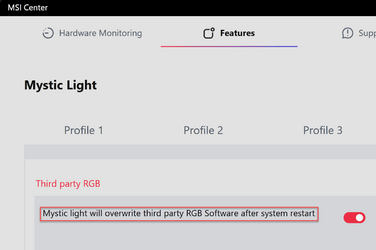
Re conflicts involving MSI Center. Has it been tried to change this setting? Can be found under the 'Mystic Lights Settings' tab.

View attachment 51154
Hi
I installed MSI Center along with Mystic Light. I can get control of the GPU RGB now, which is great.

But, any setting I apply gets lost when I turn the PC on again. which is pretty ridiculous to be honest. I have also turned off the option you show above because I don't want the rest of the RGB to get messed up.

So it looks like I will have to go into MSI Center everytime I start the machine in order to change the RGB of the GPU. Very odd.
 

My Computer My Computer

At a glance

Windows 11 ProfessionalAMD Ryzen™ 9 7950XDOMINATOR® PLATINUM RGB 64GB (2x32GB) DDR5 DR...MSI GeForce RTX™ 3080 Ti SUPRIM X 12GB
OS
Windows 11 Professional
Computer type
PC/Desktop
Manufacturer/Model
Custom build
CPU
AMD Ryzen™ 9 7950X
Motherboard
ASUS ROG Strix X670E-E Gaming WiFi
Memory
DOMINATOR® PLATINUM RGB 64GB (2x32GB) DDR5 DRAM 5200MHz
Graphics Card(s)
MSI GeForce RTX™ 3080 Ti SUPRIM X 12GB
Hard Drives
980 PRO NVMe M.2 SSD 1TB
970 EVO Plus NVMe M.2 SSD 2TB
PSU
Corsair HX1000 1000 W 80+ Platinum
Case
Fractal Design Meshify 2
Cooling
iCUE H150i ELITE LCD Display Liquid CPU Cooler
So it looks like I will have to go into MSI Center everytime I start the machine in order to change the RGB of the GPU. Very odd.

You shouldn't have to do that.
 

My Computers My Computers

  • At a glance

    Windows 11 Pro 25H2Intel Core i9 13900KCorsair Dominator Platinum 64gb 5600MT/s DDR5...Sapphire NITRO+ AMD Radeon RX 7900 XTX Vapor-...
    OS
    Windows 11 Pro 25H2
    Computer type
    PC/Desktop
    Manufacturer/Model
    Homebuilt
    CPU
    Intel Core i9 13900K
    Motherboard
    Asus ProArt Z790 Creator WiFi - Bios 3107
    Memory
    Corsair Dominator Platinum 64gb 5600MT/s DDR5 Dual Channel
    Graphics Card(s)
    Sapphire NITRO+ AMD Radeon RX 7900 XTX Vapor-X 24GB
    Sound Card
    External DAC: Cambridge Audio DACMagic200M - Headphone Amp: Topping L50
    Monitor(s) Displays
    Panasonic MX950 Mini LED 55" TV 120hz
    Screen Resolution
    3840 x 2160 120hz
    Hard Drives
    Samsung 980 Pro 2TB (OS)
    Samsung 980 Pro 1TB (Files)
    Lexar NZ790 4TB
    LaCie d2 Professional 6TB external - USB 3.1
    Seagate Expansion 16TB external - USB 3.2
    Seagate One Touch 18TB external HD - USB 3.0
    PSU
    Corsair RM1200x Shift
    Case
    Corsair RGB Smart Case 5000x (white)
    Cooling
    Corsair iCue H150i Elite Capellix XT
    Keyboard
    Incase Ergonomic USB (Microsoft clone)
    Mouse
    Logitech MX Master 3S
    Internet Speed
    Fibre 900/500 Mbps
    Browser
    Microsoft Edge Chromium
    Antivirus
    Bitdefender Total Security
    Other Info
    AMD Radeon Software & Drivers 26.1.1
    Hasleo Backup Suite
    Dashlane password manager
    Kensington Verimark fingerprint reader
    Logitech Brio 4K webcam
    Orico 10-port powered USB 3.0 hub
  • At a glance

    Windows 11 Pro 25H2Intel® Core™ i9-13900H32GB DDR4-3200 Dual channel*Intel Iris Xᵉ Graphics G7
    Operating System
    Windows 11 Pro 25H2
    Computer type
    Laptop
    Manufacturer/Model
    Asus Vivobook X1605VA
    CPU
    Intel® Core™ i9-13900H
    Motherboard
    Asus X1605VA bios 309
    Memory
    32GB DDR4-3200 Dual channel
    Graphics card(s)
    *Intel Iris Xᵉ Graphics G7
    Sound Card
    Realtek | Intel SST Bluetooth & USB
    Monitor(s) Displays
    16.0-inch, WUXGA 16:10 aspect ratio, IPS-level Panel
    Screen Resolution
    1920 x 1200 60hz
    Hard Drives
    512GB M.2 NVMe™ PCIe® 3.0 SSD
    Mouse
    Logitech MX Ergo Trackball
    Antivirus
    Bitdefender Total Security
    Other Info
    720p Webcam
    WiFi & USB to ethernet

My Computer My Computer

At a glance

Windows 11 ProfessionalAMD Ryzen™ 9 7950XDOMINATOR® PLATINUM RGB 64GB (2x32GB) DDR5 DR...MSI GeForce RTX™ 3080 Ti SUPRIM X 12GB
OS
Windows 11 Professional
Computer type
PC/Desktop
Manufacturer/Model
Custom build
CPU
AMD Ryzen™ 9 7950X
Motherboard
ASUS ROG Strix X670E-E Gaming WiFi
Memory
DOMINATOR® PLATINUM RGB 64GB (2x32GB) DDR5 DRAM 5200MHz
Graphics Card(s)
MSI GeForce RTX™ 3080 Ti SUPRIM X 12GB
Hard Drives
980 PRO NVMe M.2 SSD 1TB
970 EVO Plus NVMe M.2 SSD 2TB
PSU
Corsair HX1000 1000 W 80+ Platinum
Case
Fractal Design Meshify 2
Cooling
iCUE H150i ELITE LCD Display Liquid CPU Cooler
Hi
I installed MSI Center along with Mystic Light. I can get control of the GPU RGB now, which is great.

But, any setting I apply gets lost when I turn the PC on again. which is pretty ridiculous to be honest. I have also turned off the option you show above because I don't want the rest of the RGB to get messed up.

So it looks like I will have to go into MSI Center everytime I start the machine in order to change the RGB of the GPU. Very odd.
I don't have to do that. I don't even have MSI Center/Mystic Light installed. I installed it once, set my GPU colours and then uninstalled. My lights are set to blue and stay that way. Also using a 3080 Ti Suprim X
 

My Computer My Computer

At a glance

Windows 11 Pro 25H2 (RP channel)AMD Ryzen 7 9800X3D 8-core64GB Corsair Titanium 6000/CL30MSI Suprim 5080 SOC
OS
Windows 11 Pro 25H2 (RP channel)
Computer type
PC/Desktop
Manufacturer/Model
MSI
CPU
AMD Ryzen 7 9800X3D 8-core
Motherboard
MEG X870E Godlike
Memory
64GB Corsair Titanium 6000/CL30
Graphics Card(s)
MSI Suprim 5080 SOC
Sound Card
Soundblaster AE-9
Monitor(s) Displays
ASUS TUF Gaming VG289Q
Screen Resolution
3840x2160
Hard Drives
Samsung 9100 Pro 4TB (gen 5 x4, system drive/games)
Samsung 990 Pro 2TB
Samsung 980 Pro 2TB
Samsung 870 Evo 4TB
Samsung 870 Evo 2TB
Samsung T9 4TB
PSU
Seasonic PX-2200
Case
Bequiet! Dark Base Pro 901
Cooling
Noctua NH-D15S Chromax black
Keyboard
Logitech G915 X (wired)
Mouse
Logitech G903 with PowerPlay charger
Internet Speed
900Mb/sec
Browser
Microsoft Edge
Antivirus
Windows Defender
I don't have to do that. I don't even have MSI Center/Mystic Light installed. I installed it once, set my GPU colours and then uninstalled. My lights are set to blue and stay that way. Also using a 3080 Ti Suprim X
Cheers for the info Brian

It is actually working now, it is respecting the settings I apply in both iCUE and Mystic Light. However, I haven't turned the power off at the mains, I have a feeling if I do that it will revert to normal. Might give it a shot :cautious:
 

My Computer My Computer

At a glance

Windows 11 ProfessionalAMD Ryzen™ 9 7950XDOMINATOR® PLATINUM RGB 64GB (2x32GB) DDR5 DR...MSI GeForce RTX™ 3080 Ti SUPRIM X 12GB
OS
Windows 11 Professional
Computer type
PC/Desktop
Manufacturer/Model
Custom build
CPU
AMD Ryzen™ 9 7950X
Motherboard
ASUS ROG Strix X670E-E Gaming WiFi
Memory
DOMINATOR® PLATINUM RGB 64GB (2x32GB) DDR5 DRAM 5200MHz
Graphics Card(s)
MSI GeForce RTX™ 3080 Ti SUPRIM X 12GB
Hard Drives
980 PRO NVMe M.2 SSD 1TB
970 EVO Plus NVMe M.2 SSD 2TB
PSU
Corsair HX1000 1000 W 80+ Platinum
Case
Fractal Design Meshify 2
Cooling
iCUE H150i ELITE LCD Display Liquid CPU Cooler

Cheers for the info Brian

It is actually working now, it is respecting the settings I apply in both iCUE and Mystic Light. However, I haven't turned the power off at the mains, I have a feeling if I do that it will revert to normal. Might give it a shot :cautious:
Mine stays even after a full power down
 

My Computer My Computer

At a glance

Windows 11 Pro 25H2 (RP channel)AMD Ryzen 7 9800X3D 8-core64GB Corsair Titanium 6000/CL30MSI Suprim 5080 SOC
OS
Windows 11 Pro 25H2 (RP channel)
Computer type
PC/Desktop
Manufacturer/Model
MSI
CPU
AMD Ryzen 7 9800X3D 8-core
Motherboard
MEG X870E Godlike
Memory
64GB Corsair Titanium 6000/CL30
Graphics Card(s)
MSI Suprim 5080 SOC
Sound Card
Soundblaster AE-9
Monitor(s) Displays
ASUS TUF Gaming VG289Q
Screen Resolution
3840x2160
Hard Drives
Samsung 9100 Pro 4TB (gen 5 x4, system drive/games)
Samsung 990 Pro 2TB
Samsung 980 Pro 2TB
Samsung 870 Evo 4TB
Samsung 870 Evo 2TB
Samsung T9 4TB
PSU
Seasonic PX-2200
Case
Bequiet! Dark Base Pro 901
Cooling
Noctua NH-D15S Chromax black
Keyboard
Logitech G915 X (wired)
Mouse
Logitech G903 with PowerPlay charger
Internet Speed
900Mb/sec
Browser
Microsoft Edge
Antivirus
Windows Defender

My Computer My Computer

At a glance

Windows 11 ProfessionalAMD Ryzen™ 9 7950XDOMINATOR® PLATINUM RGB 64GB (2x32GB) DDR5 DR...MSI GeForce RTX™ 3080 Ti SUPRIM X 12GB
OS
Windows 11 Professional
Computer type
PC/Desktop
Manufacturer/Model
Custom build
CPU
AMD Ryzen™ 9 7950X
Motherboard
ASUS ROG Strix X670E-E Gaming WiFi
Memory
DOMINATOR® PLATINUM RGB 64GB (2x32GB) DDR5 DRAM 5200MHz
Graphics Card(s)
MSI GeForce RTX™ 3080 Ti SUPRIM X 12GB
Hard Drives
980 PRO NVMe M.2 SSD 1TB
970 EVO Plus NVMe M.2 SSD 2TB
PSU
Corsair HX1000 1000 W 80+ Platinum
Case
Fractal Design Meshify 2
Cooling
iCUE H150i ELITE LCD Display Liquid CPU Cooler

My Computer My Computer

At a glance

Windows 11 Pro 25H2 (RP channel)AMD Ryzen 7 9800X3D 8-core64GB Corsair Titanium 6000/CL30MSI Suprim 5080 SOC
OS
Windows 11 Pro 25H2 (RP channel)
Computer type
PC/Desktop
Manufacturer/Model
MSI
CPU
AMD Ryzen 7 9800X3D 8-core
Motherboard
MEG X870E Godlike
Memory
64GB Corsair Titanium 6000/CL30
Graphics Card(s)
MSI Suprim 5080 SOC
Sound Card
Soundblaster AE-9
Monitor(s) Displays
ASUS TUF Gaming VG289Q
Screen Resolution
3840x2160
Hard Drives
Samsung 9100 Pro 4TB (gen 5 x4, system drive/games)
Samsung 990 Pro 2TB
Samsung 980 Pro 2TB
Samsung 870 Evo 4TB
Samsung 870 Evo 2TB
Samsung T9 4TB
PSU
Seasonic PX-2200
Case
Bequiet! Dark Base Pro 901
Cooling
Noctua NH-D15S Chromax black
Keyboard
Logitech G915 X (wired)
Mouse
Logitech G903 with PowerPlay charger
Internet Speed
900Mb/sec
Browser
Microsoft Edge
Antivirus
Windows Defender

My Computer My Computer

At a glance

Windows 11 ProfessionalAMD Ryzen™ 9 7950XDOMINATOR® PLATINUM RGB 64GB (2x32GB) DDR5 DR...MSI GeForce RTX™ 3080 Ti SUPRIM X 12GB
OS
Windows 11 Professional
Computer type
PC/Desktop
Manufacturer/Model
Custom build
CPU
AMD Ryzen™ 9 7950X
Motherboard
ASUS ROG Strix X670E-E Gaming WiFi
Memory
DOMINATOR® PLATINUM RGB 64GB (2x32GB) DDR5 DRAM 5200MHz
Graphics Card(s)
MSI GeForce RTX™ 3080 Ti SUPRIM X 12GB
Hard Drives
980 PRO NVMe M.2 SSD 1TB
970 EVO Plus NVMe M.2 SSD 2TB
PSU
Corsair HX1000 1000 W 80+ Platinum
Case
Fractal Design Meshify 2
Cooling
iCUE H150i ELITE LCD Display Liquid CPU Cooler
Back
Top Bottom




