6 week's travel with WSL 2.5.7 and Ubuntu 25.04 on hp 17-cpl3005 laptop


smoketoxdoc

Well-known member
Member
Local time
5:27 AM
Posts
51
OS
Windows 11
Six weeks out-of-office with going back and forth to Europe on Queen Mary 2. Everything worked, no failures and no need to unpack backup laptop). Only operational problem was that I was using device so much that the lettering is coming off the keys. Main Linux program I use is Gnome Evolution for email It is far easier to use the Outlook 365, I also use Cinnamon's Nemo as my file manager. It is essential when you first start to see where program files such as Studio Pro 2024 (PDF editor) are being loaded so you can setup the file associations for opening PDF files. Use of Firefox under WSL will occur when you open hyperlinks in the email you are receiving with Evolution. This gives an instability, so it is better to copy the hyperlink to a windows in MS Edge. Also, program updates and upgrades are done from a command line that yuou open with WSL.

John
 
Windows Build/Version
27919,1000

My Computers

System One System Two

  • OS
    Windows 11
    Computer type
    Laptop
    Manufacturer/Model
    Dell Precision 7720
    Memory
    32 gb
    Graphics Card(s)
    NVidia
    Monitor(s) Displays
    built on
    Screen Resolution
    1920 x 1080
    Browser
    Edge
    Other Info
    This is stock Dell 7720. Only thing not stock is that it is dual boot with Ubuntu Unity 25.04 and SSD has two exFAT partitions for my files. They can be accessed by both Ubuntu and Win software.
  • Operating System
    Windows 11
    Computer type
    Laptop
    Manufacturer/Model
    HP Laptop 17-cp3005dx
    Memory
    32 GB
    Browser
    firefox
    Other Info
    Running most everything I need under WSL2 including EVOLUTION, LIBREOFFICE, NEMIO, PDFSTUDIO PRO 2024.
So why do you think we need to know that?
 

My Computers

System One System Two

  • OS
    Windows 11 Enterprise 25H2 26200 7462
    Computer type
    PC/Desktop
    Manufacturer/Model
    Custom Build
    CPU
    Intel XEON E5-2699 v3
    Motherboard
    ASUS X99-A
    Memory
    64GB Teamgroup UD4-3600
    Graphics Card(s)
    NVIDIA GeForce GTX 1080 Ti
    Sound Card
    Integrated
    Monitor(s) Displays
    ACER X34 Predator
    Screen Resolution
    3440 x 1440
    Hard Drives
    Crucial CT1000P 3P SSD8 1TB
    Crucial CT1000 BX500 SSD 1TB
    PSU
    GameMax Pro
    Case
    Fractal Design
    Cooling
    Corsair H110iGT + 6 140mm Fans
    Keyboard
    Corsair K4
    Mouse
    G-Skill G502
    Internet Speed
    300MBs
    Browser
    Chrome
    Antivirus
    OEM
    Other Info
    ASUS RT-AC87U Router
  • Operating System
    25H2 26200.5074
    Computer type
    Laptop
    Manufacturer/Model
    ASUS X555LA
    Memory
    8GB
    Browser
    Chrome
    Antivirus
    OEM
Thank you for asking the question. Here is why my update is important:
1. hp has put some sort of protection on this particular laptop that prevents the normal Ubuntu installation software from doing the installation.
2. WSL gets unstable when you open hyperlinks in Evolution email that cause Firefox to launch and open the hyperlink.
3. Laptop is relatively cheap compared to others with 17-inch screens, so some may question durability. Yes, I had enough emails and reports to write to beat on the machine more than I would with normal use (my go-to office PC is a Dell 7720 laptop).
 

My Computers

System One System Two

  • OS
    Windows 11
    Computer type
    Laptop
    Manufacturer/Model
    Dell Precision 7720
    Memory
    32 gb
    Graphics Card(s)
    NVidia
    Monitor(s) Displays
    built on
    Screen Resolution
    1920 x 1080
    Browser
    Edge
    Other Info
    This is stock Dell 7720. Only thing not stock is that it is dual boot with Ubuntu Unity 25.04 and SSD has two exFAT partitions for my files. They can be accessed by both Ubuntu and Win software.
  • Operating System
    Windows 11
    Computer type
    Laptop
    Manufacturer/Model
    HP Laptop 17-cp3005dx
    Memory
    32 GB
    Browser
    firefox
    Other Info
    Running most everything I need under WSL2 including EVOLUTION, LIBREOFFICE, NEMIO, PDFSTUDIO PRO 2024.
Thank you for asking the question. Here is why my update is important:
1. hp has put some sort of protection on this particular laptop that prevents the normal Ubuntu installation software from doing the installation.
2. WSL gets unstable when you open hyperlinks in Evolution email that cause Firefox to launch and open the hyperlink.
3. Laptop is relatively cheap compared to others with 17-inch screens, so some may question durability. Yes, I had enough emails and reports to write to beat on the machine more than I would with normal use (my go-to office PC is a Dell 7720 laptop).
1. There are always around installation unless the device is a cheap mmc style device which sometimes can only install windows due to firmware constraints.

2. No idea but this does not seem to be an issue that would concern most wsl users.

3. As my dear old Gran used to say "You get what you pay for". Is that any different to any other purchase in life?

I have to say your post is pretty pointless splurging a number of issues together in one long paragraph. I read it several time but could not really make out what you were saying without a decent description of your system.
 

My Computer

System One

  • OS
    Windows 11 Pro + Win11 Canary VM.
    Computer type
    Laptop
    Manufacturer/Model
    ASUS Zenbook 14
    CPU
    I9 13th gen i9-13900H 2.60 GHZ
    Motherboard
    Yep, Laptop has one.
    Memory
    16 GB soldered
    Graphics Card(s)
    Integrated Intel Iris XE
    Sound Card
    Realtek built in
    Monitor(s) Displays
    laptop OLED screen
    Screen Resolution
    2880x1800 touchscreen
    Hard Drives
    1 TB NVME SSD (only weakness is only one slot)
    PSU
    Internal + 65W thunderbolt USB4 charger
    Case
    Yep, got one
    Cooling
    Stella Artois (UK pint cans - 568 ml) - extra cost.
    Keyboard
    Built in UK keybd
    Mouse
    Bluetooth , wireless dongled, wired
    Internet Speed
    900 mbs (ethernet), wifi 6 typical 350-450 mb/s both up and down
    Browser
    Edge
    Antivirus
    Defender
    Other Info
    TPM 2.0, 2xUSB4 thunderbolt, 1xUsb3 (usb a), 1xUsb-c, hdmi out, 3.5 mm audio out/in combo, ASUS backlit trackpad (inc. switchable number pad)

    Macrium Reflect Home V8
    Office 365 Family (6 users each 1TB onedrive space)
    Hyper-V (a vm runs almost as fast as my older laptop)
As each of the applications mentioned in the O/P is available as a native Windows build, I just don't get the point of making life more difficult with that Laptop by using WSL/Ubuntu, unless it was simply a 'learning experience'.
Then again, as an occasional Linux user, I have grown to 'hate' most things Canonical/Ubuntu, so perhaps I'm biased.
 

My Computers

System One System Two

  • OS
    macOS 14.x (plus Windows 11, Debian, FreeBSD for ARM64)
    Computer type
    Laptop
    Manufacturer/Model
    MacBook Pro M1 MAX
    CPU
    Apple M1 Max (T6001) - 8 performance 2 efficiency cores
    Memory
    32GB LPDDR5
    Graphics Card(s)
    Apple M1 Max (32-core)
    Hard Drives
    a) 1TB SSD + + 1TB SD Card + external SSD Drives
    Browser
    1. Safari 2. DuckDuckGo
    Antivirus
    -
  • Operating System
    Windows 11 Pro, plus VirtualBox VMs: various Windows & Linux
    Computer type
    Laptop
    Manufacturer/Model
    Microsoft Surface Laptop Studio
    CPU
    i7
    Memory
    32GB
    Hard Drives
    1TB SSD, plus external SSDs for Virtual Machines etc.
    Browser
    1. MS Edge 2. DuckDuckGo
    Antivirus
    Defender
@LeLibran

I've found this system easily the most convenient when using a laptop on travels -- The whole thing runs from an external Nvme ssd type drive (2TB) attached to the PC via a small NVME->USB3 adapter -- and the laptop is a 2016 HP envy Gen 6 CPU which in theory shouldn't run Windows 11 at all.

Screenshot_20250814_105311.webp

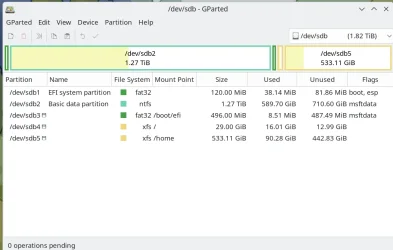
Partitions are /dev/sdb1 - EFI partition for Windows boot menu, /dev/sdb2 large data partition containing several Windows vhdx physical files so can have choice of around 6 different Windows builds / language options etc, /dev/sdb3 EFI partition for Linux grub efi boot /dev/sdb4 Linux '/' or root partition and /dev/sdb5 for Linux /home partition. Linux system is currently Fedora 42 but I could add more. This Linux distro doesn't need a separate swap partition as it's done via "ZRAM".

I see no reason any more to mess around with the WSL - good idea when it started but technology has moved on both hardware and software wise.

I have a 2nd copy of the stick - easy to create via dd !! just in case of device failure.

Works brilliantly especially as the laptop has actually a slower 256 SSD internal drive and only 8GB of RAM - but these days I'm not taking an expensive new laptop while travelling these days especially seeing the typical chaos at larger airports now almost everywhere.

Cheers
jimbo
 

My Computer

System One

  • OS
    Windows XP,11 Linux Fedora Rawhide pre-release 45
    Computer type
    PC/Desktop
    CPU
    2 X Intel i7
    Screen Resolution
    4KUHD X 2
As each of the applications mentioned in the O/P is available as a native Windows build, I just don't get the point of making life more difficult with that Laptop by using WSL/Ubuntu, unless it was simply a 'learning experience'.
Then again, as an occasional Linux user, I have grown to 'hate' most things Canonical/Ubuntu, so perhaps I'm biased.

"Perhaps! !?

:lmao:
 

My Computers

System One System Two

  • OS
    Fedora/KDE Plasma F43
    Computer type
    PC/Desktop
    Manufacturer/Model
    HP Z640
    CPU
    Xeon 2667 v4
    Motherboard
    Xeon V4 Motherboard
    Memory
    48GB ECC DDR4
    Graphics Card(s)
    nVidia GTX 1650
    Monitor(s) Displays
    LG 27"
    Screen Resolution
    1920x1080@144hz
    Hard Drives
    NVME, SSD
    PSU
    850W
  • Operating System
    Windows 11 IOT Enterprise LTSC/RHEL 10.1 KDE Plasma
    Computer type
    PC/Desktop
    Manufacturer/Model
    HP Z440
    CPU
    Intel Xeom 2680 V4
    Motherboard
    HP Z440
    Memory
    64gb DDR4 ECC
    Graphics card(s)
    AMD RX560
    Monitor(s) Displays
    LG Gsync 27" 144hz
    Screen Resolution
    1920x1080@144hz
    Hard Drives
    SSD/nVme/HDD
    PSU
    standard 700W
    Case
    standard
    Cooling
    Standard
    Browser
    MS Edge
    Antivirus
    BitDefender
Back
Top Bottom