A few queries about windows home drive encryption and imaging with Macrium


perfection

Well-known member
Member
Local time
3:20 AM
Posts
45
OS
windows 11 64 bit
01. Can I successfully image my encrypted system drive with a Macrium boot disk?
02. Will the image created be encrypted or not?
03. If i unlock the system drive and image it will the image be encrypted or not?
04. if i restore an encrypted image onto a encrypted partition will i require the unlock key
05. If i restore an unencrypted image onto a encrypted partition will the result be an encrypted or unencrypted partition and will i require the unlock key to do this restore?
06. what exactly does BitLocker support do, if added to my Macrium bootable image?

Thanks - i have a new laptop and do not want to mess anything up at the onset
 

My Computer My Computer

At a glance

windows 11 64 bitintel i5 8th geeneration16GB
OS
windows 11 64 bit
Computer type
Laptop
Manufacturer/Model
HP x360 cd
CPU
intel i5 8th geeneration
Memory
16GB
Screen Resolution
1920
Hard Drives
one 500 GB SSD plus 1 TB hdd (2.5 inches)
Keyboard
inbuilt
Mouse
inbuilt trackpad
Internet Speed
500 Mbps
Browser
Edge chromium
Antivirus
Defender
I cannot answer ALL of your questions. Others here might if they are currently active in this forum. I would suggest researching the Macrium forums until someone else is available.
Holiday and weekend you know.
 

My Computers My Computers

  • At a glance

    Clean Install 26200.9168 Secure boot is on.AMD Ryzen 7 8845HSDDR5-5600 / PC5-44800 DDR5 SDRAM SO-DIMM32GAMD Radeon 780M
    OS
    Clean Install 26200.9168 Secure boot is on.
    Computer type
    PC/Desktop
    Manufacturer/Model
    Beelink SER8 Mini
    CPU
    AMD Ryzen 7 8845HS
    Motherboard
    AZW SER8 AMD Promontory/Bixby FCH
    Memory
    DDR5-5600 / PC5-44800 DDR5 SDRAM SO-DIMM32G
    Graphics Card(s)
    AMD Radeon 780M
    Sound Card
    AMD Zen - Audio Processor - HD Audio Controller
    Monitor(s) Displays
    1 LG HDR 32"
    Screen Resolution
    2560x1440
    Hard Drives
    1TB Crucial NVME Internal
    2TB Crucial NVME Internal
    2TB Crucial NVME External
    WD 1TB SSD SATA to USB3
    Samsung SSD 1TB SATA to USB3
    Samsung 500G SATA to USB3
    500G Crucial SSD to USB3
    PSU
    Beelink
    Case
    Beelink
    Cooling
    Beelink
    Keyboard
    Logitech Backlit USB
    Mouse
    Logitech M510
    Internet Speed
    250-500
    Browser
    Edge, Firefox, Chrome
    Antivirus
    Microsoft Security 1.451.235.0 version created 6-2-2026
    Other Info
    Macrium X Build 10.0.8843
    Minitool Pro Ultimate 13.9
    Aomie Partition Assistant Pro 10.12.0
    REVO Pro 5.5.2.0 Portable
    JAM Treesize 9.7.2.2203 Perpetual Outdated.
    JAM Ultrasearch Pro 4.9.1.1204 Perpetual Outdated.
    Malwarebytes Pro 5.6.5 Update 1.0.113698 Component 163.0.5714
    Screenpresso Pro 2.2.12.3 beta (.Net 4.8) 2026-5-026
    Hamrick Vue Scan Pro 9.7.99
    Visio 2021 Pro 2021 MSO (Version 2605 Build 16.0.20026.20076) 64-bit
    Droid Transfer-Android 26.2.26.0
    Thunderbird 154
    em Client 10.4.5674
    Affinity Suite Publisher, Designer, Photo 2.6.5
    Microsoft 365 MSO (Version 2608 Build 16.0.20326.20072) 64-bit
    Adobe Creative cloud Version 6911 Apps 6.9.0.618 CCLibrary 4.16.2 (Photo subscription)
    HXD Hex Editor Version 2.5.0.0
    DAW Software Reaper-Izotope Plugins
    WYSIWYG Web Builder 20.4.2
    Filezilla 3.70.5
    System Informer
    O&O Regedit
    Advanced IP Scanner 2.5.1
    Epson Eco Tank Printers and Epson Scanners.
    PEAK DCA Transistor Graphical USB Interface for Viewing Transistor Operational Curves. Win
    Games - Win-7 Card Games
    Microsoft FSX "Pro Gold Flight Sim with add ons. Still works perfectly.
    Many Other free and paid applications
  • At a glance

    Win11 Pro OEM 25H2 OS Build 26200.7019AMD Ryzen 7 8845HSDDR5 32GBeelink SER7
    Operating System
    Win11 Pro OEM 25H2 OS Build 26200.7019
    Computer type
    PC/Desktop
    Manufacturer/Model
    Beelink
    CPU
    AMD Ryzen 7 8845HS
    Motherboard
    AMD
    Memory
    DDR5 32G
    Graphics card(s)
    Beelink SER7
    Sound Card
    Beelink SER7
    Monitor(s) Displays
    Dell
    Screen Resolution
    Native
    Hard Drives
    1TB Crucial NVMe SSD 2G SATA
    PSU
    Beelink Proprietary
    Case
    Beelink Proprietary
    Cooling
    Beelink Proprietary
    Keyboard
    gaming keyboard
    Mouse
    MS
    Internet Speed
    T-Mobile 5G
    Antivirus
    Defender Malwarebytes
    Other Info
    Microsoft 365 Family Office
    Macrium X Subscription1 Version 10
    Mini-Tool Ultimate 13.0 Lifetime
    Malwarebytes Premium w/VPN 5
    Revo Pro Portable Pro 5
    Roboform 9.7.7.
    Others. (All legit)
The content on disk is always encrypted, bitlcocker decrypts on read in memory so the image will be encrypted
 

My Computer My Computer

At a glance

Linux Mint
OS
Linux Mint
Computer type
Laptop
Manufacturer/Model
System76 Lemur Pro
How Macrium Deals with BitLocker
  1. Imaging Encrypted Drives (Without Unlocking):
    • Macrium can create an image of a BitLocker drive without unlocking it first.
    • It captures the drive's encrypted sectors, resulting in an encrypted image.
    • This works for backup, but restoring to a new drive requires manual decryption or re-encryption in the new OS.
  2. Rescue Media with BitLocker Support:
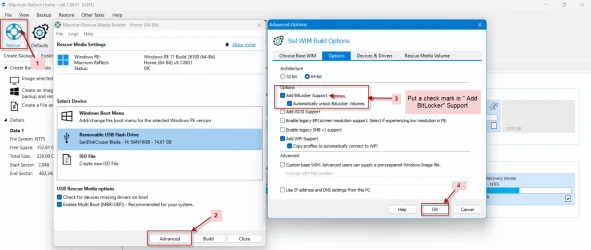
    • During rescue media creation, you can add optional components, including BitLocker support, and choose to "Automatically unlock BitLocker encrypted drives".
    • When you boot from this media, any BitLocker drives attached during creation are unlocked automatically.
  3. Benefits of Unlocking in Rescue Media:
    • Faster Operations: Enables intelligent sector copy for quicker imaging/cloning and Rapid Delta Restores.
    • Access to Contents: Allows viewing files within the encrypted volume in the PE environment.
    • Retains Encryption: Restoring to an unlocked volume maintains its encryption status after reboot.
 

My Computers My Computers

  • At a glance

    Windows 11 Pro 25H2 26200.9168i9-10900 10 core 20 threads32 gbnone-Intel UHD Graphics 630
    OS
    Windows 11 Pro 25H2 26200.9168
    Computer type
    PC/Desktop
    Manufacturer/Model
    Dell Optiplex 7080
    CPU
    i9-10900 10 core 20 threads
    Motherboard
    DELL 0J37VM
    Memory
    32 gb
    Graphics Card(s)
    none-Intel UHD Graphics 630
    Sound Card
    Integrated Realtek
    Monitor(s) Displays
    Benq 27
    Screen Resolution
    2560x1440
    Hard Drives
    2x1tb Solidigm m.2 nvme /External drives 512gb Samsung m.2 sata+2tb Kingston m2.nvme
    PSU
    500w
    Case
    MT
    Cooling
    Dell Premium
    Keyboard
    Logitech wired
    Mouse
    Logitech wireless
    Internet Speed
    so slow I'm too embarrassed to tell
    Browser
    #1 Edge #2 Firefox
    Antivirus
    Defender+MWB Premium
  • At a glance

    Windows 11 Pro 24H2 26200.9168AMD Ryzen 7 6800U32 gbintegrated
    Operating System
    Windows 11 Pro 24H2 26200.9168
    Computer type
    PC/Desktop
    Manufacturer/Model
    Beelink Mini PC SER5
    CPU
    AMD Ryzen 7 6800U
    Memory
    32 gb
    Graphics card(s)
    integrated
    Sound Card
    integrated
    Monitor(s) Displays
    Benq 27
    Screen Resolution
    2560x1440
    Hard Drives
    1TB Crucial nvme
    Keyboard
    Logitech wired
    Mouse
    Logitech wireless
    Internet Speed
    still too embarrassed to tell
    Browser
    Firefox
    Antivirus
    Defender
  • System 3 is non compliant Dell 9020 i7-4770/24gb ram Win11 PRO 26200.9168
@perfection

Perhaps you missed my post here can i suspend (not disable) my encrpyted drive on windows home
That thread was initiated by you and everything about Device Encryption on your new Lenova laptop, how to suspend/unsuspend ( disable/enable) has been explained in my post

Whether it is Bitlocker Device encryption in Windows 11 Home or Bitlocker Drive encryption in Windows 11 Pro while creating Macrium Rescue media, click on the Advanced button at the bottom, put a check mark in the Add BitLocker squre and click on "OK" as shown in the screenshot below. When imaging with Macrium Rescue media, Macrium Reflect will automatically unllock the disks/drives.

28-12-2025 10-41-00.webp

Now on the topic of BitLocker Restore outcomes

BitLocker Restore Outcomes

When restoring a BitLocker-encrypted volume, there are three possible outcomes: Read here Restoring BitLocker Encrypted Partitions. An extract below

IconDescription
BitLocker-unlocked-png.png
BitLocker Live Restore
The BitLocker state is preserved for the restored partition, and the volume is unlocked.
BitLocker-Locked-png.png
BitLocker Encrypted
The volume is restored/cloned in a locked BitLocker state and can be unlocked using the source volume password or TPM chip.
No IconBitLocker Removal
The file system is restored/cloned "in the clear," and BitLocker encryption must be manually re-enabled on the restored volume to maintain the BitLocker encryption.
 
Last edited:

My Computers My Computers

  • At a glance

    Windows 11 Pro Version:25H2 OS Build: 26200.916812th Gen Intel core i5-1235U(Alder16*2 (32 GB) DDR 4-3200(1600MHz) Crucial Tech...Intel Iris Xe Graphics (Internal)
    OS
    Windows 11 Pro Version:25H2 OS Build: 26200.9168
    Computer type
    PC/Desktop
    Manufacturer/Model
    Beelink Mini PC Model: SEi12
    CPU
    12th Gen Intel core i5-1235U(Alder
    Motherboard
    SEi (manufactured by AZW)
    Memory
    16*2 (32 GB) DDR 4-3200(1600MHz) Crucial Technology
    Graphics Card(s)
    Intel Iris Xe Graphics (Internal)
    Sound Card
    Internal
    Monitor(s) Displays
    BenQ GW2283
    Screen Resolution
    1920*1080
    Hard Drives
    500GB NVME (Kingston SNV2S500G)
    1TB (Crucial CT1000BX500SSD1)
    PSU
    Power Brick 19V-6.32A , 120.08W
    Keyboard
    Dell KB3322Wi (Wireless)
    Mouse
    Dell WM118t (Wireless)
    Internet Speed
    4G/5G
    Browser
    MS Edge, Chrome
    Antivirus
    Malwarebytes Premium - Subscription
  • At a glance

    Windows 11 Home Version 25H2 Build 26200.9168Intel Core i3 8145UIntel Optane 16GB module + DDR 4 16GB (Optane...Intel UHD Graphics 620
    Operating System
    Windows 11 Home Version 25H2 Build 26200.9168
    Computer type
    PC/Desktop
    Manufacturer/Model
    Dell Inspiron 3280 AIO 22"
    CPU
    Intel Core i3 8145U
    Motherboard
    Dell inc. 027W48
    Memory
    Intel Optane 16GB module + DDR 4 16GB (Optane disabled.)
    Graphics card(s)
    Intel UHD Graphics 620
    Sound Card
    Internal
    Monitor(s) Displays
    Dell Monitor 22"
    Screen Resolution
    1920x1080
    Hard Drives
    Crucial CT1000BX500SSD1 ; 1000,2 GB
    PSU
    Power Brick
    Case
    All-in one
    Keyboard
    Dell Wireless KM636
    Mouse
    Dell Wireless KM 636
    Internet Speed
    4G
    Browser
    Edge, Chrome
    Antivirus
    Malwarebytes
    Other Info
    Upgraded from Windows 10 Home to Windows 11 Home on 28 Oct 2023
what if my Macrium rescue cd with Gitlocker support is created on my PC but used to image and restore my system encrypted partition of my LAPTOP?
 

My Computer My Computer

At a glance

windows 11 64 bitintel i5 8th geeneration16GB
OS
windows 11 64 bit
Computer type
Laptop
Manufacturer/Model
HP x360 cd
CPU
intel i5 8th geeneration
Memory
16GB
Screen Resolution
1920
Hard Drives
one 500 GB SSD plus 1 TB hdd (2.5 inches)
Keyboard
inbuilt
Mouse
inbuilt trackpad
Internet Speed
500 Mbps
Browser
Edge chromium
Antivirus
Defender
Life is much easier without BitLocker, but you guys seem to like it.
I don't use it.
 

My Computers My Computers

  • At a glance

    Windows 11 ProIntel Core i9-10900XCorsair 64 GB (4 x 16 GB) CMW64GX4M4C3000C15 ...GIGABYTE GeForce GTX 1660 Super Mini ITX 6 GB OC
    OS
    Windows 11 Pro
    Computer type
    PC/Desktop
    Manufacturer/Model
    Stigg's Build
    CPU
    Intel Core i9-10900X
    Motherboard
    GIGABYTE X299X DESIGNARE 10G
    Memory
    Corsair 64 GB (4 x 16 GB) CMW64GX4M4C3000C15 Vengeance RGB Pro 3000Mhz DDR4
    Graphics Card(s)
    GIGABYTE GeForce GTX 1660 Super Mini ITX 6 GB OC
    Sound Card
    Realtek ALC1220
    Monitor(s) Displays
    Samsung 27" FHD LED FreeSync Gaming Monitor (LS27F350FHEXXY)
    Screen Resolution
    1920 x 1080
    Hard Drives
    Samsung 970 Pro Series 1TB M.2 2280 NVMe SSD
    Western Digital Red Pro WD8003FFBX-68B9AN0 8 TB, 7200 RPM, SATA-III
    Western Digital Red Pro WD8003FFBX-68B9AN0 8 TB, 7200 RPM, SATA-III
    PSU
    Corsair HX1200 1200W 80 Plus Platinum
    Case
    Fractal Design Define 7 Black Solid Case
    Cooling
    Noctua NH-D15 Chromax Black
    Keyboard
    Razer Ornata V2
    Mouse
    Razer DeathAdder Essential
    Internet Speed
    FTTN 100Mbps / 40Mbps
    Browser
    Mozilla Firefox
    Antivirus
    N/A
    Other Info
    Logitech BRIO 4k Ultra HD USB-C Webcam
  • At a glance

    Windows 10 ProCore i7-8750HSK Hynix 32 GB (2 x 16 GB) HMA82GS6CJR8N-VK 1...NVIDIA GeForce GTX 1070
    Operating System
    Windows 10 Pro
    Computer type
    Laptop
    Manufacturer/Model
    ASUS ROG Zephyrus M GM501GS
    CPU
    Core i7-8750H
    Motherboard
    Zephyrus M GM501GS
    Memory
    SK Hynix 32 GB (2 x 16 GB) HMA82GS6CJR8N-VK 16 GB DDR4-2666 DDR4 SDRAM
    Graphics card(s)
    NVIDIA GeForce GTX 1070
    Sound Card
    Realtek ALC294
    Monitor(s) Displays
    AU Optronics B156HAN07.1 [15.6" LCD]
    Screen Resolution
    1920 x 1080
    Hard Drives
    Samsung MZVKW512HMJP-00000 512 GB, PCI-E 3.0 x4
    Samsung SSD 860 QVO 4TB 4 TB, SATA-III
    PSU
    N/A
    Case
    N/A
    Cooling
    N/A
    Keyboard
    PC/AT Enhanced PS2 Keyboard (101/102-Key)
    Mouse
    Razer DeathAdder Essential
    Internet Speed
    FTTN 100Mbps / 40Mbps
    Browser
    Mozilla Firefox
    Antivirus
    N/A
    Other Info
    USB2.0 HD UVC Webcam
Life is much easier without BitLocker, but you guys seem to like it.
I don't use it.
I'm mobile most of the time and security is important to me. My System One and System Two are always in my backpack. I've used BitLocker for years and never had any problems.
 

My Computers My Computers

  • At a glance

    Windows 11 ProIntel Series 3 Core Ultra X9 388H64GB LPDDR5x 9600 MT/sIntel Arc graphics B390 Panther Lake
    OS
    Windows 11 Pro
    Computer type
    Laptop
    Manufacturer/Model
    Dell XPS 16 DA16260
    CPU
    Intel Series 3 Core Ultra X9 388H
    Memory
    64GB LPDDR5x 9600 MT/s
    Graphics Card(s)
    Intel Arc graphics B390 Panther Lake
    Monitor(s) Displays
    16" 3.2K Tandem OLED Infinity Edge
    Screen Resolution
    3200 x 2000 16:10 236 PPI
    Hard Drives
    1 Terabyte M.2 PCIe NVMe SSD
    Case
    Black Anodized Aluminum
    Cooling
    Vapor Chamber Cooling
    Mouse
    None
    Internet Speed
    942 Mbps Netgear Mesh + 2 Satellites
    Browser
    Microsoft Edge (Chromium)
    Antivirus
    Windows Security (Defender)
    Other Info
    NPU delivering 67 TOPS
    Microsoft 365 subscription
    Microsoft Office 365
    Microsoft OneDrive 1TB Cloud
    Microsoft Visual Studio
    Microsoft Visual Studio Code
    Microsoft Sysinternals Suite
    Microsoft BitLocker
    Microsoft Copilot
    Dell Support Assist
    Dell Command | Update
    Macrium Reflect X subscription
    1Password Password Manager
    Amazon Kindle for PC
    Lightroom/Photoshop subscription
    Interactive Brokers Trader Workstation
  • At a glance

    Windows 11 ProSnapdragon® X Elite (12 Core) with Hexagon NP...32GB LPDDR5x 8448 MT/sIntegrated Adreno GPU
    Operating System
    Windows 11 Pro
    Computer type
    Laptop
    Manufacturer/Model
    Microsoft Surface Laptop 7
    CPU
    Snapdragon® X Elite (12 Core) with Hexagon NPU delivering 45 TOPS
    Memory
    32GB LPDDR5x 8448 MT/s
    Graphics card(s)
    Integrated Adreno GPU
    Sound Card
    Omnisonic speakers with Dolby Atmos spatial sound
    Monitor(s) Displays
    13.8″ PixelSense Flow touchscreen 120 Hz 600 NIT
    Screen Resolution
    2304 × 1536 (201 PPI), 3:2 aspect ratio
    Hard Drives
    1 TB PCIe NVMe Gen 4 SSD
    Case
    Black Anodized Aluminum
    Cooling
    Vapor Chamber Cooling
    Mouse
    None
    Internet Speed
    942 Mbps Netgear Mesh + 2 Satellites
    Browser
    Microsoft Edge (Chromium)
    Antivirus
    Windows Security (Defender)
    Other Info
    Microsoft 365 subscription (Office)
    Microsoft Office 365
    Microsoft OneDrive 1TB Cloud
    Microsoft Visual Studio 2026
    Microsoft Visual Studio Code
    Interactive Brokers Trader Workstation
    Lightroom/Photoshop subscription
    1Password Password Manager
    Microsoft Sysinternals
    Amazon Kindle for PC
    Microsoft BitLocker
    Microsoft Copilot
While convenient, it seems to me that Macrium's rescue media "Automatically unlock BitLocker encrypted drives" option is like storing your Bitlocker keys on a post-it note wherever you keep your rescue media. If that's correct, I would not use it. I use Image For Windows (IFW), and it does not have such a feature. Instead, I suspend protection on the Windows 11 Pro system I want to restore before booting into the IFW rescue media, and then I can restore my system volume, which was imaged with the volume unlocked so in the plaintext state, such that it will be encrypted by Bitlocker on the fly, as it's being restored. This avoids needing to re-encrypt after rebooting and trashing the auto-unlock keys for my internal data and external backup drives, which are a hassle to get working again. I use a 1 TB internal drive as the primary storage for my images, so I normally suspend protection on both drives before booting the rescue media; there's a tutorial here that explains how to do that using manage-bde and PowerShell.

Note that I Bitlocker all my drives: system, internal data, and external data and backup drives. In the worst case, I boot into the rescue environment with all drives locked. Then I have to open a command shell and use manage-bde to unlock the drives I need to work with. It can be a challenge to match drive letters to locked volumes, because they're not the same as in normal Windows. That's why I set things up in Windows as previously described before booting the rescue media, which I'm normally able to do.
 

My Computer My Computer

At a glance

Windows 11
OS
Windows 11
Like @Stigg, I bitlock nothing. Nor will I ever.
 

My Computers My Computers

  • At a glance

    Windows 11 Pro 25H2 26200.9168i9-10900 10 core 20 threads32 gbnone-Intel UHD Graphics 630
    OS
    Windows 11 Pro 25H2 26200.9168
    Computer type
    PC/Desktop
    Manufacturer/Model
    Dell Optiplex 7080
    CPU
    i9-10900 10 core 20 threads
    Motherboard
    DELL 0J37VM
    Memory
    32 gb
    Graphics Card(s)
    none-Intel UHD Graphics 630
    Sound Card
    Integrated Realtek
    Monitor(s) Displays
    Benq 27
    Screen Resolution
    2560x1440
    Hard Drives
    2x1tb Solidigm m.2 nvme /External drives 512gb Samsung m.2 sata+2tb Kingston m2.nvme
    PSU
    500w
    Case
    MT
    Cooling
    Dell Premium
    Keyboard
    Logitech wired
    Mouse
    Logitech wireless
    Internet Speed
    so slow I'm too embarrassed to tell
    Browser
    #1 Edge #2 Firefox
    Antivirus
    Defender+MWB Premium
  • At a glance

    Windows 11 Pro 24H2 26200.9168AMD Ryzen 7 6800U32 gbintegrated
    Operating System
    Windows 11 Pro 24H2 26200.9168
    Computer type
    PC/Desktop
    Manufacturer/Model
    Beelink Mini PC SER5
    CPU
    AMD Ryzen 7 6800U
    Memory
    32 gb
    Graphics card(s)
    integrated
    Sound Card
    integrated
    Monitor(s) Displays
    Benq 27
    Screen Resolution
    2560x1440
    Hard Drives
    1TB Crucial nvme
    Keyboard
    Logitech wired
    Mouse
    Logitech wireless
    Internet Speed
    still too embarrassed to tell
    Browser
    Firefox
    Antivirus
    Defender
  • System 3 is non compliant Dell 9020 i7-4770/24gb ram Win11 PRO 26200.9168
While convenient, it seems to me that Macrium's rescue media "Automatically unlock BitLocker encrypted drives" option is like storing your Bitlocker keys on a post-it note wherever you keep your rescue media. If that's correct, I would not use it. I use Image For Windows (IFW), and it does not have such a feature. Instead, I suspend protection on the Windows 11 Pro system I want to restore before booting into the IFW rescue media, and then I can restore my system volume, which was imaged with the volume unlocked so in the plaintext state, such that it will be encrypted by Bitlocker on the fly, as it's being restored. This avoids needing to re-encrypt after rebooting and trashing the auto-unlock keys for my internal data and external backup drives, which are a hassle to get working again. I use a 1 TB internal drive as the primary storage for my images, so I normally suspend protection on both drives before booting the rescue media; there's a tutorial here that explains how to do that using manage-bde and PowerShell.

Note that I Bitlocker all my drives: system, internal data, and external data and backup drives. In the worst case, I boot into the rescue environment with all drives locked. Then I have to open a command shell and use manage-bde to unlock the drives I need to work with. It can be a challenge to match drive letters to locked volumes, because they're not the same as in normal Windows. That's why I set things up in Windows as previously described before booting the rescue media, which I'm normally able to do.
forgive me for asking on an old thread, but I'm new at this and want to confirm that the following is correct, if I'm correctly following what you and others are saying

1) I can use either Macrium or IFW to image a Bitlocked drive onto external media that I have previously encrypted with Bitlocker to Go, by first suspending Bitlocker on both drives? I can make the image of my system volume *without* having to "turn off" (I guess this means decrypt) Bitlocker on my system volume?
2) Suspending rather than "turning off" Bitlocker saves me the trouble of having to decrypt and re-encrypt my whole drive and also saves me the trouble of having to a new key generated for the drive that I have to keep track of, is that right? I would really rather not have the stress of that if not needed.
3) The only issue is that when I go to restore the saved image, I will need to suspend Bitlocker again on the drives I'm restoring from and to? Can I first suspend Bitlocker on the external drive I am restoring from using some other computer, in lieu of using a command shell with a manage-bde command and having to keep guessing at drive letters until I get the correct one? and then boot the machine I am restoring to using separate unencrypted rescue media, to suspend Bitlocker on the internal drive I am restoring to by entering my saved key somehow?
4) The above will work as long as I am restoring to the same drive that was imaged from.

I'm asking since you use IFW and because the TeraByte Unlimited kb article on this topic (Using BitLocker with TeraByte’s Imaging Programs – TeraByte Knowledge Base) is really hard for me to follow and understand, and I'm not that familiar with how Bitlocker works. The TeraByte kb article suggests to me that if I restore a "type B" backup to a drive with different hardware than the original drive I may need to decrypt the whole drive I am restoring to anyway in order to be able to repair the installation and install the correct drivers for booting on that drive.

One last question: is it best practice or required to install the boot/rescue media on a separate, dedicated drive other than the drive I have backed up the images to? It seems like I should put the rescue media on an unencrypted drive? It is causing me consternation that I cannot readily find any explanation of this basic information anywhere. I'd be super grateful for enlightenment on the above.
 

My Computer My Computer

At a glance

Windows 11 Pro
OS
Windows 11 Pro
Computer type
Laptop
Manufacturer/Model
Framework 13

Latest Support Threads

Back
Top Bottom