ACPI thermal zone \_TZ.PCT0 has been enumerated


rzn6jw

Well-known member
Member
Local time
3:29 AM
Posts
272
OS
Win 11Pro v25H2 build 26200.7171
I'd normally post this under BSOD but there's no BSOD, just a crash and reboot. Using Gigabyte X570 Aorus Pro WIFI, AMD Ryxen 9 3900X, Corsair H80i V2 water cooler, 32G DDR4 3200 memory, Corsair 850W power supply. Error is thus:

ACPI thermal zone \_TZ.PCT0 has been enumerated.
_PSV = 290K
_TC1 = 0
_TC2 = 0
_TSP = 1000ms
_AC0 = 0K
_AC1 = 0K
_AC2 = 0K
_AC3 = 0K
_AC4 = 0K
_AC5 = 0K
_AC6 = 0K
_AC7 = 0K
_AC8 = 0K
_AC9 = 0K
_CRT = 294K
_HOT = 293K
minimum throttle = 0
_CR3 = 0K

Any idea? Not a regular happening but a couple of times over the last few weeks.
 
Windows Build/Version
v 22H2, build 22621.1635

My Computer My Computer

At a glance

Win 11Pro v25H2 build 26200.7171AMD Ryzen 7 9800X3D64G DDR5 6000ASUS RTX 4070 Ti Super OC
OS
Win 11Pro v25H2 build 26200.7171
Computer type
PC/Desktop
Manufacturer/Model
DIY
CPU
AMD Ryzen 7 9800X3D
Motherboard
Gigabyte X670 Aorus Elite AX
Memory
64G DDR5 6000
Graphics Card(s)
ASUS RTX 4070 Ti Super OC
Sound Card
Soundblaster Z SE
Monitor(s) Displays
LG 24"
Screen Resolution
3480 x 2160
Hard Drives
C: drive SOLIDIGM P44 PRO 2TB SSD
D: drive SOLIDIGM P44 PRO 2TB SSD
H: drive Samsung 970 EVO Plus 2TB SSD
PSU
Corsair RM850X
Case
GameMax
Cooling
NZXT Kraken Elite 360 RGB 2024
Keyboard
Corsair
Mouse
Razor
Internet Speed
Gigabyte
Browser
Firefox
Antivirus
Norton 360
You do not mention what GPU you have.

My first suspicion is you're overheating. First and foremost I would reapply new thermal paste on CPU. Make sure to use a good quality product.
If it continues to happen after doing that , stress test your hardware starting with your GPU. It could also be overheating.

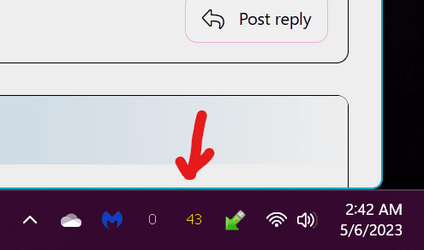
Install a small app called Coretemp. I run Coretemp all the time in my system tray (see screenshot) which gives me the highest temp across all cores at a glance. It's my first indicator if my cpu is running hot. When you click on the reading a popup will give the temp of each core individually. Before you apply new paste, make note of your temp. You should see quite a bit of difference after new paste is applied.

If you have to get to down and dirty troubleshooting after applying new paste, use HWMonitor to monitor temps and voltages while running stress tests.

Memtest86 is gold standard to test ram (has to be run outside of windows minimum of 4 passes so run it overnight. It takes a long time).

CPU stress test- Prime95(free) or Aida64 (paid with free trial) 1 hour

GPU stress test - Furmark 30 minutes

These just happen to be the ones I use but there are others. Do a web search.
 

Attachments

  • Screenshot 2023-05-06 024313.png
    Screenshot 2023-05-06 024313.png
    12.6 KB · Views: 3

My Computers My Computers

  • At a glance

    Windows 11 Pro 25H2 26200.8655i9-10900 10 core 20 threads32 gbnone-Intel UHD Graphics 630
    OS
    Windows 11 Pro 25H2 26200.8655
    Computer type
    PC/Desktop
    Manufacturer/Model
    Dell Optiplex 7080
    CPU
    i9-10900 10 core 20 threads
    Motherboard
    DELL 0J37VM
    Memory
    32 gb
    Graphics Card(s)
    none-Intel UHD Graphics 630
    Sound Card
    Integrated Realtek
    Monitor(s) Displays
    Benq 27
    Screen Resolution
    2560x1440
    Hard Drives
    2x1tb Solidigm m.2 nvme /External drives 512gb Samsung m.2 sata+2tb Kingston m2.nvme
    PSU
    500w
    Case
    MT
    Cooling
    Dell Premium
    Keyboard
    Logitech wired
    Mouse
    Logitech wireless
    Internet Speed
    so slow I'm too embarrassed to tell
    Browser
    #1 Edge #2 Firefox
    Antivirus
    Defender+MWB Premium
  • At a glance

    Windows 11 Pro 24H2 26200.8457AMD Ryzen 7 6800U32 gbintegrated
    Operating System
    Windows 11 Pro 24H2 26200.8457
    Computer type
    PC/Desktop
    Manufacturer/Model
    Beelink Mini PC SER5
    CPU
    AMD Ryzen 7 6800U
    Memory
    32 gb
    Graphics card(s)
    integrated
    Sound Card
    integrated
    Monitor(s) Displays
    Benq 27
    Screen Resolution
    2560x1440
    Hard Drives
    1TB Crucial nvme
    Keyboard
    Logitech wired
    Mouse
    Logitech wireless
    Internet Speed
    still too embarrassed to tell
    Browser
    Firefox
    Antivirus
    Defender
    Other Info
    System 3 is non compliant Dell 9020 i7-4770/24gb ram Win11 PRO 26200.8457
I installed an ASUS RTX 4070 Super OC last week, but this reboot has happened a few times before when I had a Gigabyte RTX 2070 Super OC installed.

I use Arctic Silver for all my installs and never had an issue before. My cooler was bought in 2019 so I don't know if that's going south or not. I will repaste the CPU and run some stress tests and get back to this post Monday.

Thanks for your insight.
 

My Computer My Computer

At a glance

Win 11Pro v25H2 build 26200.7171AMD Ryzen 7 9800X3D64G DDR5 6000ASUS RTX 4070 Ti Super OC
OS
Win 11Pro v25H2 build 26200.7171
Computer type
PC/Desktop
Manufacturer/Model
DIY
CPU
AMD Ryzen 7 9800X3D
Motherboard
Gigabyte X670 Aorus Elite AX
Memory
64G DDR5 6000
Graphics Card(s)
ASUS RTX 4070 Ti Super OC
Sound Card
Soundblaster Z SE
Monitor(s) Displays
LG 24"
Screen Resolution
3480 x 2160
Hard Drives
C: drive SOLIDIGM P44 PRO 2TB SSD
D: drive SOLIDIGM P44 PRO 2TB SSD
H: drive Samsung 970 EVO Plus 2TB SSD
PSU
Corsair RM850X
Case
GameMax
Cooling
NZXT Kraken Elite 360 RGB 2024
Keyboard
Corsair
Mouse
Razor
Internet Speed
Gigabyte
Browser
Firefox
Antivirus
Norton 360
By the way, I ran AIDA64 on memory and the test ended with 'hardware error' after 8 seconds. It failed to give me any information on the hardware error. Do I have to spend $56 for a 3 PC license to get more information from the program?
 

My Computer My Computer

At a glance

Win 11Pro v25H2 build 26200.7171AMD Ryzen 7 9800X3D64G DDR5 6000ASUS RTX 4070 Ti Super OC
OS
Win 11Pro v25H2 build 26200.7171
Computer type
PC/Desktop
Manufacturer/Model
DIY
CPU
AMD Ryzen 7 9800X3D
Motherboard
Gigabyte X670 Aorus Elite AX
Memory
64G DDR5 6000
Graphics Card(s)
ASUS RTX 4070 Ti Super OC
Sound Card
Soundblaster Z SE
Monitor(s) Displays
LG 24"
Screen Resolution
3480 x 2160
Hard Drives
C: drive SOLIDIGM P44 PRO 2TB SSD
D: drive SOLIDIGM P44 PRO 2TB SSD
H: drive Samsung 970 EVO Plus 2TB SSD
PSU
Corsair RM850X
Case
GameMax
Cooling
NZXT Kraken Elite 360 RGB 2024
Keyboard
Corsair
Mouse
Razor
Internet Speed
Gigabyte
Browser
Firefox
Antivirus
Norton 360
By the way, I ran AIDA64 on memory and the test ended with 'hardware error' after 8 seconds. It failed to give me any information on the hardware error. Do I have to spend $56 for a 3 PC license to get more information from the program?


To test the Memory... use Memtest. It's free and far more accurate.
 

My Computers My Computers

  • At a glance

    Win 11 Home ♦♦♦26200.8655 ♦♦♦♦♦♦♦25H2AMD Ryzen 7 3700XG.Skill (F4-3200C14D-16GTZKW)EVGA RTX 2070 (08G-P4-2171-KR)
    OS
    Win 11 Home ♦♦♦26200.8655 ♦♦♦♦♦♦♦25H2
    Computer type
    PC/Desktop
    Manufacturer/Model
    Built by Ghot® [May 2020]
    CPU
    AMD Ryzen 7 3700X
    Motherboard
    Asus Pro WS X570-ACE (BIOS 5302)
    Memory
    G.Skill (F4-3200C14D-16GTZKW)
    Graphics Card(s)
    EVGA RTX 2070 (08G-P4-2171-KR)
    Sound Card
    Realtek ALC1220P / ALC S1220A
    Monitor(s) Displays
    Dell U3011 30"
    Screen Resolution
    2560 x 1600
    Hard Drives
    2x Samsung 860 EVO 500GB,
    WD 4TB Black FZBX - SATA III,
    WD 8TB Black FZBX - SATA III,
    DRW-24B1ST CD/DVD Burner
    PSU
    PC Power & Cooling 750W Quad EPS12V
    Case
    Cooler Master ATCS 840 Tower
    Cooling
    CM Hyper 212 EVO (push/pull)
    Keyboard
    Ducky DK9008 Shine II Blue LED
    Mouse
    Logitech Optical M-100
    Internet Speed
    300/300
    Browser
    Firefox (latest)
    Antivirus
    Bitdefender Total Security
    Other Info
    Speakers: Klipsch Pro Media 2.1
  • At a glance

    Windows XP Pro 32bit w/SP3AMD Athlon 64 X2 5000+ (OC'd @ 3.2Ghz)TWIN2X2048-6400C4DHX (2 x 1GB, DDR2 800)EVGA 256-P2-N758-TR GeForce 8600GT SSC
    Operating System
    Windows XP Pro 32bit w/SP3
    Computer type
    PC/Desktop
    Manufacturer/Model
    Built by Ghot® (not in use)
    CPU
    AMD Athlon 64 X2 5000+ (OC'd @ 3.2Ghz)
    Motherboard
    ASUS M2N32-SLI Deluxe Wireless Edition
    Memory
    TWIN2X2048-6400C4DHX (2 x 1GB, DDR2 800)
    Graphics card(s)
    EVGA 256-P2-N758-TR GeForce 8600GT SSC
    Sound Card
    Onboard
    Monitor(s) Displays
    ViewSonic G90FB Black 19" Professional (CRT)
    Screen Resolution
    up to 2048 x 1536
    Hard Drives
    WD 36GB 10,000rpm Raptor SATA
    Seagate 80GB 7200rpm SATA
    Lite-On LTR-52246S CD/RW
    Lite-On LH-18A1P CD/DVD Burner
    PSU
    PC Power & Cooling Silencer 750 Quad EPS12V
    Case
    Generic Beige case, 80mm fans
    Cooling
    ZALMAN 9500A 92mm CPU Cooler
    Keyboard
    Logitech Classic Keybooard 200
    Mouse
    Logitech Optical M-BT96a
    Internet Speed
    300/300
    Browser
    Firefox 3.x ??
    Antivirus
    Symantec (Norton)
    Other Info
    Still assembled, still runs. Haven't turned it on for 15 years?
Replaced the memory and AIDA64 tests no error now. Must have been something with the other memory sticks. Will do more stress testing tomorrow and get back.

Thanks for the reply.
 

My Computer My Computer

At a glance

Win 11Pro v25H2 build 26200.7171AMD Ryzen 7 9800X3D64G DDR5 6000ASUS RTX 4070 Ti Super OC
OS
Win 11Pro v25H2 build 26200.7171
Computer type
PC/Desktop
Manufacturer/Model
DIY
CPU
AMD Ryzen 7 9800X3D
Motherboard
Gigabyte X670 Aorus Elite AX
Memory
64G DDR5 6000
Graphics Card(s)
ASUS RTX 4070 Ti Super OC
Sound Card
Soundblaster Z SE
Monitor(s) Displays
LG 24"
Screen Resolution
3480 x 2160
Hard Drives
C: drive SOLIDIGM P44 PRO 2TB SSD
D: drive SOLIDIGM P44 PRO 2TB SSD
H: drive Samsung 970 EVO Plus 2TB SSD
PSU
Corsair RM850X
Case
GameMax
Cooling
NZXT Kraken Elite 360 RGB 2024
Keyboard
Corsair
Mouse
Razor
Internet Speed
Gigabyte
Browser
Firefox
Antivirus
Norton 360
You do not mention what GPU you have.
Sorry, I overlooked that you did. I read it but just didn't see it. I forgot to say that for hardware testing to be reliable,overclocking should be removed until you’ve verified the issue also occurs at stock frequencies.
 

My Computers My Computers

  • At a glance

    Windows 11 Pro 25H2 26200.8655i9-10900 10 core 20 threads32 gbnone-Intel UHD Graphics 630
    OS
    Windows 11 Pro 25H2 26200.8655
    Computer type
    PC/Desktop
    Manufacturer/Model
    Dell Optiplex 7080
    CPU
    i9-10900 10 core 20 threads
    Motherboard
    DELL 0J37VM
    Memory
    32 gb
    Graphics Card(s)
    none-Intel UHD Graphics 630
    Sound Card
    Integrated Realtek
    Monitor(s) Displays
    Benq 27
    Screen Resolution
    2560x1440
    Hard Drives
    2x1tb Solidigm m.2 nvme /External drives 512gb Samsung m.2 sata+2tb Kingston m2.nvme
    PSU
    500w
    Case
    MT
    Cooling
    Dell Premium
    Keyboard
    Logitech wired
    Mouse
    Logitech wireless
    Internet Speed
    so slow I'm too embarrassed to tell
    Browser
    #1 Edge #2 Firefox
    Antivirus
    Defender+MWB Premium
  • At a glance

    Windows 11 Pro 24H2 26200.8457AMD Ryzen 7 6800U32 gbintegrated
    Operating System
    Windows 11 Pro 24H2 26200.8457
    Computer type
    PC/Desktop
    Manufacturer/Model
    Beelink Mini PC SER5
    CPU
    AMD Ryzen 7 6800U
    Memory
    32 gb
    Graphics card(s)
    integrated
    Sound Card
    integrated
    Monitor(s) Displays
    Benq 27
    Screen Resolution
    2560x1440
    Hard Drives
    1TB Crucial nvme
    Keyboard
    Logitech wired
    Mouse
    Logitech wireless
    Internet Speed
    still too embarrassed to tell
    Browser
    Firefox
    Antivirus
    Defender
    Other Info
    System 3 is non compliant Dell 9020 i7-4770/24gb ram Win11 PRO 26200.8457
Update: AIDA64 indicated hardware error during memory testing again. Had installed my wife's 16G DDR4 3200 in place of my 32G DDR4 3200. Hardware error was on this memory. Re-installed my memory and AIDA64 ran clean.

Proceeded to upgrade my CPU from an AMD Ryzen 9 3900X to an AMD Ryzen 9 5950X. PC would power on but not boot. Mobo error light indicated memory. Removed 5950X and re-installed 3900X but would not boot, error still memory. Removed one stick from mobo slot 2 and PC booted.

From this I can gather that either that stick was going bad or the mobo slot 2 is going bad (?). Wanted to upgrade to 64G so I have ordered the new memory but it won't be here until Wednesday.

Will post back after it arrives.
 

My Computer My Computer

At a glance

Win 11Pro v25H2 build 26200.7171AMD Ryzen 7 9800X3D64G DDR5 6000ASUS RTX 4070 Ti Super OC
OS
Win 11Pro v25H2 build 26200.7171
Computer type
PC/Desktop
Manufacturer/Model
DIY
CPU
AMD Ryzen 7 9800X3D
Motherboard
Gigabyte X670 Aorus Elite AX
Memory
64G DDR5 6000
Graphics Card(s)
ASUS RTX 4070 Ti Super OC
Sound Card
Soundblaster Z SE
Monitor(s) Displays
LG 24"
Screen Resolution
3480 x 2160
Hard Drives
C: drive SOLIDIGM P44 PRO 2TB SSD
D: drive SOLIDIGM P44 PRO 2TB SSD
H: drive Samsung 970 EVO Plus 2TB SSD
PSU
Corsair RM850X
Case
GameMax
Cooling
NZXT Kraken Elite 360 RGB 2024
Keyboard
Corsair
Mouse
Razor
Internet Speed
Gigabyte
Browser
Firefox
Antivirus
Norton 360
Back
Top Bottom