Solved Ad for Windows PowerShell


Rboppy

Member
Member
Local time
8:07 PM
Posts
94
OS
Windows 11
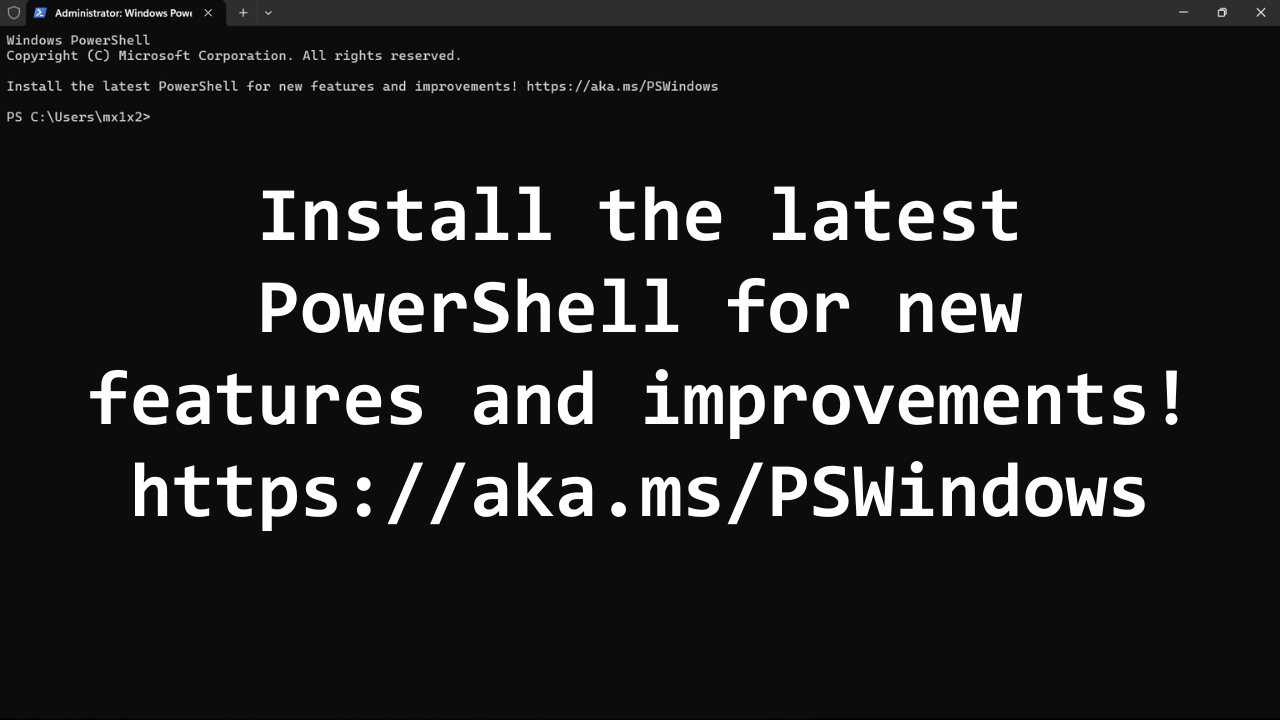
Every time I reboot my computer I get a popup that looks like an advertisement, any way to turn this off?
pwrshell.webp
 
Windows Build/Version
22H2 (22621.4317)

My Computer My Computer

At a glance

Windows 11AMD Ryzen 7 5700U16GB
OS
Windows 11
Computer type
Laptop
Manufacturer/Model
Acer Aspire 3 15
CPU
AMD Ryzen 7 5700U
Memory
16GB
Monitor(s) Displays
Sceptre 24"
You can disable the entire banner at the top by opening the Terminal's settings, and adding a -NoLogo switch to the command line for the Windows PowerShell profile.


View attachment 135175
 

My Computer My Computer

At a glance

Windows 11 Pro 25H212th Gen Core i7-1260P64 GB Micron PC4-25600Intel Iris Xe Graphics
OS
Windows 11 Pro 25H2
Computer type
PC/Desktop
Manufacturer/Model
Intel NUC12WSHi7
CPU
12th Gen Core i7-1260P
Motherboard
NUC12WSBi7
Memory
64 GB Micron PC4-25600
Graphics Card(s)
Intel Iris Xe Graphics
Sound Card
on-board Realtek HD Audio
Monitor(s) Displays
Dell U3219Q
Screen Resolution
3840 x 2160
Hard Drives
Samsung SSD 990 PRO 1TB
Crucial MX500 2 TB
Antivirus
Microsoft Defender
It's not an ad. It's a notice that you are not on the most current version of Powershell. Based on the icon you're using Windows Powershell instead of Microsoft Powershell (aka powershell core).

You can remove it by editing the Windows powershell profile.
Steps outlined in this link
 

My Computer My Computer

At a glance

Linux Mint
OS
Linux Mint
Computer type
Laptop
Manufacturer/Model
System76 Lemur Pro
@pseymour my screen shot looks nothing like yours:ps2.webp

@neemobeer, following that link asks me to open JSON file which pops up a Windows asking me to open an app on my computer.
 

My Computer My Computer

At a glance

Windows 11AMD Ryzen 7 5700U16GB
OS
Windows 11
Computer type
Laptop
Manufacturer/Model
Acer Aspire 3 15
CPU
AMD Ryzen 7 5700U
Memory
16GB
Monitor(s) Displays
Sceptre 24"
Your left side is collapsed. Click the three bars at the top.
 

My Computer My Computer

At a glance

Windows 11 Pro 25H212th Gen Core i7-1260P64 GB Micron PC4-25600Intel Iris Xe Graphics
OS
Windows 11 Pro 25H2
Computer type
PC/Desktop
Manufacturer/Model
Intel NUC12WSHi7
CPU
12th Gen Core i7-1260P
Motherboard
NUC12WSBi7
Memory
64 GB Micron PC4-25600
Graphics Card(s)
Intel Iris Xe Graphics
Sound Card
on-board Realtek HD Audio
Monitor(s) Displays
Dell U3219Q
Screen Resolution
3840 x 2160
Hard Drives
Samsung SSD 990 PRO 1TB
Crucial MX500 2 TB
Antivirus
Microsoft Defender
Thanks, I think we're halfway there, I still get a PowerShell popup but no nag to install the latest version. I want to get rid of the popup.
 

My Computer My Computer

At a glance

Windows 11AMD Ryzen 7 5700U16GB
OS
Windows 11
Computer type
Laptop
Manufacturer/Model
Acer Aspire 3 15
CPU
AMD Ryzen 7 5700U
Memory
16GB
Monitor(s) Displays
Sceptre 24"
Let us see your settings, and what you mean by popup.
 

My Computer My Computer

At a glance

Windows 11 Pro 25H212th Gen Core i7-1260P64 GB Micron PC4-25600Intel Iris Xe Graphics
OS
Windows 11 Pro 25H2
Computer type
PC/Desktop
Manufacturer/Model
Intel NUC12WSHi7
CPU
12th Gen Core i7-1260P
Motherboard
NUC12WSBi7
Memory
64 GB Micron PC4-25600
Graphics Card(s)
Intel Iris Xe Graphics
Sound Card
on-board Realtek HD Audio
Monitor(s) Displays
Dell U3219Q
Screen Resolution
3840 x 2160
Hard Drives
Samsung SSD 990 PRO 1TB
Crucial MX500 2 TB
Antivirus
Microsoft Defender
This is the popup on my Desktop after a restart:
popup.webp

What settings are you referring to?
 

My Computer My Computer

At a glance

Windows 11AMD Ryzen 7 5700U16GB
OS
Windows 11
Computer type
Laptop
Manufacturer/Model
Acer Aspire 3 15
CPU
AMD Ryzen 7 5700U
Memory
16GB
Monitor(s) Displays
Sceptre 24"
There's no popup there, just a PowerShell window. Do you mean it's starting on its own?
 

My Computer My Computer

At a glance

Windows 11 Pro 25H212th Gen Core i7-1260P64 GB Micron PC4-25600Intel Iris Xe Graphics
OS
Windows 11 Pro 25H2
Computer type
PC/Desktop
Manufacturer/Model
Intel NUC12WSHi7
CPU
12th Gen Core i7-1260P
Motherboard
NUC12WSBi7
Memory
64 GB Micron PC4-25600
Graphics Card(s)
Intel Iris Xe Graphics
Sound Card
on-board Realtek HD Audio
Monitor(s) Displays
Dell U3219Q
Screen Resolution
3840 x 2160
Hard Drives
Samsung SSD 990 PRO 1TB
Crucial MX500 2 TB
Antivirus
Microsoft Defender
Yes Sir!

Thanks, I disabled it in the task manager, DUH!
 

My Computer My Computer

At a glance

Windows 11AMD Ryzen 7 5700U16GB
OS
Windows 11
Computer type
Laptop
Manufacturer/Model
Acer Aspire 3 15
CPU
AMD Ryzen 7 5700U
Memory
16GB
Monitor(s) Displays
Sceptre 24"
There ya go. I was going to suggest the venerable Autoruns tool, but you sorted it.


My Computer My Computer

At a glance

Windows 11 Pro 25H212th Gen Core i7-1260P64 GB Micron PC4-25600Intel Iris Xe Graphics
OS
Windows 11 Pro 25H2
Computer type
PC/Desktop
Manufacturer/Model
Intel NUC12WSHi7
CPU
12th Gen Core i7-1260P
Motherboard
NUC12WSBi7
Memory
64 GB Micron PC4-25600
Graphics Card(s)
Intel Iris Xe Graphics
Sound Card
on-board Realtek HD Audio
Monitor(s) Displays
Dell U3219Q
Screen Resolution
3840 x 2160
Hard Drives
Samsung SSD 990 PRO 1TB
Crucial MX500 2 TB
Antivirus
Microsoft Defender
Thanks for that too.
 

My Computer My Computer

At a glance

Windows 11AMD Ryzen 7 5700U16GB
OS
Windows 11
Computer type
Laptop
Manufacturer/Model
Acer Aspire 3 15
CPU
AMD Ryzen 7 5700U
Memory
16GB
Monitor(s) Displays
Sceptre 24"
Back
Top Bottom