Time and Language Add or Remove Additional Clocks for Different Time Zones in Windows 11

  • Thread starter Thread starter Brink
  • Start date Published: Start date Updated Updated:
  • Tags Tags
    taskbar

Time_banner.png

This tutorial will show you how to setup and show up to two additional clocks for different time zones on the taskbar for your account in Windows 11.

Windows can display up to three clocks on the taskbar: one for the local time and two additional clocks for different time zones. After you set up additional clocks, you can view them by clicking on or hover the pointer over the taskbar clock.

Starting with Windows 11 build 26040 (Canary), when you hover over the date and time in the system tray, the tooltip will now always show a clock even when you only have a single clock added.

Each addition clock is saved to the registry keys below:

Clock 1 = HKEY_CURRENT_USER\Control Panel\TimeDate\AdditionalClocks\1

Clock 2 = HKEY_CURRENT_USER\Control Panel\TimeDate\AdditionalClocks\2


Additional clocks requires Show time and date in the System tray turned on.


Contents

  • Option One: Add or Remove Additional Clocks in Control Panel
  • Option Two: Add or Remove Additional Clocks in Settings


EXAMPLE: Additional clocks for different time zones on taskbar

Additional_clocks_taskbar-1.png
Additional_clocks_taskbar-2.png


Option One

Add or Remove Additional Clocks in Control Panel


1 Open the Control Panel (icons view), and click/tap on Date and Time.

2 Click/tap on the Additional Clocks (control timedate.cpl,,1) tab. (see screenshot below)

Additional_clocks-1.webp

3 Do step 4 (add/change) or step 5 (remove) below for what you want.

4 Add or Change Additional Clock(s)

A) Check Show this clock for the clock(s) you want to add or change. (see screenshot below)​

B) Select time zone you want for the clock(s).​

C) Enter display name you want for the clock(s).​

D) Click/tap on OK.​

Additional_clocks-3.png

5 Remove Additional Clock(s)

This is the default setting.


A) Uncheck Show this clock for the clock(s) you want to remove, and click/tap on OK. (see screenshot below)​

Additional_clocks-4.png


Option Two

Add or Remove Additional Clocks in Settings


This option is currently only available to Windows 11 build 26200.5742 (Dev 25H2), build 26120.5742 (Beta 24H2), build 27928 (Canary), and build 2610.5061 (RP 24H2).

If you don't have this setting available in the build above yet, then you can enable it using the ViVeTool command below.

vivetool /enable /id:57159238


1 Open Settings (Win+I).

2 Click/tap on Time & language on the left side, and click/tap on Date & time on the right side. (see screenshot below)


Additional_Clocks_Settings-1.webp

3 Do step 4 (add/change) or step 5 (remove) below for what you want.


 4. Add or Change Additional Clock(s)

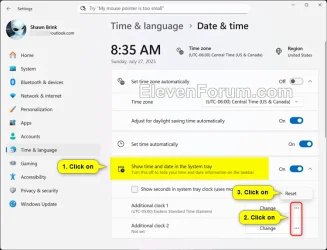
A) Click/tap on Show time and date in the System tray to expand it open. (see screenshot below step 4B)​

B) Click/tap on the Change button for the "Additional Clock 1" or "Additional Clock 2" you want to add or change. (see screenshot below)​

Additional_Clocks_Settings-2.webp

C) Select a Time zone you want for the additional clock in the drop menu. (see screenshot below step 4E)​

D) Enter a Display name you want for the additional clock. (see screenshot below step 4E)​

E) Click/tap on Change to apply. (see screenshot below)​

Additional_Clocks_Settings-3.webp


 5. Remove Additional Clock(s)

A) Click/tap on Show time and date in the System tray to expand it open. (see screenshot below)​

B) Click/tap on the More options (3 dots) button for the "Additional Clock 1" or "Additional Clock 2" you want to remove.​

C) Click/tap on Reset.​

Additional_Clocks_Settings-2.webp


That's it,
Shawn Brink


Attachments

  • Additional_Clocks_Settings-4.webp
    Additional_Clocks_Settings-4.webp
    37.4 KB · Views: 60
Last edited:
Brink, any way to make the clock & type bigger ? Not the taskbar just clock & calender !
 

My Computer

System One

  • OS
    Windows11 23H2 (OS Build 22631.2428)
    Computer type
    PC/Desktop
    Manufacturer/Model
    HP HP ENVY TE01
    CPU
    2.90 gigahertz Intel Core i7-10700
    Motherboard
    Board: HP 8767 A (SMVB)
    Memory
    16214 Megabytes Usable Installed Memor
    Hard Drives
    1511.52 Gigabytes Usable Hard Drive Capacity
    1418.15 Gigabytes Hard Drive Free Space
    Keyboard
    Logitech wireless
    Mouse
    M 185 wireless
    Internet Speed
    12 ms Jitter 8 ms Download 10.5 Mbps Upload 1.7
    Browser
    Edge & FF
    Antivirus
    Windows Defender
Brink, any way to make the clock & type bigger ?

Hello, :-)

You could increase the text size, but it's applied to everything though.


My Computers

System One System Two

  • OS
    Windows 11 Pro for Workstations
    Computer type
    PC/Desktop
    Manufacturer/Model
    Custom self build
    CPU
    Intel i7-8700K 5 GHz
    Motherboard
    ASUS ROG Maximus XI Formula Z390
    Memory
    64 GB (4x16GB) G.SKILL TridentZ RGB DDR4 3600 MHz (F4-3600C18D-32GTZR)
    Graphics Card(s)
    ASUS ROG-STRIX-GTX1080TI-O11G-GAMING (11GB GDDR5X)
    Sound Card
    Integrated Digital Audio (S/PDIF)
    Monitor(s) Displays
    2 x Samsung Odyssey G75 27"
    Screen Resolution
    2560x1440
    Hard Drives
    1TB Samsung 990 PRO M.2,
    4TB Samsung 990 PRO M.2,
    TerraMaster F8 SSD Plus NAS
    PSU
    Seasonic Prime Titanium 850W
    Case
    Thermaltake Core P3 wall mounted
    Cooling
    Corsair Hydro H115i
    Keyboard
    Amazon Basics Wired Full Keyboard MD005
    Mouse
    Logitech MX Master 4
    Internet Speed
    2 Gbps Download and 100 Mbps Upload
    Browser
    Chrome and Edge
    Antivirus
    Microsoft Defender
    Other Info
    Logitech Z625 speaker system,
    Logitech BRIO 4K Pro webcam,
    HP Color LaserJet Pro MFP M477fdn,
    CyberPower CP1500PFCLCD
    Galaxy S23 Plus phone
  • Operating System
    Windows 11 Pro
    Computer type
    Laptop
    Manufacturer/Model
    Surface Laptop 7 Copilot+ PC
    CPU
    Snapdragon X Elite (12 core) 3.42 GHz
    Memory
    16 GB LPDDR5x-7467 MHz
    Monitor(s) Displays
    15" HDR
    Screen Resolution
    2496 x 1664
    Hard Drives
    1 TB SSD
    Internet Speed
    Wi-Fi 7 and Bluetooth 5.4
    Browser
    Chrome and Edge
    Antivirus
    Microsoft Defender
Yeah, just as i thought, ok Thanks !
 

My Computer

System One

  • OS
    Windows11 23H2 (OS Build 22631.2428)
    Computer type
    PC/Desktop
    Manufacturer/Model
    HP HP ENVY TE01
    CPU
    2.90 gigahertz Intel Core i7-10700
    Motherboard
    Board: HP 8767 A (SMVB)
    Memory
    16214 Megabytes Usable Installed Memor
    Hard Drives
    1511.52 Gigabytes Usable Hard Drive Capacity
    1418.15 Gigabytes Hard Drive Free Space
    Keyboard
    Logitech wireless
    Mouse
    M 185 wireless
    Internet Speed
    12 ms Jitter 8 ms Download 10.5 Mbps Upload 1.7
    Browser
    Edge & FF
    Antivirus
    Windows Defender
Tutorial updated to add option 2. :alien:
 

My Computers

System One System Two

  • OS
    Windows 11 Pro for Workstations
    Computer type
    PC/Desktop
    Manufacturer/Model
    Custom self build
    CPU
    Intel i7-8700K 5 GHz
    Motherboard
    ASUS ROG Maximus XI Formula Z390
    Memory
    64 GB (4x16GB) G.SKILL TridentZ RGB DDR4 3600 MHz (F4-3600C18D-32GTZR)
    Graphics Card(s)
    ASUS ROG-STRIX-GTX1080TI-O11G-GAMING (11GB GDDR5X)
    Sound Card
    Integrated Digital Audio (S/PDIF)
    Monitor(s) Displays
    2 x Samsung Odyssey G75 27"
    Screen Resolution
    2560x1440
    Hard Drives
    1TB Samsung 990 PRO M.2,
    4TB Samsung 990 PRO M.2,
    TerraMaster F8 SSD Plus NAS
    PSU
    Seasonic Prime Titanium 850W
    Case
    Thermaltake Core P3 wall mounted
    Cooling
    Corsair Hydro H115i
    Keyboard
    Amazon Basics Wired Full Keyboard MD005
    Mouse
    Logitech MX Master 4
    Internet Speed
    2 Gbps Download and 100 Mbps Upload
    Browser
    Chrome and Edge
    Antivirus
    Microsoft Defender
    Other Info
    Logitech Z625 speaker system,
    Logitech BRIO 4K Pro webcam,
    HP Color LaserJet Pro MFP M477fdn,
    CyberPower CP1500PFCLCD
    Galaxy S23 Plus phone
  • Operating System
    Windows 11 Pro
    Computer type
    Laptop
    Manufacturer/Model
    Surface Laptop 7 Copilot+ PC
    CPU
    Snapdragon X Elite (12 core) 3.42 GHz
    Memory
    16 GB LPDDR5x-7467 MHz
    Monitor(s) Displays
    15" HDR
    Screen Resolution
    2496 x 1664
    Hard Drives
    1 TB SSD
    Internet Speed
    Wi-Fi 7 and Bluetooth 5.4
    Browser
    Chrome and Edge
    Antivirus
    Microsoft Defender
Shawn @Brink, I see option 2 works in the current Beta 26120.6690 but am I correct that option 1 does not work as step 3 does not exist? Thanks!

1759121114308.webp
 

My Computer

System One

  • OS
    WindowsXP/7/8/8.1/10/11,Linux,Android,FreeBSD Unix
    Computer type
    Laptop
    Manufacturer/Model
    Dell XPS 15 9570
    CPU
    Intel® Core™ i7-8750H 8th Gen 2.2Ghz up to 4.1Ghz
    Motherboard
    Dell XPS 15 9570
    Memory
    64GB using 2x32GB CL16 Mushkin redLine modules
    Graphics Card(s)
    Intel UHD 630 & NVIDIA GeForce GTX 1050 Ti with 4GB DDR5
    Sound Card
    Realtek ALC3266-CG
    Monitor(s) Displays
    15.6" 4K Touch UltraHD 3840x2160 made by Sharp
    Screen Resolution
    3840x2160 4K UltraHD
    Hard Drives
    Samsung MZ-V9P4T0B/AM 990 PRO 4TB PCIe®4.0 NVMe™ M.2 SSD was Toshiba KXG60ZNV1T02 NVMe 1TB SSD
    PSU
    Dell XPS 15 9570
    Case
    Dell XPS 15 9570
    Cooling
    Stock
    Keyboard
    Stock
    Mouse
    SwitftPoint ProPoint
    Internet Speed
    Comcast/XFinity 1.44Gbps/42.5Mbps
    Browser
    Microsoft EDGE (Chromium based) & Google Chrome
    Antivirus
    Windows Defender that came with Windows
Shawn @Brink, I see option 2 works in the current Beta 26120.6690 but am I correct that option 1 does not work as step 3 does not exist? Thanks!

Hello mate, :alien:

It looks like the related link was removed. I've updated option one to just directly open the Control Panel now.
 

My Computers

System One System Two

  • OS
    Windows 11 Pro for Workstations
    Computer type
    PC/Desktop
    Manufacturer/Model
    Custom self build
    CPU
    Intel i7-8700K 5 GHz
    Motherboard
    ASUS ROG Maximus XI Formula Z390
    Memory
    64 GB (4x16GB) G.SKILL TridentZ RGB DDR4 3600 MHz (F4-3600C18D-32GTZR)
    Graphics Card(s)
    ASUS ROG-STRIX-GTX1080TI-O11G-GAMING (11GB GDDR5X)
    Sound Card
    Integrated Digital Audio (S/PDIF)
    Monitor(s) Displays
    2 x Samsung Odyssey G75 27"
    Screen Resolution
    2560x1440
    Hard Drives
    1TB Samsung 990 PRO M.2,
    4TB Samsung 990 PRO M.2,
    TerraMaster F8 SSD Plus NAS
    PSU
    Seasonic Prime Titanium 850W
    Case
    Thermaltake Core P3 wall mounted
    Cooling
    Corsair Hydro H115i
    Keyboard
    Amazon Basics Wired Full Keyboard MD005
    Mouse
    Logitech MX Master 4
    Internet Speed
    2 Gbps Download and 100 Mbps Upload
    Browser
    Chrome and Edge
    Antivirus
    Microsoft Defender
    Other Info
    Logitech Z625 speaker system,
    Logitech BRIO 4K Pro webcam,
    HP Color LaserJet Pro MFP M477fdn,
    CyberPower CP1500PFCLCD
    Galaxy S23 Plus phone
  • Operating System
    Windows 11 Pro
    Computer type
    Laptop
    Manufacturer/Model
    Surface Laptop 7 Copilot+ PC
    CPU
    Snapdragon X Elite (12 core) 3.42 GHz
    Memory
    16 GB LPDDR5x-7467 MHz
    Monitor(s) Displays
    15" HDR
    Screen Resolution
    2496 x 1664
    Hard Drives
    1 TB SSD
    Internet Speed
    Wi-Fi 7 and Bluetooth 5.4
    Browser
    Chrome and Edge
    Antivirus
    Microsoft Defender

Latest Support Threads

Back
Top Bottom