Administrator can not delete some folders and files !


theoldwizard1

Well-known member
Member
Local time
12:03 AM
Posts
41
OS
windows 11
I'm new to Windows 11, so maybe this is a "feature" I don't know about.

First, all PCs I "support", close to a dozen for family and friends, have the Administrator account enabled. I does not get used very often, but I like having it as a kind of backdoor.

From my many years of supporting mini-computers, workstation and servers (all non-Windows, many pre-Microsoft days) I am used to "cleaning up" after applications have been removed. I removed SignalRGB and found a bunch of "leftovers" so I logged into Administrator to delete these folders and files. I found them with File Explorer, Select, Delete key, NOTHING HAPPENS !

Select again, Right Click, Trash can, NOTHING HAPPENS !

Why ?
 

My Computer My Computer

At a glance

windows 11AMD 8700G2 - DDR5-6000 8GB Kinston KF560C35-8none
OS
windows 11
Computer type
PC/Desktop
Manufacturer/Model
Self built
CPU
AMD 8700G
Motherboard
ASRock B650I Lightning
Memory
2 - DDR5-6000 8GB Kinston KF560C35-8
Graphics Card(s)
none
Sound Card
none
Monitor(s) Displays
SAMSUNG SyncMaster 220WM
Screen Resolution
1680 x 1050
Hard Drives
Samsung SSD 990 Pro 1TB
PSU
PicoPSU-160-XT
Case
MITXPC MX500-USB3 Compact Mini-ITX Case
Cooling
Noctua NH-L9a-AM5, Chromax.Black, Low-Profile
Browser
Chrome
It would probably help if you told us the paths of the "leftovers" that cannot be deleted. Someone might have the same app and can check the permissions on those folders to see if they need to be modified. Or, you can check yourself, to see if the Administrators group has permissions by default, or if you need to take ownership before deleting.
 

My Computer My Computer

At a glance

Windows 11 Enterprise 25H2 [rev. 8893]
OS
Windows 11 Enterprise 25H2 [rev. 8893]
Hello @theoldwizard1 and welcome to ElevenForum. :-)

There's a program called Unlockit by EMCO (free), that can "unlock" whatever is locking those files.

There's a program called REVO Uninstaller (free), that can uninstall just about anything. What's even better is that it then offers to "scan for leftovers", and allows you to delete them with one click.

In the case of REVO... you'll probably have to re-install the program you just uninstalled... then use REVO to uninstall it properly.


=================================================================
=================================================================


Here's some other things that may help on your Windows 11 journeys...


My Computers My Computers

  • At a glance

    Win 11 Home ♦♦♦26200.8875 ♦♦♦♦♦♦♦25H2AMD Ryzen 7 3700XG.Skill (F4-3200C14D-16GTZKW)EVGA RTX 2070 (08G-P4-2171-KR)
    OS
    Win 11 Home ♦♦♦26200.8875 ♦♦♦♦♦♦♦25H2
    Computer type
    PC/Desktop
    Manufacturer/Model
    Built by Ghot® [May 2020]
    CPU
    AMD Ryzen 7 3700X
    Motherboard
    Asus Pro WS X570-ACE (BIOS 5302)
    Memory
    G.Skill (F4-3200C14D-16GTZKW)
    Graphics Card(s)
    EVGA RTX 2070 (08G-P4-2171-KR)
    Sound Card
    Realtek ALC1220P / ALC S1220A
    Monitor(s) Displays
    Dell U3011 30"
    Screen Resolution
    2560 x 1600
    Hard Drives
    2x Samsung 860 EVO 500GB,
    WD 4TB Black FZBX - SATA III,
    WD 8TB Black FZBX - SATA III,
    DRW-24B1ST CD/DVD Burner
    PSU
    PC Power & Cooling 750W Quad EPS12V
    Case
    Cooler Master ATCS 840 Tower
    Cooling
    CM Hyper 212 EVO (push/pull)
    Keyboard
    Ducky DK9008 Shine II Blue LED
    Mouse
    Logitech Optical M-100
    Internet Speed
    300/300
    Browser
    Firefox (latest)
    Antivirus
    Bitdefender Total Security
    Other Info
    Speakers: Klipsch Pro Media 2.1
  • At a glance

    Windows XP Pro 32bit w/SP3AMD Athlon 64 X2 5000+ (OC'd @ 3.2Ghz)TWIN2X2048-6400C4DHX (2 x 1GB, DDR2 800)EVGA 256-P2-N758-TR GeForce 8600GT SSC
    Operating System
    Windows XP Pro 32bit w/SP3
    Computer type
    PC/Desktop
    Manufacturer/Model
    Built by Ghot® (not in use)
    CPU
    AMD Athlon 64 X2 5000+ (OC'd @ 3.2Ghz)
    Motherboard
    ASUS M2N32-SLI Deluxe Wireless Edition
    Memory
    TWIN2X2048-6400C4DHX (2 x 1GB, DDR2 800)
    Graphics card(s)
    EVGA 256-P2-N758-TR GeForce 8600GT SSC
    Sound Card
    Onboard
    Monitor(s) Displays
    ViewSonic G90FB Black 19" Professional (CRT)
    Screen Resolution
    up to 2048 x 1536
    Hard Drives
    WD 36GB 10,000rpm Raptor SATA
    Seagate 80GB 7200rpm SATA
    Lite-On LTR-52246S CD/RW
    Lite-On LH-18A1P CD/DVD Burner
    PSU
    PC Power & Cooling Silencer 750 Quad EPS12V
    Case
    Generic Beige case, 80mm fans
    Cooling
    ZALMAN 9500A 92mm CPU Cooler
    Keyboard
    Logitech Classic Keybooard 200
    Mouse
    Logitech Optical M-BT96a
    Internet Speed
    300/300
    Browser
    Firefox 3.x ??
    Antivirus
    Symantec (Norton)
    Other Info
    Still assembled, still runs. Haven't turned it on for 15 years?
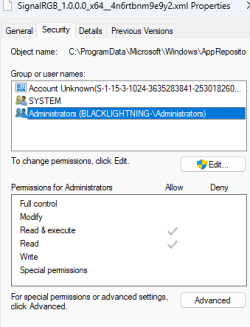
The file/folder in question is not "lock". Administrator just does NOT have full access to it !


Screenshot 2024-03-23 074105.png
Screenshot 2024-03-23 074256.png
 

My Computer My Computer

At a glance

windows 11AMD 8700G2 - DDR5-6000 8GB Kinston KF560C35-8none
OS
windows 11
Computer type
PC/Desktop
Manufacturer/Model
Self built
CPU
AMD 8700G
Motherboard
ASRock B650I Lightning
Memory
2 - DDR5-6000 8GB Kinston KF560C35-8
Graphics Card(s)
none
Sound Card
none
Monitor(s) Displays
SAMSUNG SyncMaster 220WM
Screen Resolution
1680 x 1050
Hard Drives
Samsung SSD 990 Pro 1TB
PSU
PicoPSU-160-XT
Case
MITXPC MX500-USB3 Compact Mini-ITX Case
Cooling
Noctua NH-L9a-AM5, Chromax.Black, Low-Profile
Browser
Chrome
I'm new to Windows 11, so maybe this is a "feature" I don't know about.
Yes, many items in Windows require higher authority than an Admin account - such as System or Trusted installer authority.
That's how Windows protects itself against corruption.
It has been like this for more than a decade. And it was almost the same for over a decade before that.

have the Administrator account enabled
The Built-in Admin account has no more authority than any Admin user account that you have created yourself.
It exists for one reason & one reason only, to get enabled by Windows to appear on the Safe mode login screen if Windows cannot detect any other functional Admin accounts on the computer.
Unless you have added a password to this account, I urge you not to leave it enabled when you are online. It can be exploited.
If you want the safety net of an additional Admin user account then make one.
my ditty - Create two spare local, password-protected Admin accounts [post #2] in Windows 10, 11 - TenForums

I found them with File Explorer, Select, Delete key, NOTHING HAPPENS !
The Permissions that apply to the folders they are in tell you that Admins do not have the power to alter the contents. Only the System 'user' does.
I suggest you leave the debris alone or user a trusted utility to remove it. I've seen lots of members recommend this one - Revo Uninstaller - Paul Black post #3 - TenForums


All the best,
Denis
 
Last edited:

My Computer My Computer

At a glance

Windows 11 Home x64 Version 25H2 Build 26200....
OS
Windows 11 Home x64 Version 25H2 Build 26200.8037
That is correct. My permissions are the same as yours on that folder. One can always change permissons on the folder but I would advise against it as it is a system folder. Doing so can have very negative results as we have seen many times on this forum when one messes with ownership of system and trusted installer folders. Do so at your own risk.
 

My Computers My Computers

  • At a glance

    Windows 11 Pro 25H2 26200.8875i9-10900 10 core 20 threads32 gbnone-Intel UHD Graphics 630
    OS
    Windows 11 Pro 25H2 26200.8875
    Computer type
    PC/Desktop
    Manufacturer/Model
    Dell Optiplex 7080
    CPU
    i9-10900 10 core 20 threads
    Motherboard
    DELL 0J37VM
    Memory
    32 gb
    Graphics Card(s)
    none-Intel UHD Graphics 630
    Sound Card
    Integrated Realtek
    Monitor(s) Displays
    Benq 27
    Screen Resolution
    2560x1440
    Hard Drives
    2x1tb Solidigm m.2 nvme /External drives 512gb Samsung m.2 sata+2tb Kingston m2.nvme
    PSU
    500w
    Case
    MT
    Cooling
    Dell Premium
    Keyboard
    Logitech wired
    Mouse
    Logitech wireless
    Internet Speed
    so slow I'm too embarrassed to tell
    Browser
    #1 Edge #2 Firefox
    Antivirus
    Defender+MWB Premium
  • At a glance

    Windows 11 Pro 24H2 26200.8875AMD Ryzen 7 6800U32 gbintegrated
    Operating System
    Windows 11 Pro 24H2 26200.8875
    Computer type
    PC/Desktop
    Manufacturer/Model
    Beelink Mini PC SER5
    CPU
    AMD Ryzen 7 6800U
    Memory
    32 gb
    Graphics card(s)
    integrated
    Sound Card
    integrated
    Monitor(s) Displays
    Benq 27
    Screen Resolution
    2560x1440
    Hard Drives
    1TB Crucial nvme
    Keyboard
    Logitech wired
    Mouse
    Logitech wireless
    Internet Speed
    still too embarrassed to tell
    Browser
    Firefox
    Antivirus
    Defender
    Other Info
    System 3 is non compliant Dell 9020 i7-4770/24gb ram Win11 PRO 26200.8875
I am used to "cleaning up" after applications have been removed
You do not have to "cleanup" if you use one of the uninstallers that does the cleaning up for you. (I second @Try3 suggestion of Revo) The free version of Revo is very good finding most leftovers left behind. The Pro version is even better as if does extended scanning for leftover files and registry entries. The portable version can be put on a usb stick and used on multiple computers. Download Revo Uninstaller Freeware - Free and Full Download
 

My Computers My Computers

  • At a glance

    Windows 11 Pro 25H2 26200.8875i9-10900 10 core 20 threads32 gbnone-Intel UHD Graphics 630
    OS
    Windows 11 Pro 25H2 26200.8875
    Computer type
    PC/Desktop
    Manufacturer/Model
    Dell Optiplex 7080
    CPU
    i9-10900 10 core 20 threads
    Motherboard
    DELL 0J37VM
    Memory
    32 gb
    Graphics Card(s)
    none-Intel UHD Graphics 630
    Sound Card
    Integrated Realtek
    Monitor(s) Displays
    Benq 27
    Screen Resolution
    2560x1440
    Hard Drives
    2x1tb Solidigm m.2 nvme /External drives 512gb Samsung m.2 sata+2tb Kingston m2.nvme
    PSU
    500w
    Case
    MT
    Cooling
    Dell Premium
    Keyboard
    Logitech wired
    Mouse
    Logitech wireless
    Internet Speed
    so slow I'm too embarrassed to tell
    Browser
    #1 Edge #2 Firefox
    Antivirus
    Defender+MWB Premium
  • At a glance

    Windows 11 Pro 24H2 26200.8875AMD Ryzen 7 6800U32 gbintegrated
    Operating System
    Windows 11 Pro 24H2 26200.8875
    Computer type
    PC/Desktop
    Manufacturer/Model
    Beelink Mini PC SER5
    CPU
    AMD Ryzen 7 6800U
    Memory
    32 gb
    Graphics card(s)
    integrated
    Sound Card
    integrated
    Monitor(s) Displays
    Benq 27
    Screen Resolution
    2560x1440
    Hard Drives
    1TB Crucial nvme
    Keyboard
    Logitech wired
    Mouse
    Logitech wireless
    Internet Speed
    still too embarrassed to tell
    Browser
    Firefox
    Antivirus
    Defender
    Other Info
    System 3 is non compliant Dell 9020 i7-4770/24gb ram Win11 PRO 26200.8875
Microsoft Store apps are protected more than traditional apps. They're generally best left alone, but if you really want to clean up, use PowerRun to open Cmd as TrustedInstaller. Then you can add/change/delete without having to touch the permissions. With great power comes great responsibility. Be careful.
 

My Computer My Computer

At a glance

Windows 10/11
OS
Windows 10/11
Computer type
Laptop
Manufacturer/Model
Acer
Back
Top Bottom