
TurtleInTheSky
Member
- Local time
- 1:33 PM
- Posts
- 19
- OS
- Windows 11
After much pain, I got file sharing between my home Win 11 Home 23H2 and Pro 23H2 but I had to set the public network and all networks on like:
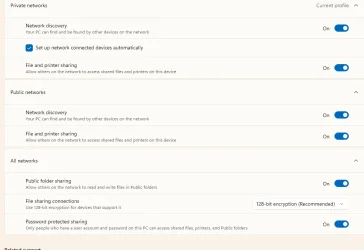
My worry it that seems like I'm sharing to the entire world. Is this right? Is this in no way accessible outside my little 2 home computers behind a router on home fiber internet?
I tried a LOT of things before landing on this... including:
Control Panel->Programs->Turn Windows features on or off->SMB 1.0/CIFS File Sharing Support ON (ignoring security weaknesses....???)
Maybe my question(s) is , now that it works, what should I turn off?
My worry it that seems like I'm sharing to the entire world. Is this right? Is this in no way accessible outside my little 2 home computers behind a router on home fiber internet?
I tried a LOT of things before landing on this... including:
Control Panel->Programs->Turn Windows features on or off->SMB 1.0/CIFS File Sharing Support ON (ignoring security weaknesses....???)
Maybe my question(s) is , now that it works, what should I turn off?
- Windows Build/Version
- 11 23h2
My Computer
At a glance
Windows 11i9-12900K64 GBNVidea Quardro P620
- OS
- Windows 11
- Computer type
- PC/Desktop
- Manufacturer/Model
- Home build
- CPU
- i9-12900K
- Motherboard
- GigABYTE Z690 AORUS ELITE AX D5
- Memory
- 64 GB
- Graphics Card(s)
- NVidea Quardro P620






