After clean windows install still have the same problem


vsub

Active member
Member
VIP
Local time
4:23 AM
Posts
209
OS
Windows 11
I delete the whole drive so there was nothing left

I don't understand this weird problem I have with running specific games

Honkai Star Rail
Wuthering Waves - this one sometimes takes 2 min to load
Neverness To Everness
Endfield
Duet Night Abyss
Genshin Impact
Zenless Zone Zero
and more

If I double click on the shortcut or go to the exe location using windows explorer,it takes 3 times longer(sometimes much longer)for the game window to actually appear
When I look at the game activity with System Informer,there is barely any activity for a long time(low cpu usage,low ram usage,low ssd usage(read))and then after some time,it suddenly starts to load,the cpu\ram\ssd usage goes up and the game window finally appears

Now if I open ANY other program that allows me to open the game executable(for example Everything
Or even Notepad=>File=>Open=>Right click on the exe file=>Open
Then the game loads multiple times faster,you can see that the cpu\ram\ssd\gpu usage instantly goes up

I can't figure out what's up with that

For example running Wuthering Waves from the desktop shortcut(the desktop is part of Explorer)it takes 45s - 2min to load while if I double click on the shortcut I see from within the Everything window,it never takes more than 15s even after windows restart
 

My Computer My Computer

At a glance

Windows 1114700HX64GBRTX 4070
OS
Windows 11
Computer type
Laptop
Manufacturer/Model
MSI Sword 17 HX
CPU
14700HX
Memory
64GB
Graphics Card(s)
RTX 4070
@vsub


You might try disabling this and seeing if it makes a difference...


My Computers My Computers

  • At a glance

    Win 11 Home ♦♦♦26200.8655 ♦♦♦♦♦♦♦25H2AMD Ryzen 7 3700XG.Skill (F4-3200C14D-16GTZKW)EVGA RTX 2070 (08G-P4-2171-KR)
    OS
    Win 11 Home ♦♦♦26200.8655 ♦♦♦♦♦♦♦25H2
    Computer type
    PC/Desktop
    Manufacturer/Model
    Built by Ghot® [May 2020]
    CPU
    AMD Ryzen 7 3700X
    Motherboard
    Asus Pro WS X570-ACE (BIOS 5302)
    Memory
    G.Skill (F4-3200C14D-16GTZKW)
    Graphics Card(s)
    EVGA RTX 2070 (08G-P4-2171-KR)
    Sound Card
    Realtek ALC1220P / ALC S1220A
    Monitor(s) Displays
    Dell U3011 30"
    Screen Resolution
    2560 x 1600
    Hard Drives
    2x Samsung 860 EVO 500GB,
    WD 4TB Black FZBX - SATA III,
    WD 8TB Black FZBX - SATA III,
    DRW-24B1ST CD/DVD Burner
    PSU
    PC Power & Cooling 750W Quad EPS12V
    Case
    Cooler Master ATCS 840 Tower
    Cooling
    CM Hyper 212 EVO (push/pull)
    Keyboard
    Ducky DK9008 Shine II Blue LED
    Mouse
    Logitech Optical M-100
    Internet Speed
    300/300
    Browser
    Firefox (latest)
    Antivirus
    Bitdefender Total Security
    Other Info
    Speakers: Klipsch Pro Media 2.1
  • At a glance

    Windows XP Pro 32bit w/SP3AMD Athlon 64 X2 5000+ (OC'd @ 3.2Ghz)TWIN2X2048-6400C4DHX (2 x 1GB, DDR2 800)EVGA 256-P2-N758-TR GeForce 8600GT SSC
    Operating System
    Windows XP Pro 32bit w/SP3
    Computer type
    PC/Desktop
    Manufacturer/Model
    Built by Ghot® (not in use)
    CPU
    AMD Athlon 64 X2 5000+ (OC'd @ 3.2Ghz)
    Motherboard
    ASUS M2N32-SLI Deluxe Wireless Edition
    Memory
    TWIN2X2048-6400C4DHX (2 x 1GB, DDR2 800)
    Graphics card(s)
    EVGA 256-P2-N758-TR GeForce 8600GT SSC
    Sound Card
    Onboard
    Monitor(s) Displays
    ViewSonic G90FB Black 19" Professional (CRT)
    Screen Resolution
    up to 2048 x 1536
    Hard Drives
    WD 36GB 10,000rpm Raptor SATA
    Seagate 80GB 7200rpm SATA
    Lite-On LTR-52246S CD/RW
    Lite-On LH-18A1P CD/DVD Burner
    PSU
    PC Power & Cooling Silencer 750 Quad EPS12V
    Case
    Generic Beige case, 80mm fans
    Cooling
    ZALMAN 9500A 92mm CPU Cooler
    Keyboard
    Logitech Classic Keybooard 200
    Mouse
    Logitech Optical M-BT96a
    Internet Speed
    300/300
    Browser
    Firefox 3.x ??
    Antivirus
    Symantec (Norton)
    Other Info
    Still assembled, still runs. Haven't turned it on for 15 years?
Check that Memory integrity is switched off (Device security, Core isolation). Then try to temporarily disable Real-time protection in Virus & threat protection or (better) add the exe files or whole game folders to the list of Exclusions. Check if these changes decrease the loading time (or not).
 

My Computer My Computer

At a glance

Windows 11 Pro 25H2AMD Rysen 5 4600H32 GB (2 x 16 GB Samsung SO-DIMM DDR4-3200)GeForce GTX 1650 Ti, 4 GB GDDR6
OS
Windows 11 Pro 25H2
Computer type
Laptop
Manufacturer/Model
Lenovo Legion 5-15ARH05
CPU
AMD Rysen 5 4600H
Memory
32 GB (2 x 16 GB Samsung SO-DIMM DDR4-3200)
Graphics Card(s)
GeForce GTX 1650 Ti, 4 GB GDDR6
Screen Resolution
1920x1080
Hard Drives
SSD M.2 512 GB SAMSUNG MZALQ512; SSD M.2 1 TB Seagate FireCuda 530
Mouse
Logitech M650L in Bluetooth mode
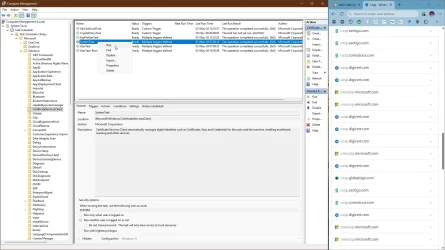
Since you are advanced user, make sure, you are not blocking svchost and certificate updates.
They come from various ISPs (certum.pl), so you might be blocking them, look for ocsp traffic.

capture_05032026_115002.webp

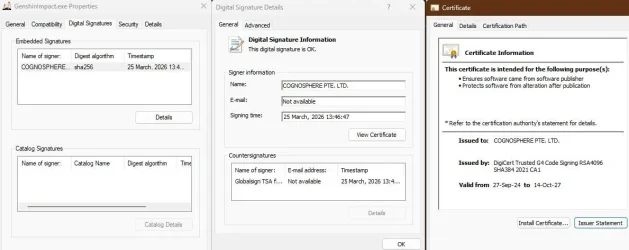
Genshin Impact uses DigiCert, so the certificate itself is perfect, but checking it might be the problem.
Code:
reg add "HKLM\Software\Microsoft\Cryptography\Wintrust\Config" /v "EnableCertPaddingCheck" /t REG_DWORD /d "1" /f
reg add "HKLM\Software\Wow6432Node\Microsoft\Cryptography\Wintrust\Config" /v "EnableCertPaddingCheck" /t REG_DWORD /d "1" /f
 

Attachments

  • capture_05032026_115617.webp
    capture_05032026_115617.webp
    155 KB · Views: 1

My Computer My Computer

At a glance

Home26H2CanAMD Ryzen 5 8600G (07/24)2x32GB Kingston FURY DDR5 5600 MHz CL36 @5200...ASROCK Radeon RX 6600 Challenger D 8G @48FPS ...
OS
Home26H2Can
Computer type
PC/Desktop
CPU
AMD Ryzen 5 8600G (07/24)
Motherboard
ASROCK B650M-HDV/M.2 (07/24) BIOS 4.21 AGESA ComboAM5 1.3.0.1 (04/26)
Memory
2x32GB Kingston FURY DDR5 5600 MHz CL36 @5200 CL36 (07/24)
Graphics Card(s)
ASROCK Radeon RX 6600 Challenger D 8G @48FPS (08/24)
Sound Card
Creative Sound BlasterX AE-5 Plus (05/24)
Monitor(s) Displays
24" Philips 24M1N3200ZS/00 (05/24)
Screen Resolution
1920×1080@165Hz via DP1.4
Hard Drives
Kingston KC3000 NVMe 2TB (05/24)
ADATA XPG GAMMIX S11 Pro 512GB (07/19)
PSU
Seasonic Core GM 550 Gold (04/24)
Case
Fractal Design Define 7 Mini with 3x Noctua NF-P14s/12@555rpm (04/24)
Cooling
Noctua NH-U12S with Noctua NF-P12 (04/24)
Keyboard
HP Pavilion Wired Keyboard 300 (07/24) + Rabalux 76017 Parker (01/24)
Mouse
Logitech M330 Silent Plus (01/26)
Internet Speed
500/100 Mbps via RouterOS (05/21) & TCP Optimizer
Browser
Edge, Brave for YouTube, LibreWolf for FB
Antivirus
NextDNS blocking 1/3 Traffic
Other Info
Phone: Motorola Moto G86 (02/26)
Backup: Hasleo Backup Suite (PreOS)
Headphones: Sennheiser RS170 (09/10)
Chair: Huzaro Force 4.4 Grey Mesh (05/24)
Notifier: Xiaomi Mi Band 9 Milanese (10/24)
FlexCore USB-C 3.2 Gen 1 (M) to LAN (F) (08/25)
@Ghot I tried that before posting and before reinstalling but no change

@Slavic I am not 100% sure,it feels like it loads faster by disabling the Memory integrity but it is definitely not as fast as running the game from Everything for example even with all option in Windows Defender enabled

Basically, if the parent process is explorer.exe,there will be a massive delay and if it's not,it loads as fast as if I don't have any problem

@TairikuOkami I have the task in the task scheduler and it was at ready with the last run time around the time I start the game(or maybe windows,I restart it multiple times during those tests)

I did not have those registry keys so I add them and restart but again,very long delay from explorer and very fast load from anywhere else
Btw do I actually need those keys,if they were not added on a clean windows install(should I keep them or remove them if they did not fix the problem)
 

My Computer My Computer

At a glance

Windows 1114700HX64GBRTX 4070
OS
Windows 11
Computer type
Laptop
Manufacturer/Model
MSI Sword 17 HX
CPU
14700HX
Memory
64GB
Graphics Card(s)
RTX 4070
Go to Task Manager>Startup Apps and disable all the problem programmes.
Then do a Power Off shutdown and wait a minute then restart.
Enable only one programme and see if the fault still exists.
If so,then in Terminal [admin ] run ---dism /online /cleanup-image /restorehealth ---and when completed,run ---sfc /scannow ---and run it until a clean report is given.
Also check that WHQL is checked.In the Search box,type in ---dxdiag ----and WHQL is on the System page.
 

My Computer My Computer

At a glance

win 10amd ryzen 5-2600ng skill sniper x 16gbnvidea gtx 1050
OS
win 10
Computer type
PC/Desktop
Manufacturer/Model
home built
CPU
amd ryzen 5-2600
Motherboard
gigabyte b450m-ds3h
Memory
ng skill sniper x 16gb
Graphics Card(s)
nvidea gtx 1050
Monitor(s) Displays
benq fp 92
Hard Drives
samsung 860 evo 500gb m2 ssd
PSU
antec ea550g
Case
nzxt noctis 450
Browser
edge

Latest Support Threads

Back
Top Bottom