Hi guys,
Today, when trying to backup my system drive for the first time (with EaseUS Todo Backup Free), my PC crashed rather violently (BSOD) and unexpectedly. Since the reboot, my taskbar looks and feels differently.
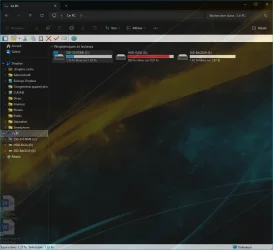
1. Now when I click on any of my pinned apps, the app just opens as a duplicate on the taskbar:

It happens to all the pinned apps.
I have tried unpinning and pinning again, even from the original app (not from a shortcut). Doesn't change anything.
I should mention that I am using StartAllBack (as you can probably see). Never had this issue before.
2. Also, when I open a new Explorer window, it goes to the right of the taskbar. Even if I drag it to the left (like you can see with the "TELECHARGEMENTS" window), if I close it then open it again, it goes again to the right. This wasn't the case before the crash, all Explorer windows stayed nicely on the left.
These are the two issues I'm facing right now, when everything used to work perfectly before that damn crash.
On the bright side, my PC definitely feels faster since the crash/reboot. Go figure!
Thanks in advance for your help!
Today, when trying to backup my system drive for the first time (with EaseUS Todo Backup Free), my PC crashed rather violently (BSOD) and unexpectedly. Since the reboot, my taskbar looks and feels differently.
1. Now when I click on any of my pinned apps, the app just opens as a duplicate on the taskbar:
It happens to all the pinned apps.
I have tried unpinning and pinning again, even from the original app (not from a shortcut). Doesn't change anything.
I should mention that I am using StartAllBack (as you can probably see). Never had this issue before.
2. Also, when I open a new Explorer window, it goes to the right of the taskbar. Even if I drag it to the left (like you can see with the "TELECHARGEMENTS" window), if I close it then open it again, it goes again to the right. This wasn't the case before the crash, all Explorer windows stayed nicely on the left.
These are the two issues I'm facing right now, when everything used to work perfectly before that damn crash.
On the bright side, my PC definitely feels faster since the crash/reboot. Go figure!
Thanks in advance for your help!
Last edited:
My Computer
At a glance
Windows 11AMD Ryzen 7700DDR5 = 32 GB = 2x16 GB (Corsair Dominator - D...Not yet
- OS
- Windows 11
- Computer type
- PC/Desktop
- Manufacturer/Model
- Personal build
- CPU
- AMD Ryzen 7700
- Motherboard
- Asus TUF Gaming B650M-Plus WiFi
- Memory
- DDR5 = 32 GB = 2x16 GB (Corsair Dominator - DDR5 RGB - 6000 MT/s)
- Graphics Card(s)
- Not yet
- Sound Card
- No
- Monitor(s) Displays
- Philips BDM3270QP2
- Screen Resolution
- 2560x1440
- Hard Drives
- M.2 = 2 TB (Samsung 990 Pro)
SATA = 12 TB (Western Digital Red - WD120EFAX - 5400 rpm)
- PSU
- Corsair RM850e (850W - ATX 3.0)
- Case
- Corsair Crystal 280X TG (White, RGB)
- Cooling
- Intake = 2x120mm fans (Corsair LL120 RGB) / Exhaust = 2x120mm AIO (Aerocool Mirage L240)
- Keyboard
- Corsair K55 RGB
- Mouse
- Vertical mouse from AliExpress, very good for the price and a lifesaver for my wrist :)
- Internet Speed
- Fiber
- Browser
- Firefox, Brave, Tor
- Antivirus
- Windows Defender
- Other Info
- UPS = 1000VA (Nitram PB1000 LCD), protecting PC + Monitor + Speakers