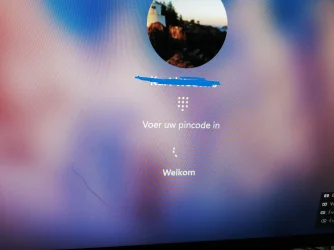
after installing KB5064081 (26100.5074), text displays on startup screen : "Enter pincode"


tom54

New member
Local time
6:52 PM
Posts
5
OS
Windows 11
I just installed the update (KB5064081) (26100.5074).
Now, when I start up my computer, I get the familiar spinning circle, but above it says "Enter your PIN." However, the computer (the spinning circle) continues to run, so I don't have to enter a PIN (it is just a text message) ; it just says "Enter your PIN" without an input prompt.
How do I remove the "Enter your PIN" message from the start screen?
 

My Computer My Computer

At a glance

Windows 11
OS
Windows 11
Computer type
PC/Desktop
Look below that and you should see an option to sign in with a different method where you can choose to use your password.
 

My Computers My Computers

  • At a glance

    Windows 11 Enterprise 25H2 26200 7462Intel XEON E5-2699 v364GB Teamgroup UD4-3600NVIDIA GeForce GTX 1080 Ti
    OS
    Windows 11 Enterprise 25H2 26200 7462
    Computer type
    PC/Desktop
    Manufacturer/Model
    Custom Build
    CPU
    Intel XEON E5-2699 v3
    Motherboard
    ASUS X99-A
    Memory
    64GB Teamgroup UD4-3600
    Graphics Card(s)
    NVIDIA GeForce GTX 1080 Ti
    Sound Card
    Integrated
    Monitor(s) Displays
    ACER X34 Predator
    Screen Resolution
    3440 x 1440
    Hard Drives
    Crucial CT1000P 3P SSD8 1TB
    Crucial CT1000 BX500 SSD 1TB
    PSU
    GameMax Pro
    Case
    Fractal Design
    Cooling
    Corsair H110iGT + 6 140mm Fans
    Keyboard
    Corsair K4
    Mouse
    G-Skill G502
    Internet Speed
    300MBs
    Browser
    Chrome
    Antivirus
    OEM
    Other Info
    ASUS RT-AC87U Router
  • At a glance

    25H2 26200.50748GB
    Operating System
    25H2 26200.5074
    Computer type
    Laptop
    Manufacturer/Model
    ASUS X555LA
    Memory
    8GB
    Browser
    Chrome
    Antivirus
    OEM
Hi, welcome.

How do I remove the "Enter your PIN" message from the start screen?

Is Windows Hello disabled in settings?

Check this first one, disable Windows Hello.


I am assuming you already have this one setup


My Computers My Computers

  • At a glance

    Windows 11 Pro 25H2 Build 26200.8894Intel(R) Core(TM) i7-4770K CPU @ 3.50GHz32.0 GB of I forget and the box is in storage.Gigabyte nVidia GeForce GTX 1660 Super OC 6GB
    OS
    Windows 11 Pro 25H2 Build 26200.8894
    Computer type
    PC/Desktop
    Manufacturer/Model
    Sin-built 2013
    CPU
    Intel(R) Core(TM) i7-4770K CPU @ 3.50GHz
    Motherboard
    ASUS ROG Maximus VI Formula
    Memory
    32.0 GB of I forget and the box is in storage.
    Graphics Card(s)
    Gigabyte nVidia GeForce GTX 1660 Super OC 6GB
    Sound Card
    ROG SupremeFX Formula 8-Channel High Definition Audio
    Monitor(s) Displays
    5 x LG 25MS500-B - 1 x 24MK430H-B - 1 x Wacom Pro 22" Touch Screen Tablet
    Screen Resolution
    All over the place
    Hard Drives
    Too many to list. OS on Samsung 1TB 870 QVO SATA
    PSU
    Silverstone 1500
    Case
    NZXT Phantom 820 Full-Tower Case
    Cooling
    Noctua NH-D15 Elite Class Dual Tower CPU Cooler / 6 x EziDIY 120mm / 2 x Corsair 140mm somethings / 1 x 140mm Thermaltake something / 2 x 200mm Corsair.
    Keyboard
    Corsair K95 / Logitech diNovo Edge Wireless
    Mouse
    Logitech: G402 / G502 / Mx Masters / Mx Air Cordless
    Internet Speed
    2000/500Mbps
    Browser
    All sorts
    Antivirus
    Kaspersky Premium
    Other Info
    ㅤㅤㅤㅤㅤㅤㅤㅤㅤㅤㅤㅤㅤㅤㅤㅤㅤㅤㅤㅤㅤㅤㅤㅤㅤㅤㅤㅤㅤㅤㅤㅤㅤㅤㅤㅤㅤㅤㅤㅤ⠀⠀⠀⠀⠀⠀⠀⠀⠀⠀
    TP-Link BE9300 WiFi 7 Bluetooth 5.4 (Archer TBE550E)
    TP-Link TX201 V1 2.5GB Lan

    Grandstream HT812 - VoIP
    ASUS DSL-AX82U - Mesh
    ASUS RT-AC68U - Mesh
    ASUS RT-BE88U Router

    Brother MFC-L2880DW Printer

    I’m on a horse.
  • At a glance

    Windows 11 Pro 25H2 Build 26200.8894 (Wifes)13th Generation Intel® Core™ i5-1340P Process...16GB LPDDR5-52001x Intel® Iris® Xe Graphics
    Operating System
    Windows 11 Pro 25H2 Build 26200.8894 (Wifes)
    Computer type
    Laptop
    Manufacturer/Model
    LENOVO Yoga 7 14IRL8 - Type 82YL
    CPU
    13th Generation Intel® Core™ i5-1340P Processor(Core™ i5-1340P)
    Memory
    16GB LPDDR5-5200
    Graphics card(s)
    1x Intel® Iris® Xe Graphics
    Sound Card
    Optimized with Dolby Atmos®
    Screen Resolution
    QHD 2880 x 1800 OLED
    Hard Drives
    M.2 512 GB SSD PCIe
    Mouse
    Logiteck MX Master 3S
    Internet Speed
    2000/500
    Antivirus
    Defender / Malwarebytes
    Other Info
    …still on a horse.


    Wireless Network: Wi-Fi 6E 2x2 AX; Bluetooth® 5.1 or above
    Ports: 1x 1 Novo button; 2 in 1 Audio Combo jack; Micro SD Card Reader; HDMI 1.4b; 2 x USB Type-C (TBT4)
    USB 3.2 Gen 2 DP 1.4a
    PD 3.0); 1 x USB 3.2 Gen1 Type A
    Camera
    1x 1080P FHD IR/RGB Hybrid with Privacy Shutter and Dual Array Microphone
    Graphics
    1x Intel® Iris® Xe Graphics
    Monitor
    14" WUXGA
    Form Factor
    Convertible Notebook
  • Windows 11 Pro 25H2 Build 26200.8894 (Wifes)

    Yoga 7 2-in-1 14IML9 - Type 83DJ

    Processor: Intel® Core™ Ultra 7 155H Processor(Core™ Ultra 7 155H)

    Memory: 32GB LPD5X-7467

    Hard Drive: 1 TB SSD PCIe

    Wireless Network: 1x Wi-Fi 6E 2x2 AX; Bluetooth® 5.1 or above

    Ports: 1 x HDMI 2.1 TMDS; 1 x Novo Button; 1 x Combo Audio Jack
    2 x USB-C (USB 4.0)
    1 x USB-A 3.2 Gen 1

    Camera: 1080P FHD IR Hybrid with Dual Microphone

    Graphics: Intel® Arc™ Graphics

    Monitor: 14" 2.8K

    ...Where's my horse?
So it looks like this (see the photo below), and I don't have to type anything, and it boots up just fine. However, since installing the new update, the text "Enter PIN" appears above the "Welcome" text. I'd like to remove that text.

After booting, it boots up normally, and that's how it always was. Except that the text "Enter PIN" appears at boot time.
 

Attachments

  • fotoopstart3.webp
    fotoopstart3.webp
    912.7 KB · Views: 3

My Computer My Computer

At a glance

Windows 11
OS
Windows 11
Computer type
PC/Desktop
Id still give you the same tutorials to check, so that you can make sure Windows Hello is disabled, is it?
I do understand what you’re saying though. If Hello is already disabled, it is certainly strange.
 

My Computers My Computers

  • At a glance

    Windows 11 Pro 25H2 Build 26200.8894Intel(R) Core(TM) i7-4770K CPU @ 3.50GHz32.0 GB of I forget and the box is in storage.Gigabyte nVidia GeForce GTX 1660 Super OC 6GB
    OS
    Windows 11 Pro 25H2 Build 26200.8894
    Computer type
    PC/Desktop
    Manufacturer/Model
    Sin-built 2013
    CPU
    Intel(R) Core(TM) i7-4770K CPU @ 3.50GHz
    Motherboard
    ASUS ROG Maximus VI Formula
    Memory
    32.0 GB of I forget and the box is in storage.
    Graphics Card(s)
    Gigabyte nVidia GeForce GTX 1660 Super OC 6GB
    Sound Card
    ROG SupremeFX Formula 8-Channel High Definition Audio
    Monitor(s) Displays
    5 x LG 25MS500-B - 1 x 24MK430H-B - 1 x Wacom Pro 22" Touch Screen Tablet
    Screen Resolution
    All over the place
    Hard Drives
    Too many to list. OS on Samsung 1TB 870 QVO SATA
    PSU
    Silverstone 1500
    Case
    NZXT Phantom 820 Full-Tower Case
    Cooling
    Noctua NH-D15 Elite Class Dual Tower CPU Cooler / 6 x EziDIY 120mm / 2 x Corsair 140mm somethings / 1 x 140mm Thermaltake something / 2 x 200mm Corsair.
    Keyboard
    Corsair K95 / Logitech diNovo Edge Wireless
    Mouse
    Logitech: G402 / G502 / Mx Masters / Mx Air Cordless
    Internet Speed
    2000/500Mbps
    Browser
    All sorts
    Antivirus
    Kaspersky Premium
    Other Info
    ㅤㅤㅤㅤㅤㅤㅤㅤㅤㅤㅤㅤㅤㅤㅤㅤㅤㅤㅤㅤㅤㅤㅤㅤㅤㅤㅤㅤㅤㅤㅤㅤㅤㅤㅤㅤㅤㅤㅤㅤ⠀⠀⠀⠀⠀⠀⠀⠀⠀⠀
    TP-Link BE9300 WiFi 7 Bluetooth 5.4 (Archer TBE550E)
    TP-Link TX201 V1 2.5GB Lan

    Grandstream HT812 - VoIP
    ASUS DSL-AX82U - Mesh
    ASUS RT-AC68U - Mesh
    ASUS RT-BE88U Router

    Brother MFC-L2880DW Printer

    I’m on a horse.
  • At a glance

    Windows 11 Pro 25H2 Build 26200.8894 (Wifes)13th Generation Intel® Core™ i5-1340P Process...16GB LPDDR5-52001x Intel® Iris® Xe Graphics
    Operating System
    Windows 11 Pro 25H2 Build 26200.8894 (Wifes)
    Computer type
    Laptop
    Manufacturer/Model
    LENOVO Yoga 7 14IRL8 - Type 82YL
    CPU
    13th Generation Intel® Core™ i5-1340P Processor(Core™ i5-1340P)
    Memory
    16GB LPDDR5-5200
    Graphics card(s)
    1x Intel® Iris® Xe Graphics
    Sound Card
    Optimized with Dolby Atmos®
    Screen Resolution
    QHD 2880 x 1800 OLED
    Hard Drives
    M.2 512 GB SSD PCIe
    Mouse
    Logiteck MX Master 3S
    Internet Speed
    2000/500
    Antivirus
    Defender / Malwarebytes
    Other Info
    …still on a horse.


    Wireless Network: Wi-Fi 6E 2x2 AX; Bluetooth® 5.1 or above
    Ports: 1x 1 Novo button; 2 in 1 Audio Combo jack; Micro SD Card Reader; HDMI 1.4b; 2 x USB Type-C (TBT4)
    USB 3.2 Gen 2 DP 1.4a
    PD 3.0); 1 x USB 3.2 Gen1 Type A
    Camera
    1x 1080P FHD IR/RGB Hybrid with Privacy Shutter and Dual Array Microphone
    Graphics
    1x Intel® Iris® Xe Graphics
    Monitor
    14" WUXGA
    Form Factor
    Convertible Notebook
  • Windows 11 Pro 25H2 Build 26200.8894 (Wifes)

    Yoga 7 2-in-1 14IML9 - Type 83DJ

    Processor: Intel® Core™ Ultra 7 155H Processor(Core™ Ultra 7 155H)

    Memory: 32GB LPD5X-7467

    Hard Drive: 1 TB SSD PCIe

    Wireless Network: 1x Wi-Fi 6E 2x2 AX; Bluetooth® 5.1 or above

    Ports: 1 x HDMI 2.1 TMDS; 1 x Novo Button; 1 x Combo Audio Jack
    2 x USB-C (USB 4.0)
    1 x USB-A 3.2 Gen 1

    Camera: 1080P FHD IR Hybrid with Dual Microphone

    Graphics: Intel® Arc™ Graphics

    Monitor: 14" 2.8K

    ...Where's my horse?
And when I uninstall the update, I get a normal boot screen with the spinning thing and the word "Welcome" and NOT the text "Enter your PIN"... I rolled back the update. I postponed it for a week. It's strange, isn't it, that the PIN text appears there when I don't have to enter it; it's just a "text" (so, after installing update KB5064081).

A solution might be to remove everything via netplwiz, but I can't delete the account.

Windows Hello isn't installed on my computer.


1756753537386.webp
 

My Computer My Computer

At a glance

Windows 11
OS
Windows 11
Computer type
PC/Desktop
This is a new 'goodie' in 25H2
 

My Computer My Computer

At a glance

Windows 11 Pro 25H2 (Build 26200.8968)Intel Core Ultra 9 285 5.6 GHz32.00 GBIntel Integrated Graphics (128 MB)
OS
Windows 11 Pro 25H2 (Build 26200.8968)
Computer type
PC/Desktop
Manufacturer/Model
Dell Pro Max Tower T2 FCT2250
CPU
Intel Core Ultra 9 285 5.6 GHz
Motherboard
64-bit operating system, x64-based processor
Memory
32.00 GB
Graphics Card(s)
Intel Integrated Graphics (128 MB)
Sound Card
Realtek Audio
Monitor(s) Displays
Dell P2714H Monitor
Screen Resolution
1920 x 1080
Hard Drives
1 x 512GB M.2 XG10d SED KIOXIA PCIe solid state drive (Internal)
1 x 2TB Seagate ST2000DM008-2UB102 HDD (Internal)
1 x 4TB Seagate STGX4000400 External HDD
1 x 6TB WD Elements AE 2689 External HDD
PSU
500 Watts
Cooling
Air
Keyboard
Microsoft Wired Keyboard 600
Mouse
Microsoft USB Basic Optical Mouse v2.0
Browser
Firefox
Antivirus
Windows Defender + Malwarebytes Premium
Other Info
BaseBoard Manufacturer Dell Inc.
BaseBoard Product 022RY57
BaseBoard Version A01
Will it be "gone" in next updates?
 

My Computer My Computer

At a glance

Windows 11
OS
Windows 11
Computer type
PC/Desktop
And when I uninstall the update, I get a normal boot screen with the spinning thing and the word "Welcome" and NOT the text "Enter your PIN"... I rolled back the update. I postponed it for a week. It's strange, isn't it, that the PIN text appears there when I don't have to enter it; it's just a "text" (so, after installing update KB5064081).

A solution might be to remove everything via netplwiz, but I can't delete the account.

Windows Hello isn't installed on my computer.


View attachment 144089

Did you look at this or is it that you don’t understand it?


My Computers My Computers

  • At a glance

    Windows 11 Pro 25H2 Build 26200.8894Intel(R) Core(TM) i7-4770K CPU @ 3.50GHz32.0 GB of I forget and the box is in storage.Gigabyte nVidia GeForce GTX 1660 Super OC 6GB
    OS
    Windows 11 Pro 25H2 Build 26200.8894
    Computer type
    PC/Desktop
    Manufacturer/Model
    Sin-built 2013
    CPU
    Intel(R) Core(TM) i7-4770K CPU @ 3.50GHz
    Motherboard
    ASUS ROG Maximus VI Formula
    Memory
    32.0 GB of I forget and the box is in storage.
    Graphics Card(s)
    Gigabyte nVidia GeForce GTX 1660 Super OC 6GB
    Sound Card
    ROG SupremeFX Formula 8-Channel High Definition Audio
    Monitor(s) Displays
    5 x LG 25MS500-B - 1 x 24MK430H-B - 1 x Wacom Pro 22" Touch Screen Tablet
    Screen Resolution
    All over the place
    Hard Drives
    Too many to list. OS on Samsung 1TB 870 QVO SATA
    PSU
    Silverstone 1500
    Case
    NZXT Phantom 820 Full-Tower Case
    Cooling
    Noctua NH-D15 Elite Class Dual Tower CPU Cooler / 6 x EziDIY 120mm / 2 x Corsair 140mm somethings / 1 x 140mm Thermaltake something / 2 x 200mm Corsair.
    Keyboard
    Corsair K95 / Logitech diNovo Edge Wireless
    Mouse
    Logitech: G402 / G502 / Mx Masters / Mx Air Cordless
    Internet Speed
    2000/500Mbps
    Browser
    All sorts
    Antivirus
    Kaspersky Premium
    Other Info
    ㅤㅤㅤㅤㅤㅤㅤㅤㅤㅤㅤㅤㅤㅤㅤㅤㅤㅤㅤㅤㅤㅤㅤㅤㅤㅤㅤㅤㅤㅤㅤㅤㅤㅤㅤㅤㅤㅤㅤㅤ⠀⠀⠀⠀⠀⠀⠀⠀⠀⠀
    TP-Link BE9300 WiFi 7 Bluetooth 5.4 (Archer TBE550E)
    TP-Link TX201 V1 2.5GB Lan

    Grandstream HT812 - VoIP
    ASUS DSL-AX82U - Mesh
    ASUS RT-AC68U - Mesh
    ASUS RT-BE88U Router

    Brother MFC-L2880DW Printer

    I’m on a horse.
  • At a glance

    Windows 11 Pro 25H2 Build 26200.8894 (Wifes)13th Generation Intel® Core™ i5-1340P Process...16GB LPDDR5-52001x Intel® Iris® Xe Graphics
    Operating System
    Windows 11 Pro 25H2 Build 26200.8894 (Wifes)
    Computer type
    Laptop
    Manufacturer/Model
    LENOVO Yoga 7 14IRL8 - Type 82YL
    CPU
    13th Generation Intel® Core™ i5-1340P Processor(Core™ i5-1340P)
    Memory
    16GB LPDDR5-5200
    Graphics card(s)
    1x Intel® Iris® Xe Graphics
    Sound Card
    Optimized with Dolby Atmos®
    Screen Resolution
    QHD 2880 x 1800 OLED
    Hard Drives
    M.2 512 GB SSD PCIe
    Mouse
    Logiteck MX Master 3S
    Internet Speed
    2000/500
    Antivirus
    Defender / Malwarebytes
    Other Info
    …still on a horse.


    Wireless Network: Wi-Fi 6E 2x2 AX; Bluetooth® 5.1 or above
    Ports: 1x 1 Novo button; 2 in 1 Audio Combo jack; Micro SD Card Reader; HDMI 1.4b; 2 x USB Type-C (TBT4)
    USB 3.2 Gen 2 DP 1.4a
    PD 3.0); 1 x USB 3.2 Gen1 Type A
    Camera
    1x 1080P FHD IR/RGB Hybrid with Privacy Shutter and Dual Array Microphone
    Graphics
    1x Intel® Iris® Xe Graphics
    Monitor
    14" WUXGA
    Form Factor
    Convertible Notebook
  • Windows 11 Pro 25H2 Build 26200.8894 (Wifes)

    Yoga 7 2-in-1 14IML9 - Type 83DJ

    Processor: Intel® Core™ Ultra 7 155H Processor(Core™ Ultra 7 155H)

    Memory: 32GB LPD5X-7467

    Hard Drive: 1 TB SSD PCIe

    Wireless Network: 1x Wi-Fi 6E 2x2 AX; Bluetooth® 5.1 or above

    Ports: 1 x HDMI 2.1 TMDS; 1 x Novo Button; 1 x Combo Audio Jack
    2 x USB-C (USB 4.0)
    1 x USB-A 3.2 Gen 1

    Camera: 1080P FHD IR Hybrid with Dual Microphone

    Graphics: Intel® Arc™ Graphics

    Monitor: 14" 2.8K

    ...Where's my horse?
@antspants: i've read it, i understand it, and i have check this on my pc. I've enabled automatic sign-in. It works always, and it works also after the update, but there is a text message of "enter pin code". Just a text message, i don' have to fill in my pin code, and i did'nt want it to enter. I wanna be simple, so immediately startup because it's not a professional pc, but a standalone private pc which don't need to login everytime at startup.
 

My Computer My Computer

At a glance

Windows 11
OS
Windows 11
Computer type
PC/Desktop
Once again, I understand very clearly what you’re concerned about.

I believe the answer is as simple as this:

For some reason, your PC is taking too long to login using netplwiz
Some people see the same thing you do but maybe for a split second, less or if at all.
It doesn’t remove the login screen, it just logs in before it can show. But for whatever reason, your system is hanging at the login process, most users, maybe with faster PC’s, probably don't see a spinning wheel.

In short, I believe you have lag when you get to the logon.

So the question is, “Why is the login process taking so long?”
Perhaps a thread to ask why.
 

My Computers My Computers

  • At a glance

    Windows 11 Pro 25H2 Build 26200.8894Intel(R) Core(TM) i7-4770K CPU @ 3.50GHz32.0 GB of I forget and the box is in storage.Gigabyte nVidia GeForce GTX 1660 Super OC 6GB
    OS
    Windows 11 Pro 25H2 Build 26200.8894
    Computer type
    PC/Desktop
    Manufacturer/Model
    Sin-built 2013
    CPU
    Intel(R) Core(TM) i7-4770K CPU @ 3.50GHz
    Motherboard
    ASUS ROG Maximus VI Formula
    Memory
    32.0 GB of I forget and the box is in storage.
    Graphics Card(s)
    Gigabyte nVidia GeForce GTX 1660 Super OC 6GB
    Sound Card
    ROG SupremeFX Formula 8-Channel High Definition Audio
    Monitor(s) Displays
    5 x LG 25MS500-B - 1 x 24MK430H-B - 1 x Wacom Pro 22" Touch Screen Tablet
    Screen Resolution
    All over the place
    Hard Drives
    Too many to list. OS on Samsung 1TB 870 QVO SATA
    PSU
    Silverstone 1500
    Case
    NZXT Phantom 820 Full-Tower Case
    Cooling
    Noctua NH-D15 Elite Class Dual Tower CPU Cooler / 6 x EziDIY 120mm / 2 x Corsair 140mm somethings / 1 x 140mm Thermaltake something / 2 x 200mm Corsair.
    Keyboard
    Corsair K95 / Logitech diNovo Edge Wireless
    Mouse
    Logitech: G402 / G502 / Mx Masters / Mx Air Cordless
    Internet Speed
    2000/500Mbps
    Browser
    All sorts
    Antivirus
    Kaspersky Premium
    Other Info
    ㅤㅤㅤㅤㅤㅤㅤㅤㅤㅤㅤㅤㅤㅤㅤㅤㅤㅤㅤㅤㅤㅤㅤㅤㅤㅤㅤㅤㅤㅤㅤㅤㅤㅤㅤㅤㅤㅤㅤㅤ⠀⠀⠀⠀⠀⠀⠀⠀⠀⠀
    TP-Link BE9300 WiFi 7 Bluetooth 5.4 (Archer TBE550E)
    TP-Link TX201 V1 2.5GB Lan

    Grandstream HT812 - VoIP
    ASUS DSL-AX82U - Mesh
    ASUS RT-AC68U - Mesh
    ASUS RT-BE88U Router

    Brother MFC-L2880DW Printer

    I’m on a horse.
  • At a glance

    Windows 11 Pro 25H2 Build 26200.8894 (Wifes)13th Generation Intel® Core™ i5-1340P Process...16GB LPDDR5-52001x Intel® Iris® Xe Graphics
    Operating System
    Windows 11 Pro 25H2 Build 26200.8894 (Wifes)
    Computer type
    Laptop
    Manufacturer/Model
    LENOVO Yoga 7 14IRL8 - Type 82YL
    CPU
    13th Generation Intel® Core™ i5-1340P Processor(Core™ i5-1340P)
    Memory
    16GB LPDDR5-5200
    Graphics card(s)
    1x Intel® Iris® Xe Graphics
    Sound Card
    Optimized with Dolby Atmos®
    Screen Resolution
    QHD 2880 x 1800 OLED
    Hard Drives
    M.2 512 GB SSD PCIe
    Mouse
    Logiteck MX Master 3S
    Internet Speed
    2000/500
    Antivirus
    Defender / Malwarebytes
    Other Info
    …still on a horse.


    Wireless Network: Wi-Fi 6E 2x2 AX; Bluetooth® 5.1 or above
    Ports: 1x 1 Novo button; 2 in 1 Audio Combo jack; Micro SD Card Reader; HDMI 1.4b; 2 x USB Type-C (TBT4)
    USB 3.2 Gen 2 DP 1.4a
    PD 3.0); 1 x USB 3.2 Gen1 Type A
    Camera
    1x 1080P FHD IR/RGB Hybrid with Privacy Shutter and Dual Array Microphone
    Graphics
    1x Intel® Iris® Xe Graphics
    Monitor
    14" WUXGA
    Form Factor
    Convertible Notebook
  • Windows 11 Pro 25H2 Build 26200.8894 (Wifes)

    Yoga 7 2-in-1 14IML9 - Type 83DJ

    Processor: Intel® Core™ Ultra 7 155H Processor(Core™ Ultra 7 155H)

    Memory: 32GB LPD5X-7467

    Hard Drive: 1 TB SSD PCIe

    Wireless Network: 1x Wi-Fi 6E 2x2 AX; Bluetooth® 5.1 or above

    Ports: 1 x HDMI 2.1 TMDS; 1 x Novo Button; 1 x Combo Audio Jack
    2 x USB-C (USB 4.0)
    1 x USB-A 3.2 Gen 1

    Camera: 1080P FHD IR Hybrid with Dual Microphone

    Graphics: Intel® Arc™ Graphics

    Monitor: 14" 2.8K

    ...Where's my horse?
Back
Top Bottom