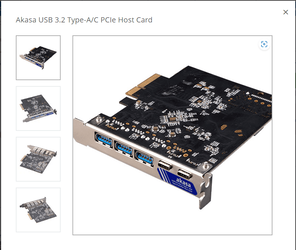
Alternative to a USB hub?


Ultrarunner22

Well-known member
Member
Local time
5:51 PM
Posts
64
OS
Dual-Boot Windows 11 / Ubuntu 20.04.3
Hi;
Windows 11 Pro (latest build) on Asus Tuf Gaming X570 Plus WiFi mobo, AMD Ryzen 7 3700X.

I have gone through several cheap USB hubs, all of which became intermittent or stopped working after a relatively short time. My latest is a Tripp Lite 10-USB 3.0 model I purchased on Amazon in April. It was working fine until recently, when I started hearing the notification for USB disconnect/connect repeatedly for no reason; I wasn't plugging or unplugging anything at the time.
It doesn't seem to matter whether anything is plugged into the hub for the notification to occur.
I found that wiggling the cable plugged into the root port (which connects the hub to the computer) causes the disconnect/connect notification.
I have a trackball plugged into the hub, and it has repeatedly stopped working.
The end of the USB cable that plugs into the hub has a proprietary plug, so I cannot simply switch the cable. The connector on the hub is very flimsy, which appears to be the root of the problem. Why not just use a USB A or USB C connector?

It seems to me that all USB hubs are worthless, so I thought maybe a PCIE to USB card could be the solution.
I need at least 4 USB A ports, but having a couple USB C ports would be nice.
There are lots of these devices on Amazon, but which one (if any) should I try?
Unfortunately, my Asus Tuf Gaming X570 Plus WiFi mobo only has 8 total USB ports, and I need more.

Any suggestions?
Thanks
Ultrarunner
 

My Computer My Computer

At a glance

Dual-Boot Windows 11 / Ubuntu 20.04.3AMD Ryzen 7 3700X32GB DDR4 @ 3200MHzGigabyte GeForce RTX 2070 Super Windforce OC ...
OS
Dual-Boot Windows 11 / Ubuntu 20.04.3
Computer type
PC/Desktop
Manufacturer/Model
Asus
CPU
AMD Ryzen 7 3700X
Motherboard
Asus Tuf Gaming X570 Plus WiFi
Memory
32GB DDR4 @ 3200MHz
Graphics Card(s)
Gigabyte GeForce RTX 2070 Super Windforce OC 3X 8G
Sound Card
OBD: Realtek S 1200A, USB: Behringer UMC202HD
Monitor(s) Displays
Main: Asus Tuf Gaming VG27AQL1A, #2: NEC EA244WMi, #3: Samsung 2494HS
Screen Resolution
2560 X 1440 @ 144Hz
Hard Drives
2ea WD Blue SN550 NVMe M.2 1TB SSD
PSU
Seasonic Focus GM-750
Case
Fractal Designs Meshify C (no glass)
Cooling
CPU: AMD Ryzen stock cooler, Case: 2x 140mm front, 1x 120mm rear, 1x 120mm top
Keyboard
Glorious GMMK with Pudding Keycaps
Mouse
UtechSmart Venus MMO Gaming mouse
Internet Speed
100Mb/s
Browser
Firefox ver 93.0 64-bit
Antivirus
ESET Internet Security Suite
I would say you get what you pay for essentially, but you can probably avoid the obviously pointless stuff like 'diamond encrusted USB cable for stronger connections'. :-)
Try to find add in cards that have seperate controllers for each additional port, they are more expensive but they are better when using a lot of devices.
Icy Dock, Star Tech, Akasa are some common brands that seem to combine decent price with good overall quality, there may well be many more depending on your region.
 

My Computer My Computer

At a glance

Windows 11 Pro 22H2, build: 22621.521Intel i7-12700K 3.6GHz Base (5.0GHz Turbo)64GB DDR 3600MhzAsus Tuff RTX 3080 10GB OC
OS
Windows 11 Pro 22H2, build: 22621.521
Computer type
PC/Desktop
Manufacturer/Model
Scan 3XS Custom 1700
CPU
Intel i7-12700K 3.6GHz Base (5.0GHz Turbo)
Motherboard
Asus ProArt Creator B660 D4
Memory
64GB DDR 3600Mhz
Graphics Card(s)
Asus Tuff RTX 3080 10GB OC
Sound Card
Onboard Realtek
Monitor(s) Displays
Gigabyte G32QC 32inch 16:9 curved @2560 x 1440p 165Hz Freesync Premium Pro/ Dell SE2422H 24inch 16:9 1920 x 1080p 75Hz Freesync
Screen Resolution
2560 x 1440p & 1920 x 1080p
Hard Drives
WD SN570 1TB NVME (Boot), Samsung 870QVO 1TB (SSD), SanDisk 3D Ultra 500Gb (SSD) x2, Seagate 3Tb Expansion Desk (Ext HDD), 2x Toshiba 1Tb P300 (Ext HDD)
PSU
Corsair RM1000X Modular
Case
Corsair 4000D Airflow Desktop
Cooling
Corsair Hydro H150i RGB Pro XT 360mm Liquid Cooler, 3 x 120mm fans, 1x Exhaust
Keyboard
Microsoft Ergonomic
Mouse
Logitech G402
Internet Speed
800Mbs
Browser
Edge Chromium
Antivirus
Defender, Malwarebytes
I feel that it might be worth mentioning here the difference between a passive (or bus-powered) USB hub and a self-powered USB hub.

I know that you mentioned that you had difficulties even when no devices were connected, but when shopping for a hub, consider what types of devices as well as the quantity of devices that you want to connect to the hub.

A passive hub (also known as a bus-powered hub) gets its power from the USB port that it is plugged into. In addition, ALL devices connected to that hub will get their power from that same USB port on the computer. This may be okay for devices such as a keyboard or mouse, and maybe a single external 2.5-inch HDD. However, if you plan to connect multiple devices, especially power-hungry devices such as external HDDs into the hub, you should definitely opt for a "self-powered" USB hub. A self-powered hub will come with a power supply to supply power to all the connected devices, eliminating the possibility of drawing more power than the single USB port on the computer can provide which in turn will lead to disconnections and reliability problems.
 

My Computers My Computers

  • At a glance

    Win11 Pro 25H2 (RTM+)Intel i7-14650HX32 GBNo GPU - Built-in Intel Graphics
    OS
    Win11 Pro 25H2 (RTM+)
    Computer type
    PC/Desktop
    Manufacturer/Model
    Acemagic
    CPU
    Intel i7-14650HX
    Memory
    32 GB
    Graphics Card(s)
    No GPU - Built-in Intel Graphics
    Sound Card
    Integrated
    Monitor(s) Displays
    Varies as machine will often be moved to locations with different monitors
    Screen Resolution
    Varies
    Hard Drives
    1 x 1TB Gen 4 NVMe SSD
    PSU
    120W Power Brick
    Keyboard
    Corsair K70 Max RGB Magnetic Keyboard
    Mouse
    Logitech MX Master 3
    Internet Speed
    1Gb Up / 1 Gb Down
    Browser
    Edge
    Antivirus
    Windows Defender
  • At a glance

    Win11 Pro 25H2 (RTM+)Intel i7-1255U16 GBIntel Iris Xe Graphics
    Operating System
    Win11 Pro 25H2 (RTM+)
    Computer type
    Laptop
    Manufacturer/Model
    Lenovo ThinkBook 13x Gen 2
    CPU
    Intel i7-1255U
    Memory
    16 GB
    Graphics card(s)
    Intel Iris Xe Graphics
    Sound Card
    Realtek® ALC3306-CG codec
    Monitor(s) Displays
    13.3-inch IPS Display
    Screen Resolution
    WQXGA (2560 x 1600)
    Hard Drives
    2 TB 4 x 4 NVMe SSD
    PSU
    USB-C / Thunderbolt 4 Power / Charging
    Keyboard
    Backlit, spill resistant keyboard
    Mouse
    Buttonless Glass Precision Touchpad
    Internet Speed
    1Gb Up / 1Gb Down
    Browser
    Edge
    Antivirus
    Windows Defender
    Other Info
    WiFi 6e / Bluetooth 5.1 / Facial Recognition / Fingerprint Sensor / ToF (Time of Flight) Human Presence Sensor
Another possible reason is that the USB socket on the computer is loose. Does a single gadget 'come and go' when you wiggle?
 

My Computers My Computers

  • At a glance

    Windows 11 Pro 25H2 26200.8655AMD Ryzen 7 5825U with Radeon Graphics16GB
    OS
    Windows 11 Pro 25H2 26200.8655
    Computer type
    Laptop
    Manufacturer/Model
    Acemagic LX15PRO
    CPU
    AMD Ryzen 7 5825U with Radeon Graphics
    Motherboard
    BIOS CT_BI_AMI_LX15PRO_AB8139_A-004
    Memory
    16GB
    Screen Resolution
    1920 x 1080
    Hard Drives
    SSD 2TB
    Internet Speed
    30 Mbps
    Browser
    Brave
    Antivirus
    Defender/Windows Security
    Other Info
    System 3

    Acer Swift SF114-34 laptop
    OS Windows 11 Pro 26200.8655
    CPU Pentium Silver N6000
    RAM 4GB
    BIOS v1.17
    SSD Samsung 970 EVO Plus SSD 2TB (an upgrade)
  • At a glance

    Windows 11 Pro 23H2 22631.2506Atom N450 1.66GHz2GB
    Operating System
    Windows 11 Pro 23H2 22631.2506
    Computer type
    Laptop
    Manufacturer/Model
    HP Mini 210-1090NR PC (bought in late 2009!)
    CPU
    Atom N450 1.66GHz
    Memory
    2GB
    Browser
    Brave
    Antivirus
    Webroot
Hi;
Windows 11 Pro (latest build) on Asus Tuf Gaming X570 Plus WiFi mobo, AMD Ryzen 7 3700X.

I have gone through several cheap USB hubs, all of which became intermittent or stopped working after a relatively short time. My latest is a Tripp Lite 10-USB 3.0 model I purchased on Amazon in April. It was working fine until recently, when I started hearing the notification for USB disconnect/connect repeatedly for no reason; I wasn't plugging or unplugging anything at the time.
It doesn't seem to matter whether anything is plugged into the hub for the notification to occur.
I found that wiggling the cable plugged into the root port (which connects the hub to the computer) causes the disconnect/connect notification.
I have a trackball plugged into the hub, and it has repeatedly stopped working.
The end of the USB cable that plugs into the hub has a proprietary plug, so I cannot simply switch the cable. The connector on the hub is very flimsy, which appears to be the root of the problem. Why not just use a USB A or USB C connector?

It seems to me that all USB hubs are worthless, so I thought maybe a PCIE to USB card could be the solution.
I need at least 4 USB A ports, but having a couple USB C ports would be nice.
There are lots of these devices on Amazon, but which one (if any) should I try?
Unfortunately, my Asus Tuf Gaming X570 Plus WiFi mobo only has 8 total USB ports, and I need more.

Any suggestions?
Thanks
Ultrarunner
How about buying a wireless usb hub?
 

My Computer My Computer

At a glance

Windows 11 Pro + Win11 Canary VM.I9 13th gen i9-13900H 2.60 GHZ16 GB solderedIntegrated Intel Iris XE
OS
Windows 11 Pro + Win11 Canary VM.
Computer type
Laptop
Manufacturer/Model
ASUS Zenbook 14
CPU
I9 13th gen i9-13900H 2.60 GHZ
Motherboard
Yep, Laptop has one.
Memory
16 GB soldered
Graphics Card(s)
Integrated Intel Iris XE
Sound Card
Realtek built in
Monitor(s) Displays
laptop OLED screen
Screen Resolution
2880x1800 touchscreen
Hard Drives
1 TB NVME SSD (only weakness is only one slot)
PSU
Internal + 65W thunderbolt USB4 charger
Case
Yep, got one
Cooling
Stella Artois (UK pint cans - 568 ml) - extra cost.
Keyboard
Built in UK keybd
Mouse
Bluetooth , wireless dongled, wired
Internet Speed
900 mbs (ethernet), wifi 6 typical 350-450 mb/s both up and down
Browser
Edge
Antivirus
Defender
Other Info
TPM 2.0, 2xUSB4 thunderbolt, 1xUsb3 (usb a), 1xUsb-c, hdmi out, 3.5 mm audio out/in combo, ASUS backlit trackpad (inc. switchable number pad)

Macrium Reflect Home V8
Office 365 Family (6 users each 1TB onedrive space)
Hyper-V (a vm runs almost as fast as my older laptop)
The Tripp Lite hub is self-powered, but will function without its psu. I normally do have it plugged in.
I did test the hub on another port on the rear of the computer, but got the same results. The cable has a USB A on one end and the proprietary plug on the other end. It's that end which goes into the hub that is bad; it is loose, much more so than any other USB device I own.
I'm going to look for a PCIE device, as suggested by DigitalGoat. There is one USB C port on the mobo, along with 6 USB A ports, and 2 more USB A ports on the front of the box.

As for wireless, I don't use it on my system, except for Bluetooth. I have never had any luck with wireless USB devices such as keyboards and mice.
Maybe too much interference from the WiFi router which sits about 3ft away from my PC?
 

My Computer My Computer

At a glance

Dual-Boot Windows 11 / Ubuntu 20.04.3AMD Ryzen 7 3700X32GB DDR4 @ 3200MHzGigabyte GeForce RTX 2070 Super Windforce OC ...
OS
Dual-Boot Windows 11 / Ubuntu 20.04.3
Computer type
PC/Desktop
Manufacturer/Model
Asus
CPU
AMD Ryzen 7 3700X
Motherboard
Asus Tuf Gaming X570 Plus WiFi
Memory
32GB DDR4 @ 3200MHz
Graphics Card(s)
Gigabyte GeForce RTX 2070 Super Windforce OC 3X 8G
Sound Card
OBD: Realtek S 1200A, USB: Behringer UMC202HD
Monitor(s) Displays
Main: Asus Tuf Gaming VG27AQL1A, #2: NEC EA244WMi, #3: Samsung 2494HS
Screen Resolution
2560 X 1440 @ 144Hz
Hard Drives
2ea WD Blue SN550 NVMe M.2 1TB SSD
PSU
Seasonic Focus GM-750
Case
Fractal Designs Meshify C (no glass)
Cooling
CPU: AMD Ryzen stock cooler, Case: 2x 140mm front, 1x 120mm rear, 1x 120mm top
Keyboard
Glorious GMMK with Pudding Keycaps
Mouse
UtechSmart Venus MMO Gaming mouse
Internet Speed
100Mb/s
Browser
Firefox ver 93.0 64-bit
Antivirus
ESET Internet Security Suite
For some of my backups, I use a tiny Sandisk Ultrafit as it won't protrude far and is far less likely to weaken the USB port. There are available up to 256GB and are quite cheap. They are up to 130MB per second. I might stick this in my router.

Sandisk Connect is a wireless version of 200GB capacity. £66 on Amazon UK.

In USA it's up to 512GB 400MBb/s and $43!
 

My Computers My Computers

  • At a glance

    Windows 11 Pro 25H2 26200.8655AMD Ryzen 7 5825U with Radeon Graphics16GB
    OS
    Windows 11 Pro 25H2 26200.8655
    Computer type
    Laptop
    Manufacturer/Model
    Acemagic LX15PRO
    CPU
    AMD Ryzen 7 5825U with Radeon Graphics
    Motherboard
    BIOS CT_BI_AMI_LX15PRO_AB8139_A-004
    Memory
    16GB
    Screen Resolution
    1920 x 1080
    Hard Drives
    SSD 2TB
    Internet Speed
    30 Mbps
    Browser
    Brave
    Antivirus
    Defender/Windows Security
    Other Info
    System 3

    Acer Swift SF114-34 laptop
    OS Windows 11 Pro 26200.8655
    CPU Pentium Silver N6000
    RAM 4GB
    BIOS v1.17
    SSD Samsung 970 EVO Plus SSD 2TB (an upgrade)
  • At a glance

    Windows 11 Pro 23H2 22631.2506Atom N450 1.66GHz2GB
    Operating System
    Windows 11 Pro 23H2 22631.2506
    Computer type
    Laptop
    Manufacturer/Model
    HP Mini 210-1090NR PC (bought in late 2009!)
    CPU
    Atom N450 1.66GHz
    Memory
    2GB
    Browser
    Brave
    Antivirus
    Webroot
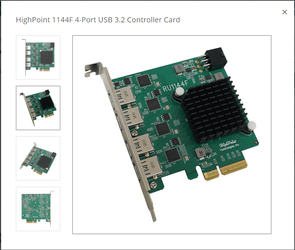
I found a suitable PCIE USB card, but not 4x4; it's 2x2 (2 ports on 2 root controllers); I couldn't find anything that is 4x4.
This one is expensive enough, at $114.70 on Amazon.

I think this will do, but I'll need a couple more USB extension cables.
I would really like to have a 4-port USB panel near the front of my PC, but I haven't found anything that would be suitable; only what is available for automobile & marine use.
I guess I could build something myself, but I'm not really into all of that right now.
I guess I could just buy the USB 3.x extension cables, and bundle them into a sort of panel using electrical tape to hold the connectors together. Seems a bit rough, but I'll probably be changing my entire setup within 1yr, so I don't want to invest my time and $ into something elaborate right now.
 

My Computer My Computer

At a glance

Dual-Boot Windows 11 / Ubuntu 20.04.3AMD Ryzen 7 3700X32GB DDR4 @ 3200MHzGigabyte GeForce RTX 2070 Super Windforce OC ...
OS
Dual-Boot Windows 11 / Ubuntu 20.04.3
Computer type
PC/Desktop
Manufacturer/Model
Asus
CPU
AMD Ryzen 7 3700X
Motherboard
Asus Tuf Gaming X570 Plus WiFi
Memory
32GB DDR4 @ 3200MHz
Graphics Card(s)
Gigabyte GeForce RTX 2070 Super Windforce OC 3X 8G
Sound Card
OBD: Realtek S 1200A, USB: Behringer UMC202HD
Monitor(s) Displays
Main: Asus Tuf Gaming VG27AQL1A, #2: NEC EA244WMi, #3: Samsung 2494HS
Screen Resolution
2560 X 1440 @ 144Hz
Hard Drives
2ea WD Blue SN550 NVMe M.2 1TB SSD
PSU
Seasonic Focus GM-750
Case
Fractal Designs Meshify C (no glass)
Cooling
CPU: AMD Ryzen stock cooler, Case: 2x 140mm front, 1x 120mm rear, 1x 120mm top
Keyboard
Glorious GMMK with Pudding Keycaps
Mouse
UtechSmart Venus MMO Gaming mouse
Internet Speed
100Mb/s
Browser
Firefox ver 93.0 64-bit
Antivirus
ESET Internet Security Suite
If you are going to use extension cables (I use one myself, works fine for me) look for USB Certified & get an active cable, only a couple of £/$ more, they improve signal quality for higher speed devices, especially over 3M distances, so good for read/write flash drives etc.
4 port cards do exist, I have found 2 on Scan UK.
£59.00
Screenshot_20221211_124334.png
£169.00
Screenshot_20221211_124419.png
 

My Computer My Computer

At a glance

Windows 11 Pro 22H2, build: 22621.521Intel i7-12700K 3.6GHz Base (5.0GHz Turbo)64GB DDR 3600MhzAsus Tuff RTX 3080 10GB OC
OS
Windows 11 Pro 22H2, build: 22621.521
Computer type
PC/Desktop
Manufacturer/Model
Scan 3XS Custom 1700
CPU
Intel i7-12700K 3.6GHz Base (5.0GHz Turbo)
Motherboard
Asus ProArt Creator B660 D4
Memory
64GB DDR 3600Mhz
Graphics Card(s)
Asus Tuff RTX 3080 10GB OC
Sound Card
Onboard Realtek
Monitor(s) Displays
Gigabyte G32QC 32inch 16:9 curved @2560 x 1440p 165Hz Freesync Premium Pro/ Dell SE2422H 24inch 16:9 1920 x 1080p 75Hz Freesync
Screen Resolution
2560 x 1440p & 1920 x 1080p
Hard Drives
WD SN570 1TB NVME (Boot), Samsung 870QVO 1TB (SSD), SanDisk 3D Ultra 500Gb (SSD) x2, Seagate 3Tb Expansion Desk (Ext HDD), 2x Toshiba 1Tb P300 (Ext HDD)
PSU
Corsair RM1000X Modular
Case
Corsair 4000D Airflow Desktop
Cooling
Corsair Hydro H150i RGB Pro XT 360mm Liquid Cooler, 3 x 120mm fans, 1x Exhaust
Keyboard
Microsoft Ergonomic
Mouse
Logitech G402
Internet Speed
800Mbs
Browser
Edge Chromium
Antivirus
Defender, Malwarebytes
Perhaps an alternative to disappointing USB hubs are industrial USB hubs


My Computer My Computer

At a glance

Windows 10 Pro
OS
Windows 10 Pro
Last edited:

My Computer My Computer

At a glance

Dual-Boot Windows 11 / Ubuntu 20.04.3AMD Ryzen 7 3700X32GB DDR4 @ 3200MHzGigabyte GeForce RTX 2070 Super Windforce OC ...
OS
Dual-Boot Windows 11 / Ubuntu 20.04.3
Computer type
PC/Desktop
Manufacturer/Model
Asus
CPU
AMD Ryzen 7 3700X
Motherboard
Asus Tuf Gaming X570 Plus WiFi
Memory
32GB DDR4 @ 3200MHz
Graphics Card(s)
Gigabyte GeForce RTX 2070 Super Windforce OC 3X 8G
Sound Card
OBD: Realtek S 1200A, USB: Behringer UMC202HD
Monitor(s) Displays
Main: Asus Tuf Gaming VG27AQL1A, #2: NEC EA244WMi, #3: Samsung 2494HS
Screen Resolution
2560 X 1440 @ 144Hz
Hard Drives
2ea WD Blue SN550 NVMe M.2 1TB SSD
PSU
Seasonic Focus GM-750
Case
Fractal Designs Meshify C (no glass)
Cooling
CPU: AMD Ryzen stock cooler, Case: 2x 140mm front, 1x 120mm rear, 1x 120mm top
Keyboard
Glorious GMMK with Pudding Keycaps
Mouse
UtechSmart Venus MMO Gaming mouse
Internet Speed
100Mb/s
Browser
Firefox ver 93.0 64-bit
Antivirus
ESET Internet Security Suite
If your laptop has only one USB port, you will need a USB hub. Particularly when you need to plug in a USB keyboard and a USB mouse.
 

My Computers My Computers

  • At a glance

    Windows 11 Education For 25H2Intel® Core i7 5500u8 GBIntel HD Family Graphics 5500 AMD Firepro 4150M
    OS
    Windows 11 Education For 25H2
    Computer type
    Laptop
    Manufacturer/Model
    HP ZBook G2
    CPU
    Intel® Core i7 5500u
    Motherboard
    HP
    Memory
    8 GB
    Graphics Card(s)
    Intel HD Family Graphics 5500 AMD Firepro 4150M
    Sound Card
    Realtek High Audio
    Hard Drives
    1 TB SSD
    Mouse
    HP USB Mouse
    Antivirus
    Windows Defender
  • At a glance

    Windows 11 Pro For Workstations 25H2Xeon 1535m v632 GBAMD Quadro Pro 4100
    Operating System
    Windows 11 Pro For Workstations 25H2
    Computer type
    Laptop
    Manufacturer/Model
    HP Zbook G4
    CPU
    Xeon 1535m v6
    Motherboard
    HP
    Memory
    32 GB
    Graphics card(s)
    AMD Quadro Pro 4100
    Sound Card
    Bang and Olufson Audio
    Hard Drives
    1TB SSD
    Mouse
    HP USB Mouse
    Antivirus
    Windows Defender
Last edited:

My Computers My Computers

  • At a glance

    11 Homei7 13650HX16GB DDR5GeForce RTX 4060 Mobile
    OS
    11 Home
    Computer type
    Laptop
    Manufacturer/Model
    Asus TUF Gaming F16 (2024)
    CPU
    i7 13650HX
    Memory
    16GB DDR5
    Graphics Card(s)
    GeForce RTX 4060 Mobile
    Sound Card
    Eastern Electric MiniMax DAC Supreme; Emotiva UMC-200; Astell & Kern AK240
    Monitor(s) Displays
    Sony Bravia XR-55X90J
    Screen Resolution
    3840×2160
    Hard Drives
    512GB SSD internal
    37TB external
    PSU
    Li-ion
    Cooling
    2× Arc Flow Fans, 4× exhaust vents, 5× heatpipes
    Keyboard
    Logitech K800
    Mouse
    Logitech G402
    Internet Speed
    30Mbit/s up, 500Mbit/s down
    Browser
    FF
    Antivirus
    What's an antivirus?
  • At a glance

    11 Homei5 1135G716GB DDR4Intel Iris Xe
    Operating System
    11 Home
    Computer type
    Laptop
    Manufacturer/Model
    Medion S15450
    CPU
    i5 1135G7
    Memory
    16GB DDR4
    Graphics card(s)
    Intel Iris Xe
    Sound Card
    Eastern Electric MiniMax DAC Supreme; Emotiva UMC-200; Astell & Kern AK240
    Monitor(s) Displays
    Sony Bravia XR-55X90J
    Screen Resolution
    3840×2160
    Hard Drives
    2TB SSD internal
    37TB external
    PSU
    Li-ion
    Keyboard
    Logitech K800
    Mouse
    Logitech G402
    Internet Speed
    30Mbit/s up, 500Mbit/s down
    Browser
    FF
Back
Top Bottom