AMD Radeon Windows 11 screen flashing/flickering

  • Thread starter Thread starter Sandi1987
  • Start date Start date

S

Sandi1987

Guest
I have problem with screen flashing/flickering on AMD Radeon RX 6000 Series in Windows 11 (latest build). Screen flash then window/apps goes black (see attachment).

In Windows 10 i don't have this problem anymore. Any solution? Do i need to wait for Windows 11 AMD GPU drivers?
 

Attachments

  • 2021-07-14_030857.png
    2021-07-14_030857.png
    704.8 KB · Views: 25
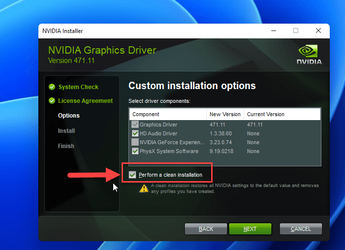
Try to clean install the driver.
 

My Computers My Computers

  • At a glance

    Windows 11 ProAMD Ryzen 7 9800X3D32GB DDR5 CL30 Kingston FuryASUS Prime Radeon RX 9060 XT OC Edition 16GB
    OS
    Windows 11 Pro
    Computer type
    PC/Desktop
    CPU
    AMD Ryzen 7 9800X3D
    Motherboard
    MSI PRO B850-P Wifi
    Memory
    32GB DDR5 CL30 Kingston Fury
    Graphics Card(s)
    ASUS Prime Radeon RX 9060 XT OC Edition 16GB
    Monitor(s) Displays
    LG Ultrawide 34" + LG 27" 1080p
    Screen Resolution
    3440x1440
    Hard Drives
    Main Boot Drive : 512GB Adata XPG RGB Gen3x4 NVMe M.2 SSD
    PSU
    EVGA 750 Watts 80+ Gold
    Case
    Deepcool Genome II
    Cooling
    Thermalright Burst Assassin 120
    Internet Speed
    1Gbps
    Browser
    Chrome
    Antivirus
    "Moderna"
  • At a glance

    Windows 11 Proi7-4790K16GB Corsair Vengeance ProMSI R9 290
    Operating System
    Windows 11 Pro
    Computer type
    PC/Desktop
    CPU
    i7-4790K
    Motherboard
    ASRock Xtreme6 Z97
    Memory
    16GB Corsair Vengeance Pro
    Graphics card(s)
    MSI R9 290
    Monitor(s) Displays
    LG Ultrawide 34"
    Screen Resolution
    3440x1440
    Hard Drives
    500GB Adata SSD (OS Only)
    PSU
    Thermaltake 475 Watts 80 Bronze
    Case
    Thermaltake Commander I Snow Edition
    Cooling
    Deep Cool Archer Air Cooler
    Keyboard
    Armageddon MKA-5R RGB-Hornet
    Mouse
    Logitech G402
    Internet Speed
    1Gbps
    Browser
    Chrome
    Antivirus
    Moderna :)
I agree to @badrobot.

Try this:

For best results, use Safe Mode then use the program.
 

My Computers My Computers

  • At a glance

    Windows 11 HomeCore i5-12450HX20GB DDR5-4800iGPU + RTX 3050 Mobile (6GB)
    OS
    Windows 11 Home
    Computer type
    Laptop
    Manufacturer/Model
    Lenovo
    CPU
    Core i5-12450HX
    Memory
    20GB DDR5-4800
    Graphics Card(s)
    iGPU + RTX 3050 Mobile (6GB)
    Sound Card
    Realtek
    Monitor(s) Displays
    the built-in laptop screen, and a generic monitor
    Screen Resolution
    1080p * 2
    Hard Drives
    GIGABYTE NVMe SSD 256GB (GP-GSM2NE3256GNTD)
    Micron NVMe SSD 512GB (MTFDKCD512QFM-1BDIAABLA)
    Browser
    Firefox
    Antivirus
    WD
  • At a glance

    Windows 10 ProCore i3-21004GB DDR3-2133iGPU
    Operating System
    Windows 10 Pro
    Computer type
    PC/Desktop
    Manufacturer/Model
    Dell
    CPU
    Core i3-2100
    Memory
    4GB DDR3-2133
    Graphics card(s)
    iGPU
    Screen Resolution
    1080p
    Antivirus
    WD

My Computers My Computers

  • At a glance

    Windows 11 ProAMD Ryzen 7 9800X3D32GB DDR5 CL30 Kingston FuryASUS Prime Radeon RX 9060 XT OC Edition 16GB
    OS
    Windows 11 Pro
    Computer type
    PC/Desktop
    CPU
    AMD Ryzen 7 9800X3D
    Motherboard
    MSI PRO B850-P Wifi
    Memory
    32GB DDR5 CL30 Kingston Fury
    Graphics Card(s)
    ASUS Prime Radeon RX 9060 XT OC Edition 16GB
    Monitor(s) Displays
    LG Ultrawide 34" + LG 27" 1080p
    Screen Resolution
    3440x1440
    Hard Drives
    Main Boot Drive : 512GB Adata XPG RGB Gen3x4 NVMe M.2 SSD
    PSU
    EVGA 750 Watts 80+ Gold
    Case
    Deepcool Genome II
    Cooling
    Thermalright Burst Assassin 120
    Internet Speed
    1Gbps
    Browser
    Chrome
    Antivirus
    "Moderna"
  • At a glance

    Windows 11 Proi7-4790K16GB Corsair Vengeance ProMSI R9 290
    Operating System
    Windows 11 Pro
    Computer type
    PC/Desktop
    CPU
    i7-4790K
    Motherboard
    ASRock Xtreme6 Z97
    Memory
    16GB Corsair Vengeance Pro
    Graphics card(s)
    MSI R9 290
    Monitor(s) Displays
    LG Ultrawide 34"
    Screen Resolution
    3440x1440
    Hard Drives
    500GB Adata SSD (OS Only)
    PSU
    Thermaltake 475 Watts 80 Bronze
    Case
    Thermaltake Commander I Snow Edition
    Cooling
    Deep Cool Archer Air Cooler
    Keyboard
    Armageddon MKA-5R RGB-Hornet
    Mouse
    Logitech G402
    Internet Speed
    1Gbps
    Browser
    Chrome
    Antivirus
    Moderna :)
Agree with a clean install if you're having issues. That said, I did the Insiders in-place upgrade and had no issues with my AMD R9 Fury running the Adrenalin 21.5.2 drivers. I bought this card in 2015.

You can also see if Windows 11 auto updates the drivers.
 

My Computers My Computers

  • At a glance

    Windows 11 Pro 24H2 (Build 26100.4770)Intel Core 9 Ultra 285K64G (4x16) DDR5 Corsair RGB Dominator Platinu...Radeon (XFX Mercury) RX 9070XT OC (with Magne...
    OS
    Windows 11 Pro 24H2 (Build 26100.4770)
    Computer type
    PC/Desktop
    Manufacturer/Model
    Custom built
    CPU
    Intel Core 9 Ultra 285K
    Motherboard
    Gigabyte Aorus Z890 Xtreme AI Top
    Memory
    64G (4x16) DDR5 Corsair RGB Dominator Platinum (6400Mhz)
    Graphics Card(s)
    Radeon (XFX Mercury) RX 9070XT OC (with Magnetic Fans)
    Sound Card
    Onboard (DTS:X® Ultra Audio: ESS ES9280A DAC)
    Monitor(s) Displays
    27-inch Eizo Color Edge - CG2700X
    Screen Resolution
    3840 x 2160
    Hard Drives
    4 Samsung NVM 990 Pro drives: 1TB (OS), 2TB, 2 X 4TB.
    PSU
    Seasonic TX-1300 (1300 Watts)
    Case
    Cooler Master H500M
    Cooling
    Corsair Link Titan 280 RX RGB
    Keyboard
    Logitech Craft
    Mouse
    Logitech MX Master 3S
    Internet Speed
    1TB Download. 512mb Upload
    Browser
    Microsoft Edge Chromium
    Antivirus
    Windows Security
    Other Info
    System used for gaming, photography, music, school.
  • At a glance

    Windows 11 Pro 24H2 (Build 26100.4061)Intel Core i9-9900K32gig (4 x 8) Corsair Dominator Platinum DDR4...Radeon XFX Merc 7900XT (20gig)
    Operating System
    Windows 11 Pro 24H2 (Build 26100.4061)
    Computer type
    PC/Desktop
    Manufacturer/Model
    Custom built
    CPU
    Intel Core i9-9900K
    Motherboard
    Gigabyte Z390 Aorus Xtreme
    Memory
    32gig (4 x 8) Corsair Dominator Platinum DDR4 3600Mhz (B-Die)
    Graphics card(s)
    Radeon XFX Merc 7900XT (20gig)
    Sound Card
    Onboard
    Monitor(s) Displays
    24-Inch NEC PA242W
    Screen Resolution
    2880 x 1800
    Hard Drives
    2 X NVME, 1 X SATA SSD
    PSU
    EVGA Super Nova 1000 P2 (1000 Watt)
    Case
    Phantek Enthoo Luxe
    Cooling
    Corsair H115i Elite AIO Cooler
    Keyboard
    Logitech Keys
    Mouse
    Logitech MX Master 3
    Internet Speed
    1TB Download. 512mb Upload
    Browser
    Microsoft Edge Chromium
    Antivirus
    Windows Security
    Other Info
    Backup System
I have problem with screen flashing/flickering on AMD Radeon RX 6000 Series in Windows 11 (latest build). Screen flash then window/apps goes black (see attachment).

In Windows 10 i don't have this problem anymore. Any solution? Do i need to wait for Windows 11 AMD GPU drivers?

See my primary computer.

Win 11 22000.65, Radeon RX 6900XT, Adrenaline drivers 21.6.2. No such issues.

I did a clean install of 11 (22000.51 at the time) using an ISO from uupdump.net. An upgrade from Win10 completed, but it was buggy. The clean install has been solid so far (touch wood).
 

My Computers My Computers

  • At a glance

    Windows 11 26200.8728Amd Threadripper 7970X128GB (4 X 32) G.Skill DDR5 6400 (RDIMM)Gigabyte RTX 4090 OC
    OS
    Windows 11 26200.8728
    Computer type
    PC/Desktop
    Manufacturer/Model
    homebuilt
    CPU
    Amd Threadripper 7970X
    Motherboard
    Gigabyte TRX50 Aero D Rev. 1.0
    Memory
    128GB (4 X 32) G.Skill DDR5 6400 (RDIMM)
    Graphics Card(s)
    Gigabyte RTX 4090 OC
    Sound Card
    none (USB to speakers), Realtek
    Monitor(s) Displays
    Innocn 32" OLED
    Screen Resolution
    3840 X 2160 @ 60Hz
    Hard Drives
    Crucial T700 2TB M.2 NVME SSD
    WD 4TB Blue SATA SSD
    Seagate 18TB IronWolf Pro
    PSU
    BeQuiet! Straight Power 12 1500W
    Case
    Lian Li 011 Dynamic Evo XL
    Cooling
    SilverStone Technology XE360-TR5, with 3 Phanteks T30 fans
    Keyboard
    Cherry KC 500 MX LP (mechanical)
    Mouse
    Logitech M500s (wired)
    Internet Speed
    2000/250 Mbps (down/up)
    Other Info
    xFinity gateway
  • At a glance

    windows 11 26200.8728Intel I9-13900K64GB G.Skill DDR5-6000Gigabyte RTX 3090 ti
    Operating System
    windows 11 26200.8728
    Computer type
    PC/Desktop
    Manufacturer/Model
    homebuilt
    CPU
    Intel I9-13900K
    Motherboard
    Asus RoG Strix Z690-E
    Memory
    64GB G.Skill DDR5-6000
    Graphics card(s)
    Gigabyte RTX 3090 ti
    Sound Card
    built in Realtek
    Monitor(s) Displays
    Philips 27E1N8900 27" OLED
    Screen Resolution
    3840 X 2160 @60Hz
    Hard Drives
    WDC SN850 1TB
    8TB Seagate Ironwolf
    4TB Seagate Ironwolf
    PSU
    eVGA SuperNOVA 1300 GT
    Case
    Lian Li 011 Dynamic Evo
    Cooling
    Corsair iCUE H150i ELITE CAPELLIX Liquid CPU Cooler
    Keyboard
    Cherry Streaming (wired)
    Mouse
    Logitech M500s (wired)
I have an Asus X470 Crosshair VII Motherboard, R5 5600X and am running a MSI RX 6600 XT Gaming X GPU. I was getting screen flashes and periodic "blackening out" of windows content. Drivers are up to date as of June 20, 2022. I changed my cable from a very thin (supposedly VESA certified 8K displayport cable to the cable included with my 34" monitor". I used BOTH the AMD cleanup and DDU to decimate existing driver content, then reinstalled latest Adrenalin driver. Since I have done that I don't seem to be having problems. Let's hope it stays that we. But it's good to hear that other AMD models have had the problem, so it appears to be a driver issue and not a defective card.
 

My Computer My Computer

At a glance

Windows 11 Pro RetailRyzen 5 5600X32GB g.skill samsung B die memory (AMD specific)MSI Gaming X 6600 XT, formerly MSI 5700 XT Ga...
OS
Windows 11 Pro Retail
Computer type
PC/Desktop
Manufacturer/Model
Asus
CPU
Ryzen 5 5600X
Motherboard
Crosshair VII Hero
Memory
32GB g.skill samsung B die memory (AMD specific)
Graphics Card(s)
MSI Gaming X 6600 XT, formerly MSI 5700 XT Gaming X
Sound Card
Topping DX3 Pro DAC/AMP
Monitor(s) Displays
AOC CU34G2X
Screen Resolution
3440x1440p
Hard Drives
Samsung 970 Evo Plus 250GB, WD SN750 500GB, Samsung 860 Evo 4TB
PSU
Corsair HX750
Case
Antec, will be upgrading
Cooling
Noctua NH-D15
Keyboard
Max Blackbird Cherry red switches doubleshot keycaps, blue RGB
Mouse
Evoluent VMR4
Internet Speed
335Mbps (lowering that soon on a budget plan)
Browser
Vivaldi. YES VIVALDI. Maybe will use firefox for ad blocking 2023 or 2024
Antivirus
Windows 11 Stock, Advanced Task Manager
Other Info
My Antec case is pretty cheap, running open side panel, but my gpu specs are low wattage.
I have problem with screen flashing/flickering on AMD Radeon RX 6000 Series in Windows 11 (latest build). Screen flash then window/apps goes black (see attachment).

In Windows 10 i don't have this problem anymore. Any solution? Do i need to wait for Windows 11 AMD GPU drivers?
I had that going on for a LONG time. I have all AMD guts and I had to uninstall the Radeon software. I use current updated windows 11 using Dual Monitors on a brand new PC build and the flickering was beyond annoying. I reinstalled the latest Win11 Pro about 2 weeks ago and no longer use ANY tweaking or theming software, just going stock themes etc and No AMD software, just their basic drivers installed and I have ZERO issues now. The software worked great on my PC until idk one of their updates and bam it was flicker city. So thats why i dont use it anymore. So if you have Radeon software installed Uninstall it and reboot and see what happens.
 

My Computer My Computer

At a glance

Windows 11 Pro Version 23H2(OS Build 22631.4890)12-Core AMD Ryzen 9 5900X, 4950 MHz (49.5 x 100)4 - G Skill Trident Z Neo F4-3600C16-16GTZNCPCI Express 4.0 x16: PowerColor RX 6800
OS
Windows 11 Pro Version 23H2(OS Build 22631.4890)
Computer type
PC/Desktop
Manufacturer/Model
AMD
CPU
12-Core AMD Ryzen 9 5900X, 4950 MHz (49.5 x 100)
Motherboard
Gigabyte X570 Aorus Master
Memory
4 - G Skill Trident Z Neo F4-3600C16-16GTZNC
Graphics Card(s)
PCI Express 4.0 x16: PowerColor RX 6800
Sound Card
Realtek ALC1220 @ AMD K19.2 - High Definition Audio Controller
Monitor(s) Displays
2 - 27 inch Westinghouse
Screen Resolution
1920 x 1080
Hard Drives
2 SSD - 2 TB each
1 SSD - 4TB
1 HDD - 2TB
Keyboard
logitech
Mouse
logitech
Internet Speed
1 GB
Browser
Firefox
Antivirus
Eset Endpoint Security
I restored Windows 11 from a June 8, 2022 backup I had made. So far the screen flickering seems to be gone. What changed between then and the start of the flickering? Well, I installed Windows 11 OPTIONAL update Advanced Micro Devices, Inc. - Display 26.20.13002.133. That might not have been the cause because it was already present in the system as of April 17 when I installed Win11. I also installed Freemake Video Converter, and K-Lite_Codec_Pack_1698_Standard. The AMD video driver has not changed since May. All the regular Win11 updates have been installed as usual. I'm running chrome and vivaldi browsers, but have not touched Opera browser since the restore, but I doubt a browser update would cause screen flicker. I had the same problem as the guy who started this thread. Flickers, and blackened out window contents. I don't think I touched or updated any other program. K-Lite Codec Pack seems suspicious as well as the optional AMD driver. I run my OS on C drive and data on D drive, so restoring from backup is pretty easy to do, then re-update. I installed a couple small games, but other than that there were no major changes. I ran AMD cleanup utility and DDU in Safe Mode and that didn't do a thing. Maybe making note of this might help someone else track down what caused the problem. Cheers.
 

My Computer My Computer

At a glance

Windows 11 Pro RetailRyzen 5 5600X32GB g.skill samsung B die memory (AMD specific)MSI Gaming X 6600 XT, formerly MSI 5700 XT Ga...
OS
Windows 11 Pro Retail
Computer type
PC/Desktop
Manufacturer/Model
Asus
CPU
Ryzen 5 5600X
Motherboard
Crosshair VII Hero
Memory
32GB g.skill samsung B die memory (AMD specific)
Graphics Card(s)
MSI Gaming X 6600 XT, formerly MSI 5700 XT Gaming X
Sound Card
Topping DX3 Pro DAC/AMP
Monitor(s) Displays
AOC CU34G2X
Screen Resolution
3440x1440p
Hard Drives
Samsung 970 Evo Plus 250GB, WD SN750 500GB, Samsung 860 Evo 4TB
PSU
Corsair HX750
Case
Antec, will be upgrading
Cooling
Noctua NH-D15
Keyboard
Max Blackbird Cherry red switches doubleshot keycaps, blue RGB
Mouse
Evoluent VMR4
Internet Speed
335Mbps (lowering that soon on a budget plan)
Browser
Vivaldi. YES VIVALDI. Maybe will use firefox for ad blocking 2023 or 2024
Antivirus
Windows 11 Stock, Advanced Task Manager
Other Info
My Antec case is pretty cheap, running open side panel, but my gpu specs are low wattage.
I bought NVIDIA GeForce RTX 30 Series in 2021. No more flashing screen.

My brother had problems with Display Errors on AMD Radeon RX 6900XT. Now he have NVIDIA GeForce RTX 30 Series like me and works without problems. I will never again buy AMD GPU.
 
I fixed the flickering with a restore from June 8, 2022 as reported. I bought an MSI 6600 XT that runs Far Cry 6 on high settings at well over 100FPS on 1440p ultrawide. And the total system power draw is 250 watts. As the great reset continues to raise energy costs, I'm staying on the medium end of the spectrum. And the 6600 XT runs silent and really cool. I simply don't need anything else. I don't NEED an nvidia 3000 or 4000 power hog system. Heck, I don't really like AAA games that much anyway. More casual games at low wattage are good enough for me. The triple AAA games these days are just a bunch of Souls clones hack and slash repeatedly. Who needs them? Flickering fixed and I don't need no damn nvidia. AMD has FSR and RSR which are really breaking through now. My nvidia 2070 burned out twice. The 2060 still works, but I have not had an AMD card fail on me. I've still got a fanless AMD HD5770 that works just fine during tests. As I reported, something I installed between June 8 to June 20 buggered up Windows 11. It's fixed now. AMD has been good to me, and it's lower wattage! And I don't need no ray tracing for the 1% of games I'll play out of the hundred or so games that support it. AMD ray tracing will catch up soon enough, and frankly, it's not needed.
 

My Computer My Computer

At a glance

Windows 11 Pro RetailRyzen 5 5600X32GB g.skill samsung B die memory (AMD specific)MSI Gaming X 6600 XT, formerly MSI 5700 XT Ga...
OS
Windows 11 Pro Retail
Computer type
PC/Desktop
Manufacturer/Model
Asus
CPU
Ryzen 5 5600X
Motherboard
Crosshair VII Hero
Memory
32GB g.skill samsung B die memory (AMD specific)
Graphics Card(s)
MSI Gaming X 6600 XT, formerly MSI 5700 XT Gaming X
Sound Card
Topping DX3 Pro DAC/AMP
Monitor(s) Displays
AOC CU34G2X
Screen Resolution
3440x1440p
Hard Drives
Samsung 970 Evo Plus 250GB, WD SN750 500GB, Samsung 860 Evo 4TB
PSU
Corsair HX750
Case
Antec, will be upgrading
Cooling
Noctua NH-D15
Keyboard
Max Blackbird Cherry red switches doubleshot keycaps, blue RGB
Mouse
Evoluent VMR4
Internet Speed
335Mbps (lowering that soon on a budget plan)
Browser
Vivaldi. YES VIVALDI. Maybe will use firefox for ad blocking 2023 or 2024
Antivirus
Windows 11 Stock, Advanced Task Manager
Other Info
My Antec case is pretty cheap, running open side panel, but my gpu specs are low wattage.
Hey Sandi1987,

Showing gratitude is important in online communities. Use the "like" button to appreciate helpful content. This motivates people to keep sharing knowledge. A "like" gives 1 point, "Helpful" gives 5 points, and "Great support" gives 10 points for exceptional help.

Latest Support Threads

Back
Top Bottom