Windows Blogs:
Breakthroughs in computing become real through the experiences developers create. Our goal is to have Windows be the best platform for developers. That means maximizing the latest in hardware innovation with software optimized for the modern builder.
At Build 2026, we introduced a developer-optimized Windows 11 experience to build and ship faster and shared how Windows is becoming the open platform for secure agentic experiences. Today, we’re taking the next step with Project Zenith, a ready-to-code distraction-free Windows experience on developer-class devices with 64 GB+ unified memory and 250+ GB/s memory bandwidth, so developers can jump right in.
Project Zenith will first become available with AMD’s Ryzen AI Halo, with more devices from our OEM and silicon partners available in the coming months.
Project Zenith devices come with a preconfigured Windows setup for development and a set of tools curated for what developers reach for first. On these devices, developers can run 30B+ parameter models locally and unmetered — accelerating experimentation while helping reduce reliance on metered cloud tokens.
Project Zenith represents Windows at its best by listening to developers, responding with purpose and working across our ecosystem to raise the bar for what a developer PC can be.
Improving the baseline Windows 11 experience
Since the beginning of this year, we’ve been dedicated to making Windows 11 more performant, reliable and refined across day-to-day experiences. From Search to File Explorer, and everyday memory usage, Windows is becoming faster, calmer, and more polished with more control over the experiences you care about most.Project Zenith devices will benefit from all these improvements, while delivering an optimized developer environment you’ve been asking for.
Ready to code out of the box
Project Zenith comes with a set of pre-installed tools spanning languages and runtimes, source control, and productivity tools. Windows Terminal and Visual Studio Code are pinned to the Taskbar by default, putting your favorite tools within immediate reach.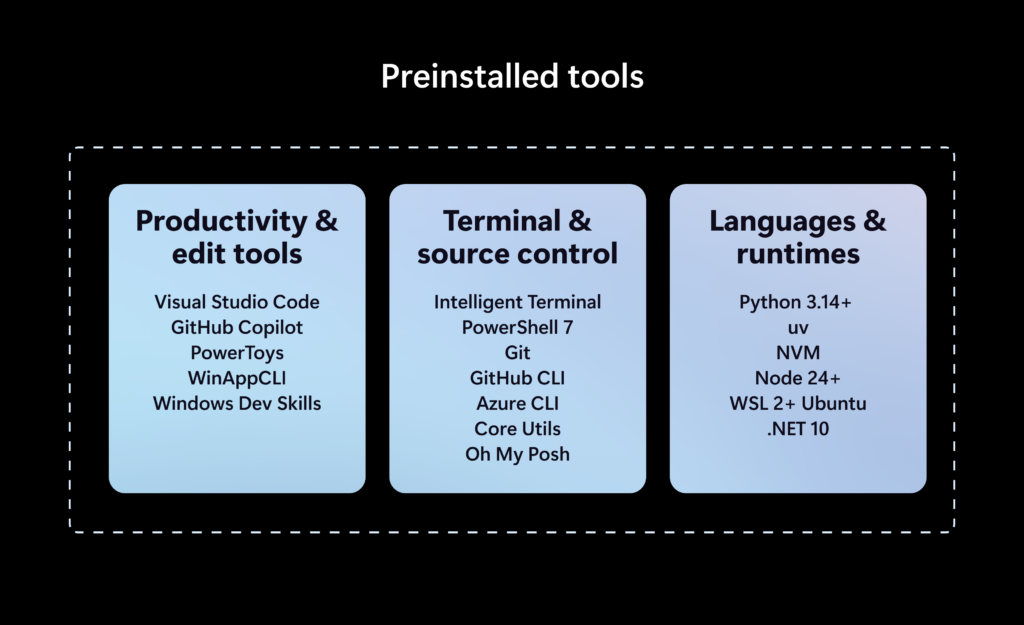
We’ve also pre-configured Windows Settings for coding across File Explorer, Search, Start, and the Taskbar. File Explorer shows file extensions, hidden files, the full path in the title bar, and the details pane, with long-path support enabled. Recently used files and folders and sync provider tips are turned off for a cleaner workspace. In Search and Start, Command Palette is enabled, while Start menu tips and account notifications are turned off to reduce distractions.
Windows Subsystem for Linux (WSL) has become foundational for running Linux workloads on Windows. Last year we open-sourced WSL. Building on that momentum at Build 2026, we integrated WSL more deeply into Windows with WSL containers to provide a built-in way to create, run, and interact with Linux containers directly on Windows.
Together, with Project Zenith, these choices create a calm, and meaningful starting point for development. Project Zenith is not about prescribing a single workflow. You can continue to configure, extend, and personalize your environment around the tools, languages, and frameworks you prefer. It is about beginning from a better baseline, shaped by the settings and tools developers reach for first, so a new device works with you to accelerate your workflows.
Secure platform for agents on developer-class hardware
As agentic applications become more common, developers need a secure foundation for building and running them. At Build 2026, we shared how Windows is evolving to provide OS-enforced identity, containment with Microsoft Execution Containers (MXC), and enterprise-grade manageability for agents. Project Zenith devices will benefit from these platform investments from day one, providing a secure environment for developing and running agents.AI models are becoming more powerful with agentic coding workflows demanding continuous compute. By shifting some of that intelligence to the edge, we are achieving token economics and transforming the developer experience: frontier models tackle frontier problems, while everything else runs locally at scale. With 64 GB+ of unified memory and 250 GB/s+ of memory bandwidth, Project Zenith devices let developers run capable coding models locally and unmetered, helping lower token costs.
Project Zenith is just the beginning
Over the past year, we have continued to evolve Windows around how development happens today. From WSL and Windows Developer Configurations to Intelligent Terminal, Coreutils for Windows and expanded on-device AI capabilities, each investment is focused on helping developers stay in control and build faster. Project Zenith brings together the work happening across the Windows platform into a tailored experience on new developer-class PCs.Project Zenith also reflects how Windows moves forward with our ecosystem. By working with our OEM partners, we give developers choice across devices and performance tiers while preserving the ready-to-code experience. The hardware may vary, but the developer promise is consistent: powerful for modern development, thoughtfully configured and ready for developers from the start.
Project Zenith is the result of listening to developers about what they need from Windows today, and where they want the platform to go next. As AI continues to transform software development, we are committed to evolving Windows alongside the community that builds on it. We are excited to see what you will build, making Windows the platform where the next generation of applications, agents, and AI experiences come to life.
Source:

Announcing Project Zenith: The ready-to-code Windows experience out of the box on developer-class devices
Breakthroughs in computing become real through the experiences developers create. Our goal is to have Windows be the best platform for developers. That means maximizing the latest in hardware innovation with software optimized for th
 blogs.windows.com