Solved Another imaging app for discussion... Minitool's Shadowmaker?


glasskuter

aka Mama Glass
Guru
VIP
Local time
1:24 AM
Posts
11,904
Location
The Lone Star State of Texas
OS
Windows 11 Pro 25H2 26200.8655
I downloaded Minitool Partition Wizard free version and Shadowmaker trial came along for the ride. However, I do notice there is also a free version available. The interface of this app is really slick and it does a lot of things. Looks to me like the free version does everything a normal user would need.
Even it's Pro Ultimate version is priced right for a perpetual license for 3 computers for $79.
Has anyone out there tried it?
 

My Computers

System One System Two

  • OS
    Windows 11 Pro 25H2 26200.8655
    Computer type
    PC/Desktop
    Manufacturer/Model
    Dell Optiplex 7080
    CPU
    i9-10900 10 core 20 threads
    Motherboard
    DELL 0J37VM
    Memory
    32 gb
    Graphics Card(s)
    none-Intel UHD Graphics 630
    Sound Card
    Integrated Realtek
    Monitor(s) Displays
    Benq 27
    Screen Resolution
    2560x1440
    Hard Drives
    2x1tb Solidigm m.2 nvme /External drives 512gb Samsung m.2 sata+2tb Kingston m2.nvme
    PSU
    500w
    Case
    MT
    Cooling
    Dell Premium
    Keyboard
    Logitech wired
    Mouse
    Logitech wireless
    Internet Speed
    so slow I'm too embarrassed to tell
    Browser
    #1 Edge #2 Firefox
    Antivirus
    Defender+MWB Premium
  • Operating System
    Windows 11 Pro 24H2 26200.8457
    Computer type
    PC/Desktop
    Manufacturer/Model
    Beelink Mini PC SER5
    CPU
    AMD Ryzen 7 6800U
    Memory
    32 gb
    Graphics card(s)
    integrated
    Sound Card
    integrated
    Monitor(s) Displays
    Benq 27
    Screen Resolution
    2560x1440
    Hard Drives
    1TB Crucial nvme
    Keyboard
    Logitech wired
    Mouse
    Logitech wireless
    Internet Speed
    still too embarrassed to tell
    Browser
    Firefox
    Antivirus
    Defender
    Other Info
    System 3 is non compliant Dell 9020 i7-4770/24gb ram Win11 PRO 26200.8457
Yes, I have. It was ok and decent enough.
But then there are so many pieces of backup software on the market that one is spoilt for choice.
 

My Computer

System One

  • OS
    Win 7,8.1,10,11, Mint, Kde Plasma, Debian
    Computer type
    Laptop
    Manufacturer/Model
    Dell
    CPU
    Intel(R) Core(TM) i7-6500U CPU @ 2.50GHz
    Memory
    16 GB
    Graphics Card(s)
    Intel(R) HD Graphics 520/Nvidia GeForce 930M
    Sound Card
    Intel(R) Display Audio/RealtekAudio
    Monitor(s) Displays
    Generic Pnp Monitor
    Screen Resolution
    1366 X 768
    Hard Drives
    ST2000LM024-1EJ164
    Keyboard
    Eng (US)
    Mouse
    Sanwa Supply
    Browser
    Firefox
    Antivirus
    Avast One
    Other Info
    Too many laptops with different system specifications.
I downloaded Minitool Partition Wizard free version and Shadowmaker trial came along for the ride. However, I do notice there is also a free version available. The interface of this app is really slick and it does a lot of things. Looks to me like the free version does everything a normal user would need.
Even it's Pro Ultimate version is priced right for a perpetual license for 3 computers for $79.
Has anyone out there tried it?
I find the free version of minitool partition wizard does pretty much all most ever need.

The one feature in the paid version that can be really useful is the ability to restore lost partitions.
The free version will identify if a lost partition can be recovered but you need the paid version to actually do it.

I do not bother with Shadowmaker as it does not really offer anything that useful that I do not already have. I certainly would not pay for it.

I actually use Easus Partition Manager (paid version) which I got on a special offer very cheaply a few years ago which has a similar lost recovery partition feature which I used a few weeks ago after I somehow lost my main data partition (data was backed up though). I recovered the lost partition and 100% of the data (250+GB) in less than two minutes. I am confident the minitool partition wizard paid version would be just as good.
 

My Computer

System One

  • OS
    Windows 11 Pro + Win11 Canary VM.
    Computer type
    Laptop
    Manufacturer/Model
    ASUS Zenbook 14
    CPU
    I9 13th gen i9-13900H 2.60 GHZ
    Motherboard
    Yep, Laptop has one.
    Memory
    16 GB soldered
    Graphics Card(s)
    Integrated Intel Iris XE
    Sound Card
    Realtek built in
    Monitor(s) Displays
    laptop OLED screen
    Screen Resolution
    2880x1800 touchscreen
    Hard Drives
    1 TB NVME SSD (only weakness is only one slot)
    PSU
    Internal + 65W thunderbolt USB4 charger
    Case
    Yep, got one
    Cooling
    Stella Artois (UK pint cans - 568 ml) - extra cost.
    Keyboard
    Built in UK keybd
    Mouse
    Bluetooth , wireless dongled, wired
    Internet Speed
    900 mbs (ethernet), wifi 6 typical 350-450 mb/s both up and down
    Browser
    Edge
    Antivirus
    Defender
    Other Info
    TPM 2.0, 2xUSB4 thunderbolt, 1xUsb3 (usb a), 1xUsb-c, hdmi out, 3.5 mm audio out/in combo, ASUS backlit trackpad (inc. switchable number pad)

    Macrium Reflect Home V8
    Office 365 Family (6 users each 1TB onedrive space)
    Hyper-V (a vm runs almost as fast as my older laptop)
I downloaded Minitool Partition Wizard free version and Shadowmaker trial came along for the ride. However, I do notice there is also a free version available. The interface of this app is really slick and it does a lot of things. Looks to me like the free version does everything a normal user would need.
Even it's Pro Ultimate version is priced right for a perpetual license for 3 computers for $79.
Has anyone out there tried it?
Just use the FREE version of gparted -- has far more recovery options in it, supports far more file systems and the GUI is much the same as all current partition managers. Create a bootable usb device by downloading the iso and using Rufus or any typical application you use for creating bootable usb devices.

I can't see ANY part of Minitool Partition Wizard (paid or otherwise) that can't be done by gparted or even within windows itself. I'm not anti-paid software (although I dislike subscription models) but it has to offer decently better stuff than is available on other FREE software. IMHO Minitool Partition Wizard clearly does not.

Cheers
jimbo
 

My Computer

System One

  • OS
    Windows XP,11 Linux Fedora Rawhide pre-release 45
    Computer type
    PC/Desktop
    CPU
    2 X Intel i7
    Screen Resolution
    4KUHD X 2
A good backup tool must be able to verify the integrity of your image, must able to verify the integrity of your systems being backed up (MBR) and has Delta Restore incorporated in it.

The Delta Restore will restore your image very quickly.
 

My Computer

System One

  • OS
    Win 7,8.1,10,11, Mint, Kde Plasma, Debian
    Computer type
    Laptop
    Manufacturer/Model
    Dell
    CPU
    Intel(R) Core(TM) i7-6500U CPU @ 2.50GHz
    Memory
    16 GB
    Graphics Card(s)
    Intel(R) HD Graphics 520/Nvidia GeForce 930M
    Sound Card
    Intel(R) Display Audio/RealtekAudio
    Monitor(s) Displays
    Generic Pnp Monitor
    Screen Resolution
    1366 X 768
    Hard Drives
    ST2000LM024-1EJ164
    Keyboard
    Eng (US)
    Mouse
    Sanwa Supply
    Browser
    Firefox
    Antivirus
    Avast One
    Other Info
    Too many laptops with different system specifications.
A good backup tool must be able to verify the integrity of your image, must able to verify the integrity of your systems being backed up (MBR) and has Delta Restore incorporated in it.

The Delta Restore will restore your image very quickly.
There are not many that do Delta Restore. That is a nice to have but not essential.
 

My Computer

System One

  • OS
    Windows 11 Pro + Win11 Canary VM.
    Computer type
    Laptop
    Manufacturer/Model
    ASUS Zenbook 14
    CPU
    I9 13th gen i9-13900H 2.60 GHZ
    Motherboard
    Yep, Laptop has one.
    Memory
    16 GB soldered
    Graphics Card(s)
    Integrated Intel Iris XE
    Sound Card
    Realtek built in
    Monitor(s) Displays
    laptop OLED screen
    Screen Resolution
    2880x1800 touchscreen
    Hard Drives
    1 TB NVME SSD (only weakness is only one slot)
    PSU
    Internal + 65W thunderbolt USB4 charger
    Case
    Yep, got one
    Cooling
    Stella Artois (UK pint cans - 568 ml) - extra cost.
    Keyboard
    Built in UK keybd
    Mouse
    Bluetooth , wireless dongled, wired
    Internet Speed
    900 mbs (ethernet), wifi 6 typical 350-450 mb/s both up and down
    Browser
    Edge
    Antivirus
    Defender
    Other Info
    TPM 2.0, 2xUSB4 thunderbolt, 1xUsb3 (usb a), 1xUsb-c, hdmi out, 3.5 mm audio out/in combo, ASUS backlit trackpad (inc. switchable number pad)

    Macrium Reflect Home V8
    Office 365 Family (6 users each 1TB onedrive space)
    Hyper-V (a vm runs almost as fast as my older laptop)
A good backup tool must be able to verify the integrity of your image

@glasskuter

Does it do that? I could not find any mention of verification / validation on their website.

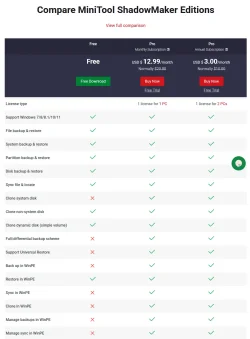
I was also rather put off by the limitations of the free edition:-
Screenshot (4797).webp
My current free editions of AcronisTI have those limitations & more.


All the best,
Denis
 

My Computer

System One

  • OS
    Windows 11 Home x64 Version 25H2 Build 26200.8037
@glasskuter

Does it do that? I could not find any mention of verification / validation on their website.

I was also rather put off by the limitations of the free edition:-
View attachment 146970
My current free editions of AcronisTI have those limitations & more.


All the best,
Denis
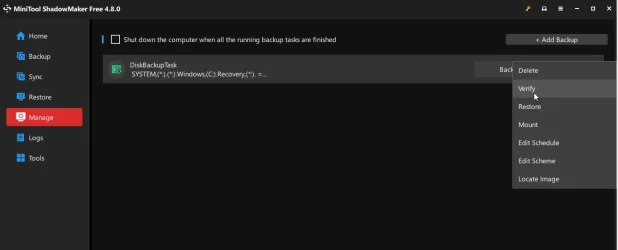
You can manually verify an image under Manage. Personally I'm used to Aomei Backupper which is good enough for me as I only do disk backups.

Snipaste_2025-09-29_16-32-06.webp
 

My Computers

System One System Two

  • OS
    Win 11 Pro
    Computer type
    Laptop
    Manufacturer/Model
    ASUS Vivobook
    CPU
    AMD Ryzen™ 7 7730U
    Motherboard
    M1605YA
    Memory
    24GB Dual-Channel DDR4 @ 1596MHz (22-22-22-52)
    Graphics Card(s)
    512MB ATI AMD Radeon Graphics (ASUStek Computer Inc)
    Monitor(s) Displays
    Generic PnP Monitor (1920x1200@60Hz) - P1 PLUS (1920x1080@59Hz)
    Screen Resolution
    1920 X 1200
    Hard Drives
    953GB Western Digital WD
    PSU
    45 Watts
    Mouse
    Lenovo Bluetooth.
    Internet Speed
    500 Mbps
    Browser
    Edge
    Antivirus
    Defender
  • Operating System
    Windows 11
    Computer type
    Laptop
    Manufacturer/Model
    ACER NITRO
    CPU
    AMD Ryzen 7 5800H / 3.2 GHz
    Motherboard
    CZ Scala_CAS (FP6)
    Memory
    32 GB DDR4 SDRAM 3200 MHz
    Graphics card(s)
    NVIDIA GeForce RTX 3060 6 GB GDDR6 SDRAM
    Sound Card
    Realtek Audio. NVIDIA High Definition Audio
    Monitor(s) Displays
    15.6" LED backlight 1920 x 1080 (Full HD) 144 Hz
    Screen Resolution
    1920 x 1080 (Full HD)
    Hard Drives
    Samsung 970 Evo Plus 2TB NVMe M.2
    PSU
    180 Watt, 19.5 V
    Mouse
    Lenovo Bluetooth
    Internet Speed
    500 Mbps
    Browser
    Edge
    Antivirus
    Defender
Yes, I finally found the verify function, too. I ran my first image with Shadowmaker last night. 86 gb of data to external nvme. Shadowmaker at default compression settings. Image+verify took 9.48 min with the resulting image being 67gb.. I can only assume those figures would be the same if I paid for the product as this is not the free version but a trial of the Pro version.

When I tested Haselo several months ago the image ended up being 61gb. I don't remember the exact amount of time it took. So, for a free imaging app, Haselo wins over Shadowmaker.
Neither of them are at Macrium levels which run the same image in 3.58 min and 47 gb resulting image, and as we all know will restore that image lickety-split...

For folks who don't image often, I guess either of those free apps would suit the purpose. Any image is better than no image. I could get by with either of those apps too, but boy, Macrium has spoiled me. I image frequently and do it for 4 machines. I'll stick with 8.1 as long as it will carry me. Hopefully, it will last as long as I do...or at least until I become too senile to remember to image.
 

My Computers

System One System Two

  • OS
    Windows 11 Pro 25H2 26200.8655
    Computer type
    PC/Desktop
    Manufacturer/Model
    Dell Optiplex 7080
    CPU
    i9-10900 10 core 20 threads
    Motherboard
    DELL 0J37VM
    Memory
    32 gb
    Graphics Card(s)
    none-Intel UHD Graphics 630
    Sound Card
    Integrated Realtek
    Monitor(s) Displays
    Benq 27
    Screen Resolution
    2560x1440
    Hard Drives
    2x1tb Solidigm m.2 nvme /External drives 512gb Samsung m.2 sata+2tb Kingston m2.nvme
    PSU
    500w
    Case
    MT
    Cooling
    Dell Premium
    Keyboard
    Logitech wired
    Mouse
    Logitech wireless
    Internet Speed
    so slow I'm too embarrassed to tell
    Browser
    #1 Edge #2 Firefox
    Antivirus
    Defender+MWB Premium
  • Operating System
    Windows 11 Pro 24H2 26200.8457
    Computer type
    PC/Desktop
    Manufacturer/Model
    Beelink Mini PC SER5
    CPU
    AMD Ryzen 7 6800U
    Memory
    32 gb
    Graphics card(s)
    integrated
    Sound Card
    integrated
    Monitor(s) Displays
    Benq 27
    Screen Resolution
    2560x1440
    Hard Drives
    1TB Crucial nvme
    Keyboard
    Logitech wired
    Mouse
    Logitech wireless
    Internet Speed
    still too embarrassed to tell
    Browser
    Firefox
    Antivirus
    Defender
    Other Info
    System 3 is non compliant Dell 9020 i7-4770/24gb ram Win11 PRO 26200.8457
I'll stick with 8.1 as long as it will carry me.

I would do that too if I were you.

Twice, I unplugged the rescue disk (ATI 2021 and Hasleo) in the middle of a restore for some explicable reason and it messed up my MBR big time. Why did I do that? Old age I guess.

Only Macrium was able to save me as the good old restored MBR was in the Macrium image itself. That was what I meant when I mentioned a good backup app must be able to back up the integrity of your systems being backed up.
 
Last edited:

My Computer

System One

  • OS
    Win 7,8.1,10,11, Mint, Kde Plasma, Debian
    Computer type
    Laptop
    Manufacturer/Model
    Dell
    CPU
    Intel(R) Core(TM) i7-6500U CPU @ 2.50GHz
    Memory
    16 GB
    Graphics Card(s)
    Intel(R) HD Graphics 520/Nvidia GeForce 930M
    Sound Card
    Intel(R) Display Audio/RealtekAudio
    Monitor(s) Displays
    Generic Pnp Monitor
    Screen Resolution
    1366 X 768
    Hard Drives
    ST2000LM024-1EJ164
    Keyboard
    Eng (US)
    Mouse
    Sanwa Supply
    Browser
    Firefox
    Antivirus
    Avast One
    Other Info
    Too many laptops with different system specifications.

My Computer

System One

  • OS
    Win 7,8.1,10,11, Mint, Kde Plasma, Debian
    Computer type
    Laptop
    Manufacturer/Model
    Dell
    CPU
    Intel(R) Core(TM) i7-6500U CPU @ 2.50GHz
    Memory
    16 GB
    Graphics Card(s)
    Intel(R) HD Graphics 520/Nvidia GeForce 930M
    Sound Card
    Intel(R) Display Audio/RealtekAudio
    Monitor(s) Displays
    Generic Pnp Monitor
    Screen Resolution
    1366 X 768
    Hard Drives
    ST2000LM024-1EJ164
    Keyboard
    Eng (US)
    Mouse
    Sanwa Supply
    Browser
    Firefox
    Antivirus
    Avast One
    Other Info
    Too many laptops with different system specifications.
@pewa (and others)

Sorry folks - but if we are mainly concerned with backing up and integrity of the OS why on earth bother with delta restores etc.

If you organise your OS sensibly so only have a smallish partition and then have your data elsewhere then just backup / recover the OS in its entirity. With decent hardware and if you organise your OS sensibly backup won't take long - and in any case run it at night etc when you aren't doing anything on it so does it matter if the system takes 5 mins or 3 hrs to backup.

I think a load of people here just don't realize that there's really at least 3 different types of data which really need to be handled differently.

1) OS -- obviously without a reliable OS all else is pointless - so reasonable backups of a clean safe virus free OS. Just dump the whole kybosh.

2) "Archived data" which doesn't change -- things like ripped CD's / other multi-media etc -- back up once to 2 different types of data storage -- then forget it.

3) "daily" type User data e,g work in progress, office type stuff, network shared folders, client computers backup , multi-media such as home videos / saved tv / radio / photos /saved whatsapp etc sessions etc etc.

This is the most complex and there's no easy 1-off answer to how to manage and process this stuff. Some really critical stuff -- just leave on the cloud and back up every so often. Other data -- people have different ideas but I would forget all this stuff with incrementals / differentials - but just have a system which overwrites any data that's changed. If you need to recover an earlier version just have say 3 sets of backups.

There's all sorts of ways of managing this stuff -- some companies even employ people full time to mange this -- so some simple "generic" imaging program isn't going to be the answer.

Cheers
jimbo
 

My Computer

System One

  • OS
    Windows XP,11 Linux Fedora Rawhide pre-release 45
    Computer type
    PC/Desktop
    CPU
    2 X Intel i7
    Screen Resolution
    4KUHD X 2

Latest Support Threads

Back
Top Bottom