Any way to create a Desktop shortcut to a subfolder?


Djard

Member
Member
Local time
3:06 PM
Posts
15
OS
Windows 11 Pro
I succeeded in creating a Desktop shortcut to a subfolder named "Guides" in the Documents directory. But if I use the same steps to create a shortcut to a subfolder named "Captures" in the Documents directory, it opens to "Home." Below are the steps I used.

1. Right-click in vacant area of Desktop -> New -> Shortcut -> in location field, type in path:

explorer.exe "C:\Documents\Guides"

2. Next -> type in name (e.g. Guides) -> Finish.

These steps also work for other subfolders in C:\Documents but not for most, even those with unique names. Is there a way to force the shortcut to open a subfolder, using RegEdit?
 

My Computer My Computer

At a glance

Windows 11 ProIntel Core Ultra 7 155H, 16 cores, 22 threads...64GB DDR5-5600 MT/sIntel Arc Graphics
OS
Windows 11 Pro
Computer type
Laptop
Manufacturer/Model
HP Envy 17t da000
CPU
Intel Core Ultra 7 155H, 16 cores, 22 threads, 4.8GHz.
Motherboard
HP?
Memory
64GB DDR5-5600 MT/s
Graphics Card(s)
Intel Arc Graphics
Sound Card
Realtek Hi-def/Intel Smart Sound
Monitor(s) Displays
17.3" touch screen
Screen Resolution
1920 x 1080
Hard Drives
1TB SSD
PSU
20VDC, 3.25A.
Case
Silver
Cooling
Fans
Keyboard
Numeric
Mouse
Logitech wireless
Internet Speed
Upload: 330 Mb/s; Download: 438 Mb/s.
Browser
Avast Secure
Antivirus
Avast One
Other Info
My cat's name is Mr. Scruffins.
If we are talking about Windows 7/8/10/11 the default location of your Documents folder is

C:\Users\yourname\Documents

so any subfolder inside Documents should be like:

C:\Users\yourname\Documents\subfolder

or in your case

C:\Users\yourname\Documents\Captures

So create a new shortcut and type the path above in the target, where yourname is the user name as shown in the Users folder. This should work. The same way you can copy paste a URL (aka internet location) so you can double-click the shortcut and open a specific website.
 

My Computers My Computers

  • At a glance

    Windows 11 Pro 23H2 (5699), 25H2 (8655)Mobile DualCore Intel Core 2 Duo T7250, 2000 MHz4GBMobile Intel(R) GMA 4500M (Mobile 4 series)
    OS
    Windows 11 Pro 23H2 (5699), 25H2 (8655)
    Computer type
    Laptop
    Manufacturer/Model
    Acer Extensa 5630EZ
    CPU
    Mobile DualCore Intel Core 2 Duo T7250, 2000 MHz
    Motherboard
    Acer Extensa 5630
    Memory
    4GB
    Graphics Card(s)
    Mobile Intel(R) GMA 4500M (Mobile 4 series)
    Sound Card
    Realtek ALC268 @ Intel 82801IB ICH9 - High Definition Audio Controller
    Monitor(s) Displays
    1
    Screen Resolution
    1280x800
    Hard Drives
    Samsung SSD 850 EVO 250GB SATA Device (250 GB, SATA-III)
    Internet Speed
    VDSL 50 Mbps
    Browser
    MICROSOFT EDGE
    Antivirus
    WINDOWS DEFENDER
    Other Info
    Legacy MBR installation, no TPM, no Secure Boot, no WDDM 2.0 graphics drivers, no SSE4.2, cannot get more unsupported ;) This is only my test laptop. I had installed Windows 11 here before upgrading my main PC. For my main PC I use everyday see my 2nd system specs.
  • At a glance

    Windows 11 Pro v25H2 (build 26200.8655)Intel Core-i7 3770 3.40GHz s1155 (3rd generat...2x Kingston Hyper-X Blu 8GB DDR3-1600GIGABYTE GeForce RTX 3050 WINDFORCE OC V2 6GB...
    Operating System
    Windows 11 Pro v25H2 (build 26200.8655)
    Computer type
    PC/Desktop
    Manufacturer/Model
    Custom-built PC
    CPU
    Intel Core-i7 3770 3.40GHz s1155 (3rd generation)
    Motherboard
    Asus P8H61 s1155 ATX
    Memory
    2x Kingston Hyper-X Blu 8GB DDR3-1600
    Graphics card(s)
    GIGABYTE GeForce RTX 3050 WINDFORCE OC V2 6GB (GV-N3050WF2OCV2-6GD)
    Sound Card
    Realtek HD audio (ALC887)
    Monitor(s) Displays
    Sony Bravia KDL-19L4000 19" LCD TV via VGA
    Screen Resolution
    1440x900 32-bit 60Hz
    Hard Drives
    WD Blue SA510 2.5 1000GB SSD as system disk, Western Digital Caviar Purple 4TB SATA III (WD40PURZ) as second
    PSU
    Thermaltake Litepower RGB 550W Full Wired
    Case
    SUPERCASE MIDI-TOWER
    Cooling
    Deepcool Gamma Archer CPU cooler, 1x 8cm fan at the back
    Keyboard
    Mitsumi 101-key PS/2
    Mouse
    Sunnyline OptiEye PS/2
    Internet Speed
    100Mbps
    Browser
    Microsoft Edge, Mozilla Firefox
    Antivirus
    Microsoft Windows Defender
    Other Info
    Legacy BIOS (MBR) installation, no TPM, no Secure Boot, WDDM 3.0 graphics drivers, WEI score 7.4
Easier to Select Folder/File > More Options > Send to > Desktop(create shortcut).
Then no errors are made in manually typing in the Target: or Start in: fields.

Using your method, Browse To the Folder/File, again the Target: and Start in: paths will be filled in.

As far as I know this works for everything in the Documents folders.

There is no "explorer.exe" in the path.
 

My Computer My Computer

At a glance

Windows 11
OS
Windows 11
If you're a creating a dummy hub for a bunch of office applications, you have put explorer. exe in the path so the hub will open the folder. You can change the default file icon to a hub one.
 

My Computers My Computers

  • At a glance

    Windows 11 Education For 25H2Intel® Core i7 5500u8 GBIntel HD Family Graphics 5500 AMD Firepro 4150M
    OS
    Windows 11 Education For 25H2
    Computer type
    Laptop
    Manufacturer/Model
    HP ZBook G2
    CPU
    Intel® Core i7 5500u
    Motherboard
    HP
    Memory
    8 GB
    Graphics Card(s)
    Intel HD Family Graphics 5500 AMD Firepro 4150M
    Sound Card
    Realtek High Audio
    Hard Drives
    1 TB SSD
    Mouse
    HP USB Mouse
    Antivirus
    Windows Defender
  • At a glance

    Windows 11 Pro For Workstations 25H2Xeon 1535m v632 GBAMD Quadro Pro 4100
    Operating System
    Windows 11 Pro For Workstations 25H2
    Computer type
    Laptop
    Manufacturer/Model
    HP Zbook G4
    CPU
    Xeon 1535m v6
    Motherboard
    HP
    Memory
    32 GB
    Graphics card(s)
    AMD Quadro Pro 4100
    Sound Card
    Bang and Olufson Audio
    Hard Drives
    1TB SSD
    Mouse
    HP USB Mouse
    Antivirus
    Windows Defender
I am successfully able to create a shortcut to a file located in both sub and sub-sub folders as well as create shortcuts to the folders themselves. I can open either folder or file from the shortcut. I did it the old fashioned way....right click on folder or file, select send to (create shortcut), select desktop.. They all opened correctly.
 

My Computers My Computers

  • At a glance

    Windows 11 Pro 25H2 26200.8655i9-10900 10 core 20 threads32 gbnone-Intel UHD Graphics 630
    OS
    Windows 11 Pro 25H2 26200.8655
    Computer type
    PC/Desktop
    Manufacturer/Model
    Dell Optiplex 7080
    CPU
    i9-10900 10 core 20 threads
    Motherboard
    DELL 0J37VM
    Memory
    32 gb
    Graphics Card(s)
    none-Intel UHD Graphics 630
    Sound Card
    Integrated Realtek
    Monitor(s) Displays
    Benq 27
    Screen Resolution
    2560x1440
    Hard Drives
    2x1tb Solidigm m.2 nvme /External drives 512gb Samsung m.2 sata+2tb Kingston m2.nvme
    PSU
    500w
    Case
    MT
    Cooling
    Dell Premium
    Keyboard
    Logitech wired
    Mouse
    Logitech wireless
    Internet Speed
    so slow I'm too embarrassed to tell
    Browser
    #1 Edge #2 Firefox
    Antivirus
    Defender+MWB Premium
  • At a glance

    Windows 11 Pro 24H2 26200.8457AMD Ryzen 7 6800U32 gbintegrated
    Operating System
    Windows 11 Pro 24H2 26200.8457
    Computer type
    PC/Desktop
    Manufacturer/Model
    Beelink Mini PC SER5
    CPU
    AMD Ryzen 7 6800U
    Memory
    32 gb
    Graphics card(s)
    integrated
    Sound Card
    integrated
    Monitor(s) Displays
    Benq 27
    Screen Resolution
    2560x1440
    Hard Drives
    1TB Crucial nvme
    Keyboard
    Logitech wired
    Mouse
    Logitech wireless
    Internet Speed
    still too embarrassed to tell
    Browser
    Firefox
    Antivirus
    Defender
    Other Info
    System 3 is non compliant Dell 9020 i7-4770/24gb ram Win11 PRO 26200.8457
Its changed by Windows updates. The more reliable alternative is TaskbarGroups. Your applications icons live in Shortcuts Taskbar Group folder that you can pin with your hub icon to the taskbar or to the Open Shell Start menu.

Web apps have to go to in a Start Menu folder and you have to change the blank icons for them to show up.
 

My Computers My Computers

  • At a glance

    Windows 11 Education For 25H2Intel® Core i7 5500u8 GBIntel HD Family Graphics 5500 AMD Firepro 4150M
    OS
    Windows 11 Education For 25H2
    Computer type
    Laptop
    Manufacturer/Model
    HP ZBook G2
    CPU
    Intel® Core i7 5500u
    Motherboard
    HP
    Memory
    8 GB
    Graphics Card(s)
    Intel HD Family Graphics 5500 AMD Firepro 4150M
    Sound Card
    Realtek High Audio
    Hard Drives
    1 TB SSD
    Mouse
    HP USB Mouse
    Antivirus
    Windows Defender
  • At a glance

    Windows 11 Pro For Workstations 25H2Xeon 1535m v632 GBAMD Quadro Pro 4100
    Operating System
    Windows 11 Pro For Workstations 25H2
    Computer type
    Laptop
    Manufacturer/Model
    HP Zbook G4
    CPU
    Xeon 1535m v6
    Motherboard
    HP
    Memory
    32 GB
    Graphics card(s)
    AMD Quadro Pro 4100
    Sound Card
    Bang and Olufson Audio
    Hard Drives
    1TB SSD
    Mouse
    HP USB Mouse
    Antivirus
    Windows Defender
I thank everybody for responding.

My apology for not mentioning I moved "C:\Users\{username}\Documents" to "C:\Documents," where a navigation panel opens at left and lets me expand folders, unlike the former in the quick access section.

I already tried the "Send to" option that sometimes works but not for a subfolder named Captures. And I do not want to pin the shortcut to my already crowded taskbar. I was hoping for a solution that involves editing the Registry as I have had more success with that option when customizing (maybe GPEdit?).

I compared the properties of my shortcut to my "Guides" subfolder with those of "Captures": the properties are identical: the former opens to the target subfolder; the latter opens to "Home" in File Explorer.

I used the command: explorer.exe "C:\Documents\Cigars" to create a Desktop shortcut to a subfolder named Cigars, and it worked, opening the subfolder. When I changed its path in Properties to Captures, the link opened to "Home." So it seems Windows handles the folder name differently. Thinking my screen capture software might be dictating the location, I renamed the Captures subfolder to My Special Screenshots. This also opens to "Home."

Another thing I tried was to copy the fully functional "Guides" shortcut, rename it as Captures and modify the path. But that opens to Home. Anything else I can try?
 

My Computer My Computer

At a glance

Windows 11 ProIntel Core Ultra 7 155H, 16 cores, 22 threads...64GB DDR5-5600 MT/sIntel Arc Graphics
OS
Windows 11 Pro
Computer type
Laptop
Manufacturer/Model
HP Envy 17t da000
CPU
Intel Core Ultra 7 155H, 16 cores, 22 threads, 4.8GHz.
Motherboard
HP?
Memory
64GB DDR5-5600 MT/s
Graphics Card(s)
Intel Arc Graphics
Sound Card
Realtek Hi-def/Intel Smart Sound
Monitor(s) Displays
17.3" touch screen
Screen Resolution
1920 x 1080
Hard Drives
1TB SSD
PSU
20VDC, 3.25A.
Case
Silver
Cooling
Fans
Keyboard
Numeric
Mouse
Logitech wireless
Internet Speed
Upload: 330 Mb/s; Download: 438 Mb/s.
Browser
Avast Secure
Antivirus
Avast One
Other Info
My cat's name is Mr. Scruffins.
Have you used the "change location" option to move the Documents folder or you simply copy-pasted the files into the new folder? Since only the C:\Documents\Captures doesn't work, it might be associate with something else like a symbolic link or network location. File Explorer doesn't know how to handle it and opens Home as a result. I would try to rename the folder and if that doesn't work, I would create a new folder, copy all the files from Capture into the new folder and create a shortcut to the new folder. This should work.
 

My Computers My Computers

  • At a glance

    Windows 11 Pro 23H2 (5699), 25H2 (8655)Mobile DualCore Intel Core 2 Duo T7250, 2000 MHz4GBMobile Intel(R) GMA 4500M (Mobile 4 series)
    OS
    Windows 11 Pro 23H2 (5699), 25H2 (8655)
    Computer type
    Laptop
    Manufacturer/Model
    Acer Extensa 5630EZ
    CPU
    Mobile DualCore Intel Core 2 Duo T7250, 2000 MHz
    Motherboard
    Acer Extensa 5630
    Memory
    4GB
    Graphics Card(s)
    Mobile Intel(R) GMA 4500M (Mobile 4 series)
    Sound Card
    Realtek ALC268 @ Intel 82801IB ICH9 - High Definition Audio Controller
    Monitor(s) Displays
    1
    Screen Resolution
    1280x800
    Hard Drives
    Samsung SSD 850 EVO 250GB SATA Device (250 GB, SATA-III)
    Internet Speed
    VDSL 50 Mbps
    Browser
    MICROSOFT EDGE
    Antivirus
    WINDOWS DEFENDER
    Other Info
    Legacy MBR installation, no TPM, no Secure Boot, no WDDM 2.0 graphics drivers, no SSE4.2, cannot get more unsupported ;) This is only my test laptop. I had installed Windows 11 here before upgrading my main PC. For my main PC I use everyday see my 2nd system specs.
  • At a glance

    Windows 11 Pro v25H2 (build 26200.8655)Intel Core-i7 3770 3.40GHz s1155 (3rd generat...2x Kingston Hyper-X Blu 8GB DDR3-1600GIGABYTE GeForce RTX 3050 WINDFORCE OC V2 6GB...
    Operating System
    Windows 11 Pro v25H2 (build 26200.8655)
    Computer type
    PC/Desktop
    Manufacturer/Model
    Custom-built PC
    CPU
    Intel Core-i7 3770 3.40GHz s1155 (3rd generation)
    Motherboard
    Asus P8H61 s1155 ATX
    Memory
    2x Kingston Hyper-X Blu 8GB DDR3-1600
    Graphics card(s)
    GIGABYTE GeForce RTX 3050 WINDFORCE OC V2 6GB (GV-N3050WF2OCV2-6GD)
    Sound Card
    Realtek HD audio (ALC887)
    Monitor(s) Displays
    Sony Bravia KDL-19L4000 19" LCD TV via VGA
    Screen Resolution
    1440x900 32-bit 60Hz
    Hard Drives
    WD Blue SA510 2.5 1000GB SSD as system disk, Western Digital Caviar Purple 4TB SATA III (WD40PURZ) as second
    PSU
    Thermaltake Litepower RGB 550W Full Wired
    Case
    SUPERCASE MIDI-TOWER
    Cooling
    Deepcool Gamma Archer CPU cooler, 1x 8cm fan at the back
    Keyboard
    Mitsumi 101-key PS/2
    Mouse
    Sunnyline OptiEye PS/2
    Internet Speed
    100Mbps
    Browser
    Microsoft Edge, Mozilla Firefox
    Antivirus
    Microsoft Windows Defender
    Other Info
    Legacy BIOS (MBR) installation, no TPM, no Secure Boot, WDDM 3.0 graphics drivers, WEI score 7.4
What happens when you open a Run box and put in what you want for the shortcut, i.e., explorer.exe "C:\Documents\Whatever-the-folder-is-named-currently"?

Also, did you try dragging the folder from Explorer to the Desktop with the right mouse button? When you let go, you should get a context menu with an option to create a shortcut.
 

My Computer My Computer

At a glance

Windows 11 Pro 25H212th Gen Core i7-1260P64 GB Micron PC4-25600Intel Iris Xe Graphics
OS
Windows 11 Pro 25H2
Computer type
PC/Desktop
Manufacturer/Model
Intel NUC12WSHi7
CPU
12th Gen Core i7-1260P
Motherboard
NUC12WSBi7
Memory
64 GB Micron PC4-25600
Graphics Card(s)
Intel Iris Xe Graphics
Sound Card
on-board Realtek HD Audio
Monitor(s) Displays
Dell U3219Q
Screen Resolution
3840 x 2160
Hard Drives
Samsung SSD 990 PRO 1TB
Crucial MX500 2 TB
Antivirus
Microsoft Defender
You don't need the explorer.exe part, just type the path directly in the Run box, but I suspect it will have the same result. File Explorer won't know how to handle it and just open to Home. Try creating a new folder and copy all the contents of Capture to that. Then create a shortcut to the new folder. This should work.
 

My Computers My Computers

  • At a glance

    Windows 11 Pro 23H2 (5699), 25H2 (8655)Mobile DualCore Intel Core 2 Duo T7250, 2000 MHz4GBMobile Intel(R) GMA 4500M (Mobile 4 series)
    OS
    Windows 11 Pro 23H2 (5699), 25H2 (8655)
    Computer type
    Laptop
    Manufacturer/Model
    Acer Extensa 5630EZ
    CPU
    Mobile DualCore Intel Core 2 Duo T7250, 2000 MHz
    Motherboard
    Acer Extensa 5630
    Memory
    4GB
    Graphics Card(s)
    Mobile Intel(R) GMA 4500M (Mobile 4 series)
    Sound Card
    Realtek ALC268 @ Intel 82801IB ICH9 - High Definition Audio Controller
    Monitor(s) Displays
    1
    Screen Resolution
    1280x800
    Hard Drives
    Samsung SSD 850 EVO 250GB SATA Device (250 GB, SATA-III)
    Internet Speed
    VDSL 50 Mbps
    Browser
    MICROSOFT EDGE
    Antivirus
    WINDOWS DEFENDER
    Other Info
    Legacy MBR installation, no TPM, no Secure Boot, no WDDM 2.0 graphics drivers, no SSE4.2, cannot get more unsupported ;) This is only my test laptop. I had installed Windows 11 here before upgrading my main PC. For my main PC I use everyday see my 2nd system specs.
  • At a glance

    Windows 11 Pro v25H2 (build 26200.8655)Intel Core-i7 3770 3.40GHz s1155 (3rd generat...2x Kingston Hyper-X Blu 8GB DDR3-1600GIGABYTE GeForce RTX 3050 WINDFORCE OC V2 6GB...
    Operating System
    Windows 11 Pro v25H2 (build 26200.8655)
    Computer type
    PC/Desktop
    Manufacturer/Model
    Custom-built PC
    CPU
    Intel Core-i7 3770 3.40GHz s1155 (3rd generation)
    Motherboard
    Asus P8H61 s1155 ATX
    Memory
    2x Kingston Hyper-X Blu 8GB DDR3-1600
    Graphics card(s)
    GIGABYTE GeForce RTX 3050 WINDFORCE OC V2 6GB (GV-N3050WF2OCV2-6GD)
    Sound Card
    Realtek HD audio (ALC887)
    Monitor(s) Displays
    Sony Bravia KDL-19L4000 19" LCD TV via VGA
    Screen Resolution
    1440x900 32-bit 60Hz
    Hard Drives
    WD Blue SA510 2.5 1000GB SSD as system disk, Western Digital Caviar Purple 4TB SATA III (WD40PURZ) as second
    PSU
    Thermaltake Litepower RGB 550W Full Wired
    Case
    SUPERCASE MIDI-TOWER
    Cooling
    Deepcool Gamma Archer CPU cooler, 1x 8cm fan at the back
    Keyboard
    Mitsumi 101-key PS/2
    Mouse
    Sunnyline OptiEye PS/2
    Internet Speed
    100Mbps
    Browser
    Microsoft Edge, Mozilla Firefox
    Antivirus
    Microsoft Windows Defender
    Other Info
    Legacy BIOS (MBR) installation, no TPM, no Secure Boot, WDDM 3.0 graphics drivers, WEI score 7.4
You already said that in your last post. No need to repeat it.
 

My Computer My Computer

At a glance

Windows 11 Pro 25H212th Gen Core i7-1260P64 GB Micron PC4-25600Intel Iris Xe Graphics
OS
Windows 11 Pro 25H2
Computer type
PC/Desktop
Manufacturer/Model
Intel NUC12WSHi7
CPU
12th Gen Core i7-1260P
Motherboard
NUC12WSBi7
Memory
64 GB Micron PC4-25600
Graphics Card(s)
Intel Iris Xe Graphics
Sound Card
on-board Realtek HD Audio
Monitor(s) Displays
Dell U3219Q
Screen Resolution
3840 x 2160
Hard Drives
Samsung SSD 990 PRO 1TB
Crucial MX500 2 TB
Antivirus
Microsoft Defender
You are trying to use command line switches with explorer.exe not Shortcuts. To start Windows Explorer at a different point.
Look up what are currently valid command line switches and contexts, that has changed in recent years.

It is far easier to use Shortcuts with the methods outlined several times before.
And I do not want to pin the shortcut to my already crowded taskbar.
But you cannot do that now anyway, it's not allowed.
 

My Computer My Computer

At a glance

Windows 11
OS
Windows 11
spapakons: I used the Move option in the Location tab of Properties from the context menu to relocate the Documents directory.

pseymour: I created a new subfolder with my cat's name, Scruffins -> right-clicked in Desktrop -> New -> Shortcut -> Browsed to and selected Scruffins -> OK -> Next -> Finish. But the shortcut open to "Home."

Dragging the subfolder to Desktop with the right mouse button and selecting "Create shortcut here" also opens to "Home." Doing the same with "Alt" key depressed or using the "Send to" option also gives the same result.

explorer.exe "C:\Documents\Captures" -> OK in the Run field opens to "Home."

Helmut: Did I misunderstand NormanF's post above, who seems to suggest pinning to the Taskbar?
 

My Computer My Computer

At a glance

Windows 11 ProIntel Core Ultra 7 155H, 16 cores, 22 threads...64GB DDR5-5600 MT/sIntel Arc Graphics
OS
Windows 11 Pro
Computer type
Laptop
Manufacturer/Model
HP Envy 17t da000
CPU
Intel Core Ultra 7 155H, 16 cores, 22 threads, 4.8GHz.
Motherboard
HP?
Memory
64GB DDR5-5600 MT/s
Graphics Card(s)
Intel Arc Graphics
Sound Card
Realtek Hi-def/Intel Smart Sound
Monitor(s) Displays
17.3" touch screen
Screen Resolution
1920 x 1080
Hard Drives
1TB SSD
PSU
20VDC, 3.25A.
Case
Silver
Cooling
Fans
Keyboard
Numeric
Mouse
Logitech wireless
Internet Speed
Upload: 330 Mb/s; Download: 438 Mb/s.
Browser
Avast Secure
Antivirus
Avast One
Other Info
My cat's name is Mr. Scruffins.
Something is wrong with the folder association. Instead of opening a specific with File Explorer it opens Home. What if a folder is in a totally different location? If you have a second partition or disk, such as D: try creating a folder there, like D:\test and see if you can create a shortcut to that. If you can, then something is wrong with your Documents folder. If it still opens Home, then something is wrong with Windows. I can't help you any further. No idea what to do.

PS: Just saw your first post again. So a folder on Desktop works but not in Documents. Something is wrong with the Documents folder. Enable showing hidden files and see if there is anything unknown and suspicious. I would check for malware. Also run this command in a Run box:

chkdsk C: /f

to scan the disk and fix any logical errors. It cannot be done while Windows is running, it will suggest to do it on startup. Reply yes and restart to complete.

Also instead of creating a Captures folder inside C:\Documents try creating it on root, that is C:\Captures and check if you can create a shortcut for this.
 

My Computers My Computers

  • At a glance

    Windows 11 Pro 23H2 (5699), 25H2 (8655)Mobile DualCore Intel Core 2 Duo T7250, 2000 MHz4GBMobile Intel(R) GMA 4500M (Mobile 4 series)
    OS
    Windows 11 Pro 23H2 (5699), 25H2 (8655)
    Computer type
    Laptop
    Manufacturer/Model
    Acer Extensa 5630EZ
    CPU
    Mobile DualCore Intel Core 2 Duo T7250, 2000 MHz
    Motherboard
    Acer Extensa 5630
    Memory
    4GB
    Graphics Card(s)
    Mobile Intel(R) GMA 4500M (Mobile 4 series)
    Sound Card
    Realtek ALC268 @ Intel 82801IB ICH9 - High Definition Audio Controller
    Monitor(s) Displays
    1
    Screen Resolution
    1280x800
    Hard Drives
    Samsung SSD 850 EVO 250GB SATA Device (250 GB, SATA-III)
    Internet Speed
    VDSL 50 Mbps
    Browser
    MICROSOFT EDGE
    Antivirus
    WINDOWS DEFENDER
    Other Info
    Legacy MBR installation, no TPM, no Secure Boot, no WDDM 2.0 graphics drivers, no SSE4.2, cannot get more unsupported ;) This is only my test laptop. I had installed Windows 11 here before upgrading my main PC. For my main PC I use everyday see my 2nd system specs.
  • At a glance

    Windows 11 Pro v25H2 (build 26200.8655)Intel Core-i7 3770 3.40GHz s1155 (3rd generat...2x Kingston Hyper-X Blu 8GB DDR3-1600GIGABYTE GeForce RTX 3050 WINDFORCE OC V2 6GB...
    Operating System
    Windows 11 Pro v25H2 (build 26200.8655)
    Computer type
    PC/Desktop
    Manufacturer/Model
    Custom-built PC
    CPU
    Intel Core-i7 3770 3.40GHz s1155 (3rd generation)
    Motherboard
    Asus P8H61 s1155 ATX
    Memory
    2x Kingston Hyper-X Blu 8GB DDR3-1600
    Graphics card(s)
    GIGABYTE GeForce RTX 3050 WINDFORCE OC V2 6GB (GV-N3050WF2OCV2-6GD)
    Sound Card
    Realtek HD audio (ALC887)
    Monitor(s) Displays
    Sony Bravia KDL-19L4000 19" LCD TV via VGA
    Screen Resolution
    1440x900 32-bit 60Hz
    Hard Drives
    WD Blue SA510 2.5 1000GB SSD as system disk, Western Digital Caviar Purple 4TB SATA III (WD40PURZ) as second
    PSU
    Thermaltake Litepower RGB 550W Full Wired
    Case
    SUPERCASE MIDI-TOWER
    Cooling
    Deepcool Gamma Archer CPU cooler, 1x 8cm fan at the back
    Keyboard
    Mitsumi 101-key PS/2
    Mouse
    Sunnyline OptiEye PS/2
    Internet Speed
    100Mbps
    Browser
    Microsoft Edge, Mozilla Firefox
    Antivirus
    Microsoft Windows Defender
    Other Info
    Legacy BIOS (MBR) installation, no TPM, no Secure Boot, WDDM 3.0 graphics drivers, WEI score 7.4
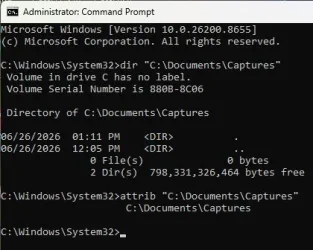
What do you get, at a command prompt, with

Batch:
dir "C:\Documents\Captures"
attrib "C:\Documents\Captures"
 

My Computer My Computer

At a glance

Windows 11 Pro 25H212th Gen Core i7-1260P64 GB Micron PC4-25600Intel Iris Xe Graphics
OS
Windows 11 Pro 25H2
Computer type
PC/Desktop
Manufacturer/Model
Intel NUC12WSHi7
CPU
12th Gen Core i7-1260P
Motherboard
NUC12WSBi7
Memory
64 GB Micron PC4-25600
Graphics Card(s)
Intel Iris Xe Graphics
Sound Card
on-board Realtek HD Audio
Monitor(s) Displays
Dell U3219Q
Screen Resolution
3840 x 2160
Hard Drives
Samsung SSD 990 PRO 1TB
Crucial MX500 2 TB
Antivirus
Microsoft Defender
spapakons: I ran chkdsk C: /f and no errors are reported. I also created the folder in the root directory and created a Desktop shortcut to the folder, but alas, "Home" opens.

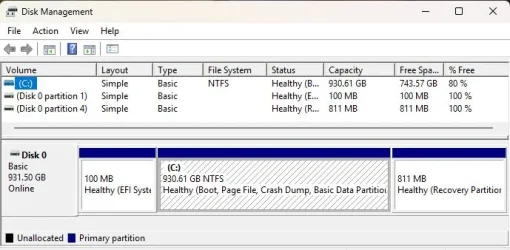
pseymour: Running the first command report that "Volume in drive C has no label." Windows' Disk Management shows the correct assignment (screenshots attached). If a volume label is merely cosmetic, its absence should not affect shortcut assignments...right?
 

Attachments

  • Volume.webp
    Volume.webp
    34.3 KB · Views: 1
  • Commands.webp
    Commands.webp
    25.8 KB · Views: 1

My Computer My Computer

At a glance

Windows 11 ProIntel Core Ultra 7 155H, 16 cores, 22 threads...64GB DDR5-5600 MT/sIntel Arc Graphics
OS
Windows 11 Pro
Computer type
Laptop
Manufacturer/Model
HP Envy 17t da000
CPU
Intel Core Ultra 7 155H, 16 cores, 22 threads, 4.8GHz.
Motherboard
HP?
Memory
64GB DDR5-5600 MT/s
Graphics Card(s)
Intel Arc Graphics
Sound Card
Realtek Hi-def/Intel Smart Sound
Monitor(s) Displays
17.3" touch screen
Screen Resolution
1920 x 1080
Hard Drives
1TB SSD
PSU
20VDC, 3.25A.
Case
Silver
Cooling
Fans
Keyboard
Numeric
Mouse
Logitech wireless
Internet Speed
Upload: 330 Mb/s; Download: 438 Mb/s.
Browser
Avast Secure
Antivirus
Avast One
Other Info
My cat's name is Mr. Scruffins.
I also have not assigned a name for my drives. I have no problem creating shortcuts for any folder. You can download the latest ISO from Microsoft and run Setup to do an in-place upgrade/repair. This should fix any issues in Registry or whatever. Then check if you can create a shortcut to the folder.
 

My Computers My Computers

  • At a glance

    Windows 11 Pro 23H2 (5699), 25H2 (8655)Mobile DualCore Intel Core 2 Duo T7250, 2000 MHz4GBMobile Intel(R) GMA 4500M (Mobile 4 series)
    OS
    Windows 11 Pro 23H2 (5699), 25H2 (8655)
    Computer type
    Laptop
    Manufacturer/Model
    Acer Extensa 5630EZ
    CPU
    Mobile DualCore Intel Core 2 Duo T7250, 2000 MHz
    Motherboard
    Acer Extensa 5630
    Memory
    4GB
    Graphics Card(s)
    Mobile Intel(R) GMA 4500M (Mobile 4 series)
    Sound Card
    Realtek ALC268 @ Intel 82801IB ICH9 - High Definition Audio Controller
    Monitor(s) Displays
    1
    Screen Resolution
    1280x800
    Hard Drives
    Samsung SSD 850 EVO 250GB SATA Device (250 GB, SATA-III)
    Internet Speed
    VDSL 50 Mbps
    Browser
    MICROSOFT EDGE
    Antivirus
    WINDOWS DEFENDER
    Other Info
    Legacy MBR installation, no TPM, no Secure Boot, no WDDM 2.0 graphics drivers, no SSE4.2, cannot get more unsupported ;) This is only my test laptop. I had installed Windows 11 here before upgrading my main PC. For my main PC I use everyday see my 2nd system specs.
  • At a glance

    Windows 11 Pro v25H2 (build 26200.8655)Intel Core-i7 3770 3.40GHz s1155 (3rd generat...2x Kingston Hyper-X Blu 8GB DDR3-1600GIGABYTE GeForce RTX 3050 WINDFORCE OC V2 6GB...
    Operating System
    Windows 11 Pro v25H2 (build 26200.8655)
    Computer type
    PC/Desktop
    Manufacturer/Model
    Custom-built PC
    CPU
    Intel Core-i7 3770 3.40GHz s1155 (3rd generation)
    Motherboard
    Asus P8H61 s1155 ATX
    Memory
    2x Kingston Hyper-X Blu 8GB DDR3-1600
    Graphics card(s)
    GIGABYTE GeForce RTX 3050 WINDFORCE OC V2 6GB (GV-N3050WF2OCV2-6GD)
    Sound Card
    Realtek HD audio (ALC887)
    Monitor(s) Displays
    Sony Bravia KDL-19L4000 19" LCD TV via VGA
    Screen Resolution
    1440x900 32-bit 60Hz
    Hard Drives
    WD Blue SA510 2.5 1000GB SSD as system disk, Western Digital Caviar Purple 4TB SATA III (WD40PURZ) as second
    PSU
    Thermaltake Litepower RGB 550W Full Wired
    Case
    SUPERCASE MIDI-TOWER
    Cooling
    Deepcool Gamma Archer CPU cooler, 1x 8cm fan at the back
    Keyboard
    Mitsumi 101-key PS/2
    Mouse
    Sunnyline OptiEye PS/2
    Internet Speed
    100Mbps
    Browser
    Microsoft Edge, Mozilla Firefox
    Antivirus
    Microsoft Windows Defender
    Other Info
    Legacy BIOS (MBR) installation, no TPM, no Secure Boot, WDDM 3.0 graphics drivers, WEI score 7.4
I just noticed that while a shortcut to my "Captures" folder opens to "Home" in the left panel of File Explorer, the contents of the subfolder DO appear in the right pane. Because the subfolder was empty, I could not see that the shortcut actually worked: I am used to seeing the folder appear in the left panel. Placing a dummy file in the folder revealed this matter.

So all the create shortcut methods work, only the parent folder is absent in the navigation panel at left. I suppose I can live with that.
 

My Computer My Computer

At a glance

Windows 11 ProIntel Core Ultra 7 155H, 16 cores, 22 threads...64GB DDR5-5600 MT/sIntel Arc Graphics
OS
Windows 11 Pro
Computer type
Laptop
Manufacturer/Model
HP Envy 17t da000
CPU
Intel Core Ultra 7 155H, 16 cores, 22 threads, 4.8GHz.
Motherboard
HP?
Memory
64GB DDR5-5600 MT/s
Graphics Card(s)
Intel Arc Graphics
Sound Card
Realtek Hi-def/Intel Smart Sound
Monitor(s) Displays
17.3" touch screen
Screen Resolution
1920 x 1080
Hard Drives
1TB SSD
PSU
20VDC, 3.25A.
Case
Silver
Cooling
Fans
Keyboard
Numeric
Mouse
Logitech wireless
Internet Speed
Upload: 330 Mb/s; Download: 438 Mb/s.
Browser
Avast Secure
Antivirus
Avast One
Other Info
My cat's name is Mr. Scruffins.
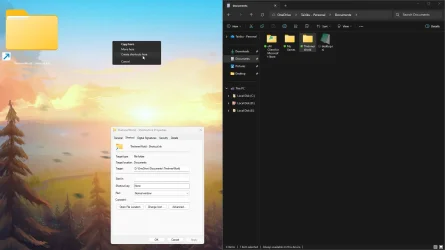
MS created a mess, by default docs link to OneDrive and by default they are always online.
Dragging a shortcut is probably the easiest way to do it without serious repercussions.

capture_06262026_202252.webp
 

My Computer My Computer

At a glance

Home26H2CanAMD Ryzen 5 8600G (07/24)2x32GB Kingston FURY DDR5 5600 MHz CL36 @5200...ASROCK Radeon RX 6600 Challenger D 8G @48FPS ...
OS
Home26H2Can
Computer type
PC/Desktop
CPU
AMD Ryzen 5 8600G (07/24)
Motherboard
ASROCK B650M-HDV/M.2 (07/24) BIOS 4.21 AGESA ComboAM5 1.3.0.1 (04/26)
Memory
2x32GB Kingston FURY DDR5 5600 MHz CL36 @5200 CL36 (07/24)
Graphics Card(s)
ASROCK Radeon RX 6600 Challenger D 8G @48FPS (08/24)
Sound Card
Creative Sound BlasterX AE-5 Plus (05/24)
Monitor(s) Displays
24" Philips 24M1N3200ZS/00 (05/24)
Screen Resolution
1920×1080@165Hz via DP1.4
Hard Drives
Kingston KC3000 NVMe 2TB (05/24)
ADATA XPG GAMMIX S11 Pro 512GB (07/19)
PSU
Seasonic Core GM 550 Gold (04/24)
Case
Fractal Design Define 7 Mini with 3x Noctua NF-P14s/12@555rpm (04/24)
Cooling
Noctua NH-U12S with Noctua NF-P12 (04/24)
Keyboard
HP Pavilion Wired Keyboard 300 (07/24) + Rabalux 76017 Parker (01/24)
Mouse
Logitech M330 Silent Plus (01/26)
Internet Speed
500/100 Mbps via RouterOS (05/21) & TCP Optimizer
Browser
Edge, Brave for YouTube, LibreWolf for FB
Antivirus
NextDNS blocking 1/3 Traffic
Other Info
Phone: Motorola Moto G86 (02/26)
Backup: Hasleo Backup Suite (PreOS)
Headphones: Sennheiser RS170 (09/10)
Chair: Huzaro Force 4.4 Grey Mesh (05/24)
Notifier: Xiaomi Mi Band 9 Milanese (10/24)
FlexCore USB-C 3.2 Gen 1 (M) to LAN (F) (08/25)
MS created a mess, by default docs link to OneDrive and by default they are always online.
Dragging a shortcut is probably the easiest way to do it without serious repercussions.

View attachment 175285
One way to avoid automatically moving your folders to OneDrive is not use a Microsoft account to login. Use a local Administrator account and login to OneDrive or other applications only with your Microsoft account. Not globally associate your local account with your Microsoft account.
 

My Computers My Computers

  • At a glance

    Windows 11 Pro 23H2 (5699), 25H2 (8655)Mobile DualCore Intel Core 2 Duo T7250, 2000 MHz4GBMobile Intel(R) GMA 4500M (Mobile 4 series)
    OS
    Windows 11 Pro 23H2 (5699), 25H2 (8655)
    Computer type
    Laptop
    Manufacturer/Model
    Acer Extensa 5630EZ
    CPU
    Mobile DualCore Intel Core 2 Duo T7250, 2000 MHz
    Motherboard
    Acer Extensa 5630
    Memory
    4GB
    Graphics Card(s)
    Mobile Intel(R) GMA 4500M (Mobile 4 series)
    Sound Card
    Realtek ALC268 @ Intel 82801IB ICH9 - High Definition Audio Controller
    Monitor(s) Displays
    1
    Screen Resolution
    1280x800
    Hard Drives
    Samsung SSD 850 EVO 250GB SATA Device (250 GB, SATA-III)
    Internet Speed
    VDSL 50 Mbps
    Browser
    MICROSOFT EDGE
    Antivirus
    WINDOWS DEFENDER
    Other Info
    Legacy MBR installation, no TPM, no Secure Boot, no WDDM 2.0 graphics drivers, no SSE4.2, cannot get more unsupported ;) This is only my test laptop. I had installed Windows 11 here before upgrading my main PC. For my main PC I use everyday see my 2nd system specs.
  • At a glance

    Windows 11 Pro v25H2 (build 26200.8655)Intel Core-i7 3770 3.40GHz s1155 (3rd generat...2x Kingston Hyper-X Blu 8GB DDR3-1600GIGABYTE GeForce RTX 3050 WINDFORCE OC V2 6GB...
    Operating System
    Windows 11 Pro v25H2 (build 26200.8655)
    Computer type
    PC/Desktop
    Manufacturer/Model
    Custom-built PC
    CPU
    Intel Core-i7 3770 3.40GHz s1155 (3rd generation)
    Motherboard
    Asus P8H61 s1155 ATX
    Memory
    2x Kingston Hyper-X Blu 8GB DDR3-1600
    Graphics card(s)
    GIGABYTE GeForce RTX 3050 WINDFORCE OC V2 6GB (GV-N3050WF2OCV2-6GD)
    Sound Card
    Realtek HD audio (ALC887)
    Monitor(s) Displays
    Sony Bravia KDL-19L4000 19" LCD TV via VGA
    Screen Resolution
    1440x900 32-bit 60Hz
    Hard Drives
    WD Blue SA510 2.5 1000GB SSD as system disk, Western Digital Caviar Purple 4TB SATA III (WD40PURZ) as second
    PSU
    Thermaltake Litepower RGB 550W Full Wired
    Case
    SUPERCASE MIDI-TOWER
    Cooling
    Deepcool Gamma Archer CPU cooler, 1x 8cm fan at the back
    Keyboard
    Mitsumi 101-key PS/2
    Mouse
    Sunnyline OptiEye PS/2
    Internet Speed
    100Mbps
    Browser
    Microsoft Edge, Mozilla Firefox
    Antivirus
    Microsoft Windows Defender
    Other Info
    Legacy BIOS (MBR) installation, no TPM, no Secure Boot, WDDM 3.0 graphics drivers, WEI score 7.4
Back
Top Bottom