Any way to get the CALCULATOR to always show on top?


orlando1974

Well-known member
Local time
8:18 AM
Posts
59
OS
Windows 10 Pro
Hi... a bit of a silly question... caused by a high annoyance.
Every time I click the calculator hot key on my Logitech keyboard (top right on the num pad), it launches the Windows 11 default calculator but.... buried underneath all my other windows. I can't seem to find a way to set it to always open on top. Which I would assume is what people want, given that a calculator is something we bring up when we need it right away for something then put it away.

Does anyone know how to set it so it always opens on top? Otherwise, is there a different free calculator available on Windows that would have this option to always open on top?
 
Windows Build/Version
23H2 (22631.2861)

My Computer My Computer

At a glance

Windows 10 ProIntel i7-9700K64GBNvidia GTX 760
OS
Windows 10 Pro
Computer type
PC/Desktop
Manufacturer/Model
ASUS
CPU
Intel i7-9700K
Motherboard
ASUS
Memory
64GB
Graphics Card(s)
Nvidia GTX 760
Screen Resolution
4K
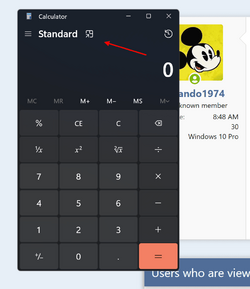
Yes keep on top Alt +UP


Screenshot 2023-12-22 065129.png
 

My Computer My Computer

At a glance

Win 11 Pro 25H2 26200 8655Intel Core I9 12900K32 GBNvidia GeForce RTX 3060 24GB
OS
Win 11 Pro 25H2 26200 8655
Computer type
PC/Desktop
Manufacturer/Model
HP Omen45L
CPU
Intel Core I9 12900K
Motherboard
HP 8917
Memory
32 GB
Graphics Card(s)
Nvidia GeForce RTX 3060 24GB
Sound Card
HP
Monitor(s) Displays
2 HP 27 & 23
Screen Resolution
3840x2160
Hard Drives
2 TB Samsung 990 EVO 2 TB Samsung 1 TB SATA ST1000
PSU
HP 800 Watt
Case
HP
Cooling
Water
Keyboard
Logo Tech G 213
Mouse
Logi Tech 502
Browser
FireFox
Antivirus
MS Defender / Malwarebytes Prem.
Other Info
Omen 45SL purchased from HP 12 2022 - Brother Printer MFC-L2700DW APC 500 Back UPS Macrium Reflect Home 8.1 25H2 Oct 2025 KEK CA 2023 cert April 2026
Thanks, I tried that but the problem is... it only works as long as you don't make active again a fullscreen app while using it.

Try to reproduce:
-Open web browser full screen (or another full screen app)
-Launch calculator (as many as you like and they will go on top)

Works fine UNTIL...
-Click somewhere in the fullscreen browser or app (which will make it in focus again).
-You should see your calculator now dissappear.
-Launch calculatior again and keeps going in background. Always on top functionality is broken.

**Calculator always on top functionality is retained if we just click in a full size window like File Explorer, but if it's an app, then the functionality breaks.
 

My Computer My Computer

At a glance

Windows 10 ProIntel i7-9700K64GBNvidia GTX 760
OS
Windows 10 Pro
Computer type
PC/Desktop
Manufacturer/Model
ASUS
CPU
Intel i7-9700K
Motherboard
ASUS
Memory
64GB
Graphics Card(s)
Nvidia GTX 760
Screen Resolution
4K
There is a method I'm using, from MS Store install MS PowerToys which has option to keep any program at the top.
CTRL + Win key + T is shortcut to bring current program in focus to top, you only need to disable drawing a border around the program in powertoys options.
 

My Computer My Computer

At a glance

Windows 11 Pro 23H2Intel i3 8100 @3.6Ghz1 x 16GB DDR4 @2400 MHzNvidia GeForce GT 1030 2GB SDDR4
OS
Windows 11 Pro 23H2
Computer type
PC/Desktop
Manufacturer/Model
MSI / MS-7B29
CPU
Intel i3 8100 @3.6Ghz
Motherboard
H310M PRO-VDH (MS-7B29)
Memory
1 x 16GB DDR4 @2400 MHz
Graphics Card(s)
Nvidia GeForce GT 1030 2GB SDDR4
Sound Card
Realtek VEN_10EC&DEV_0887 / NVIDIA VEN_10DE&DEV_0081
Monitor(s) Displays
Acer V226HQL
Screen Resolution
1920 x 1080
Hard Drives
SSD 500 GB Crucial MX500 / HDD 1 TB TOSHIBA DT01ACA100
PSU
ATX, details unknown
Case
Everest 551B
Cooling
details unknown
Keyboard
Mechanical Gaming Hydra R7 - Rampage
Mouse
Logitech G703
Internet Speed
Down: 28Mbps / Up: 19Mbps
Browser
Microsoft Edge
Antivirus
Microsoft Defender Antivirus
Other Info
Bluetooth: TP Link 5.0 Nano USB adapter UB500
WLAN: D-Link 150 Pico USB adapter, N standard
Web camera: Logitech C270 HD 720p @30fps
Microphone: Trust MICO, model 23790
There is a method I'm using, from MS Store install MS PowerToys which has option to keep any program at the top.
CTRL + Win key + T is shortcut to bring current program in focus to top, you only need to disable drawing a border around the program in powertoys options.
Oh, I used to have MSToys installed - I didn't know they had that feature. I'll consider reinstalling it if that's the only way to fix this. I do wish that Microsoft would fix their "Always on Top" toggle for the calculator so it actually sticks no matter what. I've sent feedback thru the app - who knows if they read it lol
 

My Computer My Computer

At a glance

Windows 10 ProIntel i7-9700K64GBNvidia GTX 760
OS
Windows 10 Pro
Computer type
PC/Desktop
Manufacturer/Model
ASUS
CPU
Intel i7-9700K
Motherboard
ASUS
Memory
64GB
Graphics Card(s)
Nvidia GTX 760
Screen Resolution
4K
@orlando1974
I asked same question few weeks ago, have tried out several calculators trying to replace win. calculator but powertoys method is the best for me because I use the win. calculator within game, it's simple and easy to use calculator and overall good for gaming if you need to calculate things fast due to resize ability of buttons and large digit screen.
 

My Computer My Computer

At a glance

Windows 11 Pro 23H2Intel i3 8100 @3.6Ghz1 x 16GB DDR4 @2400 MHzNvidia GeForce GT 1030 2GB SDDR4
OS
Windows 11 Pro 23H2
Computer type
PC/Desktop
Manufacturer/Model
MSI / MS-7B29
CPU
Intel i3 8100 @3.6Ghz
Motherboard
H310M PRO-VDH (MS-7B29)
Memory
1 x 16GB DDR4 @2400 MHz
Graphics Card(s)
Nvidia GeForce GT 1030 2GB SDDR4
Sound Card
Realtek VEN_10EC&DEV_0887 / NVIDIA VEN_10DE&DEV_0081
Monitor(s) Displays
Acer V226HQL
Screen Resolution
1920 x 1080
Hard Drives
SSD 500 GB Crucial MX500 / HDD 1 TB TOSHIBA DT01ACA100
PSU
ATX, details unknown
Case
Everest 551B
Cooling
details unknown
Keyboard
Mechanical Gaming Hydra R7 - Rampage
Mouse
Logitech G703
Internet Speed
Down: 28Mbps / Up: 19Mbps
Browser
Microsoft Edge
Antivirus
Microsoft Defender Antivirus
Other Info
Bluetooth: TP Link 5.0 Nano USB adapter UB500
WLAN: D-Link 150 Pico USB adapter, N standard
Web camera: Logitech C270 HD 720p @30fps
Microphone: Trust MICO, model 23790
Try to reproduce:
-Open web browser full screen (or another full screen app)
-Launch calculator (as many as you like and they will go on top)
Strange I just did and mine works fine ...... could it be something about your Win 11 stealing focus - Accessibility settings?
Or this Please recommend a calculator
 

My Computer My Computer

At a glance

Win 11 Pro 25H2 26200 8655Intel Core I9 12900K32 GBNvidia GeForce RTX 3060 24GB
OS
Win 11 Pro 25H2 26200 8655
Computer type
PC/Desktop
Manufacturer/Model
HP Omen45L
CPU
Intel Core I9 12900K
Motherboard
HP 8917
Memory
32 GB
Graphics Card(s)
Nvidia GeForce RTX 3060 24GB
Sound Card
HP
Monitor(s) Displays
2 HP 27 & 23
Screen Resolution
3840x2160
Hard Drives
2 TB Samsung 990 EVO 2 TB Samsung 1 TB SATA ST1000
PSU
HP 800 Watt
Case
HP
Cooling
Water
Keyboard
Logo Tech G 213
Mouse
Logi Tech 502
Browser
FireFox
Antivirus
MS Defender / Malwarebytes Prem.
Other Info
Omen 45SL purchased from HP 12 2022 - Brother Printer MFC-L2700DW APC 500 Back UPS Macrium Reflect Home 8.1 25H2 Oct 2025 KEK CA 2023 cert April 2026
@MitchInHome
It works for standard calculator but the option doesn't exist for scientific calculator.
Another set back is that setting the win. calc at the top will remove memory buttons and you won't be able to memorize anything.
 

My Computer My Computer

At a glance

Windows 11 Pro 23H2Intel i3 8100 @3.6Ghz1 x 16GB DDR4 @2400 MHzNvidia GeForce GT 1030 2GB SDDR4
OS
Windows 11 Pro 23H2
Computer type
PC/Desktop
Manufacturer/Model
MSI / MS-7B29
CPU
Intel i3 8100 @3.6Ghz
Motherboard
H310M PRO-VDH (MS-7B29)
Memory
1 x 16GB DDR4 @2400 MHz
Graphics Card(s)
Nvidia GeForce GT 1030 2GB SDDR4
Sound Card
Realtek VEN_10EC&DEV_0887 / NVIDIA VEN_10DE&DEV_0081
Monitor(s) Displays
Acer V226HQL
Screen Resolution
1920 x 1080
Hard Drives
SSD 500 GB Crucial MX500 / HDD 1 TB TOSHIBA DT01ACA100
PSU
ATX, details unknown
Case
Everest 551B
Cooling
details unknown
Keyboard
Mechanical Gaming Hydra R7 - Rampage
Mouse
Logitech G703
Internet Speed
Down: 28Mbps / Up: 19Mbps
Browser
Microsoft Edge
Antivirus
Microsoft Defender Antivirus
Other Info
Bluetooth: TP Link 5.0 Nano USB adapter UB500
WLAN: D-Link 150 Pico USB adapter, N standard
Web camera: Logitech C270 HD 720p @30fps
Microphone: Trust MICO, model 23790
Strange I just did and mine works fine ...... could it be something about your Win 11 stealing focus - Accessibility settings?
Or this Please recommend a calculator
Hmm, you're lucky then because on my system the moment I activate again a fullscreen app/browser window or tab, the calculator gets pushed to the background and launching again with the calculator hotkey now launches them in the background. I checked Accessibility settings and found nothing there... I don't require those so I never tweaked them.
 

My Computer My Computer

At a glance

Windows 10 ProIntel i7-9700K64GBNvidia GTX 760
OS
Windows 10 Pro
Computer type
PC/Desktop
Manufacturer/Model
ASUS
CPU
Intel i7-9700K
Motherboard
ASUS
Memory
64GB
Graphics Card(s)
Nvidia GTX 760
Screen Resolution
4K
Refer to this thread in forum from

Near the bottom user Berton: https://www.elevenforum.com/members/berton.127/
Suggested "Moffsoft FreeCalc" which may have an old interface.
For me it works perfectly. I changed my Logitech Keyboard calc button to this.

I just need a standard calc that launches on top, without finding it and clicking pins etc
 

My Computers My Computers

  • At a glance

    Windows 1112th Gen Intel(R) Core(TM) i5-12400, 2500 Mhz64 GB3 (1 Built in - Intel 730) (1 PCIE NVIDIA GT ...
    OS
    Windows 11
    Computer type
    PC/Desktop
    Manufacturer/Model
    Dell Inspiron 3910
    CPU
    12th Gen Intel(R) Core(TM) i5-12400, 2500 Mhz
    Motherboard
    Dell
    Memory
    64 GB
    Graphics Card(s)
    3 (1 Built in - Intel 730) (1 PCIE NVIDIA GT 1030) (1 SMI USB Display)
    Sound Card
    Dell Default
    Monitor(s) Displays
    5 Monitors - (30" Fiodio AF11F 30"), (27" Acer G276HL, AOC 2752H,) (23" Philips 242B9T Touch Screen) (24" Viewsonic VX2457)
    Screen Resolution
    Alot :) 5 monitors
    Hard Drives
    PNY CS3040 M.2 1TB - Split C:/D:
    PSU
    Dell 3910 Default
    Case
    Mini-Tower
    Cooling
    extra externally mounted exhaust fan for extra CPU cooling
    Keyboard
    Logitech K800
    Mouse
    Razer Basilisk Ultimate
    Internet Speed
    300/300 Fiber
    Browser
    MS Edge
    Antivirus
    Defender & UnHackme (Installed and running together) allowing for dbl protection
  • At a glance

    Windows 11Intel's 12th Gen 12-Core CPU32NVIDIA GeForce RTX 30
    Operating System
    Windows 11
    Computer type
    Laptop
    Manufacturer/Model
    Summit E16Flip A12UDT-006
    CPU
    Intel's 12th Gen 12-Core CPU
    Motherboard
    MSI
    Memory
    32
    Graphics card(s)
    NVIDIA GeForce RTX 30
    Sound Card
    MSI Default
    Monitor(s) Displays
    16:10 Golden Ratio QHD+ 165Hz
    Screen Resolution
    2560x1600
    Hard Drives
    1TB NVMe SSD
    Antivirus
    Defender & UnHackme (Installed and running together) allowing for dbl protection
A moment ago I tried the Moffsoft FreeCalc.
May be you like the program, but it is not usable for me.
- Only in English (I prefer NL for all my programs, if anyway possible)
- No other modes than just plain, simple calculator (no scientific mode, which I need often).
- No binary / hex mode possible (I use that quite often to calculate between hex numbers and decimal numbers).

My favorite calculator is the classic calculator from Windows 7 (and older), which you find linked here:
It has no option to always stay on top, but when I start it from my preprogrammed keyboard key, it always starts on top anyway!
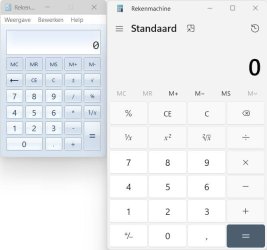
That calculator has all the modes that are in te modern app, but just a bit more modest in view on my monitor.

Compare (left the classic calculator, right the modern app):

001648.jpg
Both images are presented here at 100% size on my screen!
 

My Computer My Computer

At a glance

Windows 11 Pro 25H2 26200.8457AMD Ryzen 7 5700GKingston FURY Beast 2x16GB DIMM DDR4 2666 CL16MSI GeForce GT 730 2GB LP V1
OS
Windows 11 Pro 25H2 26200.8457
Computer type
PC/Desktop
Manufacturer/Model
Build by vendor to my specs
CPU
AMD Ryzen 7 5700G
Motherboard
MSI PRO B550M-P Gen3
Memory
Kingston FURY Beast 2x16GB DIMM DDR4 2666 CL16
Graphics Card(s)
MSI GeForce GT 730 2GB LP V1
Sound Card
Creative Sound Blaster Audigy FX
Monitor(s) Displays
Samsung S24E450F 24"
Screen Resolution
1920 x 1080
Hard Drives
1. SSD Crucial P5 Plus 500GB PCIe M.2
2. SSD-SATA Crucial MX500-2TB
PSU
Corsair CV650W
Case
Cooler Master Silencio S400
Cooling
Cooler Master Hyper H412R with Be Quiet Pure Wings 2 PWM BL038 fan
Keyboard
Cherry Stream (wired, scissor keys)
Mouse
Asus WT465 (wireless)
Internet Speed
70 Mbps down / 80 Mbps up
Browser
Firefox 130.0
Antivirus
F-Secure (Internetprovider version)
Other Info
Router: FRITZBox 7490
Oracle VirtualBox 7 for testing software on Win 10 or 11
If you have 2 monitors, you can do like me and set the default calculator to open on the 2nd display. It's a workaround but thats what I do. I have the 2nd monitor in physically rotated to portrait orientation and I just launch the calculator full screen, and keep the main display for whatever my main task is. So I have a pretty large calculator on the side screen while I I keep my main stuff on the main display. #justanotheridea
 

My Computer My Computer

At a glance

Windows 10 ProIntel i7-9700K64GBNvidia GTX 760
OS
Windows 10 Pro
Computer type
PC/Desktop
Manufacturer/Model
ASUS
CPU
Intel i7-9700K
Motherboard
ASUS
Memory
64GB
Graphics Card(s)
Nvidia GTX 760
Screen Resolution
4K
Back
Top Bottom