Any way to re-arrange shortcuts in File Explorer's Quick Access toolbar?


mwidunn

New member
Local time
4:05 PM
Posts
7
OS
Windows 11
Does anyone know of any way -- maybe, a freeware tool or something -- that would allow the shortcuts in File Explorer's Quick Access toolbar to be re-arranged?

F.Y.I. I'm using Win11 whose File Explorer has been tweaked back to the Win10 version.

Thanks!
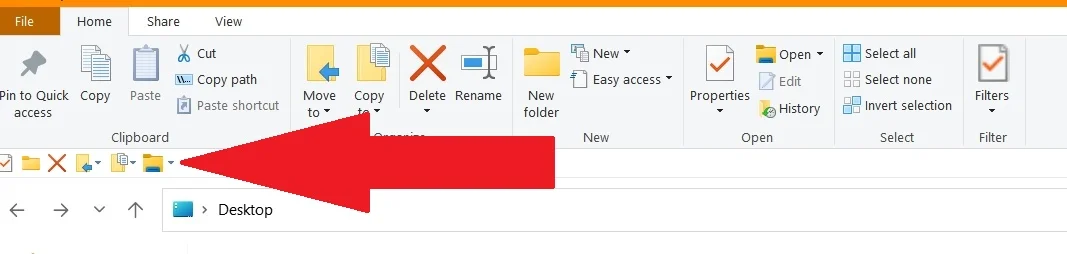
2026-07-10 15_14_39-Desktop.webp
 
Windows Build/Version
Windows 11 Home Version 25H2

My Computer My Computer

At a glance

Windows 11
OS
Windows 11
Computer type
Laptop
Manufacturer/Model
HP
Does anyone know of any way that would allow the shortcuts in File Explorer's Quick Access toolbar to be re-arranged?
Remove all of them..., then add them, one at a time, in the order you wish them to appear.
 

My Computers My Computers

  • At a glance

    Windows 11 Pro
    OS
    Windows 11 Pro
    Computer type
    PC/Desktop
    Manufacturer/Model
    ASUS ROG Strix
  • At a glance

    Windows 11 Pro
    Operating System
    Windows 11 Pro
    Computer type
    Laptop
    Manufacturer/Model
    ASUS VivoBook
  • ASUS VivoBook 'Lite' ~ Windows 11 Home
So, your answer would be . . . : no?
 

My Computer My Computer

At a glance

Windows 11
OS
Windows 11
Computer type
Laptop
Manufacturer/Model
HP
So, your answer would be . . . : no?
My answer is:
you can (re)arrange them by removing all...

13083.webp

... then adding the desired ones, one at a time..., doing so in the order you wish them to appear on the bar...

13084.webp
 

My Computers My Computers

  • At a glance

    Windows 11 Pro
    OS
    Windows 11 Pro
    Computer type
    PC/Desktop
    Manufacturer/Model
    ASUS ROG Strix
  • At a glance

    Windows 11 Pro
    Operating System
    Windows 11 Pro
    Computer type
    Laptop
    Manufacturer/Model
    ASUS VivoBook
  • ASUS VivoBook 'Lite' ~ Windows 11 Home
My answer is: you can (re)arrange them by removing all, then adding the desired ones, one at a time, doing so in the order you wish them to appear on the bar.
Thank you, I appreciate it.
But, I already knew that I could do this. I don't want to, though. I was wondering if there were any way, like we can re-arrange pinned items in Taskbar.
So, . . . Is your answer to my question: "no"?
 

My Computer My Computer

At a glance

Windows 11
OS
Windows 11
Computer type
Laptop
Manufacturer/Model
HP
Thank you, I appreciate it.
But, I already knew that I could do this. I don't want to, though. I was wondering if there were any way, like we can re-arrange pinned items in Taskbar.
So, . . . Is your answer to my question: "no"?
:think:
 

My Computers My Computers

  • At a glance

    All Branches but ReleaseAMD Ryzen 7 7735HS 3200-4500 Mhz 8 cores x 232 GB DDR5Radeon Graphic / NVIDIA GeForce RTX 4060 8 GB...
    OS
    All Branches but Release
    Computer type
    Laptop
    Manufacturer/Model
    Acer Nitro ANV15-51
    CPU
    AMD Ryzen 7 7735HS 3200-4500 Mhz 8 cores x 2
    Motherboard
    Sportage_RBH
    Memory
    32 GB DDR5
    Graphics Card(s)
    Radeon Graphic / NVIDIA GeForce RTX 4060 8 GB GDDR6
    Sound Card
    AMD/Realtek(R) Audio
    Monitor(s) Displays
    Integrated Monitor (15.3"vis)
    Screen Resolution
    FHD 1920X1080 16:9 144Hz
    Hard Drives
    KINGSTON OM8SEP4512Q-AA 1TB
    Western Digital 256GB
    PSU
    19V DC 6.32 A 120 W
    Cooling
    Dual Fans
    Mouse
    MS Bluetooth
    Internet Speed
    Fiber 1GB Cox -us & 1GB Orange-fr
    Browser
    Edge Canary- Firefox Nightly-Chrome Dev-Chrome Dev
    Antivirus
    Windows Defender
  • At a glance

    Windows 11 BetaAMD A9-94208 GB of DDR4AMD Radeon R5
    Operating System
    Windows 11 Beta
    Computer type
    Laptop
    Manufacturer/Model
    Asus X751BP
    CPU
    AMD A9-9420
    Memory
    8 GB of DDR4
    Graphics card(s)
    AMD Radeon R5
    Screen Resolution
    1600x900
    Hard Drives
    Seagate 1 TB

My Computers My Computers

  • At a glance

    Windows 11 Pro
    OS
    Windows 11 Pro
    Computer type
    PC/Desktop
    Manufacturer/Model
    ASUS ROG Strix
  • At a glance

    Windows 11 Pro
    Operating System
    Windows 11 Pro
    Computer type
    Laptop
    Manufacturer/Model
    ASUS VivoBook
  • ASUS VivoBook 'Lite' ~ Windows 11 Home
  • Haha
Reactions: OAT
- so you've got the same answer to this post on tenforums and elevenforum..
- although my answer there was never acknowledged.

Personally I can't think I've ever really used QuickAccess.. and if you want a way to reorganise shortcuts, there are plenty of other options.
 

My Computer My Computer

At a glance

Windows 11 Proi7-8650U16GBIntel UHD 620
OS
Windows 11 Pro
Computer type
Laptop
Manufacturer/Model
Lenovo t480s
CPU
i7-8650U
Memory
16GB
Graphics Card(s)
Intel UHD 620
Screen Resolution
1920x1080
Hard Drives
C SN810 SDCPNRY-512G-1006
Browser
Edge, Firefox
Antivirus
Defender
Back
Top Bottom