Coffeebean
Member
- Local time
- 1:59 AM
- Posts
- 7
- OS
- Windows 11 Home
Hello hello, new user/long time lurker here  I've been trying to find a way to stop W11H from checking for updates and running Defender EVERY time I turn on my laptop—but net searches keep returning "how to stop automatic updates" which I've already done by using instructions found in this forum a few years back—a truly wonderful find imho thankyousoverymuchindeed
I want to stop the checking for updates, or more accurately, control exactly when windows checks for updates and run scans
I shut down my laptop when I'm done with it for the time being, sometimes that's for days sometimes for hours but no matter which, every time I turn it on I have to wait FOREVER for win11 to fart around Defending & Checking... whatever it wants to look for... which takes too bleeping long before it hands over access so I can use my laptop. This constant time wasting messes with productivity. Compared to my old XP computer (just timed both fwiw) which I even have a bios password on that has to be entered first, (this one does not) W11 takes over 5 times as long to hand over control of my "modern" (ha!) desktop.
That machine is over 20 yrs old and has 1/3th the proc-power with 1/4 the ram but it loads in 18 SECONDS while this one takes 30-50 seconds just from the ASUS page to loading the first "picture screen", then 20 more seconds (sometimes longer) before my login page appears, and then anywhere from 20-40 more seconds before it stops farting around and hands over access to my frozen desktop/programs/etc... And the last thing it does before handing control over? The annoying "Windows Defender Found No Threats" pop-out (which you have to waste more time on clicking to dismiss ^%$@#&!!. ) Good lord, is every OS/App/Prog nowadays purposely designed to waste as much time as humanly possibly with needless clicking? I digress...because I long for the clean and simple days of old lol...
Anyway It has been like this from new, w/clean install & no added programs. I don't game, or run anything that windows didn't come with. Literally nothing. All Asus bloat cleaned out with a fresh 11 install. This is literally an old lady latop that writes docs in wordpad or notepad, reads news and sends email once a week on a busy day! I only realised it still hunted updates when today I opened settings for a different reason a saw it had "last checked for updates 3 hours ago".... exactly when I turned my computer on today.... grrr
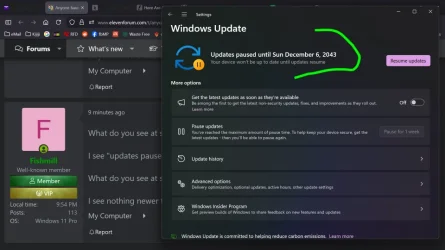
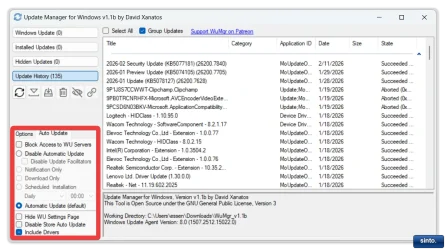
I thought I had stopped the "checking for updates" side of things when I gave myself the "20 Year Tweak" but alas no, it may not updatate automatically but it is still always loooooking - slowing things down and jamming things up.
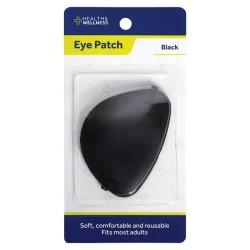
So, figuratively speaking - I want to poke it's eyes out...
Anyone have a stick?
I've been trying to find a way to stop W11H from checking for updates and running Defender EVERY time I turn on my laptop—but net searches keep returning "how to stop automatic updates" which I've already done by using instructions found in this forum a few years back—a truly wonderful find imho thankyousoverymuchindeedI want to stop the checking for updates, or more accurately, control exactly when windows checks for updates and run scans
I shut down my laptop when I'm done with it for the time being, sometimes that's for days sometimes for hours but no matter which, every time I turn it on I have to wait FOREVER for win11 to fart around Defending & Checking... whatever it wants to look for... which takes too bleeping long before it hands over access so I can use my laptop. This constant time wasting messes with productivity. Compared to my old XP computer (just timed both fwiw) which I even have a bios password on that has to be entered first, (this one does not) W11 takes over 5 times as long to hand over control of my "modern" (ha!) desktop.
That machine is over 20 yrs old and has 1/3th the proc-power with 1/4 the ram but it loads in 18 SECONDS while this one takes 30-50 seconds just from the ASUS page to loading the first "picture screen", then 20 more seconds (sometimes longer) before my login page appears, and then anywhere from 20-40 more seconds before it stops farting around and hands over access to my frozen desktop/programs/etc... And the last thing it does before handing control over? The annoying "Windows Defender Found No Threats" pop-out (which you have to waste more time on clicking to dismiss ^%$@#&!!. ) Good lord, is every OS/App/Prog nowadays purposely designed to waste as much time as humanly possibly with needless clicking? I digress...because I long for the clean and simple days of old lol...
Anyway It has been like this from new, w/clean install & no added programs. I don't game, or run anything that windows didn't come with. Literally nothing. All Asus bloat cleaned out with a fresh 11 install. This is literally an old lady latop that writes docs in wordpad or notepad, reads news and sends email once a week on a busy day! I only realised it still hunted updates when today I opened settings for a different reason a saw it had "last checked for updates 3 hours ago".... exactly when I turned my computer on today.... grrr
I thought I had stopped the "checking for updates" side of things when I gave myself the "20 Year Tweak" but alas no, it may not updatate automatically but it is still always loooooking - slowing things down and jamming things up.
So, figuratively speaking - I want to poke it's eyes out...
Anyone have a stick?
My Computer
At a glance
Windows 11 Home
- OS
- Windows 11 Home
- Computer type
- Laptop
- Manufacturer/Model
- Asus





 yep you all, every brainiac, techy, nerd, guru, noob or other kindness carrying keyboard tapper that has ever taken a moment to give a moment — folks like you are a huge reason why the world doesn't suck completely right now — may you all