Anyone used their second monitor as a tv?


Morph000

Well-known member
Member
VIP
Local time
5:47 PM
Posts
330
Location
Australia (best bit)
OS
Windows 11 Pro 24H2
I'm looking to use my 2nd monitor as a tv to save bench space, power consumption and better versatility.
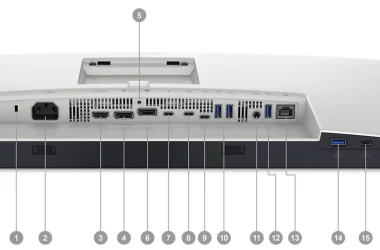
It's a Dell U2724DE with integrated Thunderbolt 4 hub, so it's feature packed for a monitor!
Yes, it has audio too.
I believe it *should* be a matter of feeding the HDMI from a set top box into the monitor's HDMI port, but you never know.
I want to feed tv straight to the monitor rather than use a USB tv tuner, as they're rare and don't play well with W11.
Anyone doing this ?
u2724de.webp
 

My Computer My Computer

At a glance

Windows 11 Pro 24H2i7 Ultra16GBIntel
OS
Windows 11 Pro 24H2
Computer type
Laptop
Manufacturer/Model
LG
CPU
i7 Ultra
Memory
16GB
Graphics Card(s)
Intel
Sound Card
Intel Realtek
Monitor(s) Displays
Laptop 17" & TB4 Dell 27" QHD Ultrasharp w/integral TB4 hub
Screen Resolution
2560x1600
Hard Drives
1TB SSD, 5 external WDs
Mouse
Logitech Master MX 3S
Browser
Vivaldi
Antivirus
Kaspersky Premium Suite
My Dell U2415, with 16:10 width/height ratio, lacks logic to render 16:9 video without distortion: it will be stretched to full-screen.
 

My Computer My Computer

At a glance

Linux
OS
Linux
It's a Dell U2724DE
Perhaps somebody else has already tried it and described their experiences in the Dell user forum.
www.dell.com/community/en/conversations/search?

feeding the HDMI from a set top box into the monitor's HDMI port
And that, I assume, is how you currently successfully connect your set-top box to your TV.
When I used to do that I found that the signal was handled correctly & displayed successfully albeit possibly offset/stretched/squashed a bit. I had to make use of my TV's HDMI input left/right/up/down & scaling controls to get it to display correctly.


Good luck,
Denis
 
Last edited:

My Computer My Computer

At a glance

Windows 11 Home x64 Version 25H2 Build 26200....
OS
Windows 11 Home x64 Version 25H2 Build 26200.9168
USB tv tuner, as they're rare and don't play well with W11
Please, for my benefit, would you explain what the problems are.
Until I read your comment, I had not realised that I've only used my USB TV tuners in my Windows 10 computers. I have yet to try them in Windows 11.


Denis
 

My Computer My Computer

At a glance

Windows 11 Home x64 Version 25H2 Build 26200....
OS
Windows 11 Home x64 Version 25H2 Build 26200.9168
I'm looking to use my 2nd monitor as a tv....
Don't see why not. I use my TV as a 2nd monitor, connected by a 3m HDMI cable....
 

My Computers My Computers

  • At a glance

    Windows 11 HomeAMD Athlon Silver 3050U8GBRadeon Graphics
    OS
    Windows 11 Home
    Computer type
    Laptop
    Manufacturer/Model
    Acer Aspire 3 A315-23-R9VY
    CPU
    AMD Athlon Silver 3050U
    Memory
    8GB
    Graphics Card(s)
    Radeon Graphics
    Monitor(s) Displays
    laptop screen
    Screen Resolution
    1366x768 native resolution, up to 2560x1440 with Radeon Virtual Super Resolution
    Hard Drives
    1TB Samsung EVO 870 SSD (from April 2026: 250GB EVO 850)
    Internet Speed
    150 Mbps
    Browser
    Edge, Firefox
    Antivirus
    Defender
    Other Info
    UPDATE - 11 April 2026: due to lid hinges starting to break up this laptop has been retired from active duty. The OS with all software and files has been migrated to my System Seven in 'Other systems' to carry on as my general purpose 'main machine'.

    I've now clean installed 25H2 and used Garlin's scripts to update Secure Boot to CA 2023 and revoke the PCA 2011 certificates. It's new role is to test secure boot issues.

    Info for 2021-2026:
    fully 'Windows 11 ready' laptop. Windows 10 C: partition migrated from my old unsupported 'main machine' then upgraded to 11. A test migration ran Insider builds for 2 months. When 11 was released on 5th October 2021 it was re-imaged back to 10 and was offered the upgrade in Windows Update on 20th October. Windows Update offered the 22H2 Feature Update on 20th September 2022. It got the 23H2 Feature Update on 4th November 2023 through Windows Update, 24H2 on 3rd October 2024 through Windows Update by setting the Target Release Version for 24H2, and 25H2 on 30th September 2025 through Windows Update by setting the Target Release Version for 25H2.
  • At a glance

    Windows 11 ProIntel® Core™ i5-520M8GB(integrated graphics) Intel HD Graphics
    Operating System
    Windows 11 Pro
    Computer type
    Laptop
    Manufacturer/Model
    Dell Latitude E4310
    CPU
    Intel® Core™ i5-520M
    Motherboard
    0T6M8G
    Memory
    8GB
    Graphics card(s)
    (integrated graphics) Intel HD Graphics
    Screen Resolution
    1366x768
    Hard Drives
    500GB Crucial MX500 SSD
    Browser
    Firefox, Edge
    Antivirus
    Defender
    Other Info
    unsupported machine: Legacy bios, MBR, TPM 1.2, upgraded from W10 to W11 using W10/W11 hybrid install media workaround.

    In-place upgrade to 22H2 using ISO and a workaround.
    Feature Update to 23H2 by manually installing the Enablement Package.
    In-place upgrade to 24H2 using hybrid 23H2/24H2 install media.
    Upgraded to 25H2 by Enablement Package.

    Also running Insider Experimental 263xx and 29xxx builds and Windows 10 as native boot .vhdx.
  • My SYSTEM THREE is a Dell Latitude 5410, i7-10610U, 32GB RAM, 512GB NVMe ssd, supported device running Windows 11 Pro.

    My SYSTEM FOUR was a 2-in-1 convertible Lenovo Yoga 11e (1st gen) type 20DA, Celeron N2930, 8GB RAM, 256GB ssd. Unsupported device. This has now been sold. It has been replaced by my System Eight.

    My SYSTEM FIVE is a Dell Latitude 3190 2-in-1, Pentium Silver N5030, 8GB RAM, 1TB NVMe ssd, supported device running Windows 11 Pro, plus Insider Beta, Experimental 263xx and 29xxx builds (and a few others) as a native boot .vhdx.

    My SYSTEM SIX is a Dell Latitude 5550, Core Ultra 7 165H, 64GB RAM, 1TB NVMe SSD, supported device, Windows 11 Pro, Hyper-V host machine. Updated to 25H2 on 30th September 2025.

    My SYSTEM SEVEN is a Lenovo Thinkpad T580, 1920x1080 touchscreen, Intel Core i7-8650U, 16GB RAM, 512GB NVMe SSD + 2nd 512GB NVMe SSD, a supported device for Windows 11. This is my current general purpose 'main machine'. The installed Windows 11 Home from my System One has been migrated to this machine. As its new home has an existing digital licence for Pro I've been able to upgrade the migrated OS from Home to Pro.

    My SYSTEM EIGHT is a 2-in-1 convertible Lenovo Yoga 11e (5th gen) type 20LN, Celeron N4120, 8GB RAM, 512GB NVMe ssd, a supported device for Windows 11. Currently running Windows 11 Pro, plus Insider Beta, Experimental 263xx and 29xxx builds as native boot vhdx.
I connect a Fire TV Stick into an Ilyama monitor with HDMI, and it works fine.
 

My Computer My Computer

At a glance

Windows 11 25H2AMD Ryzen 5 1600 - 6 Core24GBNvidia 1030GT
OS
Windows 11 25H2
Computer type
PC/Desktop
Manufacturer/Model
Custom Build
CPU
AMD Ryzen 5 1600 - 6 Core
Motherboard
Asus
Memory
24GB
Graphics Card(s)
Nvidia 1030GT
Sound Card
On Board
Monitor(s) Displays
Iiyama24
I've been watching all "TV" on my Dell PC monitor for over 5 years. I have not turned on my regular TV since.

Both for "over the air" channels and Sling TV.

Only hardware I bought was a Hauppage internal TV tuner card; about 80 dollars at the time. And a 35 dollar Mohu brand antenna that is tacked to the wall about 8 feet from the PC. I use the antenna and Hauppage to pick up maybe 50 over the air channels whose broadcast antennas are about 25 miles away. Sling is streamed over my Internet connection. All told, probably 300 channels. This was originally a way of "cutting the cord" and getting rid of Cable TV.

The connection from PC to monitor is via HDMI.

Until about 3 months ago, I had a Dell S2316H monitor with built in speakers. I don't game and don't have high requirements for PC audio, so that worked very well. But the monitor got to about 10 years old and one of the 2 speakers blew out. I could have just bought external speakers at that point, but I decided it was time to replace the monitor as well.

So I replaced it with a Dell SE2726HS monitor. No speakers. 110 bucks on sale at Best Buy. And I bought a pair of Creative Labs Pebble V3 USB speakers. 34 bucks at Amazon. Each speaker is round, slightly bigger than a grapefruit.

This all works quite well. Viewing distance is arm's length. If anything, the new 27 inch monitor might be an inch or 2 too wide, but I don't regret it.

All of this stuff connects to a PC I built last January. MSI Pro Z890-A board, which has Thunderbolt 4 and HDMI outputs. I am using the HDMI to the new monitor.

I will warn anyone who attempts to use any sort of software equalizer to adjust bass and treble on external speakers that they will likely end up highly frustrated. I tried several different equalizers and gave up after probably 50 hours of struggling. I played with dozens of settings in Device Manager, Windows sound control panel, Windows task scheduler, etc. With as much AI assistance as I could tolerate from Google.

Windows 11 Pro, the equalizer, and the speakers were all competing to be the boss, interfering with each other. I'd "solve" the situation for an hour or a day only to find that my configuration would not survive. I'd end up with no sound at all. Sometimes it failed on the very next reboot, but I had one config that was fine for a week or so and then failed. I pulled out my remaining hair and gave up.

Equalizer apps I tried and ultimately failed with: FxSound, PEACE EQ, and I think at least one more that I cannot recall.

So, I live without equalization or any type of tone control. The unaltered sound on the Pebble speakers is certainly far superior to the sound I had from the built-in speakers on my old monitor.

Apparently...if you demand tone control on external speakers, you are best advised to buy a standalone device like this:


I may or may not eventually do that.

Or you might be willing to spend more on speakers than I did. I have no idea how well speakers with "built in" rotary tone controls would work. I'd be suspicious.

 
Last edited:

My Computer My Computer

At a glance

Windows 11 ProIntel 265KG Skill DDR5 2 x 16 kit 6000/36none
OS
Windows 11 Pro
Computer type
PC/Desktop
Manufacturer/Model
Fishmill Special
CPU
Intel 265K
Motherboard
MSI Pro Z890-A
Memory
G Skill DDR5 2 x 16 kit 6000/36
Graphics Card(s)
none
Sound Card
none
Monitor(s) Displays
Dell SE2726HS
Screen Resolution
1920 x 1080
Hard Drives
WD SN770 NVME 500 GB boot; Intel 660p NVME 2 TB and WD Green 3 TB storage
PSU
Be Quiet 13M 750 ATX 3.1
Case
Lancool PC-K65
Cooling
Noctua U12S
Keyboard
Logitech K120 Wired
Mouse
Dell MS-116
Browser
Chrome
Antivirus
Microsoft Defender and Malwarebytes
I’ve never tried what you’re describing so I don’t know. I’ve been steaming from my computer to a second 32” monitor on a tv wall bracket for years. Lots of free tv and movie sites like Pluto, Plex, YouTube videos and Amazon Prime, I don’t watch a whole lot of TV so that this works for me. I use a regular 28” Samsung 4k monitor for my regular desktop monitor.
 

My Computer My Computer

At a glance

Windows XP (Stable, iconic) 7/8.1/10/ Tiny11 ...Intel i7 4790K32GB DDR3 1600 MHzATI Radeon HD 7770 2GB GDDR5
OS
Windows XP (Stable, iconic) 7/8.1/10/ Tiny11 25H2
Computer type
PC/Desktop
Manufacturer/Model
Alienware PC
CPU
Intel i7 4790K
Motherboard
ASROCK Z97 EXTREME4
Memory
32GB DDR3 1600 MHz
Graphics Card(s)
ATI Radeon HD 7770 2GB GDDR5
Sound Card
Onboard
Monitor(s) Displays
SAMSUNG UE57 Series 28-Inch 4K UHD
Hard Drives
SAMSUNG 860 EVO 250 gigabyte SSD
PSU
EVGA 850 watt
Case
Alienware Area 51 Black Tower Case
Keyboard
HyperX - Alloy Elite 2 Mechanical Gaming Keyboard.
Mouse
Microsoft Wireless
Internet Speed
1.2 GHz
Browser
Chrome..Edge..Firefox
I've been watching all "TV" on my Dell PC monitor for over 5 years
The OP is asking for advice about connecting a set-top box to a monitor without a PC being involved.


All the best,
Denis
 

My Computer My Computer

At a glance

Windows 11 Home x64 Version 25H2 Build 26200....
OS
Windows 11 Home x64 Version 25H2 Build 26200.9168
I use Sling TV for my living room TV and for my office second monitor. That makes it really simple because I have no set top boxes to deal with.
 

My Computer My Computer

At a glance

Windows 10/11
OS
Windows 10/11
Computer type
Laptop
Manufacturer/Model
Acer
The OP is asking for advice about connecting a set-top box to a monitor without a PC being involved.


All the best,
Denis
Well maybe some of us didn’t quite understand what the OP was talking about, we are not all electronic gurus here, can you please forgive us? 😁
 

My Computer My Computer

At a glance

Windows XP (Stable, iconic) 7/8.1/10/ Tiny11 ...Intel i7 4790K32GB DDR3 1600 MHzATI Radeon HD 7770 2GB GDDR5
OS
Windows XP (Stable, iconic) 7/8.1/10/ Tiny11 25H2
Computer type
PC/Desktop
Manufacturer/Model
Alienware PC
CPU
Intel i7 4790K
Motherboard
ASROCK Z97 EXTREME4
Memory
32GB DDR3 1600 MHz
Graphics Card(s)
ATI Radeon HD 7770 2GB GDDR5
Sound Card
Onboard
Monitor(s) Displays
SAMSUNG UE57 Series 28-Inch 4K UHD
Hard Drives
SAMSUNG 860 EVO 250 gigabyte SSD
PSU
EVGA 850 watt
Case
Alienware Area 51 Black Tower Case
Keyboard
HyperX - Alloy Elite 2 Mechanical Gaming Keyboard.
Mouse
Microsoft Wireless
Internet Speed
1.2 GHz
Browser
Chrome..Edge..Firefox
In my office area, I watch almost all of my TV viewing on a secondary computer monitor. However, I get all of my TV viewing via streaming these days, so I'm not using any kind of tuner card in any of my PC's. I don't connect any type of set top box to the monitor, with the exception of an AppleTV 4k box from time to time.....so my use case isn't the same as the OP is asking about.
 

My Computers My Computers

  • At a glance

    Windows 11 ProIntel Core i5-8279u32GB DDR4 2666MhzIntel Iris Plus 655
    OS
    Windows 11 Pro
    Computer type
    PC/Desktop
    Manufacturer/Model
    Beelink SEI8
    CPU
    Intel Core i5-8279u
    Motherboard
    AZW SEI
    Memory
    32GB DDR4 2666Mhz
    Graphics Card(s)
    Intel Iris Plus 655
    Sound Card
    Intel SST
    Monitor(s) Displays
    Asus ProArt PA278QV
    Screen Resolution
    2560x1440
    Hard Drives
    512GB NVMe
    PSU
    NA
    Case
    NA
    Cooling
    NA
    Keyboard
    NA
    Mouse
    NA
    Internet Speed
    500/50
    Browser
    Edge
    Antivirus
    Defender
    Other Info
    Mini PC used for testing Windows 11.
  • At a glance

    Windows 10 ProRyzen 9 5900x64GB DDR4-3600EVGA GeForce 3080 FT3 Ultra
    Operating System
    Windows 10 Pro
    Computer type
    PC/Desktop
    Manufacturer/Model
    Custom
    CPU
    Ryzen 9 5900x
    Motherboard
    Asus Rog Strix X570-E Gaming
    Memory
    64GB DDR4-3600
    Graphics card(s)
    EVGA GeForce 3080 FT3 Ultra
    Sound Card
    Onboard
    Monitor(s) Displays
    ASUS TUF Gaming VG27AQ. ASUS ProArt Display PA278QV 27” WQHD
    Screen Resolution
    2560x1440
    Hard Drives
    2TB WD SN850 PCI-E Gen 4 NVMe
    2TB Sandisk Ultra 2.5" SATA SSD
    PSU
    Seasonic Focus 850
    Case
    Fractal Meshify S2 in White
    Cooling
    Dark Rock Pro CPU cooler, 3 x 140mm case fans
    Keyboard
    Corsiar K65 RGB Lux
    Mouse
    Logitech G9 Laser Mouse
    Internet Speed
    500/50
    Browser
    Chrome
    Antivirus
    Defender.
Please, for my benefit, would you explain what the problems are.
Until I read your comment, I had not realised that I've only used my USB TV tuners in my Windows 10 computers. I have yet to try them in Windows 11.


Denis
I have a Hauppauge USB DVB-S2 stick. It works on Windows 11, but the first time opening the WinTV app it takes over 1m30 to start.
Once it's running the next time it'll be quicker (until you restart the PC).
Not sure if it's an issue with my X870E USB or just a general thing.
It does work though. Model is PCTV 461e.
 

My Computer My Computer

At a glance

Windows 11 Pro 25H2 (RP channel)AMD Ryzen 7 9800X3D 8-core64GB Corsair Titanium 6000/CL30MSI Suprim 5080 SOC
OS
Windows 11 Pro 25H2 (RP channel)
Computer type
PC/Desktop
Manufacturer/Model
MSI
CPU
AMD Ryzen 7 9800X3D 8-core
Motherboard
MEG X870E Godlike
Memory
64GB Corsair Titanium 6000/CL30
Graphics Card(s)
MSI Suprim 5080 SOC
Sound Card
Soundblaster AE-9
Monitor(s) Displays
ASUS TUF Gaming VG289Q
Screen Resolution
3840x2160
Hard Drives
Samsung 9100 Pro 4TB (gen 5 x4, system drive/games)
Samsung 990 Pro 2TB
Samsung 980 Pro 2TB
Samsung 870 Evo 4TB
Samsung 870 Evo 2TB
Samsung T9 4TB
PSU
Seasonic PX-2200
Case
Bequiet! Dark Base Pro 901
Cooling
Noctua NH-D15S Chromax black
Keyboard
Logitech G915 X (wired)
Mouse
Logitech G903 with PowerPlay charger
Internet Speed
900Mb/sec
Browser
Microsoft Edge
Antivirus
Windows Defender
I have a Hauppauge USB DVB-S2 stick. It works on Windows 11
That's reassuring. Thanks for posting.
I have two Hauppauge WinTV-dual HD Freeview HD DVB-T+T2 + DVB-C TV tuners [model # 01663]. I use terrestrial signals [DVB-T+T2].

WinTV app
The Hauppauges came with WinTV v8 about ten years ago but I took one look at WinTV and decided to buy DVBViewer instead. I remain happy with DVBViewer for all my TV & radio recording.
[I had previously used a single TerraTec USB TV tuner & I added a KWorld dual channel one when TerraTec had been slow to issue an updated driver after a Windows 7 update stopped it working. Having got used to being able to record on a total of three channels at once, when I looked around for USB3-compatible replacements, I just saw Hauppauge'd as a good bet and splashed out on the pair of dual-channel ones I now have. They cost me about £50-£80 each.]


All the best,
Denis
 

My Computer My Computer

At a glance

Windows 11 Home x64 Version 25H2 Build 26200....
OS
Windows 11 Home x64 Version 25H2 Build 26200.9168
I'm looking to use my 2nd monitor as a tv to save bench space, power consumption and better versatility.
It's a Dell U2724DE with integrated Thunderbolt 4 hub, so it's feature packed for a monitor!
Yes, it has audio too.
I believe it *should* be a matter of feeding the HDMI from a set top box into the monitor's HDMI port, but you never know.
I want to feed tv straight to the monitor rather than use a USB tv tuner, as they're rare and don't play well with W11.
Anyone doing this ?
View attachment 180861
Yes, you should be able to connect your set top box via HDMI directly to your monitor's HDMI input.
 

My Computer My Computer

At a glance

Windows 11 25H2Broadwell-e 6850K 4.5ghz @1.36v32GB Corsair LPM 3600 C16EVGA RTX 3080Ti FTW
OS
Windows 11 25H2
Computer type
PC/Desktop
Manufacturer/Model
EVGA home brew
CPU
Broadwell-e 6850K 4.5ghz @1.36v
Motherboard
EVGA X99 FTW K
Memory
32GB Corsair LPM 3600 C16
Graphics Card(s)
EVGA RTX 3080Ti FTW
Sound Card
Asus Centurion true 7.1 headset. (5 speakers in each earpeice)
Monitor(s) Displays
LG C4 55"
Screen Resolution
4K 144hz
Hard Drives
Various models of SSDs ~10TB No HDDs installed.
PSU
be quiet! BN516 Straight Power 12-1000w 80 Plus Platinum
Case
Corsair 780T modified to dual 200mm intake fans
Cooling
Corsair H110i
Keyboard
Corsair K95 Platinum
Mouse
Corsair M65 RGB Elite
Internet Speed
50Mbs
I use my TV as a second monitor. :-)
 

My Computers My Computers

  • At a glance

    Win 11 Home ♦♦♦26200.9168 ♦♦♦♦♦♦♦25H2AMD Ryzen 7 3700XG.Skill (F4-3200C14D-16GTZKW)EVGA RTX 2070 (08G-P4-2171-KR)
    OS
    Win 11 Home ♦♦♦26200.9168 ♦♦♦♦♦♦♦25H2
    Computer type
    PC/Desktop
    Manufacturer/Model
    Built by Ghot® [May 2020]
    CPU
    AMD Ryzen 7 3700X
    Motherboard
    Asus Pro WS X570-ACE (BIOS 5302)
    Memory
    G.Skill (F4-3200C14D-16GTZKW)
    Graphics Card(s)
    EVGA RTX 2070 (08G-P4-2171-KR)
    Sound Card
    Realtek ALC1220P / ALC S1220A
    Monitor(s) Displays
    Dell U3011 30"
    Screen Resolution
    2560 x 1600
    Hard Drives
    2x Samsung 860 EVO 500GB,
    WD 4TB Black FZBX - SATA III,
    WD 8TB Black FZBX - SATA III,
    DRW-24B1ST CD/DVD Burner
    PSU
    PC Power & Cooling 750W Quad EPS12V
    Case
    Cooler Master ATCS 840 Tower
    Cooling
    CM Hyper 212 EVO (push/pull)
    Keyboard
    Ducky DK9008 Shine II Blue LED
    Mouse
    Logitech Optical M-100
    Internet Speed
    300/300
    Browser
    Firefox (latest)
    Antivirus
    Bitdefender Total Security
    Other Info
    Speakers: Klipsch Pro Media 2.1
  • At a glance

    Windows XP Pro 32bit w/SP3AMD Athlon 64 X2 5000+ (OC'd @ 3.2Ghz)TWIN2X2048-6400C4DHX (2 x 1GB, DDR2 800)EVGA 256-P2-N758-TR GeForce 8600GT SSC
    Operating System
    Windows XP Pro 32bit w/SP3
    Computer type
    PC/Desktop
    Manufacturer/Model
    Built by Ghot® (not in use)
    CPU
    AMD Athlon 64 X2 5000+ (OC'd @ 3.2Ghz)
    Motherboard
    ASUS M2N32-SLI Deluxe Wireless Edition
    Memory
    TWIN2X2048-6400C4DHX (2 x 1GB, DDR2 800)
    Graphics card(s)
    EVGA 256-P2-N758-TR GeForce 8600GT SSC
    Sound Card
    Onboard
    Monitor(s) Displays
    ViewSonic G90FB Black 19" Professional (CRT)
    Screen Resolution
    up to 2048 x 1536
    Hard Drives
    WD 36GB 10,000rpm Raptor SATA
    Seagate 80GB 7200rpm SATA
    Lite-On LTR-52246S CD/RW
    Lite-On LH-18A1P CD/DVD Burner
    PSU
    PC Power & Cooling Silencer 750 Quad EPS12V
    Case
    Generic Beige case, 80mm fans
    Cooling
    ZALMAN 9500A 92mm CPU Cooler
    Keyboard
    Logitech Classic Keybooard 200
    Mouse
    Logitech Optical M-BT96a
    Internet Speed
    300/300
    Browser
    Firefox 3.x ??
    Antivirus
    Symantec (Norton)
    Other Info
    Still assembled, still runs. Haven't turned it on for 15 years?
@Morph000 I had no problem using a Samsung LS27AM500NNXZA 27" Monitor connected to my TV set top box using an HDMI Cable although the picture quality was not great compared to using an actual TV. See my system specs for my current setup.
 

My Computers My Computers

  • At a glance

    Windows 11 Pro x 2 + Insider DevIntel Core i9 12900K @ 5.2 GHz2 x Corsair Dominator Platinum RGB (4x16GB To...EVGA GeForce RTX 3080 XC3 ULTRA GAMING 10GB G...
    OS
    Windows 11 Pro x 2 + Insider Dev
    Computer type
    PC/Desktop
    Manufacturer/Model
    My first abomination, I call it the Money Pit One
    CPU
    Intel Core i9 12900K @ 5.2 GHz
    Motherboard
    ASUS ROG MAXIMUS Z690 HERO
    Memory
    2 x Corsair Dominator Platinum RGB (4x16GB Total) DDR5-6200 CL36 Dual Channel Kit
    Graphics Card(s)
    EVGA GeForce RTX 3080 XC3 ULTRA GAMING 10GB GDDR6X
    Sound Card
    ROG SupremeFX ALC4082 with ESS® ES9018Q2C DAC for pinpoint positioning and dynamics
    Monitor(s) Displays
    2 x Samsung 43" HDR Neo QLED Mini-LED Tizen Smart TV (QN43QN90DAFXZC) 2024
    Screen Resolution
    1920 x 1080 @ 150 DPI & 120Hz
    Hard Drives
    2 x Samsung 980 Series - 250GB PCIe Gen3. X4 NVMe 1.4 - M.2 Internal SSD (Windows 11 Pro Dual boot)
    PSU
    Corsair HX1000i 80+ Platinum Modular Power Supply 1000W
    Case
    Phanteks Enthoo Luxe Tempered Glass Full Tower Case - Black
    Cooling
    CORSAIR iCUE H150i RGB Elite 360mm Liquid CPU Cooler
    Keyboard
    Perixx PERIBOARD-732B Wireless Mini Backlit USB Keyboard with Low Profile Keys - US Layout
    Mouse
    Logitech MX Anywhere 2S Wireless Mouse
    Internet Speed
    1000 Mbps
    Browser
    Latest Version Of Firefox & Microsoft Edge Chromium Stable
    Antivirus
    ESET Internet Security
    Other Info
    LG Electronics 14x Sata Blu-ray Disk Rewriter - WH14NS4O
    2 x OREI 4K 4x2 HDMI Matrix Switch With ARC Audio Extraction, HDR & Downscaling (UHD-402D) so I can send the output of my Cable Box, Roku, or any of my 4 computers to either of my TV's separately or simultaneously.
  • At a glance

    Windows 11 Pro x 2Intel Core i9 12900K @ 5.2 GHz2 x Vengeance RGB 32GB DDR5 6400MHz CL32 Dual...ASUS TUF Gaming GeForce RTX 3070 Ti OC Editio...
    Operating System
    Windows 11 Pro x 2
    Computer type
    PC/Desktop
    Manufacturer/Model
    My second abomination, I call it the Money Pit Two
    CPU
    Intel Core i9 12900K @ 5.2 GHz
    Motherboard
    ASUS ROG STRIX Z690-F GAMING WIFI
    Memory
    2 x Vengeance RGB 32GB DDR5 6400MHz CL32 Dual Channel Kit (4x16GB Total) Black
    Graphics card(s)
    ASUS TUF Gaming GeForce RTX 3070 Ti OC Edition 8 GB GDDR6X
    Sound Card
    ROG SupremeFX ALC4082 with ESS® ES9018Q2C DAC for pinpoint positioning and dynamics
    Monitor(s) Displays
    2 x Samsung 43" HDR Neo QLED Mini-LED Tizen Smart TV (QN43QN90DAFXZC) 2024
    Screen Resolution
    1920 x 1080 @ 150 DPI & 120Hz
    Hard Drives
    2 x Samsung 980 Series - 250GB PCIe Gen3. X4 NVMe 1.4 - M.2 Internal SSD (Windows 11 Pro Dual boot)
    PSU
    Corsair AX860 - 860W Modular Power Supply
    Case
    Phanteks Enthoo Pro Tempered Glass Full Tower Case - Black
    Cooling
    CORSAIR iCUE H150i RGB Elite 360mm Liquid CPU Cooler
    Keyboard
    Perixx PERIBOARD-326 Wireless Mini Backlit USB Keyboard with Low Profile Keys - US Layout
    Mouse
    Logitech MX Anywhere 2S Wireless Mouse
    Internet Speed
    1000 Mbps
    Browser
    Latest Version Of Firefox & EDGE Chromium Stable
    Antivirus
    ESET Internet Security
    Other Info
    LG Electronics 14x Sata Blu-ray Disk Rewriter - WH14NS4O
    2 x OREI 4K 4x2 HDMI Matrix Switch With ARC Audio Extraction, HDR & Downscaling (UHD-402D) so I can send the output of my Cable Box, Roku, or any of my 4 computers to either of my TV's separately or simultaneously.
  • 2021 ASUS TUF Gaming A17 - FA706QM Gaming Laptop with a AMD Ryzen™ 7 5800H Mobile Processor, NVIDIA GeForce RTX 3060 Laptop GPU and AMD Graphics (512 MB), 17.3-inch, FHD (1920 x 1080) 16:9, Value IPS-level, Anti-glare display, 2 x 8GB DDR4 3200 SDRAM, Samsung 980 Series - 250GB PCIe Gen3. X4 NVMe 1.4 - M.2 Internal SSD running Windows 11 Pro , Backlit Chiclet Keyboard 1-Zone RGB, Touchpad, 720P HD camera, Wi-Fi 6(802.11ax) (Dual band) 2*2 + Bluetooth® 5.3 Wireless Card

    External Keyboard: Perixx PERIBOARD-326 Wireless Mini Backlit USB Keyboard with Low Profile Keys - US Layout

    External Mouse: Logitech MX Anywhere 2S Wireless Mouse

    External Monitor: Samsung 43" HDR Neo QLED Mini-LED Tizen Smart TV (QN43QN90DAFXZC) 2024
Please, for my benefit, would you explain what the problems are.
Until I read your comment, I had not realised that I've only used my USB TV tuners in my Windows 10 computers. I have yet to try them in Windows 11.


Down here in Oz, Hauppage is almost unobtanium and ditto other USB tv tuners.
I believe there's a licensing fee for the software too, hence my desire to just go straight to the monitor.
 

My Computer My Computer

At a glance

Windows 11 Pro 24H2i7 Ultra16GBIntel
OS
Windows 11 Pro 24H2
Computer type
Laptop
Manufacturer/Model
LG
CPU
i7 Ultra
Memory
16GB
Graphics Card(s)
Intel
Sound Card
Intel Realtek
Monitor(s) Displays
Laptop 17" & TB4 Dell 27" QHD Ultrasharp w/integral TB4 hub
Screen Resolution
2560x1600
Hard Drives
1TB SSD, 5 external WDs
Mouse
Logitech Master MX 3S
Browser
Vivaldi
Antivirus
Kaspersky Premium Suite
Thanks for replying.

I'll be able to go ahead with my Windows 11 tests with some confidence.
There's no fee for Hauppauge's bundled WinTV software. My previous USB TV Tuners also had free software bundled with them.


All the best,
Denis
 
Last edited:

My Computer My Computer

At a glance

Windows 11 Home x64 Version 25H2 Build 26200....
OS
Windows 11 Home x64 Version 25H2 Build 26200.9168

Latest Support Threads

Back
Top Bottom